Watch at EaseStories. Answers. Perspective.

WATCH AT EASE · PRACTICAL GUIDE

Tech

Answers to everyday questions, checked for current relevance.

313–336 / 343

Original editorial illustration of a television with a generic location warning while a viewer verifies the affected screen with a phone.
Original illustration: start the location refresh on the screen that is blocked, then complete its phone verification. Watch at Ease
Tech · PRACTICAL GUIDE

YouTube TV Says Outside Your Home Area Even When Both Areas Match? Verify the Affected Screen Before Changing Home

When both location labels are correct but one screen stays blocked, refresh that exact device with a location-enabled phone before changing Home area. Then separate a stale device check from travel, household, VPN, or IP-location restrictions.

Original editorial illustration of an old and a new unbranded NAS beside a photo library showing media files and missing metadata groups.
Original editorial illustration: copied photo files and restored Synology Photos application data are not the same thing. Watch at Ease
Tech · PRACTICAL GUIDE

Synology Photos Files Restored but Albums and People Are Missing? Check the App Backup Before Reindexing

If the files are visible on a new Synology NAS but created albums, People, Subjects, Places, settings, or share links are missing, pause before reindexing. First prove whether your backup contains the Synology Photos application data, not only the photo folders, and protect both the old NAS and any new-NAS changes before a supported restore.

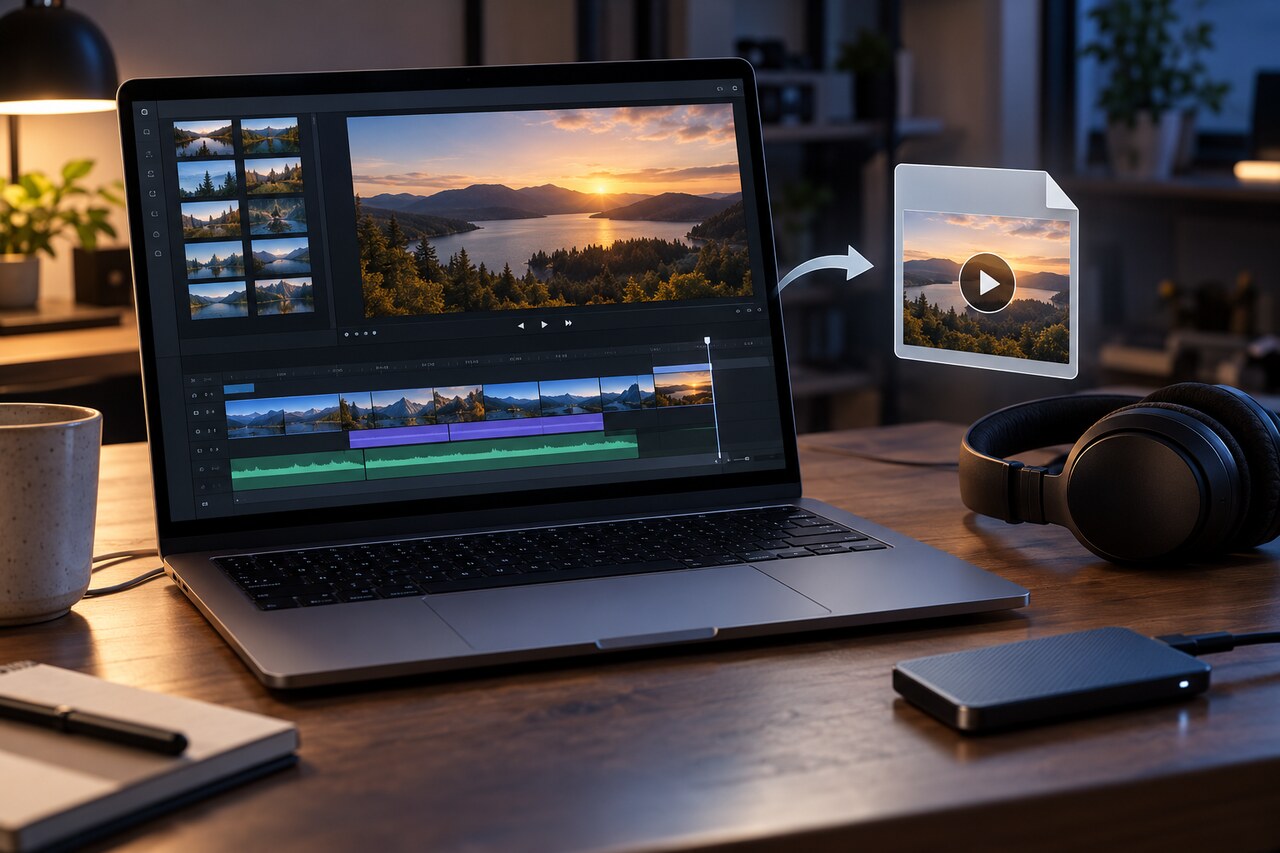
Original editorial illustration of an unbranded video-editing workstation comparing an exported file with the timeline endpoint.
Original editorial illustration: a file that exists or plays still needs to be checked against the actual delivery requirements. Watch at Ease
Tech · PRACTICAL GUIDE

Premiere Export Stuck at 100%? Check the File Before Delivery

An export can exist, play and even pass a decode while still failing your delivery requirements. Check the intended range, every required audio stream and the actual program before sending it.

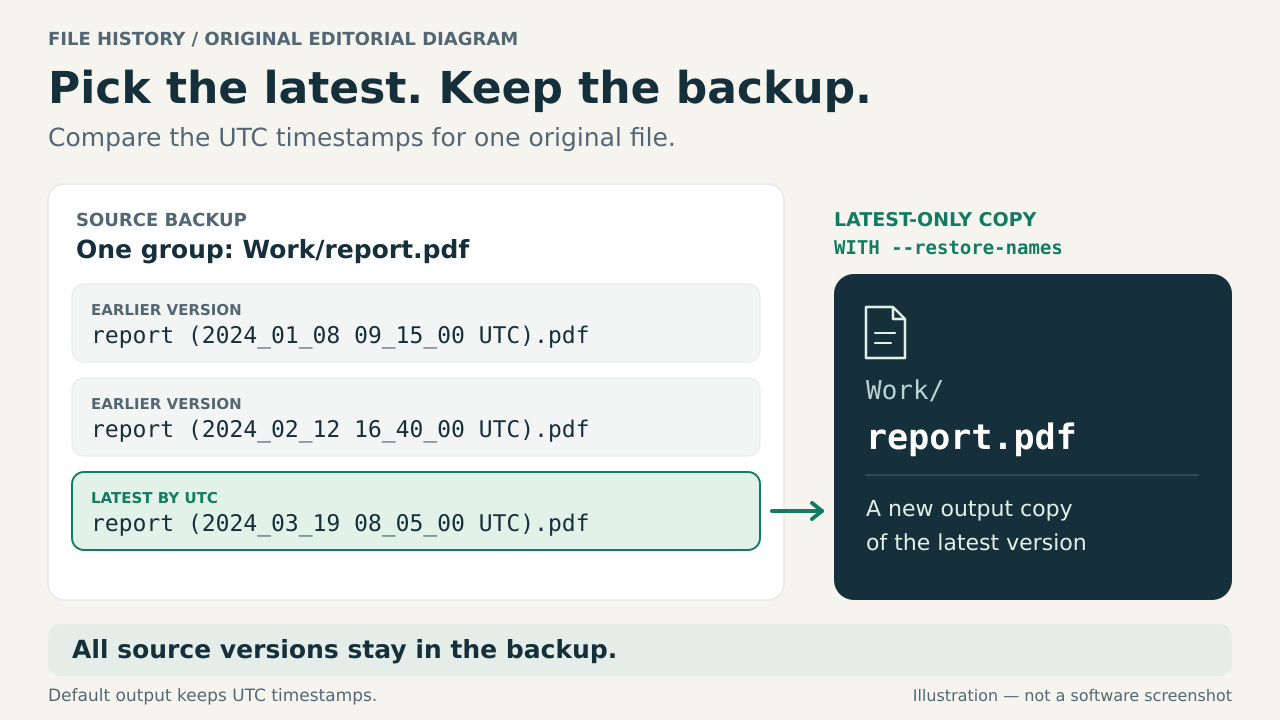
Original illustration showing three saved versions of Work/report.pdf, with the latest filename UTC timestamp selected for a separate copy named Work/report.pdf using the optional --restore-names setting.
Original explanatory illustration: select the latest of three saved versions. The output shown uses optional --restore-names; default output keeps the UTC timestamp in its name. All source versions remain in the backup. Watch at Ease
Technology · PRACTICAL GUIDE

Keep Only the Latest File History Versions on Linux

Create a latest-only copy of a readable Windows File History folder on Linux, choosing by saved UTC timestamps and keeping different files separate.

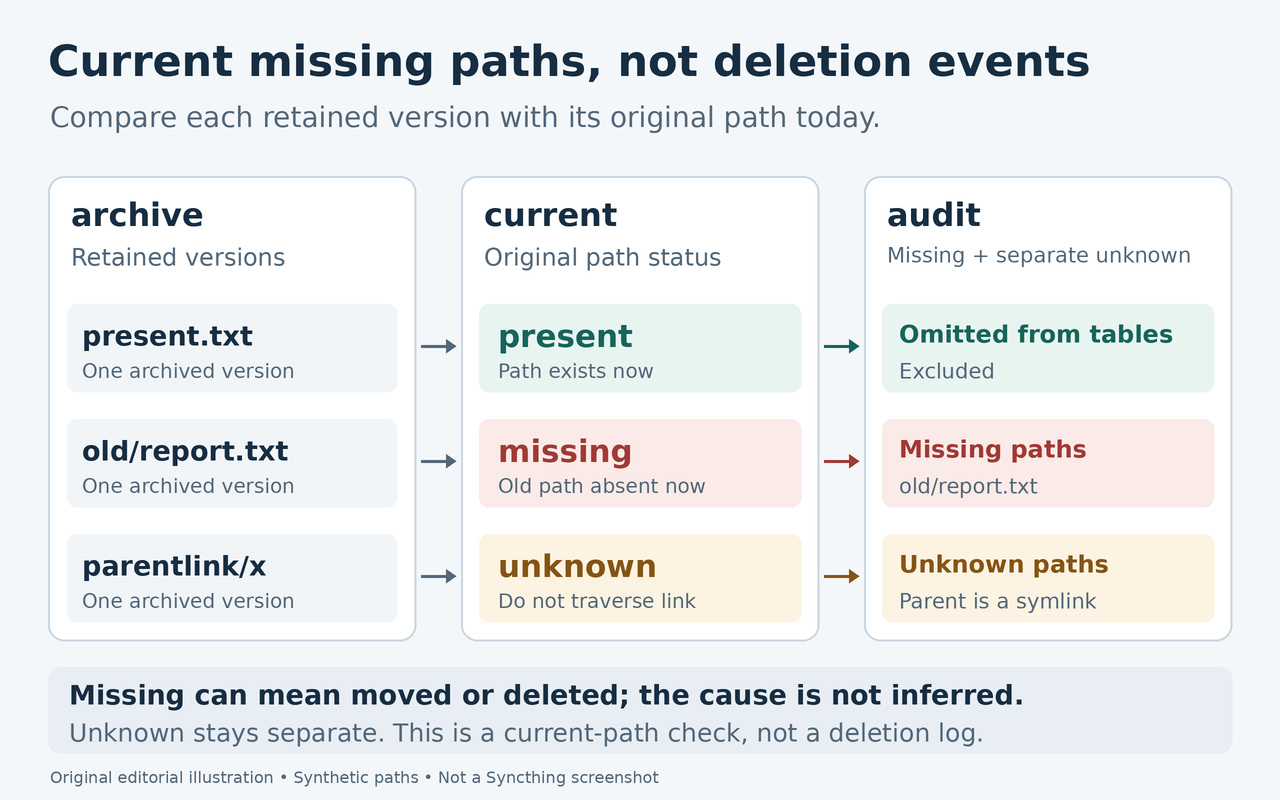
Original diagram comparing archived versions with their paths today. A present file is omitted from the missing and unknown tables. The absent old/report.txt path is listed under Missing paths, without identifying whether it was moved or deleted. A path beneath a parent symlink is unresolved and listed separately under Unknown paths.
Original editorial illustration with synthetic paths, not a Syncthing screenshot. The missing-only list reflects paths absent at the time of the check, not a history of deletion events. A moved file can leave the same absent old path. Present paths are omitted from the missing and unknown tables; unresolved parent-symlink checks remain separate for review. Watch at Ease
Tech · PRACTICAL GUIDE

Find Missing Files in Syncthing Version History

Build a monthly, chronological review of retained versions whose original paths are now missing, with uncertain results kept visible for checking.

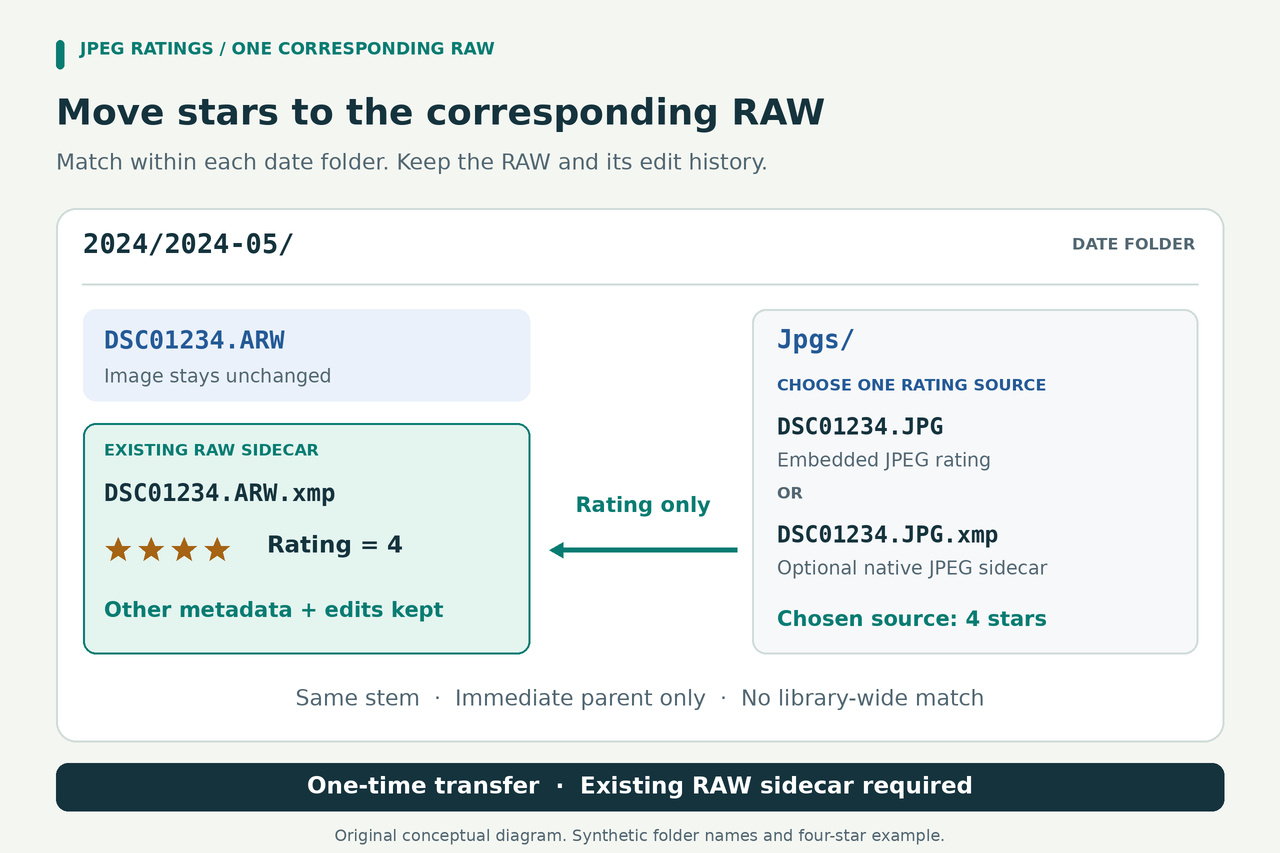
Conceptual date-folder diagram: a RAW and its existing XMP are in the parent folder; the matching JPEG and optional native JPEG XMP are in Jpgs. Choose one rating source, match the same stem only within that immediate parent, and transfer Rating while retaining the other RAW-sidecar metadata and edits.
Original illustration with synthetic filenames and a four-star example. Choose the intended embedded-JPEG or native-JPEG-sidecar source explicitly. Match each JPEG to its RAW in the immediate parent directory. The helper requires an existing RAW sidecar and changes only its XMP Rating; it does not copy the JPEG editing history to the RAW. Watch at Ease
Tech · PRACTICAL GUIDE

Copy JPEG Ratings to RAWs in Separate darktable Folders

Keep your dated RAW folders and their Jpgs subfolders. Use a reviewable plan to transfer explicit star ratings into existing darktable sidecars, then load the changes into the library.

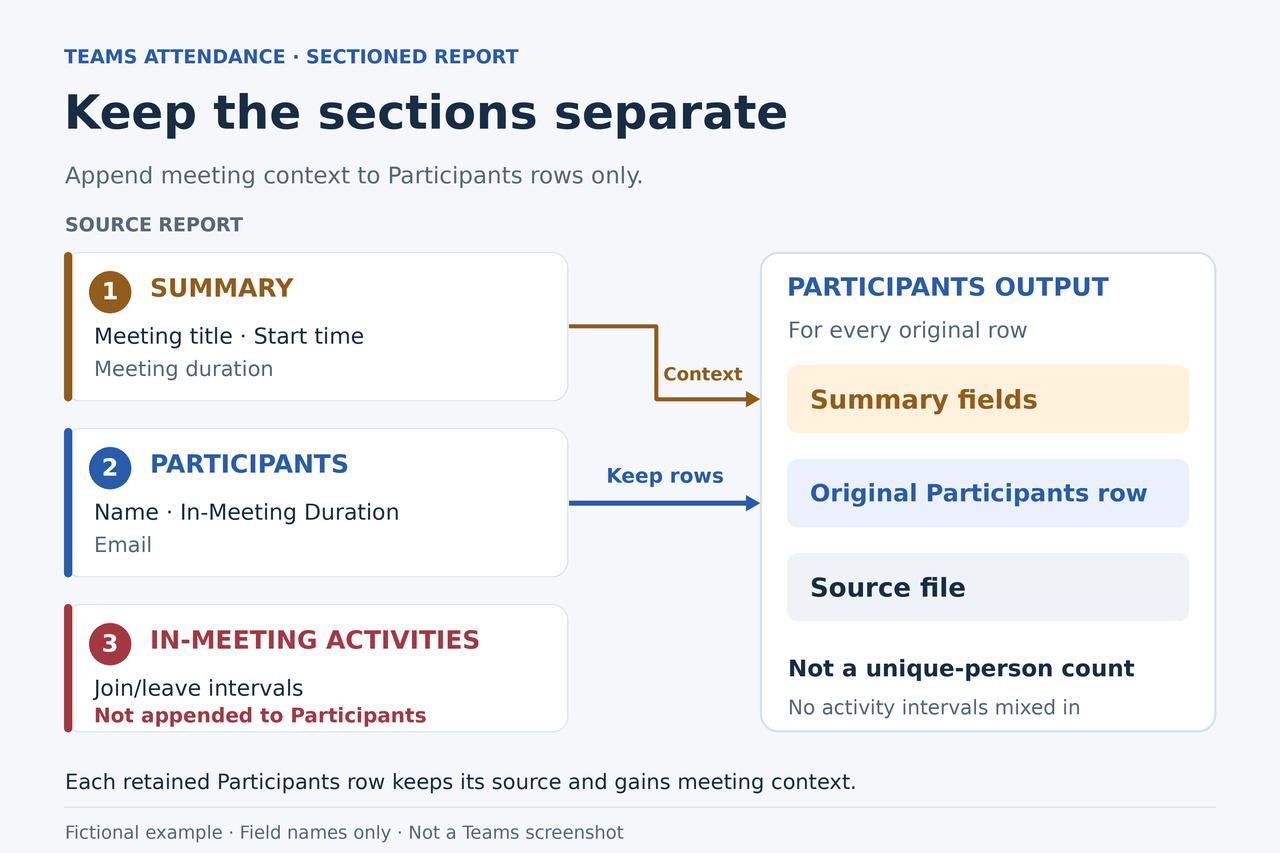
Original diagram showing Summary fields attached to each Participants row, while the separate In-Meeting Activities section is excluded from the combined detail table.
Original editorial illustration: retain each Participants row with its meeting Summary and source file. Activities intervals stay separate; a row is not a verified unique person. Watch at Ease
Technology · PRACTICAL GUIDE

Merge Teams Attendance Reports into One Workbook

Combine a folder of English Teams attendance CSVs while keeping attendee names, meeting details, original durations and a record of every input file.

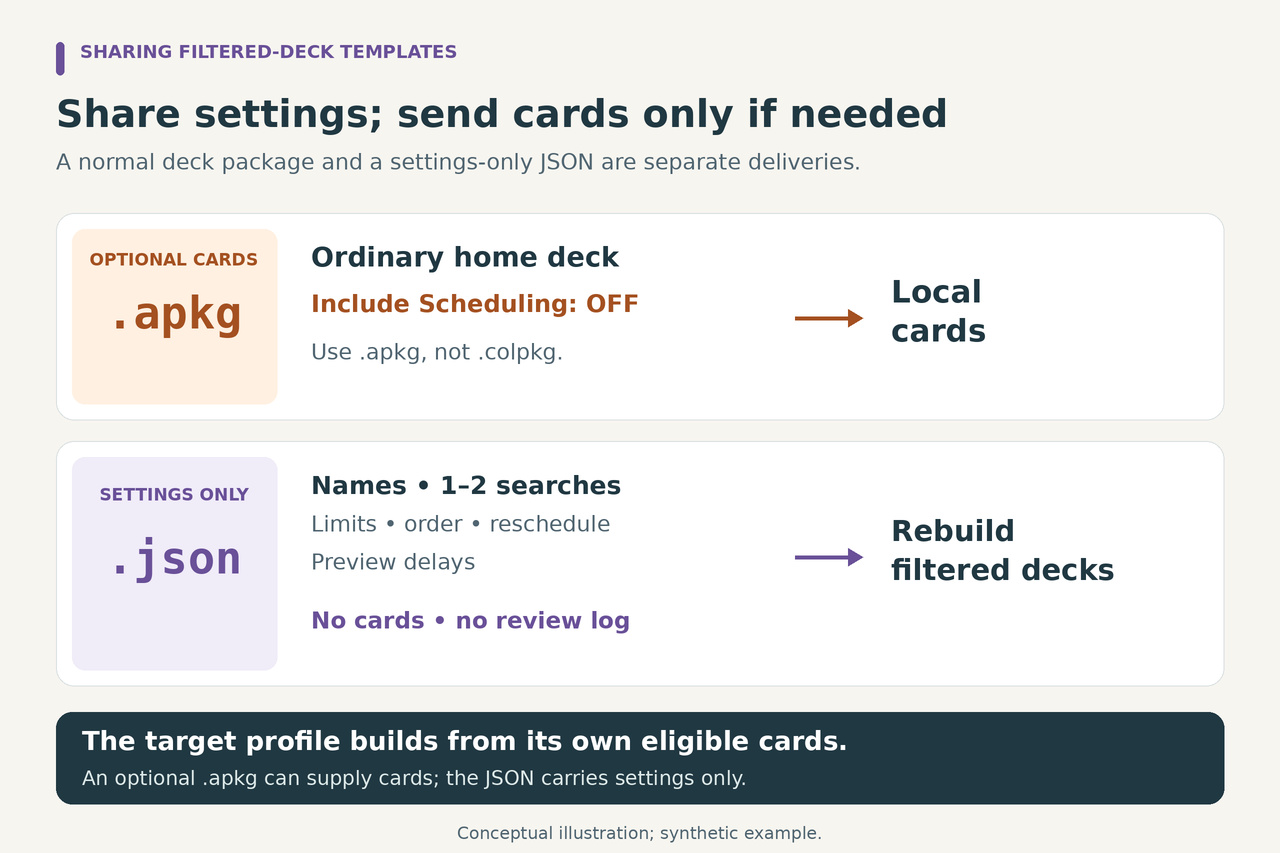
Two separate delivery paths show an optional ordinary home-deck APKG with Include Scheduling off and a settings-only JSON containing names, one or two searches, limits, order and filtered preferences. The target builds filtered decks from its eligible local cards.
Original conceptual illustration. Empty the relevant source filtered decks before exporting the optional ordinary-home-deck APKG with Include Scheduling off. The separate JSON carries settings without cards or review log; applying it builds views from eligible target cards. Watch at Ease
Tech · PRACTICAL GUIDE

Share Anki Filtered-Deck Templates Without Study History

Export existing searches and preferences to a separate JSON file, then recreate them in another Anki collection. A complete local helper checks the batch before creating new filtered decks.

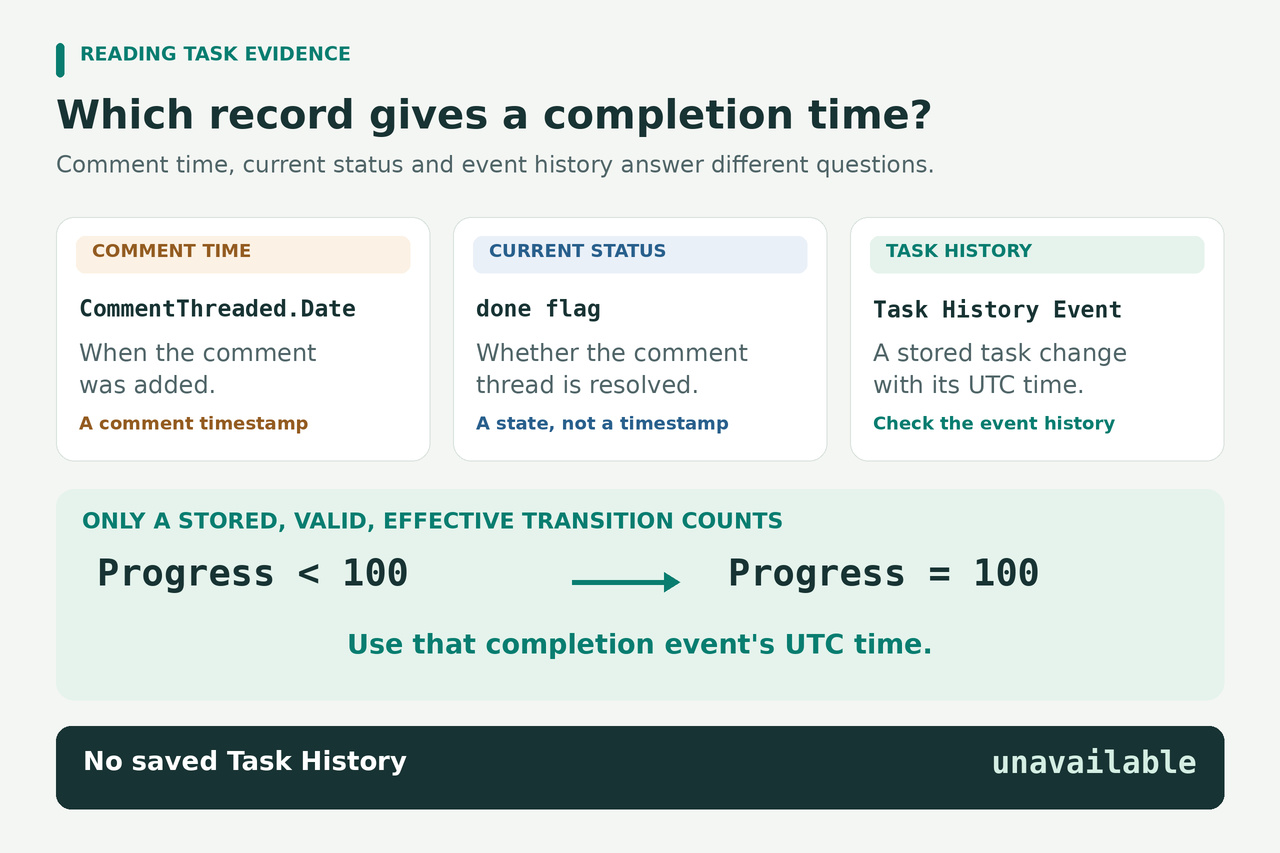
Three cards distinguish a comment's addition time, a comment thread's resolved status and a document-task event with a UTC time. An effective stored Progress transition from below 100 to 100 supplies a completion-event time; missing task history is unavailable.
Original explanatory illustration. CommentThreaded.Date records when a comment was added, and the done flag records the comment thread's resolved status. A saved task completion time requires an effective Progress transition from below 100 to 100 in the task history. Watch at Ease
Tech · PRACTICAL GUIDE

Export Excel Task Completion Dates From Saved Workbook History

If your XLSX retains assigned-task history, you can extract its effective completion events and UTC times. This local exporter also tells you when a file cannot supply that information.

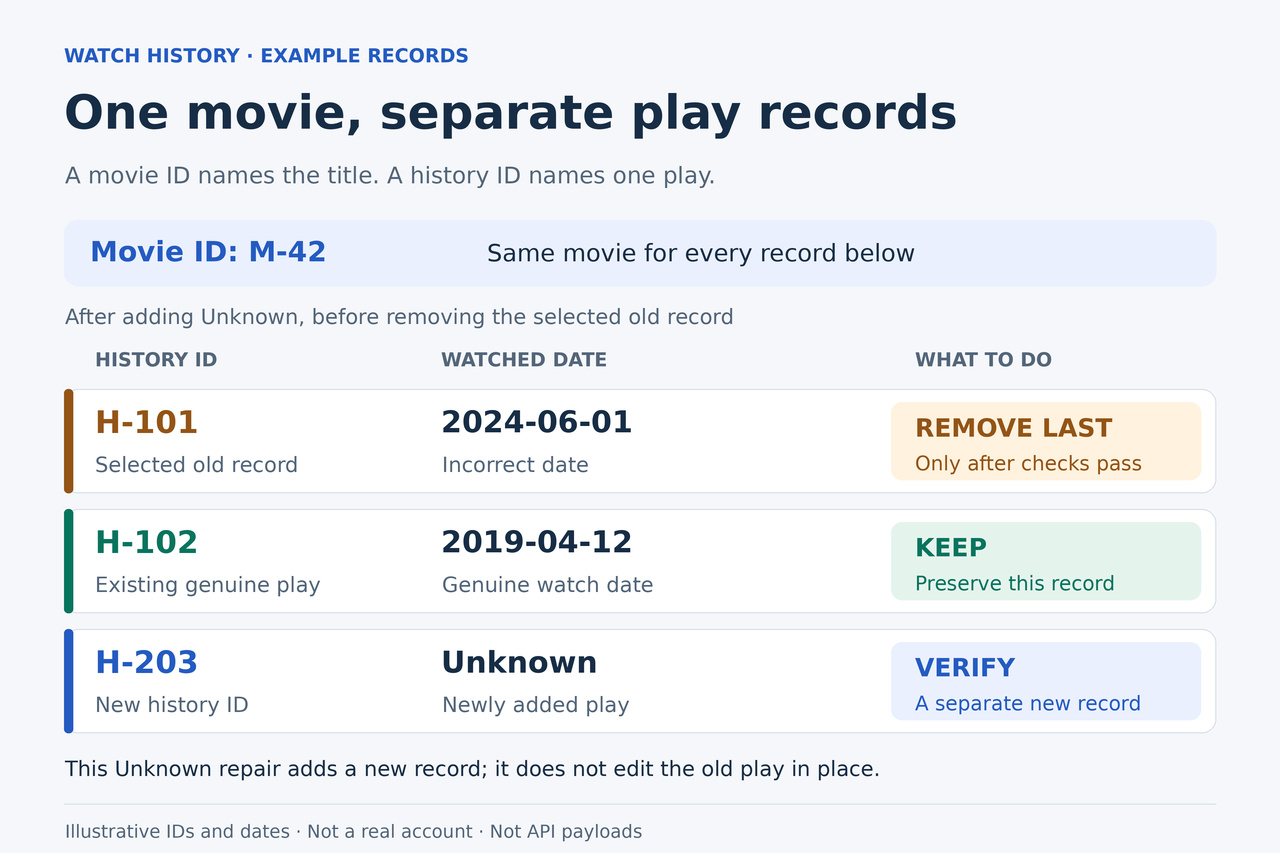
Original editorial illustration of one movie with a selected falsely dated play, a retained genuine dated play and a new Unknown play, each with a different illustrative history ID.
Original editorial illustration: a movie can have several play records. This example preserves the genuine dated play and removes only the selected false record after the new Unknown play is verified. IDs and dates are illustrative, not API payloads. Watch at Ease
Technology · PRACTICAL GUIDE

Fix Wrong Watch Dates on Imported Trakt Movies

Keep movies marked watched while replacing selected false dates with Unknown. Check for an exact import undo first; otherwise review individual plays and verify the replacement before removing the old record.

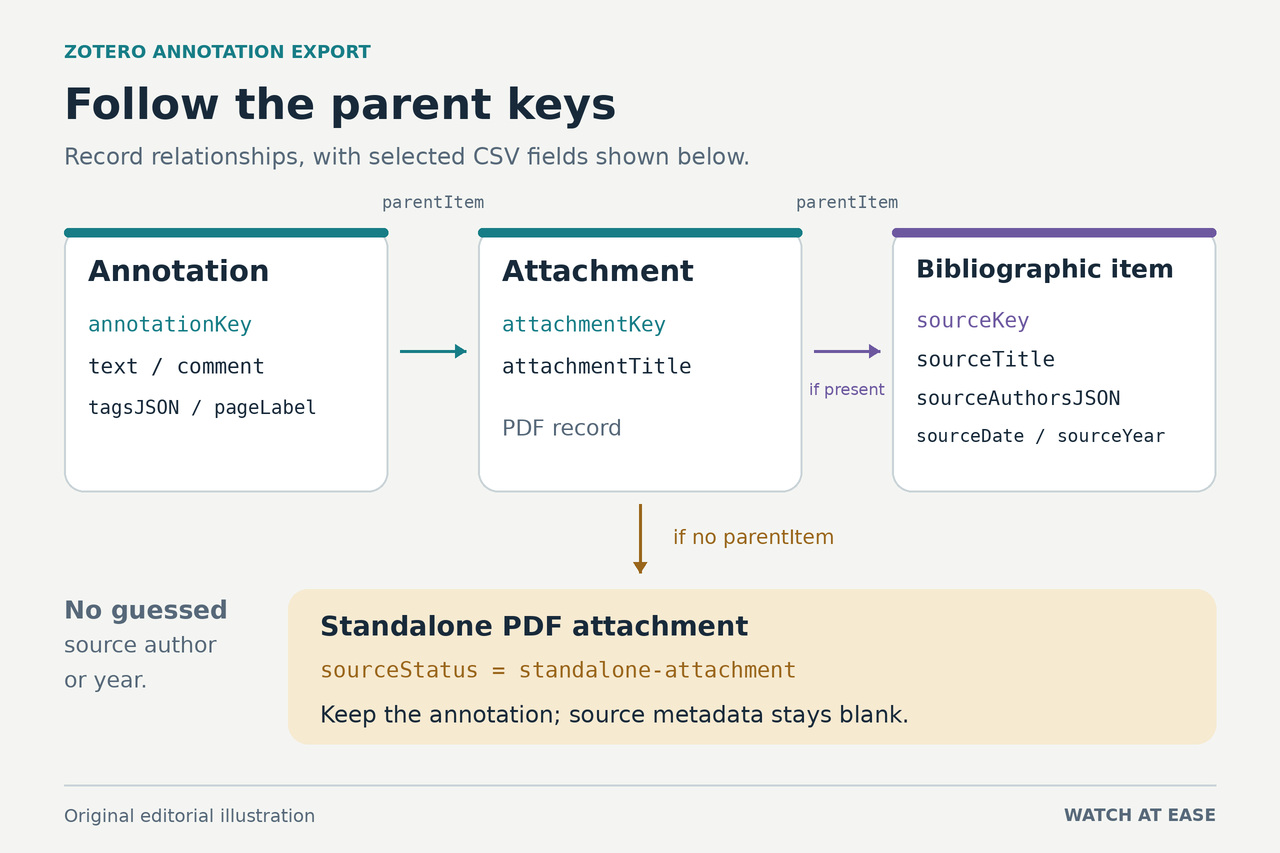
Original diagram links an annotation to its PDF attachment and, when present, a bibliographic parent. A separate branch shows a standalone attachment with sourceStatus set to standalone-attachment and blank source metadata.
Original editorial illustration. The exporter follows parentItem from annotation to attachment, then to a bibliographic item when one exists. A standalone attachment still produces an annotation record; bibliographic source fields remain blank. Selected labels are CSV output fields, not a Zotero interface. Watch at Ease
Tech · PRACTICAL GUIDE

Export Zotero annotations to CSV with one row per annotation

Build a research sheet from existing Zotero annotations, keeping quotes, comments, tags, page labels and source metadata together without confusing publication details with annotation dates.

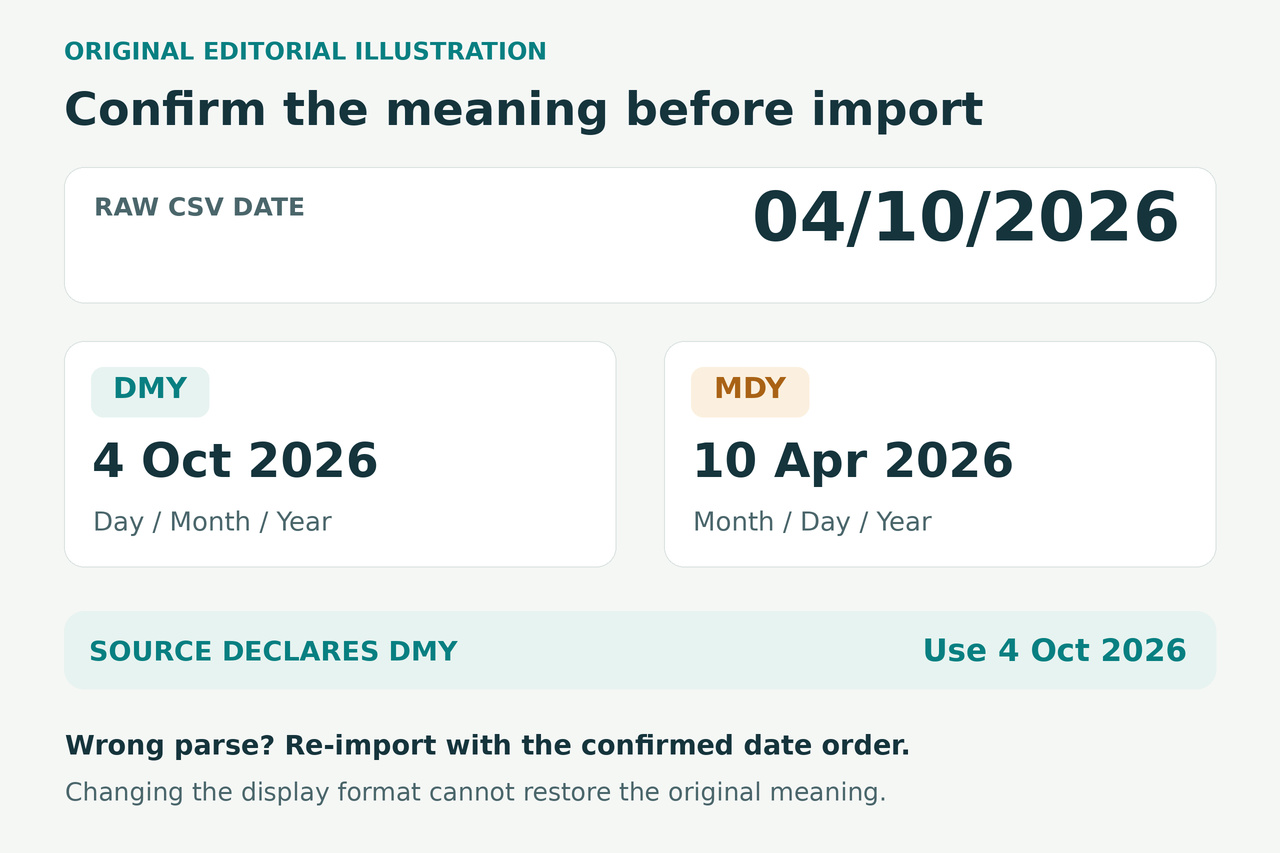
Original date-interpretation illustration: the same raw CSV text 04/10/2026 means 4 October in day-month-year order or 10 April in month-day-year order. The synthetic source declares day-month-year, so 4 October is the intended date; changing display format after a wrong parse does not restore the original meaning.
Original editorial illustration, not an Excel screenshot. Confirm the source date order before importing: 04/10/2026 is 4 October only when the source uses day-month-year. A wrong parse requires re-importing with the confirmed date order. Watch at Ease
Tech · PRACTICAL GUIDE

Turn a Clockify CSV into a monthly timesheet PDF without swapping dates

Use Clockify’s existing monthly layout, import day and month in the right order, and carry your selected hours and report note into a checked PDF.

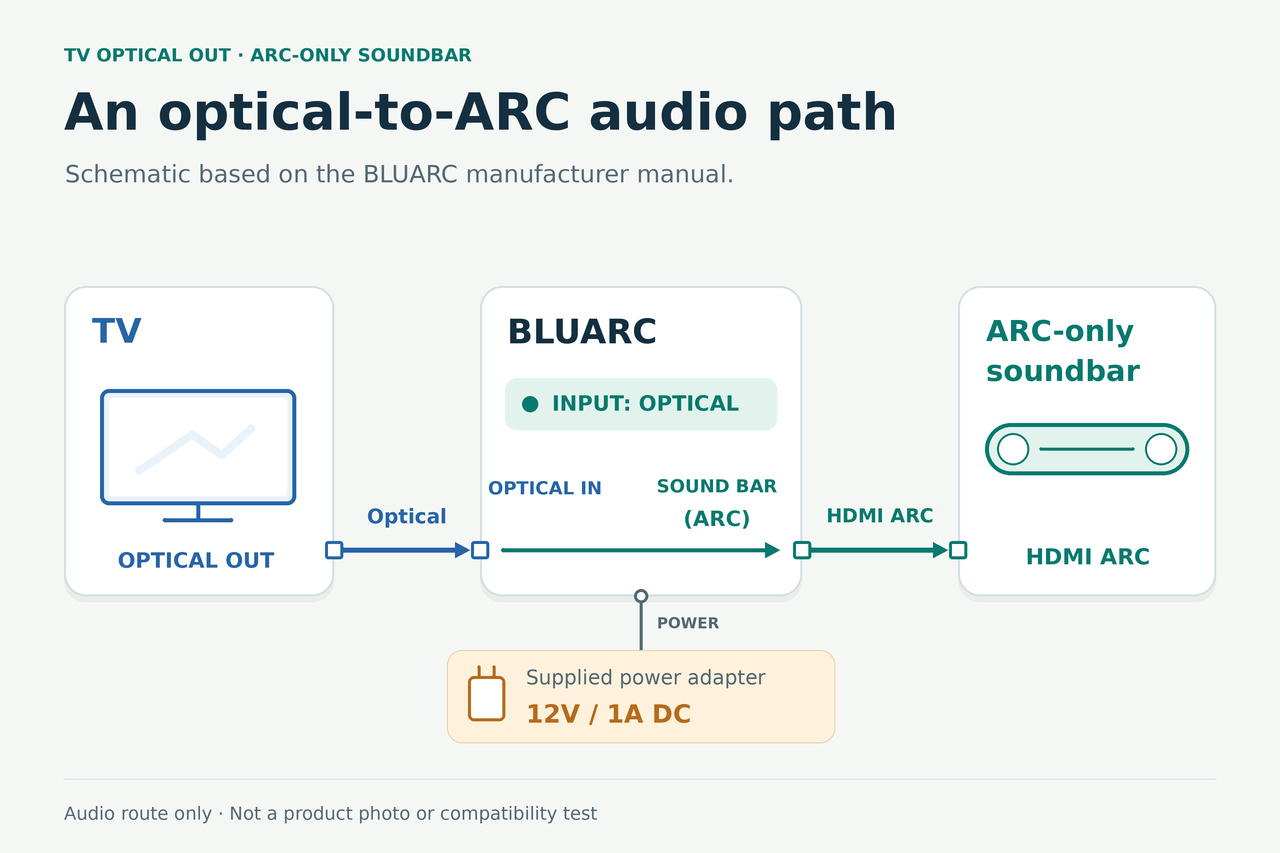
Original editorial illustration showing TV optical output connected to a powered BLUARC optical input and the dedicated soundbar ARC output connected to an ARC-only soundbar.
Original editorial illustration based on the BLUARC manuals: select the optical input and use the dedicated Soundbar ARC output. This schematic does not certify an individual soundbar pairing. Watch at Ease
Technology · PRACTICAL GUIDE

TV Has Optical but Your Soundbar Only Has HDMI ARC?

You may be able to keep both devices. Check for a soundbar-specific optical adapter first, then use a documented optical-to-ARC converter route and test the source you actually watch.

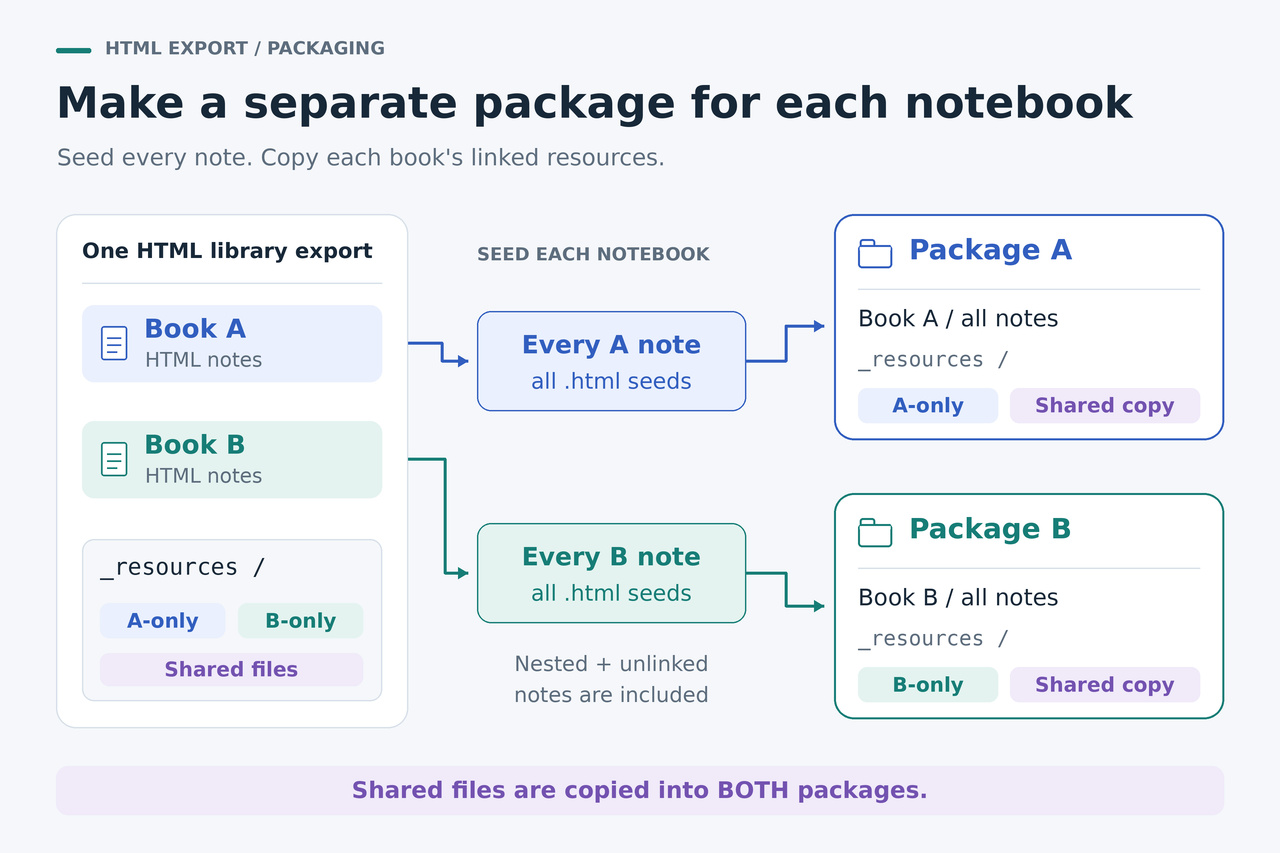
Original diagram showing one Joplin HTML export becoming two notebook packages, each with its own copy of the shared attachments it needs.
Original editorial illustration: each notebook wrapper carries its own required resources. An attachment used by both notebooks is copied into both packages. Watch at Ease
Tech · PRACTICAL GUIDE

Split a Joplin HTML Export into Portable Notebooks with Their Attachments

A tested Linux batch workflow turns one complete HTML-directory export into separate notebook packages, then checks for missing files and links that still depend on Joplin or another notebook.

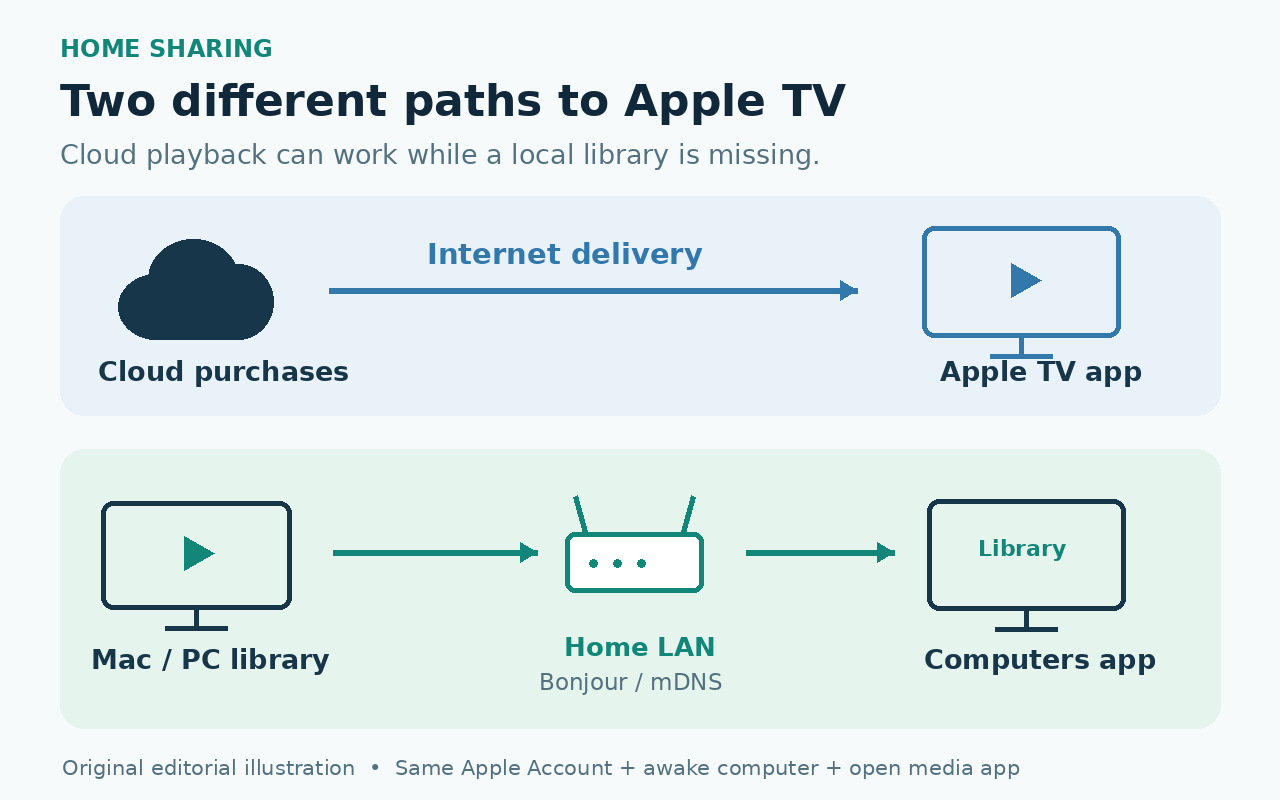
Original editorial illustration showing cloud purchases reaching the Apple TV app through the internet and a Mac or PC library reaching the Computers app over a local network.
Original editorial illustration: cloud purchases and a local Home Sharing library use different paths. A working Apple TV app does not prove that Computers can discover the local library. Watch at Ease
Tech · PRACTICAL GUIDE

Apple TV Purchased Movies Work but Computers Says No Libraries? Check Home Sharing Discovery

Purchased or cloud movies can still play even when Apple TV cannot discover a local Home Sharing library. Check the account, computer, media app, local network and Bonjour path before you reset anything.

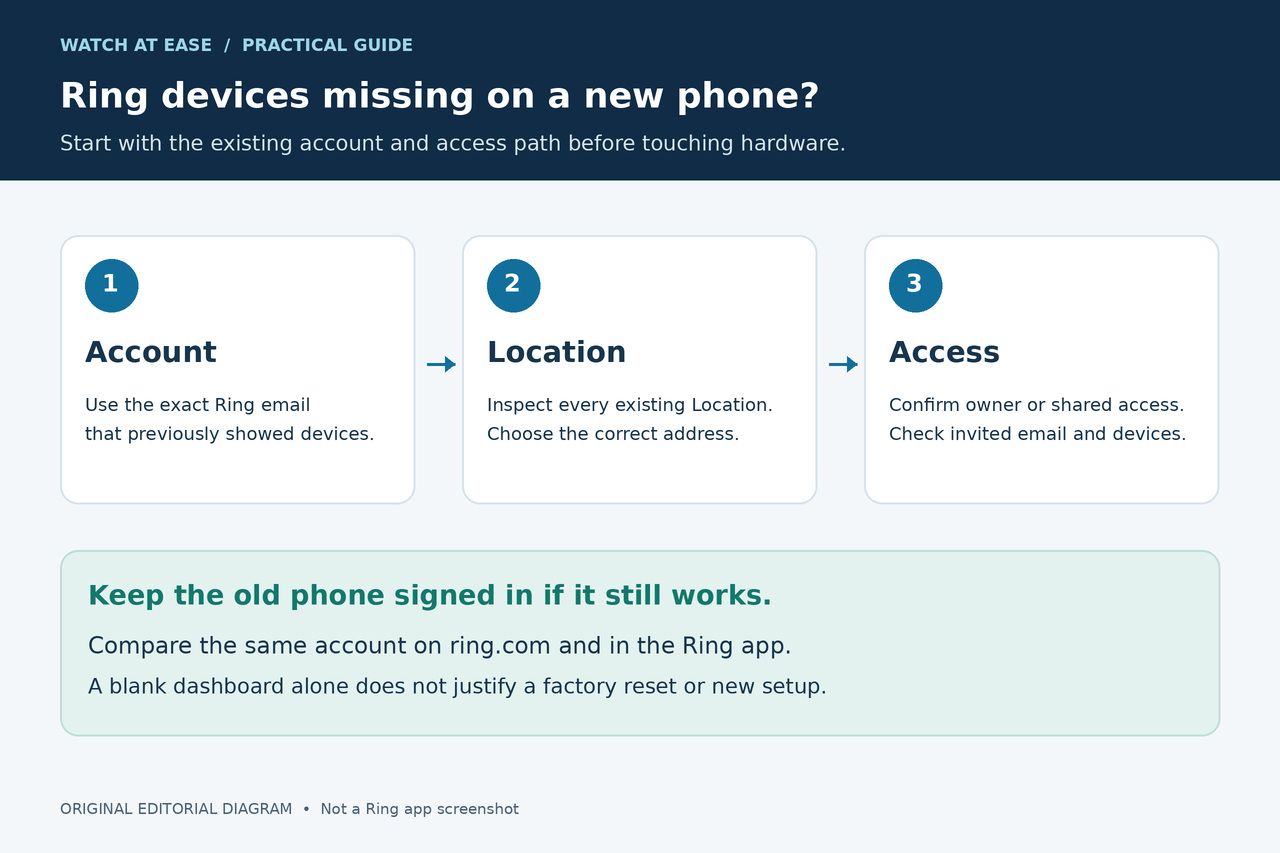
Original editorial illustration showing the sequence of exact account email, existing Location and owner or shared access checks.
Original editorial illustration: check the existing account, Location and access path, and preserve the old phone before considering setup. Watch at Ease
Tech · PRACTICAL GUIDE

Ring Devices Missing After You Switch Phones? Check the Account and Location Before Setup

A finished phone transfer does not prove that Ring restored the account, Location, owner role or shared permissions. Check those server-side paths before resetting or setting up hardware.

Original editorial illustration of an older and newer unbranded smartphone with generic message threads connected by a cloud-transfer symbol.
Original editorial illustration: preserve the old phone while you determine whether message history is restoring, downloading or indexing. Watch at Ease
Tech · PRACTICAL GUIDE

Messages Missing on a New iPhone While iCloud Says Paused? Preserve the Old Phone First

Before erasing the old iPhone, separate an active restore from paused Messages in iCloud and post-transfer indexing, then verify the new phone has a complete copy.

Two unbranded handheld consoles show a larger old album and a smaller transferred subset with a microSD card between them.
Original editorial illustration: a partial album can reflect files split between old system memory and an old microSD card. Watch at Ease
Tech · PRACTICAL GUIDE

Only Some Nintendo Switch Screenshots Moved to Switch 2? Check Both Storage Locations First

If only part of your old Nintendo Switch album appeared on Switch 2, preserve the old console and card, then check whether the missing media is still on the old microSD card and import it separately.

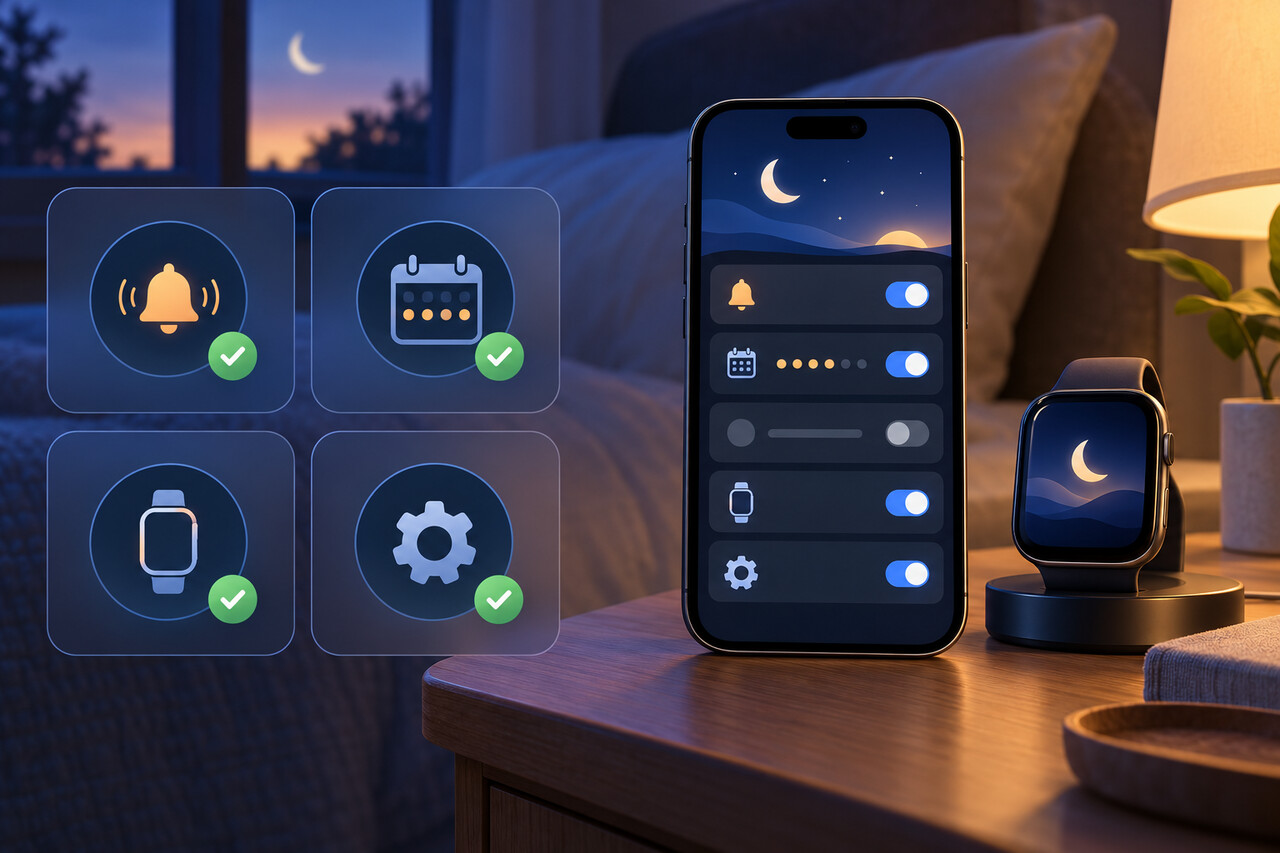
An unbranded phone and watch beside four abstract alarm, schedule, pairing, and software checkpoints; one phone setting row is blank.
Original editorial illustration: the missing option can reflect the wrong alarm, no recurring schedule, pairing, or a device-software boundary. Watch at Ease
Tech · PRACTICAL GUIDE

“Always Play on iPhone” Missing for Your Sleep Alarm? Check These Four Conditions

The switch belongs to a recurring Sleep Schedule—not a regular alarm. Check the alarm type, schedule scope and both device versions before you reset or unpair anything.

Two unbranded e-readers side by side, one with abstract highlight bands and one without.
Original editorial illustration: a book can be present on both devices while their annotation sets differ. Watch at Ease
Tech · PRACTICAL GUIDE

Kindle Highlights Missing on a New Device? Preserve Them Before You Sync or Reset

If an old Kindle or app still shows the missing annotations, treat it as the last good copy. Export or copy those notes before changing Sync, signing out, reinstalling, deleting a book, or resetting the device.

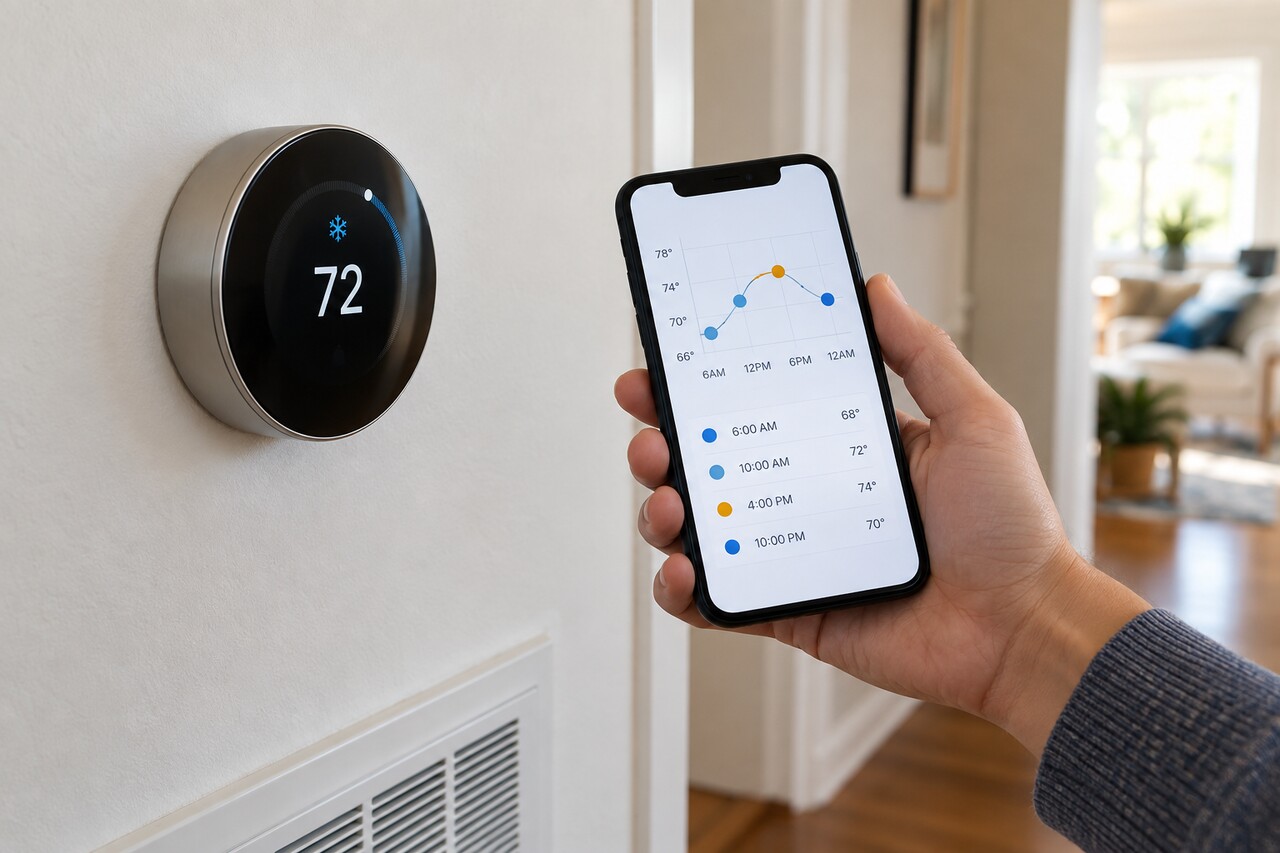
Original editorial illustration of a generic thermostat and unbranded phone showing an abstract temperature-history timeline.
Original editorial illustration: record the timestamp and compare History and Activity before changing any setting. Watch at Ease
Technology · PRACTICAL GUIDE

Nest Keeps Changing the Temperature With Auto-Schedule Off? Check What Changed It Before Resetting Anything

Turning off Auto-Schedule stops new schedule learning on supported older Nest models. An existing schedule, Eco, a timed hold, Seasonal Savings, a Home automation, Nest Renew, a utility event or Safety Temperature can still change the target or start the system.

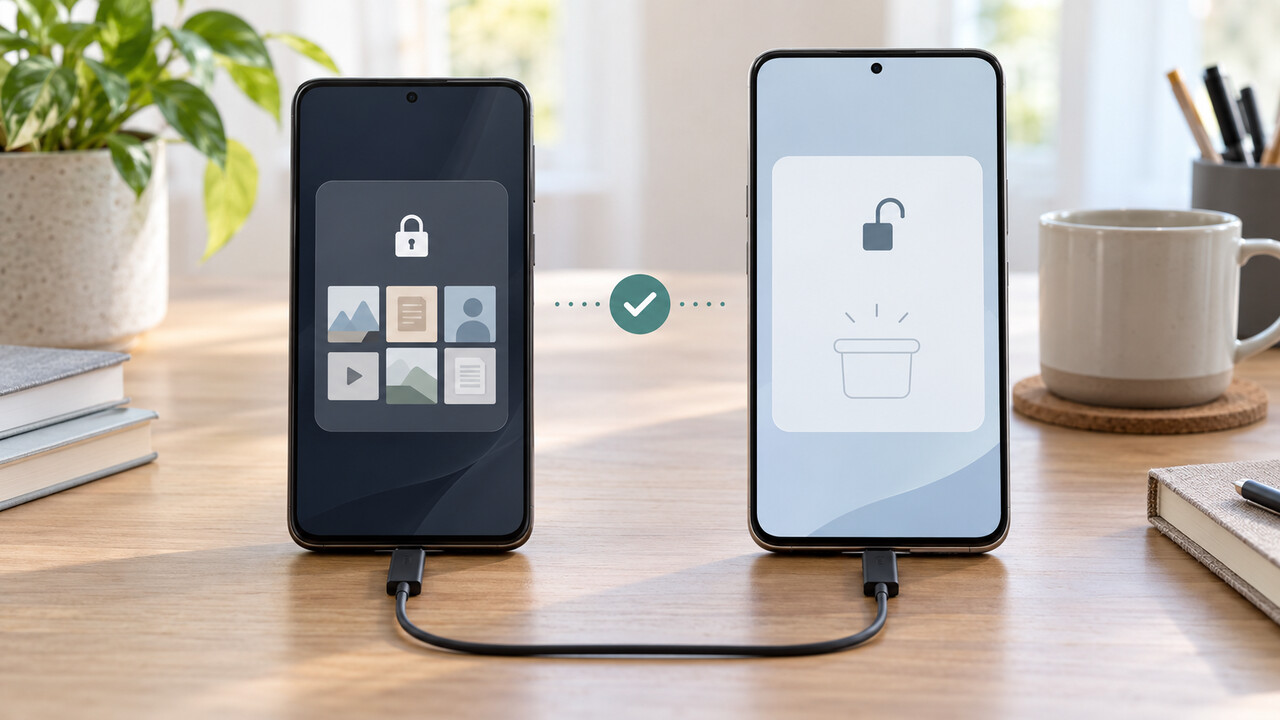
Original editorial illustration of an old phone retaining protected files while a new phone shows an empty protected vault after transfer.
Original editorial illustration: keep the old protected copy until real files open inside Secure Folder on the new phone. Watch at Ease
Technology · PRACTICAL GUIDE

Samsung Secure Folder Empty After Smart Switch Says Complete? Protect the Old Phone First

If Smart Switch says Secure Folder transferred but the new Galaxy is empty, do not reset the old phone. Verify the source, retry once safely, and use the right fallback.

Original editorial illustration of a generic routine list, cloud state and smart-home lamp that continues running.
Original editorial illustration: a cloud-synced routine can keep running even when the app list is incomplete. Watch at Ease
Technology · PRACTICAL GUIDE

Alexa Routines Missing From the App but Still Running? Try These Safe Recovery Steps

If Alexa routines vanished from the app but still run, clear saved filters, verify the account and country, refresh the app safely, and stop before rebuilding or resetting devices.