Technology · PRACTICAL GUIDE
TV Has Optical but Your Soundbar Only Has HDMI ARC?
You may be able to keep both devices. Check for a soundbar-specific optical adapter first, then use a documented optical-to-ARC converter route and test the source you actually watch.
A TV with optical audio output can feed some soundbars that accept TV sound only through HDMI ARC, but the equipment between them must support that exact direction. Start with the soundbar manufacturer's approved optical adapter. If there is none, look for a powered device whose manual explicitly routes optical input to an ARC soundbar output.
The useful distinction is the signal path, not whether the plugs fit. Below are a documented Sonos route and a Blustream BLUARC example, followed by checks for silence, missing sources and volume control. The BLUARC documentation establishes the route; it does not certify every soundbar model.
Record the ports and the source you want to hear
Write down the full TV and soundbar model numbers and the labels beside their ports. Confirm that the TV has DIGITAL AUDIO OUT or OPTICAL OUT, and that the soundbar's TV connection is ARC. A separate HDMI IN on a soundbar is a different connection with different uses. For Beam, Sonos explicitly warns that connecting to a regular TV HDMI port produces no sound.
Also record where the program comes from: a TV tuner, a built-in app or a streaming box plugged into HDMI. This matters during testing. Sony warns that audio received through HDMI or another input may not emerge from a TV's optical output. Check your TV's own manual for that path before paying for conversion hardware.
For supported Sonos models, follow the Sonos adapter route
Sonos documents its optical audio adapter for Arc, Arc SL, Arc Ultra and Beam when the TV lacks ARC. Check your exact product's instructions and what you already have; this is a named Sonos solution, not evidence that the accessory works with another brand.
For Beam, connect the HDMI cable to the soundbar, attach the Sonos optical adapter to the cable's other end, remove the adapter's protective cap and insert it into the TV's optical digital OUT port. Align the connector with the port. In this documented arrangement, the adapter plugs directly into the TV; buying an ordinary optical cable alone does not complete the connection. If Beam is not already set up, complete setup in the Sonos app.
For an ARC converter, identify the exact soundbar output
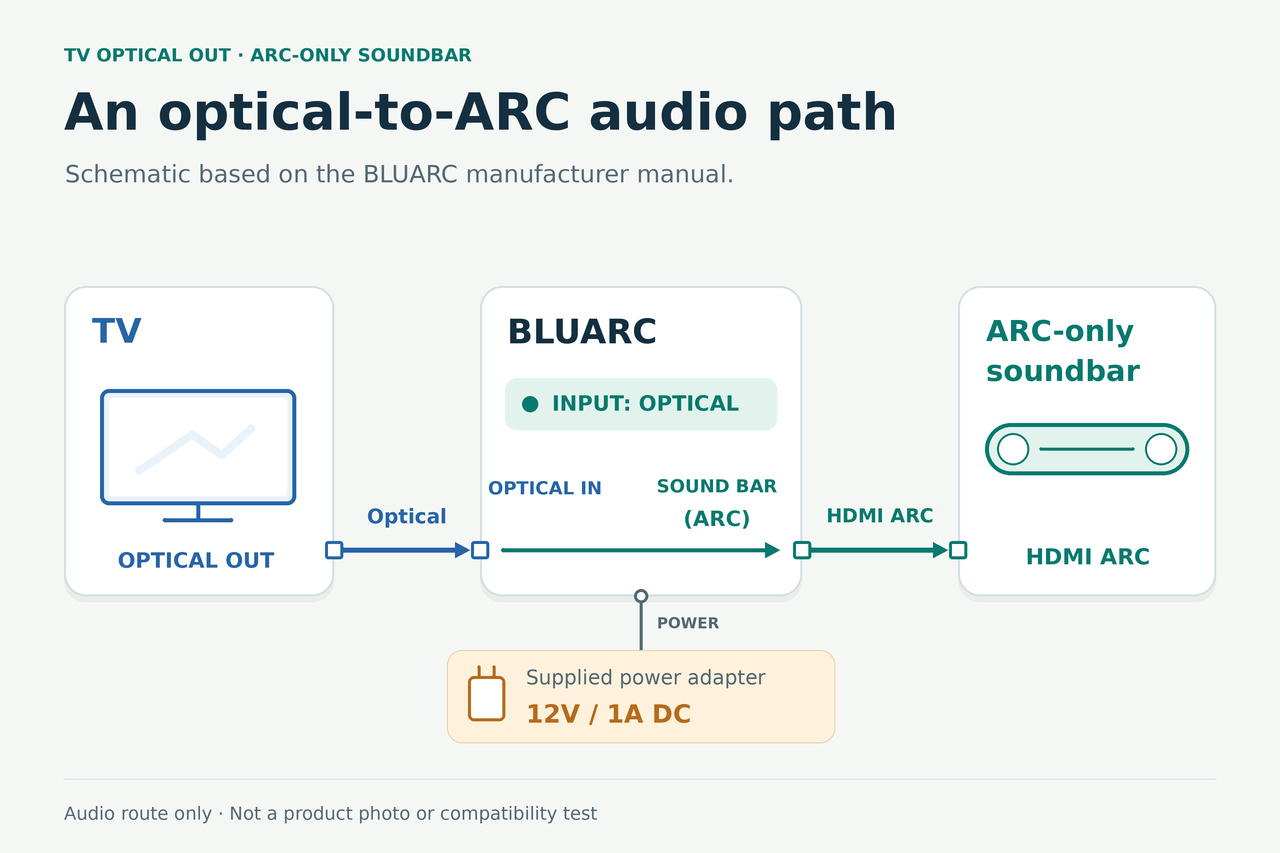
Blustream's BLUARC provides a documented example. Its user manual lists an Optical Audio Input and a separate HDMI Soundbar Output (ARC + CEC), and says the selected input is sent to the outputs. That is the direction this TV-and-soundbar combination needs.
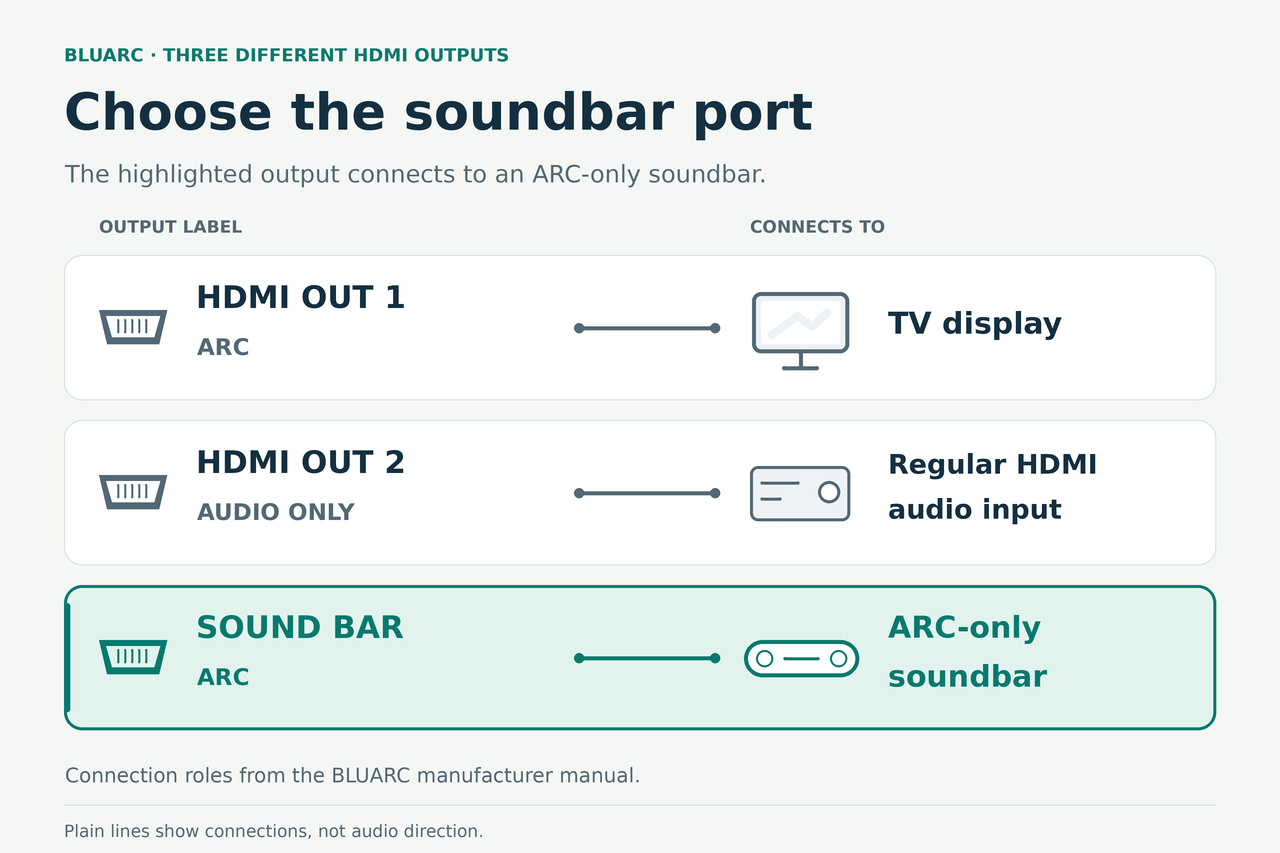
The quick reference guide distinguishes three HDMI sockets. HDMI Output 1 (ARC) connects to the display. HDMI Output 2 (Audio Only) feeds an ordinary HDMI audio input. The dedicated HDMI Soundbar Output (ARC) connects to a compatible ARC soundbar. Use that dedicated soundbar socket for this route.
An adapter advertised as an ARC extractor may be designed to receive audio from an ARC TV and deliver optical audio to older speakers. That reverses the job here. Ask the manufacturer to confirm this complete sentence: “TV [model] optical OUT into converter [model] optical IN, then converter ARC soundbar output into soundbar [model] ARC.” A list of connector names is not that confirmation.
Connect the optical route and select its input
Following the BLUARC example, connect a Toslink cable from TV optical OUT to BLUARC Optical Audio Input. Run an HDMI cable from BLUARC's dedicated Soundbar ARC output to the soundbar's ARC socket. Use the supplied 12V/1A power supply and follow the equipment manuals for power and setup.
Press BLUARC's Input button until Optical is selected. Do not select its ARC input merely because the destination is an ARC soundbar: the incoming audio in this arrangement is optical. Select the soundbar's TV/ARC input as directed by its own manual. The Optical indicator confirms input selection, not successful playback.
This is an application of the manufacturer's documented routing, not an independently tested pairing. If your soundbar's manual is unclear about using an ARC sender, obtain model-specific confirmation before treating the example as a purchase recommendation.
Establish sound before changing surround or remote settings
Enable the TV's optical or external-audio output where its manual requires it. Menu names vary. Sony's support instructions, for example, use External Speakers or Audio System and give additional optical-output settings for specified BRAVIA models; those menu paths do not apply to every television.
Where supported by the TV, converter and soundbar, try PCM/two-channel audio as a basic compatibility test. Sony specifically recommends PCM when a connected system cannot handle Dolby Digital or DTS. If this produces sound, test any desired surround format separately against all three devices' specifications. A converter cannot recover audio the TV does not send.
Check volume using the soundbar's own supported control first. Sonos says its optical route does not carry CEC or supported voice control of the TV, and Atmos requires HDMI ARC/eARC. BLUARC has separate CEC controls, but that does not prove an optical-only TV connection preserves TV-remote volume. Decide whether the control method that actually works is acceptable.
Test the original problem, then isolate what still fails
Play the channel, app or external player you bought the connection for. Confirm that sound comes from the soundbar, that ordinary listening volume is controllable and that it returns after switching away and back. If you use several sources, repeat the check for each; success with one does not establish the others.
If everything is silent, recheck power, TV output, the converter's selected input, the dedicated soundbar output and the bar's input. Keep a record of one configuration at a time rather than changing several settings together. An illuminated input light is not a replacement for this listening check.
If TV-generated sound works but an HDMI-connected player is silent, inspect that player's audio output and the TV's optical forwarding limits. Sony recommends trying a compatible PCM or two-channel output on an HDMI source. If the TV cannot pass that source's sound through optical, changing the downstream converter input cannot fix the missing upstream audio.
If sound works but volume buttons or a surround format do not, record that as a separate limitation. Before further purchases, send the manufacturers the three model numbers, exact ports, selected audio format, source tested and result. Ask about that route, rather than just whether the product “supports ARC.”
If you only need an external player, consider its HDMI route
A streaming box can also feed a device that explicitly sends its audio to an ARC soundbar while passing video to the TV. BLUARC documents an HDMI input, video on HDMI Output 1 and the separate Soundbar ARC output. That gives an alternative to routing this player's audio through the TV's optical output. For this route, press BLUARC's Input button until HDMI is selected.
Check the required video and audio formats before choosing this arrangement. Sound from TV apps or its tuner does not originate in that external player's HDMI cable, so test those separately if you need them. Choose the route that covers your actual viewing sources, using the exact device manuals and a return or support arrangement you understand.