Tech · PRACTICAL GUIDE
Find Missing Files in Syncthing Version History
Build a monthly, chronological review of retained versions whose original paths are now missing, with uncertain results kept visible for checking.
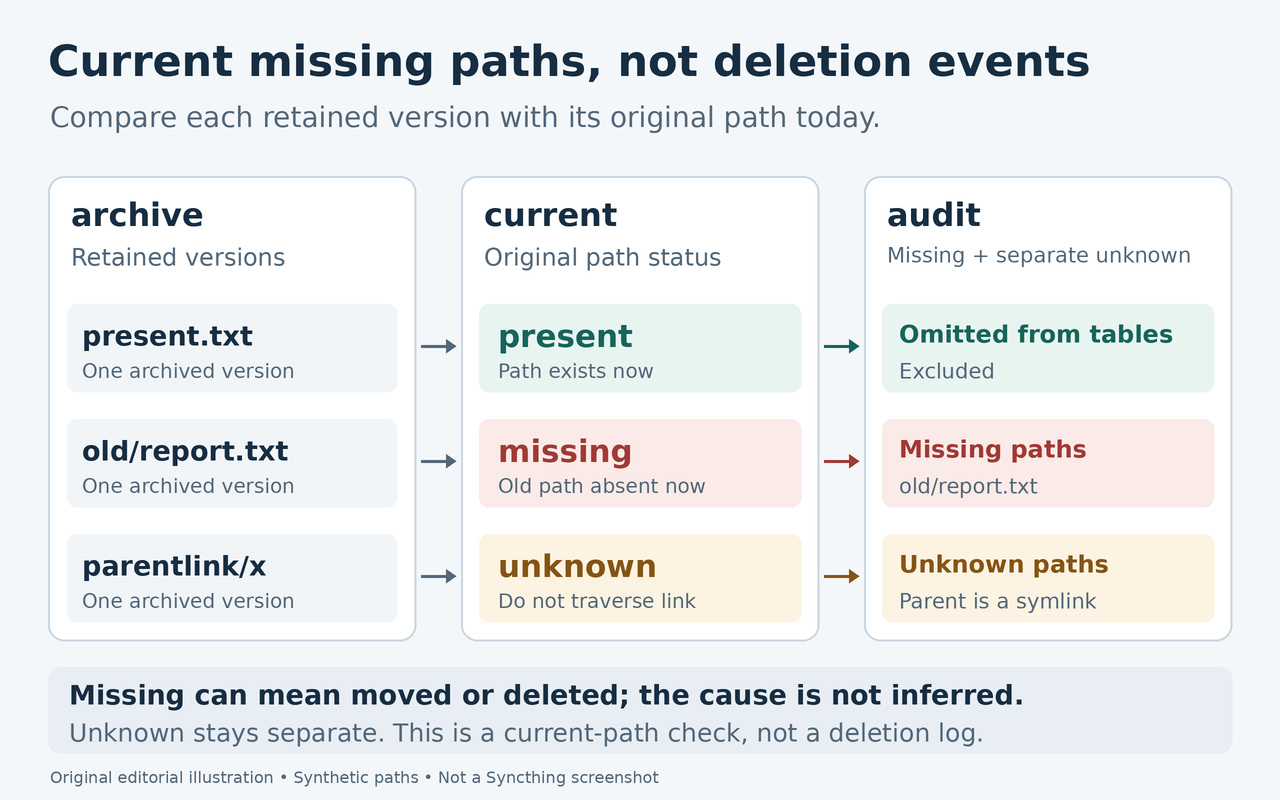
A long version history can make an unexpected missing file hard to spot. The useful question is specific: which paths have retained versions from a chosen month but no longer exist in this folder? A renamed or moved file can appear too, because its old path is now absent.
The helper below compares the selected local Syncthing folder with the versions returned by that instance and creates a standalone HTML report. It groups missing paths separately from paths it could not check, orders their retained versions by archive time, and leaves restoration to you.
Check that this is the history you need
Use the device that already holds the relevant versions. Syncthing versioning is configured separately for each folder on each device. It archives files affected by changes arriving from other devices; it does not capture edits or deletions made locally on that same device.
Retention also matters. Versions may have expired, been thinned out, or been replaced under the selected strategy. Enabling versioning now cannot reconstruct those earlier copies. This audit covers only entries the selected instance still returns, so an empty report cannot establish that nothing was ever deleted.
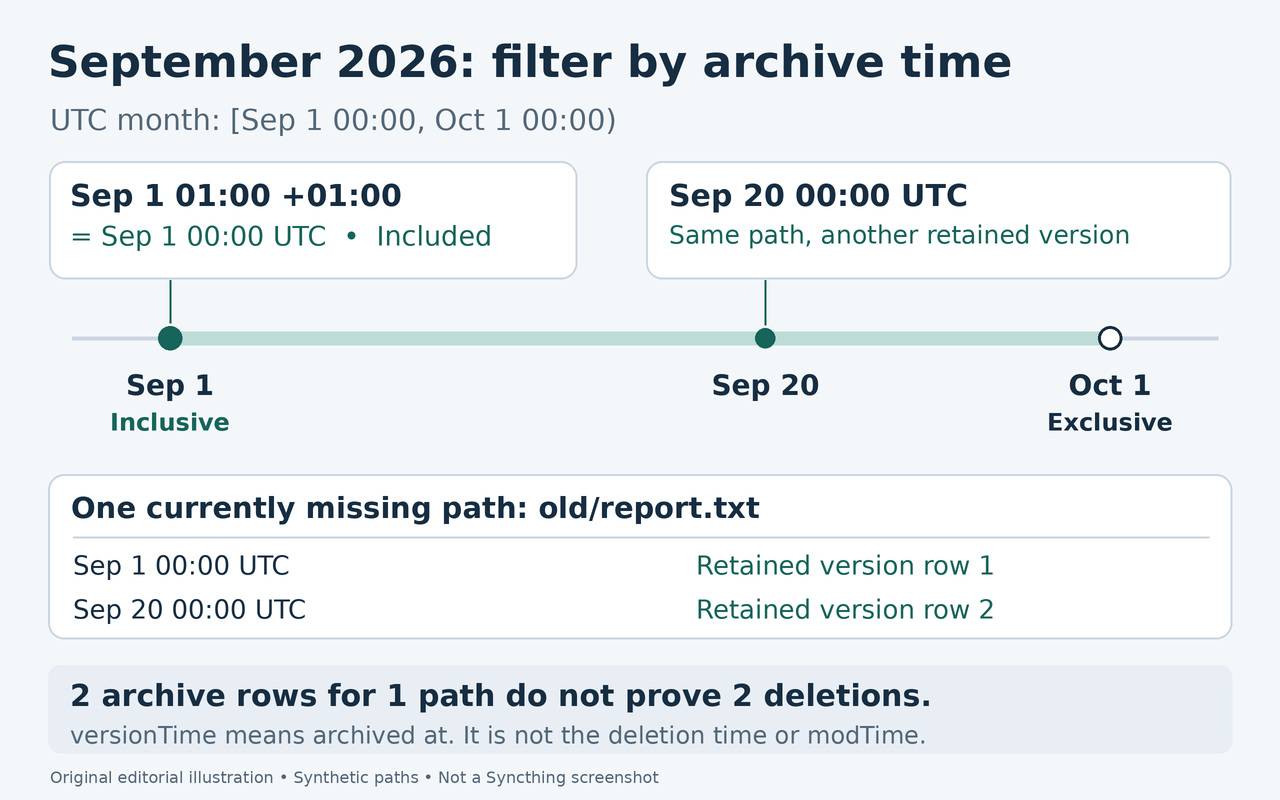
The month refers to when a version entered the archive. A file archived after an earlier edit may disappear much later. Neither its archive time nor its earlier modification time identifies when its current path disappeared.
Match the instance, folder ID and live folder
Run the helper on the same machine and in the same filesystem environment as the Syncthing instance you are querying. In that instance's web interface, identify the folder ID and its configured folder path. The ID is not necessarily the displayed folder label. Pass the live folder as --root, not its .stversions directory.
Check that the expected storage is mounted and readable, including any separate mounts inside the folder. Open a familiar file from each relevant location. A disconnected drive can leave an empty mount-point directory behind; a matching path string alone cannot prove the intended storage is present.
The helper requires an absolute matching root and Syncthing's basic filesystem. The root and its ancestors must be real directories, not symlinks. If the configured path uses ~, use the same account/home mapping as Syncthing. A container path and its host-side bind-mount path are not interchangeable; correct the execution environment or path if the match fails.
Choose a working directory and a new output filename in an existing directory outside all your synced folders. The helper checks the specified root, not every folder you synchronize. Keep Syncthing running for the API, and let active edits, moves and synchronization settle. The result reflects observations during the run, not one atomic snapshot.
Save and inspect the helper
Use Python 3.12 or newer on a POSIX system with an ordinary basic filesystem. Save the complete single line below as unpack_audit.py in a plain-text editor, in your chosen working directory. It contains the helper source and its integrity check; do not paste this Python line directly into Bash. Check python3 --version before running it; older Python versions are rejected before folder or API work.
import base64,zlib,hashlib,sys; from pathlib import Path; data=zlib.decompress(base64.b64decode('eNqdO+1y20aS//UUs3DlAq5IkJQdb0KJSnkdO/HFsV2SvJdEVqEgYCgiBgEEA0hitHqu+39Pdv0xAwxAkJLXqYjkYKa7p6e/p/Hkb+NKFePLOB3L9Frk63KZpU/3HMc5kUE0ytJkLU7XaVgu4/RKFLIM4lRGo2tZqDhLYSDPivJQfKB14qk3PdgXY/Hh/embX8VloOJQvD719vZOqlTA83IphQpWUqyCEABKESga+7OSRSwjC1OcqjJIQzkUN3G5FHGpAFeQiEWWRLLYW2VVWsKCIIX/w1AqFV8m0hMvCoB7LUUZA5JYiTQrRSQTWSKxOOiJE6nKDDZCaIIEoEbrvXiVJ3IlU0ATVkUBX0Z5AHhXMUCGeZEsZYhADoFegLuUSS4LEUSREoFYJEEpVlkKC5gh3t6bUqQSKIdJBSNUYhEnEkkqRLgM0iv43uxXybKET+Uh6/eQHgAjguIqDwolze8oKCVtDfgWlWZ0Wa4S8/0PlaXme6bMN9xLEl+an0UNEJhcg1Hren5VJDDdk0WRFZ2xFj16rJBwgKrc2/t49lLMgTIPifwrS6VXleHe3l6YBEqJF1UUl68QpvvqNpQ58nMw2xPwDzb9AvhzK6MhnCc+COA8xQoONriC41wGyE+QOhECm0EGFXCswN+lvIWdFuLFhzfis1wrj/inMb7LTmQUF3B0bptU76ezsw/m2U8gRYksNCmRXACD+Imvp7tKJouh+Duch4KPv3++wW96Af4rglhJe4MO0mPAwJdFpWTkiY9KksAb8f4azpGnlEWlUKI/nrz1nAHsAOlANsLEVe5eB0klNcJ4QXIdKwOFnw7hNIsB8gKfFtJbVEmyCspw6TZ0Op+iu2f3I/h7oP+e0d+Z9df9fvbJg2/T4Xf3g+/h1+//Pt8fXVgzBs5QEE4CvJMPb1KYGEd0PvV2ZqC44uT1S/H06dPvWFlJzY3YoOoi64E1EXIDQZfF2sIjy6pIUdKMSniLIgNtzRZZAXtmjsBp50kA/HF+B4Kd/clkNpk4g4EXKIPJBZFl+JJEUrj/wpVE/FC8BwlbJNkN/fxPthkuZfiZTrzHdKo8S5WE/QmkHYQ1lfrcQWt8FOzWses9886anRK2XIZzZxWHRaYkaEiknEGzeb1v4MDvtWQFeey3sQwFqXaksT0RH4BC1LHmoNIgNfAPLVuU4ImB/KYhDClxKdcwQ9jUeASSZBHsA4imkgFYahfE0XM/Rfu1PPFRLAq2ATDXpUXeVZFVuTsdoOwzGJnACTiwzeQPUBz3O9jdREuKZhRvp2aDRc98Muhl4E7eeY7Ybyjbt5lJpt+PwSMVsIs+XW1pY0sJ653vki40G6MRe5jf4N/ol1+G4AoLENoAPZc4mBw8H02+O9TGhQlBLQLx7lWgNRzAUPusObA0d2GVJsVTeRKXrjMCVakXgECDwZ/bKudaQIZiOhTlX3G6yOa1SpFagShsrgL+uRr5XEwPBrCcjrYZ4gPmgX0EvgW+Pmwib4jYbGVudPkxukvIDgVYavDpFG1oXrNxwrEcdQIcEDqnFD0PrelT4eBSZUlVSr/IsrYey9scHI5EtmTKQ9fs8RAgLlxLDbTs1PO1ZTeLYgU4XPN0p/ycVnkOgRwYXUMWiBMSxsqEAUgdioBL4iCLogavq1MUSHgf4NM1hABM/GxIMXqBGHwygS5+1SS25BCFmCKtOBVJDIqMEzHIwFhscD6bjaYXcP7nOHzRLCP2gCwAD4mEBAMZd9B+zuzDJ96p/+b0hzcnLq7xVOmvskiSq6yfvn33c/tpG1k/X18zo4iTGIpimIoOGQM+JVZgmMAasiixm88gzIUIguhar5I4/awMh/EfcBSZAHOZYV0pNwRG8npY/4jTzJb596cPCvzLIKUAIkWzV5rjJs6Ll+SxcCMUY4NK3QJFEjZlBduwKzg4cmrFGmSmTwFIpwJUAAnhMQTlXbvoPhzE0BD+0HYJlVyhMrrO2KFZzqdbMM8oPU08UnMTAvR07eZouGCC67AZxz9EMIkeP2vZPQA92G2OUxUscPe8sVqAOeZjt34IG9DZgLiBcD0EKSibaKblzBu8mncI0EfRlCQHwxpVEy7/kBGHyiLAgEIacRJadSAVEokMFmYczvFapuKyyD7LdIieQZsyipcRJrJCgT5tnluNnOZBfqSAc3OSlz2jwzEo/u2w5qdMq5UskH4Ca3GzXq6/jGlN/bhlHCwt59kbeq5l/jVkVu+y8jVIbNSRfovZjs7mUAKIw2EGaUwKTPDBhMGH04W7oUs2tCr9nGY3KUKjzG4NarLyKWdqAIGcE2vEERxHqrkhRmI669qqL7JEmyTwufux8vWJO19mDL8QCQDzjUlbO7ZIO1qwai6TAVGOFu0086MK5B1jRR8TNuBJXKg6xlVVgmHG3X0tWjBJByYoWTR7ZvMXnuMDXto5qg3V/cHgFv99+v6dyC7/QAuoQbT1t4nd7XHbXDPKc1h9wYqjDZDmBD+2Am6sNYCLvwwU2DlY1ecQOWoFcHa+7cEPNhK4tiGA4xaIknWsq4DmlWRjtyzLHM8APyGkJeutpy0zVabBSm4cOU1COdETMSLBid3xHJLrm6yIHgSAhZ11dxCC6CustfSvrlGwTWWrPbZDUTMj03ZjR7BnGPQ6gGjSDqrowUMhd2CSc+ThbDxGvs24tFLQmGoNQurO5aqsKtHeR7DHGBCTI2pFU5oIFDvtpICZbrgMwPUdQa6Fo83IMYTDz0kV8DcypZGdLfGeLMXpb+9env305t2PPoiv//Or30SZdWsPumgCyRx7kxwIj8mAg2lckb8vriqqixnSn4g3Vyn6fplex0WW4kPwJdktBTZ00lSnAXJvgiIijLjPcgkp3BVH0cxVTgqzXKayaOTdFGguqziJfH7aLd58AHRrXbVx7+4he7AKPRh9mjrOlSxdSAnyDJIbm2EMZxPpiS73tCQTVc4rICyJcw479oWBOWxNXJJ6q/md8+sIODv6Wa6dGZsv50WIMgo/nSBnCwRZ5Birdc49pFAShCaaOz++OmvM9mC7U6R8hHnj4YerNzCk2gOI33w6GWCR0FitrdYdKfCSLIhcM3WojaJPltZfZtnn+YbR3vDAdsWQimskiUiC3PSgIP48MQTPQ0r+bALp3bPJ00dF3Si1QQWCBerFjBSLADxwJFzEDHCmY4RlgtlNTUBdojqu0YV2ALudVkhNn02ePZZI5jHQpcl6ZihCpdBR95sfSGla1IBmnrw6PSP1VJC6YUV5K4GPQf1VZGNOshCLAxrZZiwvvrK23IfWlMpahw7WT1fNzlgGTQ3ttFs925mUoI80Tnc70UM2tlwkT3mXpyKURRkvSEr7+dVX4/uYxrjPxxFpRwLmfoF9DIYTNr3ac9RcBnqJ0q1nakcOYLd02BBmSYJWjWMGlpmh4KRAF14aZ9AUQbCm0y5K0U9WW33g8438nJ4CbnjUG65w/J+li/gKpqBxdcZ4uzHmsTGTp8ZYKWuFL39WGaQChnpMnuaO8eg9mSCDGwIPw5KyPB7wCGMcAdv+Njc3QZ2Ez57ZROVn61zyKocupRyTYG4g5ZXoq50B56IPZYJ8lqBpWqEZTlWQYZo1BZY4GnKiiFLQJm3ON2UBaWG76h13K0kM/pxJvKA94fjOdF9T1NBIdETxYgGnxSLI5aDmgqImm2obdHUH4m7f3RkKdT1btSWCEY3Nw+83RAJ+yBQVz71zeDI4R/5yPxhsu+fQ4LRoPKaoV5NXu0IsqIFK4e0hMWJUZqYoPwqKIljbqUGdr2c3uMPzC6OmVMyHDLJKUV0me3YxC1WwxEoPlRY0AV4Mp63cQSc4bWXauHiw18nZrP1rsEMqlT1orHax4Brjcr7ixCrVKsgxPAzMXEGMsHMdqkZgISJQVJjfKFG0aUdWGFhUDyDCN8IAt/+ALdUvQT/MMCuniv8CZR4Y8xv3JRJsDPSyc15yAaH15FEBRodxRP16Zn6ie0PjG53FdWaUpvKKa0FocK9AxRBlr0bXMRzEL8BH64rP3qSFy0596BolA82NKUfcsljT1l3Ykdr9uZj2FCHAox7NmbojdCU9DANd8CCMhYegvGSIZlruW3TPmgOwhy+GvedV/3MCvsT3cXd4SQWA2tdV/VCJZjDa9fYt/GboQdzMXI4qHyagAVufChJA4jbrit9DqHXjgd9oFsDQaufQp8/aB8P85b62k11Pjm6B3fwuG2mXr7klIRJRVaDZp06NMEg98S9ZxIs1OwWSG5R4ChbNtYji+xA23rbB9BR4Rhcih3kSrC6jAAdnAii8Od885AsMa26MY9M/+o/DPGW+DkxcUqVUwLxzakE3lg8YF0rAFhHrbC1A1sqE3EE9GyZhrQ53MOgeWjMb6TRT7yzKyfTBb6pJAYj7QVPKolPkqoZVi7QLbLp2ZpkpgxC9D4LtgOfTB+w94nOB+Qp9vWjqr8Smc6ZkXzjNrrGGhZsxCAfb1/DezYJtuzeA7lsl7zuHqlSBQQwshNzPucJkFivkflBqnav1zb7mB07RnX3nZLoxBECkSKlYAUTKHSh8Io3SlytkKTBGZmwcTbeBmujZJ7vYJYsGEUw9DSyiDzlGUikU7c50eNglmiR6JYMUJWFWWz6y68PN5iWHdoVnAZP5C4ygFKBcw0cHfBKvYpp77ryg2G2kY7eh6G+g6oR9MTY3YQ0QLwvwajxGUjxnqyVzziiNZceMt41ltoLAtol26cptnYZCpUGulhBx7gD2HpvPrOCF9VZcrtvZMnnZOAWuRzI6ZI5JWlfhJdY1JWpax3ah+8C6R55MEVA6Srx5pRCZw2KQazZ3l1XZ0BTrAJmywB04PjIZFg4lIR5GvSIcpt+MnuMVku6GU6aLDMKIi3tzvQoSJQufL5lc/jB3zGC7c0zxtOGl2vSMOsU8fuaiHvCN3FBQfjY/K/DmuS6e0TZdUno70taBcNcUEfZzFsaLLzVKpksCFvfftRzlx++yxhTWfK+lwxwA5v5XWbH2jsb5cVNLu8yidRO+G3NsmdE2WuKL2WbHJW11XI/xVRd9tz5UVqq9wGa8xdSYiIuh2eHARTvMw72ayc5RWRxj7uU43h9ZnOJARANaClgCcMLRmJ4szG1rfS2qzGOA1GDCYidxyDmxr0HRRLWaMMlY4yje0QmbR53n/1yXEkRn7wuYQzTUWz1hbmxcmsOeo/haUEfgXIVFliTHRyTc8IEgjnuYtIToJ4PMPMwSesQsYT4su2wiOgYb52a4hksYDR5NCxMOGPbSQ/hkysZAM/K7HdsYNdNegLkFvjGAZ1TKjapVrrQtwDRUQdrvByqMY1LvId1GpuX8wFTzz5b6KgyUB93UUNfv5a0MK6LlEK3/taTIj8pXlDaSuQqTjMwVcDXOdUFfri5lxO0tSFjTSnWEp/zpUzWZPA3tFqvjZlza4/9Vjx88b9+aA6y/RVmIqSGZtOMj/Au2Lr2ay/T4aAXmge5KlCznVbkYfXvcvg11eApebc2vY3lDdUTsLEXWfH0TR+VyHsnrOJQj+jGM0xivckagNImcT7/egFfGJZzaZqd0baFmtW3XNpFtPJw3rezCU+UaRlEk7hZA12z6PL8dT71vvhHsSEdVPFRBqkYKw/PDVVBcxensoAAXG1RlBgO3TPpsOp1M8tvDPIgiwD6biClMOgS5zorZk+m3B9ODy/sO9uX0LgHiR0sZXy0Bt3dwT5Jwd5kV4HFGWJQE9y1n5suhRjWZfHVfRsNyqWfOpvmtUBnm0k/Cy+gg+q6mA7aCdKDIjSDZvkpniVyUh9dYwgUm67Eyy7vEIfAg/IwdgZCcPpHR4uniOWCdQbCnyhGYniS6u1nGpRypHARpBtI7uimC/DDT3Zz0axaka0gYC3nvsU24M49nyMAuVgDyJUAPbRKBwG8W/6h3jvy/V9xOfmcf3OT+aMzn3pWG5fT4ZMPl6eyrT6yOxrCiCyQ/fkR3PAVwRd36rxtYokwq3cdIUYhuZce+D7rkhPzwZrnW9TQRxQptcoDRStsNG0JAvIssvTrmBHSG26bfwvJMxtTpwP6CzeRlUS9+SzcCVPy0AOy1LXAHWG9OsAka+9gpH9hNWpM+dFxwB9yPJrdhb7cb6EYipMnrZeQv1B9p8o9ZH7yeHIYhcsysSCCyhxi3I8XR0OrB3jPX8g6W+uD4l35DCE9gR7gDDE11zmnyZJNyMq4qjf+spI6i/+9/N4jvA9DkuQxjw0J74n0qKSbM6a2N9uOhIIvG+Yedp/Vsd1/HznWSr0+wZoLNDZMS9HNjx8Z0TPQAZ7YssrjRldw+zkCUoAzUG+ACGQOKqLgUGShjh5gdDQtM5LapIA078uN27gVJY1naaRfBUrON3ehyyX8uHAbAI4TjRZJYCQhmQWzkOPXQQdSlBFewxeid2dcq+iLGtIhue5+JzDHW4TaTapNBH9ZvE+nSHU5PSb9w8mLBL6BgK5LqpSzCvSYKpLJagTtaH7/MsKe8lMb6487gtPTTI+CZnUFgkGcsVEGBq4a3YQIoSASPMWe4I4pbMYibd3siGL4JJFlYaDWAp4DvU1r3SmZVmVcsAqaF1Go2Joc03923vLULezDo7c+SdOVDS/gXxKwQ5FxTTh2HpU6kO8mtnhor7Jtzey9v9FW5O/jCft73xAJDWt2Wx9KlX3HjPl4SMJA3S8Y2LsprlhG0MW+0bheD3Rh+YY9QlhILqZpAN0DDpsA2GHCqX9jd31uuKJdZhg1XqT5OCjDwu4IAg4vREFo3F5h0WdlckRqKEu41ZEoewbEWbxRe3zMZkAPdGOlHSnD3hzyLlJeiH6zecK6EMeBNgTYr7emXNy+JgEFxa6ksFDU9mRf8vBe6z+oDPXEjyfIOCjH3fch1fH9grfQglPRNa5brjEY6SBrWt00628P3FOdOk5Y0TSd88wZJZRKA0Ro4O8FTmLQFeP1GQde2kRyZm2NdeNyNhuKprXjY544oeNWtD+b9DDDBEFjtBs6CtQ06HvhPZ7+8bQteS+jUbvhVkQBwOOkALO3c0S2D04N/eBP4bzr79um3zxyDTneHYFNItmhx6OumsKnx4auGrI+Ilj4QsXJ7rBMWTdbK017Lp+bpI+E+HeJLNg/dF+Pdv/UiL/VISPD27XdesZnd3FxHeL7WEm/6zL7mZM2kBlJsvcgzFd86D1FxZuHSzRVKv1Csq6boI/XLxU1l+dAQhbkM0ggfb+O0uu0QRE4UuOfxoT6GJ2h+elRoaByyXOXlGu0cvwlhlUozaqVp9W8Q7vbLHRCXc9ON7cpoHg9oh2bVtcgwzevmIJoL8je0d2a6hGhI6wuchm7b5Ivijc44LLnY18ZgeUjAqfTUU232dA+HQ1UWZ0fLorFo1PsPdFDbIu+c6Hrv/8/J+3dvfxP/5l8vT169ODM/Xv368u1QTLLnk8mgpxESthwRvAYJ7OPm0qEeyCU1im6WVXncQ8MNUYzeaO+rBa/IPfS9CrDVsej8d/M6teViGt9iKv0kuS13sr2Nrf/thJ72nyrh/utFnMZqKRA24mLpMk1ri0ICjVjcGOuXfPiil25QghQb5MNOYLjzLaA6YAIGlK5VnLyj6nWF91KO3mbrYqtb47wfbJR0J3aA1Oy1p92UsTsBzmnyB5oEoQryf44GU5Ug28UGnqmNp35nfRv0j2ndWcTditiVWhWyfqkqBXaP+faTmFtp41JKevWbDemYbZ0CCnL9EhHXXFA0AuAWWBu8BnoM9Xt7YPF8H0XM96mQ7vsYh/i+NsO4GsKa0uXoZLD3/8AUDQM=',validate=True)); f=Path('audit.py').open('xb') if hashlib.sha256(data).hexdigest()=='71717f0699b0ab624944f1d8746eafff0d34f08f3cde079e98278112ed51d139' else sys.exit('SHA-256 mismatch; no helper file written'); f.write(data); f.close(); print('Created audit.py for inspection; it has not been run.')
From that directory, run this command to create the readable helper:
python3 unpack_audit.py
The unpacker verifies SHA-256 and creates audit.py only if that filename does not already exist. It does not run the reconstructed helper. The 16,912-byte audit.py must have SHA-256 71717f0699b0ab624944f1d8746eafff0d34f08f3cde079e98278112ed51d139. Open it in a text editor for inspection before supplying your API key.
The audit reads folder configuration and retained versions, then checks current paths on disk. Its new HTML file contains the complete report JSON and needs no network resources or executable JavaScript. It does not restore files or change synced contents. Keep the report private if its paths reveal personal information.
Set the API key without putting it in the command history
Copy the API key from the GUI settings of this local instance. It is a credential for the API, so do not put it in the command itself, a screenshot or the report. In Bash, enter it at the hidden prompt below; the commands save it only in this shell's environment.
read -r -s -p 'Syncthing API key: ' SYNCTHING_API_KEY && export SYNCTHING_API_KEY
The default connection is http://127.0.0.1:8384. For a different local port or trusted HTTPS address, add --url with that instance's direct address. URLs with credentials or path prefixes are rejected; redirects and environment proxies are not used. Keep the API and checked folder on the same machine.
Run one UTC calendar month
Replace the example folder ID and absolute paths with your own, and choose a new output filename. The example requests September 2026. It includes archive times at or after 2026-09-01T00:00:00Z and before 2026-10-01T00:00:00Z.
python3 audit.py --folder 'YOUR-FOLDER-ID' --root '/absolute/path/to/Sync' --month 2026-09 --output '/absolute/path/outside/Sync/report-2026-09.html'
Timestamps with an offset are compared after conversion to UTC. For example, 2026-09-01T01:00:00+01:00 is exactly the start of September in this report. A local calendar date can therefore differ near the boundary; use the displayed UTC interval when deciding which month to review.
On success, the command exits with code 0 and prints a short JSON message containing status: written and counts. Open the new HTML file locally in a browser. An error is not an empty result. Remove the credential from this shell with the following command; enter it again at the hidden prompt for another attempt.
unset SYNCTHING_API_KEY
Read missing paths and uncertain checks separately
Start with the report's folder and month, then inspect the chronological missing entries. Each entry describes an archived version whose original relative path was absent when checked. Search the live folder for a renamed or moved copy before deciding it is an unintended loss.
The tables count unique paths separately from retained versions. Two rows for one missing path mean one path and two versions, not two deletions. Complete report JSON also includes present paths, original versionTime and modTime values, normalized UTC times, size, current_path_state and state_reason.
Review every unknown entry too. An unreadable path or an unsupported parent-path resolution cannot safely be called missing. Fix the stated access or path issue and rerun to a new report. A symlink present at the final path is treated as present even if its target is unavailable; that does not certify the target's contents.
Zero missing entries with unknown entries means the audit is unresolved for those paths. Zero of both means this successful check found no missing path among the returned versions in the chosen window. It says nothing about expired history, versions on another device or absent files never represented in this archive.
Act on failures before drawing a conclusion
For a connection or authentication error, confirm that the local instance is running, its GUI address is correct and the key belongs to that instance. For a root mismatch, check the folder ID and configured path together. For an unavailable drive or unreadable directory, restore access first; do not create an empty replacement directory just to make the check proceed.
Malformed responses, unsupported paths or timestamps, and unexpected folder configurations stop the audit rather than yielding an empty list. API or root failures exit with code 1 and a specific error; command syntax errors exit with code 2. Resolve that error and choose a new output filename. Existing reports are preserved. If writing fails, a partial new file may remain: inspect/remove it or choose another filename before retrying.
If files changed during the run, repeat the check after activity settles. Recheck any suspicious entry immediately before acting on it. A report saved earlier cannot tell you whether the file has since returned.
Restore only a version you have chosen
Once you have checked a missing path and decided a particular retained copy is wanted, open Restore Versions for that same folder in Syncthing. Use Filter by name and Filter by date to find the entry, then check the path and selected version before using Restore. Compare the actual timestamp with the report; do not assume the GUI's date display uses the report's UTC month boundaries.
Inspect the restored file at its expected live path and review any restore error shown by Syncthing. Consider existing content before restoring an older version. The HTML audit selects nothing for restoration and cannot establish which archived copy is the right one for your work.
Restorething deserves credit for already checking whether original paths exist and offering date-based, simulated restoration. This guide adds a focused review workflow: all returned versions within one UTC month, current missing-path checks, chronological HTML and visible unknowns. Native restoration remains available when you have made a deliberate choice.
What was checked
The published helper passed 28 command-line runs and 29 assertion groups using a local HTTP test server and real temporary files on Python 3.12.14/Linux. These covered the API-to-HTML workflow, UTC boundaries and nanosecond ordering, unique-path versus version counts, escaped filenames, missing/present/unknown paths, and failures that must not become empty results. The unpacker passed three separate subprocess cases: exact reconstruction without execution, corrupted-data rejection and preservation of an existing helper.
No live Syncthing instance, native restoration GUI, Windows or macOS was tested. Permission denial was injected, not tested with operating-system access rules. The checks do not establish protection against concurrent filesystem or mount changes. The report cannot determine why a path disappeared, distinguish a move from a deletion, or recover expired versions.