Tech · PRACTICAL GUIDE
Split a Joplin HTML Export into Portable Notebooks with Their Attachments
A tested Linux batch workflow turns one complete HTML-directory export into separate notebook packages, then checks for missing files and links that still depend on Joplin or another notebook.
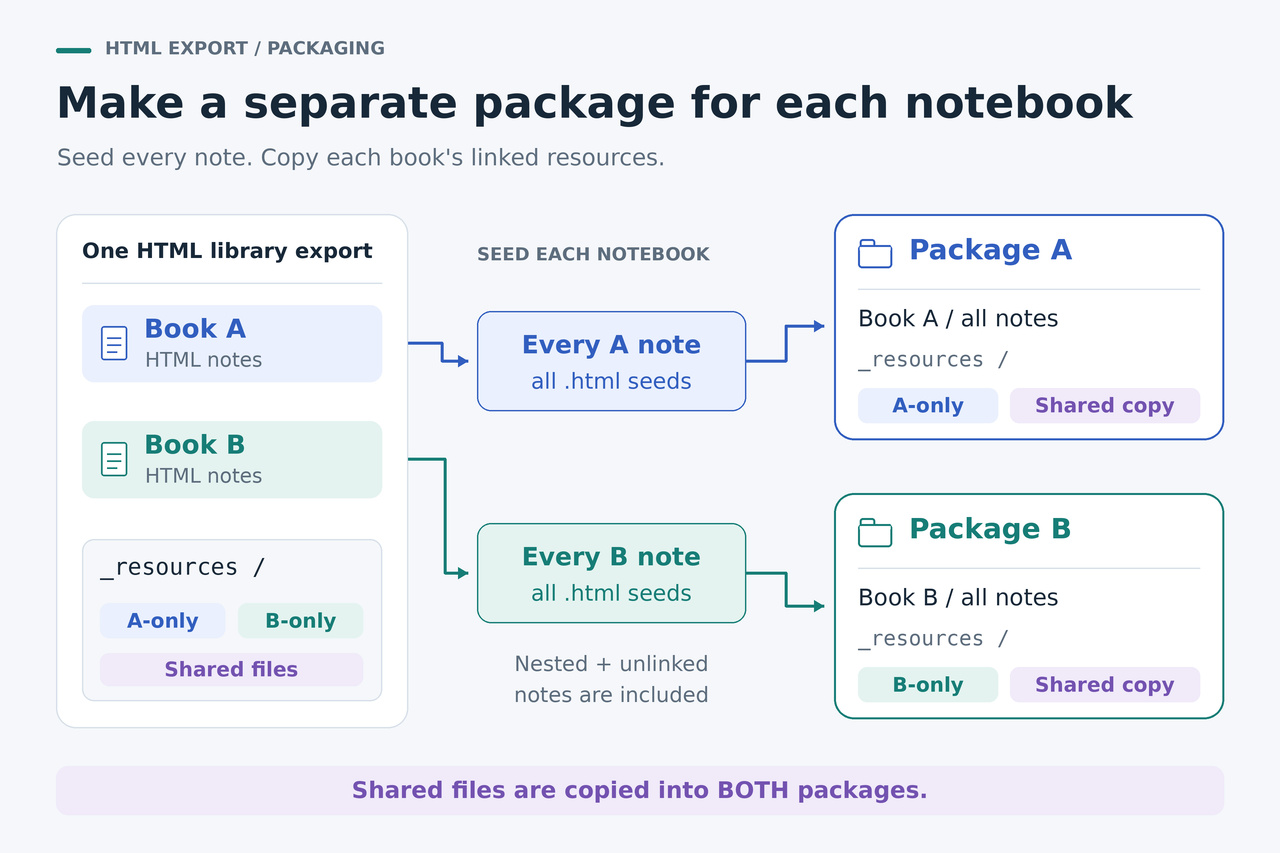
To move a notebook out of a Joplin HTML export, package its HTML notes together with the resources they actually reference. HTTrack can copy those dependencies and rewrite local links. The batch below starts from one intact export, lists every note in each top-level notebook, and creates a separate wrapper folder for each notebook.
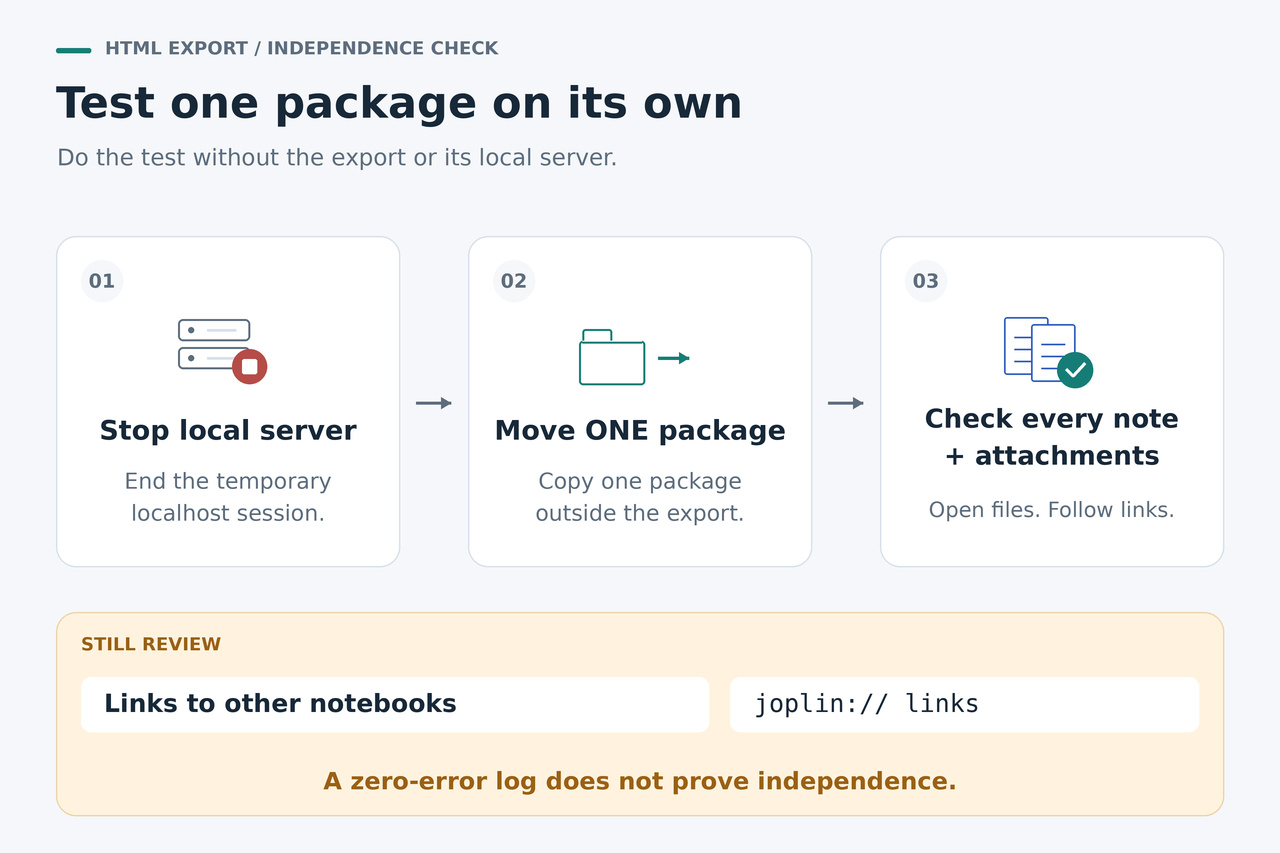
The final check matters as much as the copy. In our test, HTTrack reported zero errors while links to another notebook still pointed to the stopped local server. Follow the copy with a note inventory, an attachment check and an explicit link report before treating a package as independently readable.
Decide whether you need separate packages
If you only want to move the entire archive to another drive, keep the whole exported directory together. Its notebook folders and shared _resources directory can travel as one unit. If you have only a few notebooks, exporting each separately may also be simpler.
The batch workflow is useful when you already have one large HTML-directory export and want individual notebooks to travel independently. A 2026 Joplin Forum discussion describes a library of roughly 100 notebooks, where repeating a manual export for each notebook was the practical obstacle.
This procedure keeps the exported HTML reading format. If your real goal is importing into another notes app, consider that app's supported format or a converter such as Jimmy instead. Joplin documents JEX as a lossless, reimportable backup that preserves note metadata; retain one alongside the original export.
Start with a complete desktop export
Use the Joplin desktop application's export menu to create an HTML-directory export of the notebooks you need. Use the option that produces separate HTML files and notebook folders. The Joplin command-line application's HTML export is not supported in the v3.7.21 source reviewed for this guide.
Before exporting, let synchronization and attachment downloads finish. Joplin's attachment settings distinguish Always, Auto and Manual download behavior; Auto downloads on opening a note and Manual waits for an explicit download. The reviewed HTML exporter skips managed resources that have not been downloaded. Packaging cannot recreate bytes missing from the source.
Open the export folder in a file manager. For this recipe, its immediate children should be the notebook directories and the shared _resources directory; pluginAssets may appear within notebook directories. Nested notebooks remain inside their top-level parent's package. Keep this export intact and put the output somewhere outside it.
Open representative source HTML notes and their attachments before proceeding, including a deeply nested note and a PDF or document link. A note that already links to the wrong place needs its source export corrected first. Ordinary filesystem links, unusual custom HTML and plugin-generated content may need separate handling; the recipe is for Joplin's ordinary exported layout.
1. Set four values and start the local server
Use a Linux Bash terminal with Python 3 and the HTTrack command-line program installed. The tested HTTrack version is 3.50-5; obtain the program from the project's official download page, https://www.httrack.com/page/2/en/index.html, and check your executable's version before using the recipe. The commands below are Bash syntax and have not been tested in Windows Command Prompt, PowerShell or macOS.
In the next command, replace EXPORT with the absolute path to the intact export and HTTRACK with the absolute path to the executable. Set OUT to a new, nonexistent directory outside the export, with an existing parent directory. The corresponding OUT path with -moved appended must also not exist. Choose an unused local port; 8765 is the example.
Run each numbered command as one physical line, in the same Bash session. Preserve the straight quotes, backslashes and semicolons. The first command creates the output directory and starts a server bound only to 127.0.0.1. It does not upload the notes to a website.
EXPORT="/absolute/path/to/html-export"; OUT="/absolute/path/to/new-notebook-bundles"; PORT=8765; HTTRACK="/absolute/path/to/httrack"; mkdir "$OUT" && { python3 -m http.server "$PORT" --bind 127.0.0.1 --directory "$EXPORT" >"$OUT/server.log" 2>&1 & HTTRACK_SERVER_PID=$!; printf "%s\n" "$HTTRACK_SERVER_PID" >"$OUT/server.pid"; sleep 1; kill -0 "$HTTRACK_SERVER_PID"; }
If this command reports an error, stop before running the batch. Check OUT/server.log and correct the path or port, then use a fresh output directory. Keep the terminal session open: the later commands use its variables and the recorded server process ID.
2. Build a separate package for every top-level notebook
This command walks each notebook recursively and writes a .urls.txt file containing every HTML note's URL. It encodes spaces and non-ASCII characters in those starting URLs. It excludes pluginAssets from the note list, then runs HTTrack once per notebook.
RESULT=0; for BOOK in "$EXPORT"/*/; do NAME=${BOOK%/}; NAME=${NAME##*/}; [ "$NAME" = "_resources" ] && continue; LIST="$OUT/$NAME.urls.txt"; python3 -c 'import pathlib,sys;from urllib.parse import quote;s=pathlib.Path(sys.argv[1]).resolve();b=pathlib.Path(sys.argv[2]).resolve();sys.stdout.write("".join("http://127.0.0.1:"+sys.argv[3]+"/"+quote(p.relative_to(s).as_posix(),safe="/")+"\n" for p in sorted(b.rglob("*.html")) if "pluginAssets" not in p.relative_to(b).parts))' "$EXPORT" "$BOOK" "$PORT" >"$LIST"; [ -s "$LIST" ] || continue; "$HTTRACK" --list "$LIST" -B -N0 -K0 -q "-*" "+127.0.0.1:$PORT/_resources/*" "+127.0.0.1:$PORT/*/pluginAssets/*" -O "$OUT/$NAME"; STATUS=$?; printf "%s: %s HTML seeds; HTTrack exit %s\n" "$NAME" "$(wc -l <"$LIST")" "$STATUS"; [ "$STATUS" -eq 0 ] || { RESULT=1; break; }; done; test "$RESULT" -eq 0
The filters deny general crawling, then allow referenced files in _resources and pluginAssets. The shared _resources directory is never used as a starting page, so the batch does not deliberately fetch its entire directory listing. HTML notes do not need to link to one another: all of them were explicitly supplied in the URL list.
Let the command finish and read the per-notebook seed counts and HTTrack exit status. Stop on a Python traceback, a nonzero exit status or a notebook unexpectedly missing from the output. A normal exit and a zero-error log are useful checks, but neither proves that every reading dependency is satisfied.
3. Stop the server, move the output and report unresolved links
The next command stops this session's local server and renames the output directory by adding -moved. It then scans the mirrored HTML files and writes link-report.json at the top of that moved output. Renaming does not alter the original export.
kill "$HTTRACK_SERVER_PID" && mv "$OUT" "$OUT-moved" && python3 -c 'exec("import pathlib,sys,json\nfrom html.parser import HTMLParser\nfrom urllib.parse import urlsplit,unquote\nr=pathlib.Path(sys.argv[1]).resolve()\nrows=[]\nchecked=0\nfor m in sorted(r.glob(\"*/127.0.0.1*\")):\n for f in sorted(m.rglob(\"*.html\")):\n links=[]\n p=HTMLParser()\n p.handle_starttag=lambda tag,attrs: links.extend(v for k,v in attrs if k in (\"href\",\"src\") and v)\n p.feed(f.read_text(encoding=\"utf-8\",errors=\"replace\"))\n for v in links:\n u=urlsplit(v)\n if u.scheme==\"joplin\" or u.hostname==\"127.0.0.1\":\n rows.append({\"file\":str(f.relative_to(r)),\"kind\":\"joplin\" if u.scheme==\"joplin\" else \"local-http\",\"url\":v})\n elif not u.scheme and not u.netloc and u.path:\n checked+=1\n t=(f.parent/unquote(u.path)).resolve()\n if not t.is_file() or m.resolve() not in t.parents:\n rows.append({\"file\":str(f.relative_to(r)),\"kind\":\"missing-or-outside-local\",\"url\":v})\nresult={\"checked_local_html_references\":checked,\"review\":rows}\ntext=json.dumps(result,ensure_ascii=False,indent=2)\n(r/\"link-report.json\").write_text(text,encoding=\"utf-8\")\nprint(text)\n")' "$OUT-moved"
The report lists the HTML file, link and reason for each flagged item. Its checked_local_html_references number counts inspected local HTML href/src references, not notes, attachments or every dependency. An empty review list is useful evidence, but it is not a complete archive validation.
If stopping the server or moving the output fails, do not assume the later scan ran. Resolve that failure first. Do not reuse an old destination for a new run: choose new OUT and OUT-moved paths so an earlier mirror cannot conceal missing output.
Read the report before trusting the package
A local-http entry still points to 127.0.0.1. It may be a link to another notebook that was intentionally outside this package, or a resource that was not captured. Open the named source note and inspect the target. A required image, stylesheet or attachment still using the local server means the package is incomplete.
A joplin entry is an application link. It has not become an ordinary portable HTML link just because the note was copied. A missing-or-outside-local entry points to a local file that is absent or outside that package's mirrored directory. Investigate these entries before relying on the copy.
When a flagged link is only cross-notebook navigation, decide whether the reading copy can usefully retain that documented limitation. If you need those links to work, keep the complete original export together. This recipe does not rewrite cross-notebook navigation into a new combined library or repair existing joplin:// links.
The automatic scan covers href and src in HTML. It does not inspect CSS url() dependencies, script-generated requests, fragment targets, embedded application behavior or all other HTML attributes. Check the actual rendered notes and attachments as well.
The report does not flag ordinary external HTTP or HTTPS URLs, including remote images or stylesheets referenced in href or src. The crawl filters leave those remote resources outside the package. If a note depends on remote content, inspect those URLs or open the moved copy with the network disconnected before treating that content as available offline. Ordinary links to websites may remain useful online links.
Verify one package outside the batch folder
Choose a notebook wrapper under OUT-moved and copy that whole wrapper to another location, such as a temporary folder on another drive. Inside it, HTTrack creates a host-named directory such as 127.0.0.1_8765, which contains the notebook and its own _resources. Keep that host-named directory and everything inside it together.
Match the notebook's generated .urls.txt list against the HTML files in its mirrored notebook tree. Check filenames and nested paths, not just a total that might include HTTrack's own index pages. Every expected note should exist, including notes nobody linked to. Repeat the inventory for every package you intend to keep.
With the local server stopped, open notes from the independently moved wrapper. Open a PDF or document attachment, inspect an image and check a nested note and any formatting that uses plugin assets. For important binary attachments, compare the copied file's checksum with the corresponding file in the original _resources directory; do not treat an error page with an attachment filename as a successful copy.
A shared attachment should exist inside each notebook package that references it. A file used only by a different notebook should not appear merely because both notebooks came from the same export. Once a package's note inventory, required attachments and link limitations are accounted for, it is a separate reading copy. Keep the original full export and JEX backup.
What was tested, and what still needs your check
We tested HTTrack 3.50-5 with Bash and Python 3 on Linux using a synthetic fixture based on the directory structure in Joplin v3.7.21's HTML exporter. This was not an end-to-end test of the Joplin desktop interface or a test of every export version and plugin.
The final batch contained two top-level notebooks, one with a name containing a space and Chinese characters. All five expected HTML notes were copied, including nested notes and notes with no incoming links. The first package contained its 10 expected global resources and four plugin assets; the second contained its four expected global resources and one plugin asset. Shared PDF and document copies matched the source bytes, and all 24 source files were unchanged.
After stopping the server and moving the output, the fixture verifier found 21 valid local HTML and CSS references. The reader-facing command above separately checked 18 HTML href/src references and correctly reported two cross-notebook local HTTP links and two joplin:// links. Both HTTrack logs still reported zero errors.
An earlier filter that included the encoded notebook name missed a stylesheet for the notebook with spaces and Chinese characters. The final recipe instead follows the standard resource directories and seeds all notes explicitly. That is why the filters and the follow-up checks belong together: the copy, its log and a successfully opened first note each answer only part of the portability question.