Tech · PRACTICAL GUIDE
Copy JPEG Ratings to RAWs in Separate darktable Folders
Keep your dated RAW folders and their Jpgs subfolders. Use a reviewable plan to transfer explicit star ratings into existing darktable sidecars, then load the changes into the library.
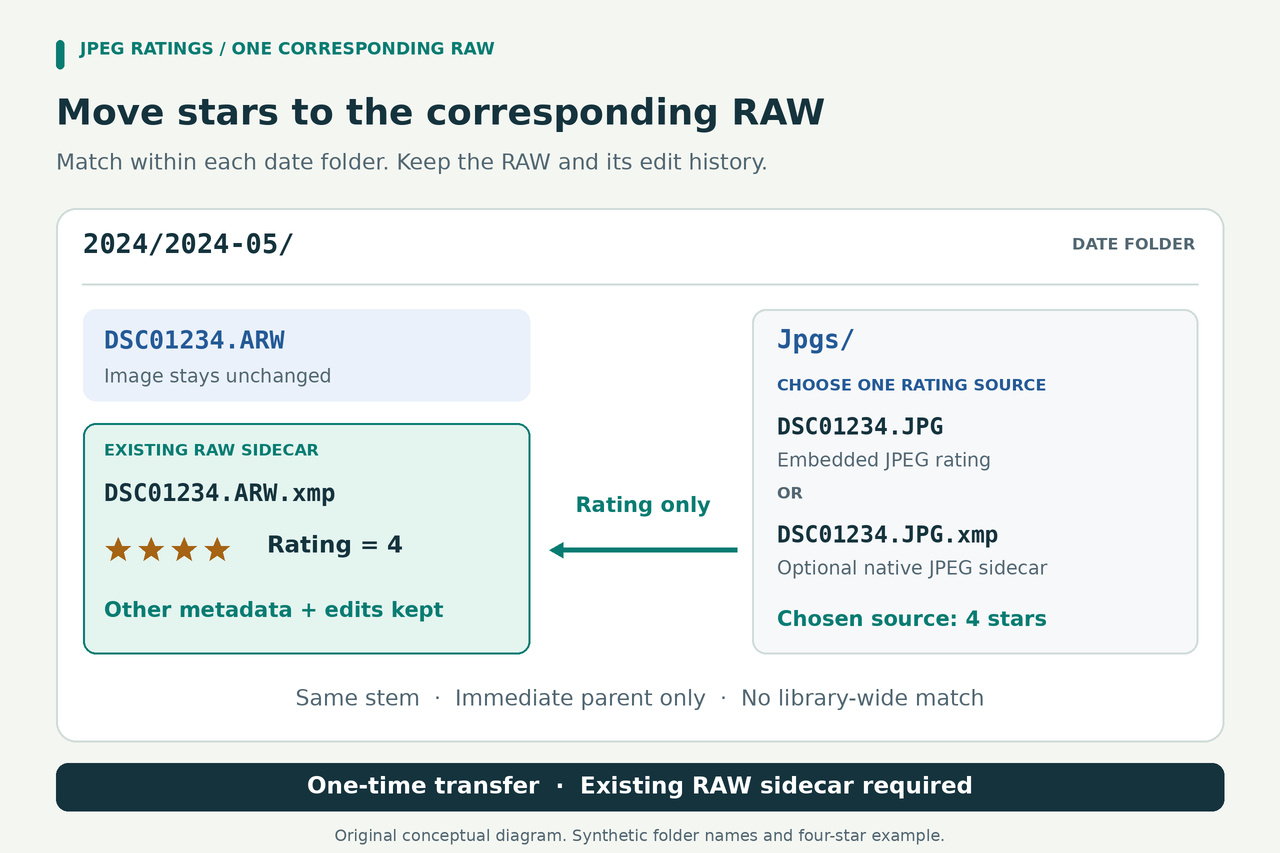
Rating JPEGs can make a large photo archive easier to sort. The extra work comes when the corresponding RAWs live one folder above them: your picks are ready, but the files you want to develop still need those decisions. Reorganizing years of folders should not be a prerequisite for carrying the ratings across.
This guide provides the complete helper for that arrangement. It matches within each date folder, updates one specific rating field in an existing RAW sidecar, and saves the original sidecar. A separate darktable readback completes the workflow. Start with a small date folder so you can inspect every match and confirm the result before moving through the archive.
1. Keep each match inside its date folder
The supported layout is a RAW directly inside a date folder and its JPEG directly inside that folder's Jpgs subfolder. For example, Photos/2024/2024-05/Jpgs/DSC01234.JPG pairs with Photos/2024/2024-05/DSC01234.ARW. The file that will receive the rating is Photos/2024/2024-05/DSC01234.ARW.xmp.
The shared stem is DSC01234, with the same spelling and letter case. Another DSC01234.ARW in a different month's folder is a different candidate and is never used to rescue a missing match. The helper walks the photo tree you select, but every pairing stays within this parent/child relationship. It does not establish that two files show the same capture; you must confirm that your naming and folder arrangement mean they belong together.
ARW and Jpgs are the defaults. You can set another RAW extension with --raw-ext and another exact child-directory name with --jpeg-subdir. Multiple JPEGs sharing a stem, multiple matching RAW formats, case ambiguity, and possible numbered edit-version sidecars are blocked for review. Nested folders inside Jpgs are outside this rule.
The target sidecar must already contain darktable metadata. The helper will not create a blank replacement for missing edit history or guess a Lightroom-style DSC01234.xmp. darktable can read some other sidecar conventions during import, but its native sidecar keeps the input image's extension. Use the actual native file for this transfer.
2. Choose the JPEG rating authority
Decide where the wanted rating currently lives before preparing anything in darktable. There are three common situations, and the preparation differs even though the helper offers only two explicit source modes.
If the rating is embedded in the original JPEG, use --rating-source jpeg. Keep those JPEGs unchanged. Do not import them or generate JPEG sidecars merely to prepare the source for this guide. The helper reads their explicit XMP-xmp:Rating; it does not assume that a rating shown by every other application has been embedded in that field.
If the wanted rating is currently in darktable's database for the JPEG, select the relevant JPEGs in lighttable and use history stack > write sidecar files. That writes the current information to a native sidecar such as Jpgs/DSC01234.JPG.xmp. After closing darktable, choose --rating-source sidecar.
If an existing JPEG sidecar already contains the wanted ratings, preserve that file as the authority. Do not overwrite it from an older darktable database simply to follow the previous paragraph. Sidecar mode requires the exact full JPEG filename plus .xmp in the same folder; it does not search for a shorter same-stem sidecar.
The plan reports both embedded and sidecar ratings when they are available. If they disagree, a warning shows the difference and your explicit source mode wins. No modification-time comparison decides for you. If the selected source lacks a rating, that pair is skipped even when the other source has one. Choose the correct mode and make a fresh plan instead of treating missing information as zero.
3. Prepare the current RAW sidecars, then close darktable
Make sure each target sidecar represents the RAW's intended current editing state. If darktable's database holds those edits, select the intended batch in lighttable and use history stack > write sidecar files. Do this before any re-import of an older sidecar. If the RAW sidecar already contains the intended newer edits, preserve it for planning instead of overwriting it from an older database; use the XMP-to-database readback after apply.
For RAWs genuinely absent from the library, use import > add to library on their existing location, then ensure native sidecars have been written. Prepare only the JPEG metadata required by your chosen source branch. Keep a backup of important library data and sidecars before the transfer; the helper's later backups cover the RAW sidecars it changes.
Before quitting, open preferences > storage > XMP sidecar files and enable look for updated XMP files on startup. For this workflow, set create XMP files to on import rather than never. The after edit policy does not ensure that every unprocessed RAW already has a sidecar.
Close darktable and leave it closed through planning, review, and apply. Also pause other applications that could rewrite these files. This keeps the prepared state stable: once an image is in darktable, its database can otherwise take precedence and write over an external XMP change.
4. Set up Python, RDFLib, and ExifTool
You need Python 3.10 or later, RDFLib 7.6.0, and an ExifTool executable. Work in a new, writable folder for the helper and manifests. The examples use python3; on Windows, use py -3 consistently if that is your Python command.
Install RDFLib into the same Python environment that will run the helper. A virtual environment is a convenient way to keep this separate from other projects. If you use one, substitute that environment's Python executable for python3 in every command below.
python3 -m pip install rdflib==7.6.0
python3 -c "import sys,rdflib; print(sys.version); print(rdflib.__version__)"
Get ExifTool from its official distribution and follow its installation instructions. On Windows, rename exiftool(-k).exe to exiftool.exe for command-line use and keep the accompanying exiftool_files folder alongside it. For the portable Perl distribution on macOS or Linux, retain its lib directory alongside the exiftool script and have Perl available.
If ExifTool is on PATH, the helper can find it as exiftool. Otherwise supply its executable path with --exiftool. On Windows that can be --exiftool "C:/Tools/ExifTool/exiftool.exe"; on macOS or Linux use the real path to your executable. This argument is a file path, not a shell command such as "perl exiftool".
Use the same executable and version when planning and applying. If you update or move ExifTool between those steps, create a fresh plan so its recorded runtime matches.
5. Save and inspect the complete helper
The next paragraph contains the complete helper in a compact, single-line package. Copy the whole paragraph into a plain-text file named unpack_rating_helper.py in your working folder. Keep it as one logical line; visual wrapping in an editor is fine. Do not add quotation marks, Markdown fences, or surrounding article text.
The unpacker works offline. It decompresses the included source, checks its SHA-256, and exclusively creates a new sync_jpeg_ratings.py for you to inspect. It neither runs the helper nor downloads anything. If that filename already exists, it refuses to overwrite it.
import base64,zlib,hashlib,sys; from pathlib import Path; data=zlib.decompress(base64.b64decode('eNrFPWt32zaW3/UrGHbPhtpItJNOZ1plNLPZxOlmJrFzHGc7s46WhxIhizVFqnzYVl3/970PAAT4kOROZzcfYpEEgYuL+74X4FdPjqoiP5rH6ZFIb5zNtlxl6dcD13U/JmE6csqVSJ1CJGJRxjci2TqLbLN1/vbho5OHZZxeFU6ZOeIuLvDCicL8ugzniXDOX/3gFHEkFmFe+IPBR+rX+dp/fvxs5Jy/efs+njt/8H/vHzthGjknd/HyIssSJ8yFk4ufqjgXke+cZk6xEkkCg67X0K6g5/MqTkp/cLESzibPrvJw7USZKJw0K51sA+DWUEQh/A0LeJjlzm0el8L5y8eT748QungdXglnGScCAIT5DpZ5tnaCYFmVVS6CABpssrwE+KBjmGuWFoOBupdfbWBiQl0vsoQwhG3kLRhalPFaOGHhRKW6uwqLVRLP1eWPRZaq31nBEGzCEpuo4T/CpWqS6wGLVVXGib4C+PTvag5YWYhCQ1Js9c9SrDc4Y3VdVXGkft+tE1+UuRD+SSLWIi0v4DdCf3LBgFV5AnD5NHEFHdz7MYvTwaDMt5OBA/+oaR4tjSl8n4eb1cj5fP7uXCybjXxY2w0uqwIxC+IiW2f5ZhUvBuJuITal846eneR5lvMo1KUzlX3CD+s1uD7NUjEYfHr9nycfXsGlexuWixUsCRDD+MeNuBoz+Y43QOXjm+fu4PzVxbvT77Hp/aosN5Ojo7TwwyibC4Tw6C7cHD33j48ezuk9d3Bxdvb+r+8u6AVqNkmLyVqU4dHD3XpTXkOPb94G52dnF2aft7e3/u3XfpZfHT3/7rvvjo5fHL14MQZMjIttWoZ347T46gFedAfAYsGHk4tXPQPgD2z0PviPV59OeoaAxzjMt0dpuBbFJlyIB+QGfu/9K3u6u98DNMGk31wEp5/wJfmO5jS/WPqpKI/cAfJXcPK3C2x27/o/bq7ckYN/xZX7MPjK+VyIyFkCOyLPxAWwjBOJkplnRDwcIluvYyCybAnkvCGywDdEuFiRYIGLdQgi4K+nZz+cBnBHD0jE4fphfkujFvlS/n1Bfxf679fyL7dLBbdL5XUEkx3JvvKQn2Wyr/yW+9gIdZ3Q36+XOf1dLvl+HP9Ef6+jhe5rnRV0by3HyUP+e/e1ghOuBw+DwWCRhEXhfNqmC6J674QYAXA0ZAbYwGNoFgHxp9mtN3TGfwIxILkjFyDCAK+lr6SQj43gGn//DKzhV+Vi6APHMCo9vF9sxGLqFmKRgaR1h7L3KL4SRRmgpPJuwqQS9lAoYQHx+NiPqvWm4EYjR6QFitGwWMTx9G2YFHCvgJUMrsW2mF7k0IY6aP8rBMiDsMzyYuq5I8TLxB0OfZEuskh4blUux98CeMZEpVT1i1X44pvfewjT0F+JO4bdU1MBoOOFnEop7soJ3pH4xOdVGv9UCW8Txnkhb/MgRZWUSF0P+h6SI0xk5NBsnTh16K2JNaV4iW3wIXcxaU04D5HM61Veum+qTRIvQlRUn85O8f2Jcw//P8gZ20BdwpMZQEZQGAATVriJiSdapSQLo4LmP3Ky+Y/AeQHBHqyy7HrKOFAYW6zE4lpEAeokD/+bkD4aOXmWlfybyAF/KLosUS7jDS8rfLz0w3mhOxjyNLS64HfysoCXqHEukhBNjaDMPBxl6NNjaiy1wX/hbAlhqJ7gprFWLYQiJE5WlWiMoDUjjRkQQjyHexwVsMs6CTqjvhZVnoMKBKCw1UAtOYLCiw0g1aPWrdWvI2oyMChBPgGeC4rtOonTa29oE0Qb9k/b9TwDcnCwuROziSO1u4gAdtmpIg4YJky33gJBBNJmhLOwxVvul/xL+uXYHfbjy30L1oFDYh8ENGikOEW77vX5yHn/Fo2o08/vyQhDSKRsFpHNjTiq5riQGN6L02U2tIQT3fJBskTiZuSoizjN6osi/lnUV2uUUUFa2GJDPwXZULdNEWGKiJcwA5Fv8jgtDRomuo1AHjBUcwFoEooIEwTc00ilycId/1Pw7tP5yfcet1bjDnfR3ylptFxcVUmYk7lZ0xzTVQSjAqug6UrwjfDqLDh/c3b6/u/OL84VqPoSVjMrQBSeBadnb8/evz/7AQTjseSm2xhpvPCXEXWyjKBhPgeaBvYAOhDhuoYQWwg55JKmyS18BC3NvOHQpFq9gPza0Hkyre8xFvZSMZEUGF+wCpFzu8Ir7A1WpYEJ/IfCoyHOh5bUnSfZ4hqpGYz53EvC9TwKJ3KWIDzCyHt+/OJ3zr85+Gc4cuau24Bw5Vcb1IsedVX3Hi6hxwC72IsdatpDLE30WCirxxgiN+1vu5O2OjCLXbcxK3nuXvflIm+5E55IzWuuYjLzUZvxXODZeGG9T1zsAvtG1m3k5/q1deMpM62LzGqNSOxrvMeEAC1WplbnBg+Sy8F9CZAPQNQHbNuTHTBx5ttSFLbRAt7e21ooOCF4mGmWSpcAvVMya146qbiBZS5EHocJ4MeZh0B64O+iGinBBxRgg1KH+ArI5Y3Iy62DzBrPKxiVfFvB3hTI0zAF/bIBtVywIgIpSwP50iF+ylpuDrb29RgxOQ5vUdZekbPD03aku4RdhORlhij2FkkVKdgL8J/BWGJ7YJMVMfml2KookbjBqmYXG1/QnjdMC0ET+Q2wZyrAxX/vgEUINnp65SusKRpn9wsUErpZO7SJdPShoXLqJwQGYjwuWW5pVMgYAawILoxADnN7TEQApioQ/DH4y/FG98ku5XRKkYVaKc7dPz55c/b64u8fT1wUHYR0UF4gQIgN8fnJ6cW7i7+3Hu+Y3JuLN0ewsDEseSTAXs85SNBWj6SOZSzE7bB/ymwDsuTkwkcTBI1USbtD0+iBxx/R8z7U7nmXglEYR7yOPDgIBXipZeuwtp86l6lfhlckZHEVECyfhOxwZrR7Bg3Rqu1opqxivJv6zAYzU4eicQIuHy4W0KeHHY7IBidGwUvgfjStkDA89951njnscj5z3KYFLPUBvkUDInS7lusTIwG1CwBjBIm0k6u4njR2/VxiT4lSEhLBIqvI4Cuqtcd4m04dGUPoQE3Hu8/4ZfmOgbL+9wGNVhd/cp4fOOE1GjcgMVLibZBCYFUCA2IcjwMa7EKoOUbLAOUPUgX46OAeKkBUTKMGCNSip9uTAjsEpnVFoowMTAAnXJTJlkBDAYaxDfIrSUHXMKE1rka6PGbKugVJBIwaIOqIiDXBIcxyXVQsZWKaNmpiBPMldDxDUUBTRecIL8B08JEfNywmcJ7QZZw0nu02gNzPaS0JaFqmN9I7X/z3lfNRiWRgHSeDF3I1Y0PNvATMAfpIK4Eov4aFhe5BMi1jaBcXRn/iTqw3pe+8cjYJoh6HRw+HGBCpA4e4xQlgu60jI00k01CCA5WgE6N7bKK/oGl63jV4xlIewC9FywwyUtK6AJSif4zIl6E0c96fU+oZCZNIBdQBghunAF6MiETAMSZVhVfiCINaoPbWIcx5UfjOxUoYfS3jO3iB2sSokk3kIOIm6KuRNiFTwYH5YFSEpMTn8/fOUpSLlW+Sjg6fWfMiHOpHKEXQ8weS4ccNKoH7hSg91X5kdHSpbs6GzVEp2GeNandLs5yqsKxHcboCg3t1+NOPWTMcSbl25LbGxlFmw1548fFIj4FDjuj5lfUcGERKCZEwOyoPFtruEBEndxv2z2GlFPkpmkfNVxNtly69koFhslC8IUerSZtOQYOWmVSvAAKGqBYZWk1TFVMaycji1AVr0h31Gh8ybFHNQYq+ezM9DMsmeYNTuEKCEwkTZS7W2Q0aRysQSlm+HSFJgloCkQuGG0gx+D8J59B8ZJt33F2WRygQ0NgEg1UJCssohRFCGbhAAxBlheEX+zb+fIbH89C8U4F7z90VF5dhcUAhvmM4kdRhII3XKYUlrFi9Rw2GvtlO6Ttl+qjY5yPMHqCUypC7ppjtMYNU0NSId9674BZIbyIAkgEPxAQTaNyUfyyMoY0lFB+GOpqrbO064hiAgxSXQeAVIkGCvBOLiowOMzTJlk6VolvKeR8ffL3FyqubW3KC27aMcwpUAY3E6PuqEJ3RhQ9WATyuCrQ3mnFMZFv9Msaw0B9uar7uFdEeBvZBsNECqHGbZp2eKRCKHrFugojyZZARm9As6J0hUG2RJUC2w0Zz4AnKM0z5Mq9S79Idw113pnX4oDHZXPjLKknWyNFe7n6Jnnl/nnzx4e/wmTuy+t0bAPmcCiXTNDIUTGALbCoMQ5o9PskRK5pKEGAmEPA5iwlZLpcA98z2ao0IoI4Cwgsd8T+6hY+4RbHPgjkVt+AGiiMM/kkZDt5WdsuuDUhkI397VaG3a0m7zxdvx9/qR/AKzBg6KDInvMniqJBJ3p+qjCxRlGM/xGmU3WIMErzgDeh4ozswGzX2luS4v/r0+t07iq2xMQ/2zRxIAdiRIjTkeiPQc4w8kZNWCzwA6wbtRk1YwNVjGGIZU+LKpcsVapESf1McCMaYwqS+pYf/Tv+7s9qdM/URcR247IkoKepWp2eJDlv8g+CMGEVTz/2Suj4pWVol9ILgTisV0lZURRkBYU2NwT6++3iCvhYoirx1v/U+Rnywg+cvjkecBJApHKtlvcZSUHtnn4hiRuY0L7gvUOvo/w9bMnyP1GBJgYu9BMtbRD3Sm0KbFYXgFbZ9xoIP+tfAFkhZHKKYupwOMigVHjTfh1u97+cCbOiFcDtlSN0L6xXsAm3dY9RM0MPB84dRWIXdd3X5gOjIyTDCqUpATJkq1Ro8NQQKx8dYpvSGxDtpmVwjW5CiqiQe+P755Hf0gy/B6xqDATeRpsEec8od/xDmKTWE34QGd1RnMRrmKHmrBesAK6fXqbmMmAO/OCIZSk4d+q98s+m87rdQTcdVO3GcdmtoNUxMqDyd9l37k4mUx5BuUhsgziv6BTjxpYfJ0cvx8xm+5rkGDhmFHa93ExwlGYGaCIZWtlHW+oCcZBh3g9y30t2Ag4PuShoh2e9KwqFYnN1+1rW6EriOhZNRbxdD6hh4dtdxUUj0cLxjQkbSQ7NbCmpwtwdTxQcrxGITv6Poz+0gYwxr8FhNwgBImqRrxMsaJsr4+S+Xx+NvZq5clI6VV8NhJozb7B9uDkKIGKWLkVBTlfrp+LnzR0nj+OObQ6xDiR9y8ueCvPO0FOCXsHiHLsvM+WbkXEH/TJtsHO1eZ15cY5WZqlv6SkMyMpLK4PCkMQpXuupRWK0hhZRYFmGN1H2y58HaXgwfajFMBWlBjzCWqzghDFsG3j9xjVpErdwpLJPCtGEu3TzDHMM6PDbppCwoKN9J74UoJYs03BSrTPudi1VWYFFhVuUL8dSOThlxSR7Kd844tgXd/lRBn8sYusS4Ho4D3HwFYPlNbWeqJ3Bkc8Z0lsdXcRpiuc6yqZ6mSvDZOodzS+DLg+EKfrmHqZe0VCuERU3gC+a6KiK8DXRdia1M5SORFpQjmDqN2qVfnHvZxEfDGlywB00nZNN6MA5oHQoO4LhskBmUwdbP5czKlqJAppSGepnCuHDV1CtIV9DWbwXhfVkoVwBRjLvUCUZx49QoPyEDtFou4zsUNdgpX6mJNcdVbadYCIViHxOjfA91Wl1QBm1x5hw1sRHaARfaQ+iHp5GnZ9Yyi2S8EtraiVIXu9dIA/blNeDlHwJbq6VvNFC3Rw5WOA1VcpIMBfaZ9TuKaJRvGGAPNelQ3covhg9Pcp4TNRsuRulZ2EFb6254XRdhIZZZEnlDxLY1sPFsZob25ajD3bmGpfsaCyvD9Ty+qrKqkLkihPJeQ+gc2UMaVStqbqjW5G/QhQQ0ql8bRXugcEDJUx8T/R66DObAIxlluG+M1UiX109NGIn6uLyU1lb6ooHK8LVXmCqNDRNb+++6ZAqWDsMTOcXUNkgmufs/mP2CO6JYhBvhUSfAmWKNfmDuBl+iZ9Ci36huvUosxS9/QUb7F5B10Ojd96dn5yevX306sSYvOYMpZye9EYHxHAyDhF8cKhFKqQ0vz25xzLDQURO4c0lKtCpcrGRzqaGI3Popt4fHip1lB6rnKk6iABWUV1eljaR6oRIDYioprcExJYFNd0x53XJPpHuH+hm9TtSxI8qvTHS4oynjMZHCFWNWME0HpthZoeJHq7aI3oiLoCGX2+l0HECbSvVaKLLFiIlWAbhkyNACJgotwecJcAGzwr8Nk2vCFfIBxnGoAKOlUFjYqUghd1ULF+zycjKrcz5c1RtJIinU3KTMBOaPhlbxWz/lUjIYXo0sRWTqISzEqDagjupedKyQUNABTNQQfwY5tISfPcG9vT3Z31szhlo0Q0QNJYohhHpGmKE0Rpg1rDZYd8Ub94qZJjUrYTWY5KGJc+miQq1px0FoHZbccbl1Zzv8dNdUeGwmKX1IAhXu1kA/DHfPUKlKDLnYZaaSXowJc8Hp0HrXTDcaClF125BPDRsEW2rDYtg7ZfA+p1xi5mwmUovWUMy3Acpjihnp/R8+yKSwSkoUCx5FGSyDjAwYCWaDBmR3tNAk6E1CUuuLDw0rBgSYTfgGJhiR/XZB00RoY2i/jWoQeHpDnqVtKdc2spa2B+MDyJr2ENDWAaY3mj1Q2z4an2FqhkMhfP3QyzDw28ZMK+RF1GtSKELRpMhG8GDnWvaFFLrDCkBL8SbhjUvSripWIcUaYizvBAL06gIw4uabMI/DtCyG7ZIZNmOwpU0sNiXtDNUxsdhzUgK1Ndc+BCkwHoOLZR15wxALFo2Naf60nUsR/Etl3FnDdFQP4Zybwke1B5tvxwrDizRRJfjp4sD1pGVEDUc75DBeBrJ4ucRCjRQwg2YULaLbP7LNp0+mToMrD8XmB7JoGRLtSqFffV8P8zAyrGg5ThcuwZ50pqafo/gfuyIT8pl07zrnha93Ziz7baF6g6Ejw3oTucVPh2Jjcy/gEjR32TG6tf4AR9+6SzsfpWzL5Dcm2zk99e6Bc/uYwXzULkoRxeVYJbzUiCD5EKG0swrzQ2qAYXt4EsAwL3J9HEmw1or0vmKvaC3JrS57RtyFLrunToxZfTwWbcRjB+HNGqYDebQ91NRCLPsxPAAX8D//VlODe4CWh94JSTJHS7Cf1GnMS44wqH5nTUGluuujVirrIMjzDMsJmpsgOAeMzzjoiLzCe2FlDL9zEtzrpTXl2aUs4J49Rq2Z7EsFikrNgWqLHO6wkzDYp+iGg+rLZ86/OsfZixcvhr8SlDSTcmQjcpIsQD/zuOyCpwJbpyIZOu0qQIf1oS0JARWWeR30JdZzEUX0PrqWMtjmdbOFAnKKVYp2YySFYR+Z7dLmFM1oZ0iI41tpkjZIXAXfgB5haQOvtl1N60lj8K920ykCSGzGUMnpttV2dqt2cNx3Tk1yJxqMKJBbLIoPEMZus99mvNruJF/lqCH7Rn0AUMkQT87oY8+MHzuMQqSkNxhI3UEbmWdQP5M3evrilaxb8zX0k4pbow+5ilTrJ4mjDzpD5KARzj9ok4j0EVxMbtz0vG1UXiFn6S0gmuXa7z10CgyFkktJ5JxwZNDJEJN46XreLUGsTrkhyT7dkbw36WU8imtpB0U7dzvNbrB+Fd+QfpO7Ve41KE9p2KezB2lQFpxCo8ZKdLh7hlCdqqnoPl/WyRmi3Kf3Bh0/PHVu47RLQIYJhgVpQ6ejEbSHC9SEuhbT6M9eL5lmGzwC21iYrfeC8rwZKnDnq4RDUHPeUUVmw55y0L55X0rYZh3WxW4V3Et9bWUO1Cd1Iva3i/LaiX9840FvI4sq2hdk2NC4LxxDG936mOXEIxajXR5/nWa3aX2ICOpjXg+21tQIvWhEcpIL+Q/A8dpMSyqCqFJcfq7IRFjqcR4HzZM9IqUVBi+uY6DSyO1v3QqLN2YgTZmOvR64xcX5WeQZFm3APPQGXtswsCaixBygVe58MzUAydEuSnjUnKtUEqHbDU3/ANb4hkQ+1rFkO5p/GEWcKIoEXYToOsrFjywuahJVsvYlllqX/BSrBxO7tMw0tw7EBhLe1u0TAb8CF49WR+45IY1rMmv+JBTWuOCs/y1VSTCpJVtNOA0UtOoENba7yyx4O6TOHKkaCu4UUz76zA/eJwp2wToEI4HPfUFbA2PSeMqNj//9zqNjIeD+ArCL6cCwxNQtHqBhbDelvQXSfkTnatRh0NXqSyWDOVItXUQVtx6YNmmdr2bfMaAzGFyLNPGJeW30AAuwRDMbmty7KPbRSkOzW1atSjdW3ZWXD0YPm5wO96ANoWjs691FWJYRVuC7gN/DylpVfFHUxHeU6TEma4K0tj5zaccmTbnrU57tg8Qjz2HCn9hVYcVofOcdl4hgDVCqLZ1dA0gwiTh5G5TZ4dNCHwE1kk5diUKy9kYIiKe7hpDWi4ogvISJ81FTqq4EmcNGHq4zaP/kUNvLJUMNK8cwx6ZB1ugAcQMzUWdLYGCDd5niRqCVMKa4Ywg1e7HGiirswZ6YWukLPPBrkSCS6tgZ7Q5LErmxZN8oOW/Bap/OBRiLl1veuQw9bWkSNFbkG/WhLu1uRJ+BkihmcuU1PhHIl6a0ZDvqluLY2W0xNJkZMJbHtC0DH6k940p+XLrrMI2XuONDehgoe809INjKPt4CbsjUM5cVcbNm4RbGTRdJVQCKrcyqPDDHO+zEnDjFvWrTF7213yqNrAerBSjtrqYTCuhUCPeu50QILhinUw5oQsbe48bjJQyxaiSS6KAEkOL9x0gw3uRZFyNHhiHVUWT++hqj4BsPhNMyvpvaBUcgsES8Kccu5bCnNBuZdGzv/eo6BuP2/2nS0ELKcbnNmex0RgLWoCVbq6ZPHZVDcqygVxrmP7So6FwEfmge0BMAZbOC3NCZfaS06uN4jCigFUKktD4yErkMw85IovJQuLqYnDQZ/WxEVUaNuImMH8pUGcZJOZ5MAHFw052N1CV2aF3VUb2BET+VSy9THr7OFDMnm1p4tqOK4oPkeCMHjgcgUZku6iOqXKw5Syd41LD0G/HSmYthWGxtP2tnZvqhUjtMDgDKHlzuONVp7UMGk76C2tTDCktBUA+Haydnj0xGQSmvndk5ZEQZMZQjovqiFIN5YGQ9rkEtRihcZd1qUNo5jYNgsdQzHyTQxLVE0NRR4Tu1vqY9OGuGMDrh1lv4yXtrdPCEt7Px9fARS6eVK6UuSbFrl082obC40mF8DEed0uhm5wfZeoFbS2nfEnh7BLgV1ZvZZUyq8z9O61dl3bG+pmey3S8SiHrYQxnEDIEoW0jtj8EhWwzTv2xqbN57YIGjN3FL4HcdbGAalM10gp68AbWirzosTuhthnRnB9Mcm0R20JdpTu8ywBZGOFdTpPeblpTbaiuvp/hkekCN/i7a/2hVodsyRJG8GkzSvnmsBVjXCgt2tFsjAlpwXIOh1DLVq6FVW0geI+xqeCsOdtV0CSP2OvH0rBXNaN5lxKs4hyQVy6U8SBneUsxzvsWDJSVK2d9XxyKpqIazwSPptvUU6pqfWimPTH096laKXLqAq1FnBHaB+kara91eRS1fOuzQgwYD+qbh1OlqOsSqyxjYS2hKsnbQlUR1IhQNsCmFRZWN6KuMuQ7NSuV92/tk0BVkQ5Jhb7q6GOW32myBZHGEh6HVuO6RT+3pEEF0qiFlY+4iYEuIYTQoRHHNp54RdBRF7MN5vDwoGaqXvzvVs4sUrOIPFalWwcPWYYTqoFSYSLLlSmHt9Zl+287iXusNECPW9YHlvjJiZe5ZtLsh/OA2Rq91NoWlaQ2BzCY/wnmQRKqrh+l8UT4AVOkiYCnQPPqsBuza32Qbr+Uky1MeFEgtf5nNGbO3jAlHSleO01EzDtUdAjo5L0W1PuLXdZ3/S1iLa5zREhC/Mgmx38O3gBv07/u/DMfL4/F3s/uvX+DWoHoKMZUcwrLsgNzcPOW0jREdz5uxZjw8pLfz9BS5bxh7OFLlL1pM9mGq18jQClAZi9pGP2DiCvOOculb9ii7a860y4XT1kmD4lVJMO2Uob1C1AdBSZU99J/fCD3T0THqbFR+oz4Y4ejLF3U2wqPm1Siltp2mrmMk/MtX4/8Oxz8jTT1z+xTjY0CwivfcXVKiZRZIK+8xo3UbAXLjAwUU5EgYQp/9djsftBCgobS72toBgTkTrGzFaKARFZQMJ0OBM+mF1aZeVbhUwiqTLjN7CeHWDtAw0qnxow1+hIOOVabz5KjgFlMkto5i87CQADcCH1ZUE/uz9mWhPyZfZ02KN9WNQ6HlauJQmanmIXF6q3JepbJK31ZVOvjSvTMDHHFGOsi9mdWTv77G1UYhMD3O/nB8PGJTM8jkIRNqKSnyp9StAuMI14ie+HTugNm2JxnUe/a/Ci7ePDeDzwh2QHmjegJo9ze0yMTWIeYpp7KlTCFZaJPF63kj92RWtMdpQIFzURRNsMAoDHRsnKGTlzPKI+HBA7L+3TirVUXxg1zg2d84Bqb3yITTB8cpa8ogUj6NvyuX4pphdCMIbq7ZSK2KtMPp8A71YYbaMq/Ju+vA9UbhVptJLMyRgdB31IQLflNdx9TlBDZrnVru8oMBIU3tUuPc2JuGN2rVg6HtLA/zrTl1eSjMOi7xjCg8aY9QQ9TfaND1pLVDQUV5+6PBg3atdm+wVce/OccpGdAK3P4GgTAzl23UDhqDDvcFDNoLdMAxDZ8aAQLp3bY9MeQKw0LqgZfqLp90RxUOOkpEJtXtSMHB0LC4teWjPmoWLtjpapyo39GDFOdSNvOF/EpDLZ1r7V0bVbyjnspfbfeuibTGod7qTes7DRqRti/bqvNte4h7DxxV5U3ynHeedQOZlD+S+NifMmtlkPSU+pp1ZZIOyyYZX3xwJegzeQAaX+5qavo9h6yCfTYNqAFThh2WtsNTFCg5MeVoPGfvkETM5N2vzdv9X2Me5xmYH7bQCGllBRcrsGs8/cJIfzbgw9mbE+8Q2uYa9p61Vy5jwMfG0ZKSNLKOEjGGb4nI9mFVBPmc6kCaZei6oxY36xf+CSJ66X4qw6s6zBvFkVE9MHHu1eAPbdHcEXfSk/i10af9vrYSLvVBvmKb4RYv6vZIHcrLh4tyBZ6U97qa2W3mngkDUyvY2LMcB2p9piFdOW/YTcDCyJYU0cC1UkkEw9JFaGq52yi0PswCtLi9XhQWtPkedj+MUTtsKtRZTSZViXmDT1pbFkzrq9VHr1FHpb+LsiKNaC5dq3+sZaaGNVblxx8sTB9Aha81pEbWaWXXgBPrxBxSvhJttmmHtDklv1MjHwRd/aU9xSSqOAocD1lrTHHZl+hPbShsLUuOFfkcBC7bpf3w8vMDAKaQzm8OcSNu3x2z7zzprWeutcrYPee63WP2pxYNq+kfxYCpw0yoAvrYCbwvZU1QlwDPuhivX4YhPDGLMEpT4OdEiL/ozM40LlY91Z49+4d2QDZxdn29zNxDtKeLXy1G+8to7XPM/iq28yzMo3dYM5dX0EVnla32zVV9LZ1vr19q1mPz6ZYscya9y2yWMuvmAQuiBX0pI+Bx7c6p0Lspx9ujdG7Stz/FZTKOLnWyra3hsJa03dzRnoz3mNns2UavgZ3qkTr07+zgLsnllvAR9WHMh2otimDnPo4dddmTQxGzf9zB/kr4rn4ZsQF7bgGP4nabx7wnAxef3rEdXTAcruuzJ5pFeMq316qdcu12WV5t93daKLI+r+Ed6FiRtb0D5CZu7yAJz+ynF48PeXXtl00Zhj2QFBt0xKJUgJDrWPvKZ5vFs7LKpRHUGjZGqFLNkvQNqy1/OZDGoiMz8d7QGcuLVncdJZsHyTxJnpI6DzgF/lwGhFlRKAxz/ppq3VF7OXIy8kRhf0ddM54rz/pNBVdGMlAAP2i/BXSahFiVFaJXpALSYencm/N6eLmreFoWlodFUa0FV0lj0bXKEmCVU61CWqfXa2zXw+kggXlT51/keco70PiK0CRpFdDEbwCmFH5x6hIPk8ZM7TS8fCQT8fgpAjzS+mZKaWRMtIOUVhWreUHfVlPfWPZfyYPD6fNHuReJYgEeLBL0NAiibBEEQ+NNP4yASeQrHieisOg4vyqm7p/xWxfbjZhywn8lks20jghuVhl+3CsX4qUjT/HBL9Xxd534Mw1hNKaQuSqCcHcMPR5baU8XT9LO4oXAz5q2sqn95gQDea5q5m6xPl8NX2/45VTk3z58HKHy/iNeqTLOPxnHbvQASlkRmXcdqblP3b9srvB7tQzBCZVpLlZxEo3tlKfjyTcmDr4x3IeU2zHYk+Y4r85/MIbZ1Hus6lNJ6iGg8b4R2L8bc5pzhIYgEotLCZugzCvh7kP3Sb2VibL3ud4JxX4Vau0du8KK3QDqDFEHNZ7KWhquz0BWUt+hszac6N1YZrlD92gk7OyhMFBxE+ZT9+P7V6cBjqTxzzyv80JGJpPPb6UiNuUX7B9cFzkYy23cU9i2DnunLScUb/PSxhfg1cojO1NSggalPzhsQVKl/hgq3PFp+lZVF52m71Mmmb+DUPhWGkPf1YlS3cxMoLdNANnKqGKgjZ/ERsZQlOynJ0j4w2Yuh6Yk2BuTq2d8wAAQMY+xOoy3d0hBwCfwKrKzbSuFCJU6R5nbM/HOI3hsiD6qEZWF59A3zuX3o3QdZlP4DVvgmFhq125Y9Rqt9p2VG7vxaIg4XQSFiEhww1KYdFdx7Krk+HOjlMNc3D2wSBFowdGs4Wh8ITDDiJLiEyZgxUZt1DZIXp6GC5SDVcBGFVzdmIvfbMeAXSdjn5Lhb8vuajNyZOza0g8bFum+Dyop28XuwjRn9vbQkezWXbWezR6MDVadR4ofWyft8acPgEadZ9Zq4xdgMabumjVHstbPOJ1UM+Gog/VGLSLfNVe9ebQtlZorqWXYVMo9dcOuWQzlB1P4uESr4aDX1WwX/LTqQfBpoxqE9mhQ8YaBdMMRUOOqUHa9j85OQO6iTzfKt0Fe0Yco+iomduC3r4ZjuPslURQYXoXhTzMZQ8T6tHZpBVrQNzFoelKvR/IQQ6lm6UwSublDGhtgNPruw47BO8jYIuFDI0bmyfcUP5K/LsB26NmnzcugQkcj2p4xLbaF/HxKC6AX4ATE+OkrlLNBQBUDQYAuQRC46rB09kQwwwgyr/TIYYC5/S/n60zc')); f=Path("sync_jpeg_ratings.py").open("xb") if hashlib.sha256(data).hexdigest()=='ba1136a7f667973bf1fef54682971bf964f4518825c99d45955ed871fdb88158' else sys.exit("SHA-256 mismatch; no helper file written"); f.write(data); f.close(); print("Created sync_jpeg_ratings.py for inspection; it has not been run.")
python3 unpack_rating_helper.py
Open the resulting sync_jpeg_ratings.py in your text editor before using it. The reconstructed file is 34,478 bytes, with SHA-256 ba1136a7f667973bf1fef54682971bf964f4518825c99d45955ed871fdb88158. A hash mismatch means no helper was written; recopy the original paragraph rather than removing its check.
The readable program changes only XMP-xmp:Rating in a temporary copy of an existing RAW sidecar. It uses RDFLib to compare all the other RDF metadata, so equivalent XML spellings are acceptable while changed edit data is not. It does not write image pixels, access darktable's database, or copy the JPEG's entire XMP block.
6. Create a plan and inspect every proposed pair
Begin with one small date folder or a selected year tree. Replace the photo and ExifTool paths in this command with your own. The default operation writes a new JSON manifest and leaves every photo and sidecar unchanged.
python3 sync_jpeg_ratings.py "/path/to/Photos/2024" --rating-source sidecar --manifest "ratings-plan.json" --exiftool "/path/to/exiftool"
For embedded JPEG ratings, replace sidecar with jpeg. If needed, add --jpeg-subdir "Jpgs" or --raw-ext ARW with the appropriate values. On Windows, a complete equivalent can look like this:
py -3 sync_jpeg_ratings.py "D:/Photos/2024" --rating-source sidecar --manifest "ratings-plan.json" --exiftool "C:/Tools/ExifTool/exiftool.exe"
Open ratings-plan.json. Start with counts, then inspect each ready row's jpeg, raw, raw_sidecar, rating_source, target_rating, and new_rating. Confirm the paths, the intended old-to-new change, and every warning about embedded/sidecar disagreement. A successful dry run does not mean every image is ready.
Ready pairs are eligible for apply. Unchanged pairs already have the desired value. Skipped pairs have no explicit rating in the selected source. Blocked pairs need attention, with reasons explaining a missing sidecar, unknown rating, conflicting file names, possible edit versions, or another unsupported condition. Fix the underlying issue and create a new manifest.
The plan records file identities, modification times, full-file hashes, and relevant neighboring filenames. Hashing large RAWs takes time even though their pixels are never edited. Select a manageable tree. An empty plan may mean the selected folder has no matching Jpgs children; it is not proof that the archive contains no rated JPEGs.
7. Treat zero stars, rejection, and existing ratings deliberately
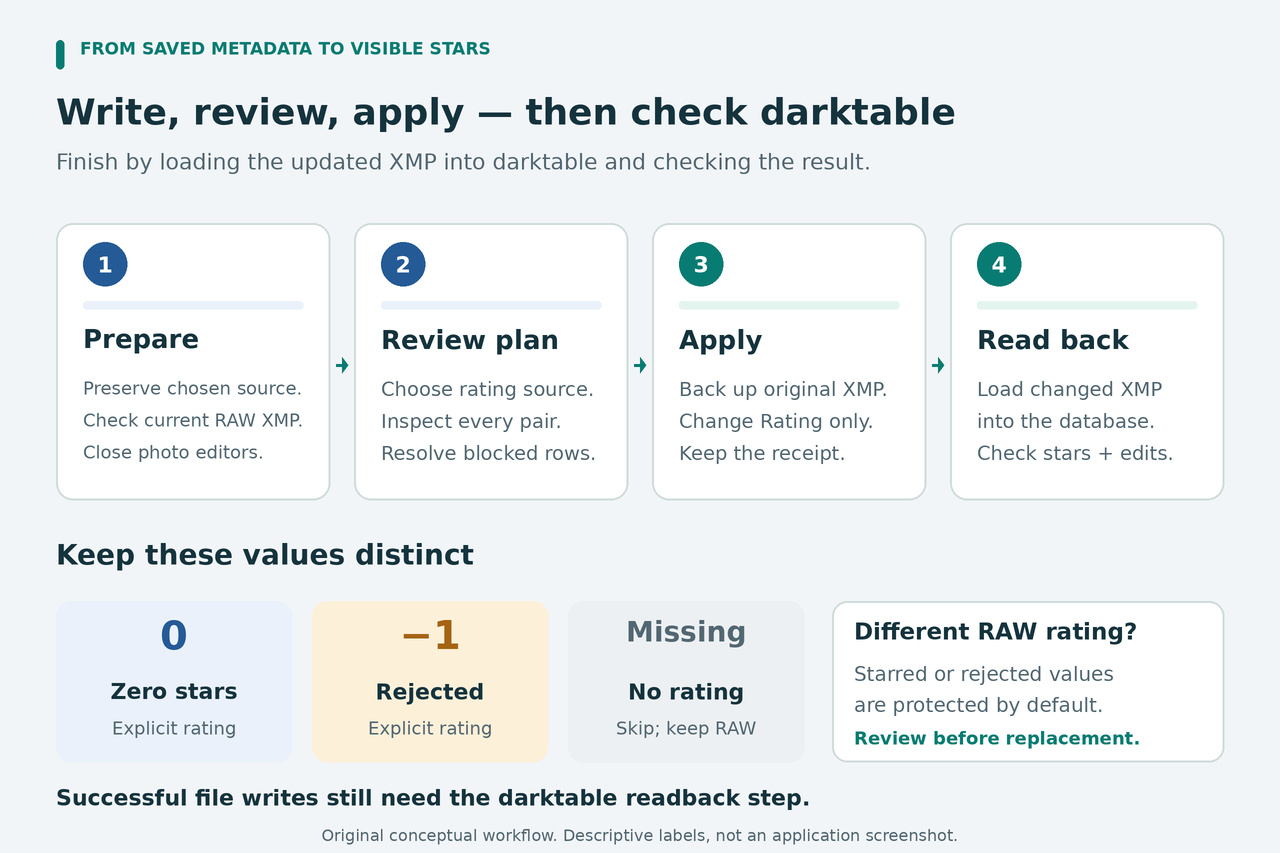
The accepted source values are integers from -1 through 5. Zero is a real zero-star rating, and -1 is a real rejection. A missing field is neither of those values. The helper preserves a RAW's rating when the selected source is missing, and it blocks unreadable, fractional, out-of-range, or ambiguous ratings.
By default, a valid source can populate a missing or zero target rating. A matching value is left alone. A different existing rating of 1–5 or -1 is protected, including when the source would clear it to zero. darktable's documented initial import rating defaults to 1, so even newly imported RAWs may hit this protection.
When the intended transfer really should replace those existing values, review the affected pairs and create a separate plan with --replace-rated. The setting applies to eligible conflicts across that new plan; use a suitably small tree rather than treating it as a selective checkbox for one row.
python3 sync_jpeg_ratings.py "/path/to/Photos/2024" --rating-source sidecar --replace-rated --manifest "ratings-replace-plan.json" --exiftool "/path/to/exiftool"
Review that new manifest before applying it. Do not hand-edit JSON values or statuses to force an operation. The checksum protects the reviewed plan from accidental changes, and apply also checks the pairing, source, conflict policy, and current files. The replacement option does not make an invalid rating or an ambiguous file match acceptable.
8. Apply the reviewed plan and keep its receipt
With darktable still closed, apply the exact manifest you reviewed. Use ratings-replace-plan.json here only if that is the new replacement plan you approved. Keep the same ExifTool path as before.
python3 sync_jpeg_ratings.py --apply "ratings-plan.json" --exiftool "/path/to/exiftool"
Before each write, the helper rereads the selected rating and verifies the planned files and directory inventory. It saves the original RAW sidecar under a unique rating-sync-backup-<plan-id> folder beside the manifest, retaining the target's relative folder path inside sidecars. receipt.json records each target, its backup, old and new ratings, and hashes.
ExifTool changes the one qualified rating field in a staged sidecar. The helper then checks the rating and the complete non-rating RDF data, rechecks the input state, and replaces that target. It verifies the committed sidecar and confirms that the RAW, JPEG, and any recorded JPEG sidecar still match their fingerprints. XML formatting or the toolkit identifier may differ; the backup retains the original bytes.
A changed file, changed relevant filename list, or altered manifest stops a stale operation. An error partway through a batch leaves earlier completed pairs completed and later pairs unattempted. Inspect result_counts and unattempted_ready_pairs in the receipt. This is a sequence of individual commits, not an all-or-nothing batch.
Pay attention to committed_verification_failed or commit_state_requires_inspection. They mean you must check the live file against the recorded hashes; an error after replacement does not mean nothing changed. A last saved prepared entry also needs inspection after an interruption. Keep the manifest, receipt, and backups together.
The unique backup directory prevents blindly running the same plan twice. After resolving a stopped batch, make a fresh plan for the remaining work. Do not delete the prior backup directory to get around that protection. A completed receipt still says darktable_reload is pending.
9. Load the sidecars into darktable and verify the result
Start darktable. In the updated-sidecar dialog, select the intended RAW entries and choose keep the XMP edit, the action that loads XMP contents into the database. Do not choose keep the database edit, which sends the old database state back to the sidecar. Those button labels were checked in the current official source; wording can vary with version and translation.
If the expected entries are not listed, do not assume the transfer failed or succeeded. The startup check depends on settings and timestamps. Use lighttable's import > add to library as the fallback: navigate to the original RAW folder, untick select only new images, and explicitly select this batch's existing RAW files. The checkbox controls the initial selection; unticking it alone is not a substitute for selecting the intended files. Complete the add operation to reload their XMP data.
Use the files in place. copy & import creates a different import path and does not use the existing sidecar in the same way. Removing or deleting images is unnecessary. refresh exif rereads the source image and can overwrite ratings; loading a JPEG sidecar as a RAW history stack can replace edits. None of those is the readback step for this transfer.
Check the visible RAW stars, rejected state, and original edits. Check any custom order you rely on, too. Custom-sort positions are not stored in XMP, so sidecar preservation cannot promise to reconstruct every database-only detail. Keep the database backup when that state matters.
To undo one confirmed transfer before further editing, close darktable and find that exact raw_sidecar and backup pair in the receipt. Verify the backup against backup_sha256 and the current sidecar against new_sidecar_sha256. This read-only command prints a file's SHA-256; substitute each actual path in turn:
python3 -c "import hashlib,sys; print(hashlib.sha256(open(sys.argv[1],'rb').read()).hexdigest())" "/full/path/to/sidecar.xmp"
If the live target still matches the recorded transferred version, copy that one original backup over that exact RAW sidecar using your file manager, then load the restored sidecar into darktable and verify it. If the live file has changed since apply, preserve it separately and inspect those later edits before restoring anything. Leave unrelated targets alone. Continue with the next date folder only after the current batch's ratings and editing state are confirmed.
Verification: the supplied helper passed 27 complete CLI cases using Python 3.12, RDFLib 7.6.0, and ExifTool 13.59 from the 13.59.3 vendor distribution. Tests used generated JPEGs, synthetic darktable-style XMP containing history, and opaque RAW sentinel files. They checked controlled rating changes, unchanged image bytes and non-rating metadata, backups, conflicts, stale inputs, partial completion, and a deliberate single-target restore. The unpacker also passed four reconstruction cases; its hash check remains active under Python optimization, and an existing output file is not overwritten. These results do not include darktable GUI/database readback, real camera RAW decoding, or cross-platform execution. UI guidance was checked against the official 5.6 manual and current source; verify the final result in your own library.