Technology · PRACTICAL GUIDE
systemd status=203/EXEC? Prove the executable, interpreter and service context first
A command that works in your shell can still fail before the service process starts. Preserve the journal, inspect the effective ExecStart, then test the executable path, shebang target, directory traversal, mount flags and policy evidence in the unit context.
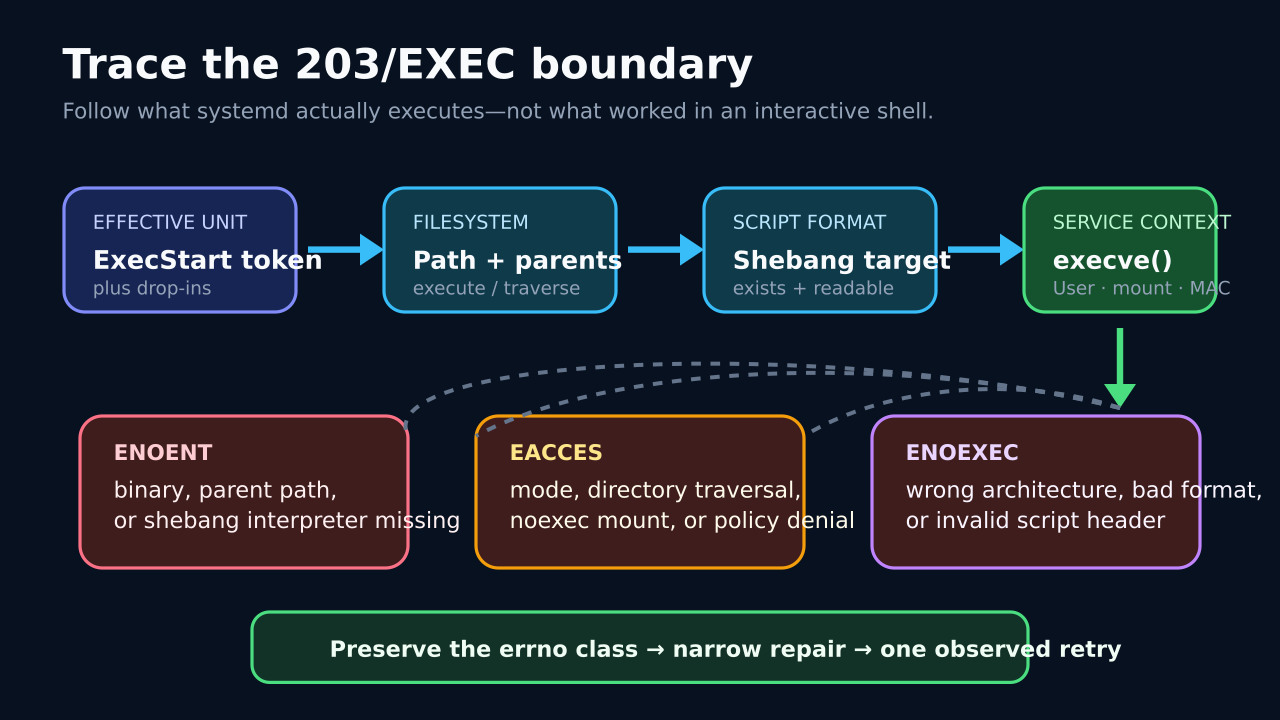
status=203/EXEC means systemd reached the step where it tried to execute the configured program, but the execve call did not start that program. A command that succeeds in your login shell can still fail because the unit uses a different executable token, working directory, user, mount view or security context.
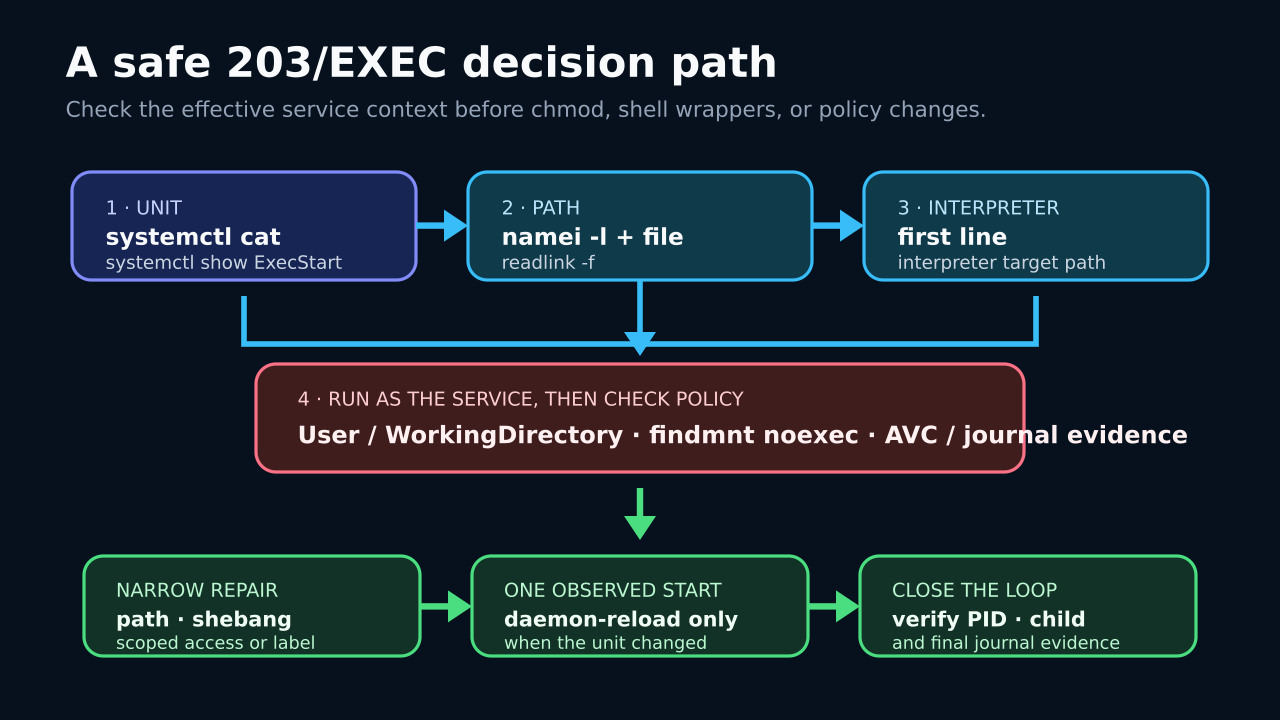
Do not begin with chmod 777, an added shell wrapper or a disabled security policy. Save the first journal evidence, inspect the merged unit and classify the failing executable or interpreter path before one narrow repair.
Freeze the first execution evidence
Save systemctl status and the first relevant journal entries before repeated restarts bury the original message. Record whether this is a system unit or --user unit, the exact unit name, boot, timestamp and status=203/EXEC line.
Use systemctl cat to capture the base unit and every drop-in, then systemctl show for ExecStart, User, Group and WorkingDirectory. Compare the merged command with the one that worked interactively; do not infer the active command from an old file alone.
Resolve the executable and every path component
Take the first executable token from the effective ExecStart. Resolve symlinks, run file on the target and use a path-walking tool such as namei -l to inspect search permission on every parent directory. Check the final file’s execute bit without broadening unrelated access.
If the target is a script, read its first line as bytes. Verify that the shebang interpreter exists at that exact absolute path and that the line does not contain a hidden carriage return. A missing interpreter can produce ENOENT even while the script path is present.
Test the service context, not just your shell
Reproduce the executable lookup with the configured user and working directory, but treat sudo -u as only a partial test: the real unit can also change environment, namespaces, capabilities and filesystem visibility. Prefer evidence from the actual unit and journal over a shell that merely resembles it.
Use findmnt -T on both executable and interpreter to check mount options, including noexec. If ordinary path and mode checks pass, inspect recent audit AVCs and the systemd journal for policy denials instead of disabling enforcement to make the symptom disappear.
Repair only the proved boundary
Correct a wrong ExecStart path, install the named interpreter, fix a malformed shebang or line ending, or grant the smallest required file and directory access. For a noexec location, move the program to an approved executable path or change the mount policy only with the filesystem owner’s intent.
For an SELinux denial, verify labels and standard locations first, then follow the platform’s analysis guidance. Do not jump straight to global permissive mode or generate a broad allow rule before understanding why the service context reached that object.
Reload only what changed, then observe one start
Run daemon-reload only if the unit or a drop-in changed. Start the service once and immediately inspect status and the new journal slice; repeated automatic retries can obscure whether the same exec boundary still fails.
A successful start is not the whole closeout. Confirm the expected main PID, child process and working directory, exercise one real request or job, and save the final effective unit plus the narrow change so a later failure can be compared without guesswork.