Technology · PRACTICAL GUIDE
Git submodule says “not our ref”? Trace the recorded commit before replacing it
The hash comes from the superproject, not from the branch you expected. Record the gitlink, verify the active submodule URL, and prove whether the object is local, reachable or missing before using --remote, recloning or changing the pinned commit.
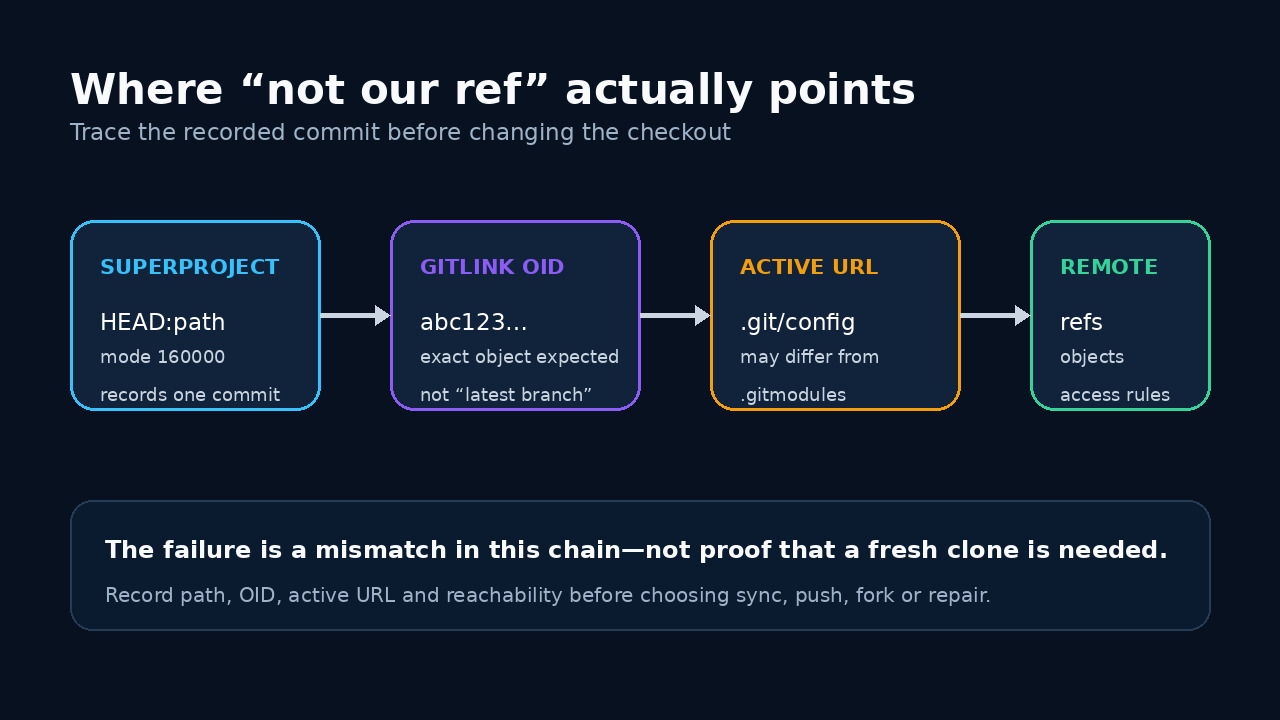
“Not our ref” is not a request to keep adding --force flags. It means the superproject asked the submodule remote for an exact object that the current route did not deliver. Preserve that request before changing it.
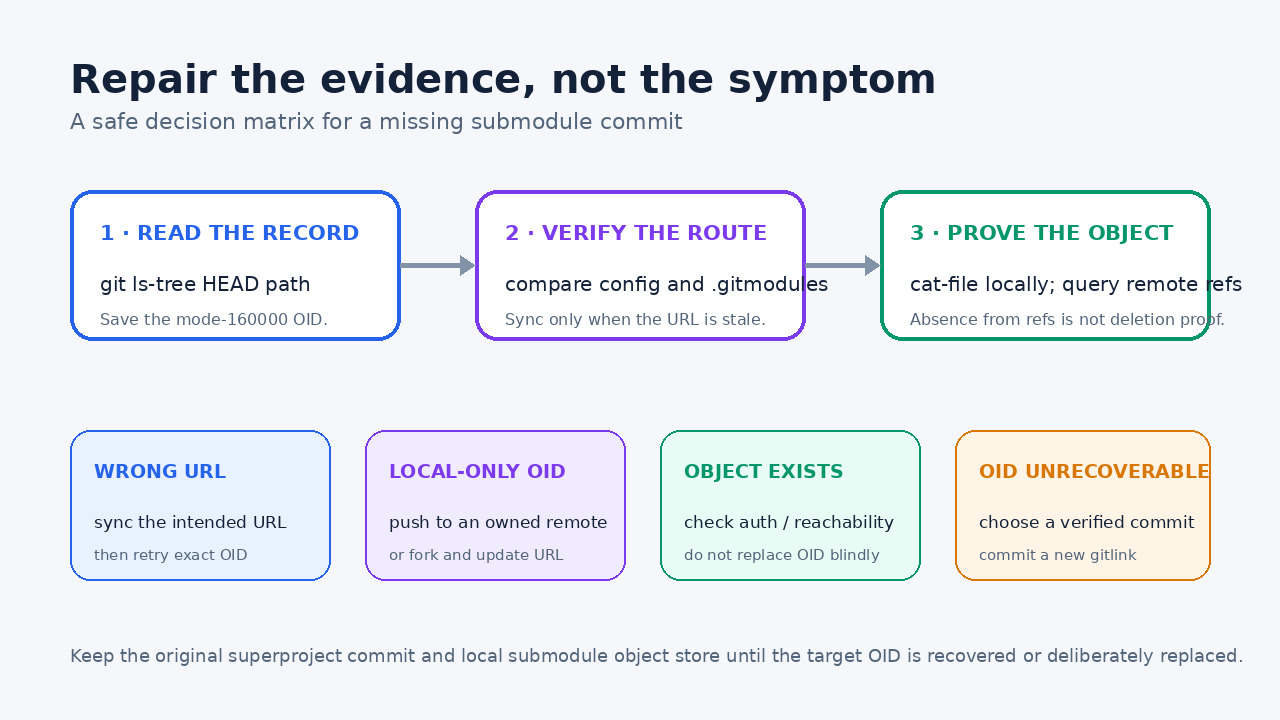
The safe order is record, route, object, repair: identify the gitlink OID, confirm the active URL, test local existence and remote reachability, then choose the smallest deliberate fix.
Freeze the failing state and read the gitlink
Do not start with rm -rf, deinit, --force or --remote. Save the failing superproject commit, the full error, the submodule path and any local work. From the superproject, run git ls-tree HEAD -- path/to/submodule. A submodule entry uses mode 160000 and records the exact object ID that this superproject commit expects. git submodule status --cached can expose the recorded ID too.
That OID is the first fact in the incident. The Git submodule data model calls the tree entry a gitlink; it contains the commit object name expected in the submodule. A branch name in .gitmodules is not a replacement for that pin. If the error shows another OID, repeat the inspection on the exact failing superproject commit or CI checkout rather than your current branch tip.
Verify the URL Git is actually using
Compare git config --get-regexp ^submodule..*.url$ with git config -f .gitmodules --get-regexp ^submodule..*.url$. Initialization copies a URL template from .gitmodules into .git/config; later edits to .gitmodules do not automatically rewrite an initialized checkout. A migration from one host or fork to another can therefore leave CI or an older clone fetching the right OID from the wrong repository.
If the superproject intentionally changed the URL, run git submodule sync --recursive and inspect the effective value again. Sync repairs that route; it does not create the missing object and does not authorize access. Record the resolved URL without embedding credentials. If local and CI routes differ, fix configuration or secret scope before changing the gitlink.
Separate local existence, advertised refs and fetchability
Inside the submodule repository, git cat-file -e OID^{commit} tests whether the exact commit object exists locally; git cat-file -t OID shows its type. If it exists only in the original developer checkout, preserve that object store. The common failure is committing a new gitlink in the superproject before pushing the corresponding submodule commit to a reachable remote.
Query the intended remote with git ls-remote --heads --tags URL and look for a ref whose history should contain the OID. ls-remote lists advertised references, not every unreachable object, so no match is not proof that the object was deleted. Attempt a normal authenticated fetch in the submodule and retain the result. “Not our ref” can mean the server will not serve that exact object through the current route or authorization.
Choose a repair that preserves dependency meaning
If the URL is stale, sync or correct it and retry the same OID. If the commit exists locally but was never published, push it to a remote you control, or create an authorized fork and update the submodule URL deliberately. Push the submodule object before the superproject gitlink. If the object exists on the intended host but CI cannot fetch it, repair credentials or host policy rather than moving the dependency.
Only when the recorded OID is truly unavailable—or the project intentionally wants a different dependency—check out a verified replacement inside the submodule, test it, then git add the submodule path and commit the new gitlink in the superproject. This is a source change, not a cache fix. Document the old OID, new OID, repository URL and reason so reviewers can see what changed.
Treat --remote and recloning as tests, not proof
git submodule update normally fetches missing commits and checks out the commit recorded by the superproject. With --remote, Git instead uses the submodule remote-tracking branch. That can make a checkout succeed while selecting a different commit, so use it only when branch-following is the intended project policy. Do not present it as recovery of the missing pin.
A clean clone is useful to verify reproducibility after the repair, but it cannot publish a local-only commit or fix a stale route. Prevent recurrence with git push --recurse-submodules=check or on-demand, review .gitmodules URL changes, and run a clean CI checkout of the exact superproject commit. Keep the failing evidence until that clean checkout resolves the same recorded OID.