technology · PRACTICAL GUIDE
systemd status=200/CHDIR? Prove the service’s filesystem view before changing permissions
Read the effective unit and the journal’s exact errno, then test the working directory as the configured user inside the service namespace—without User=root or chmod 777.
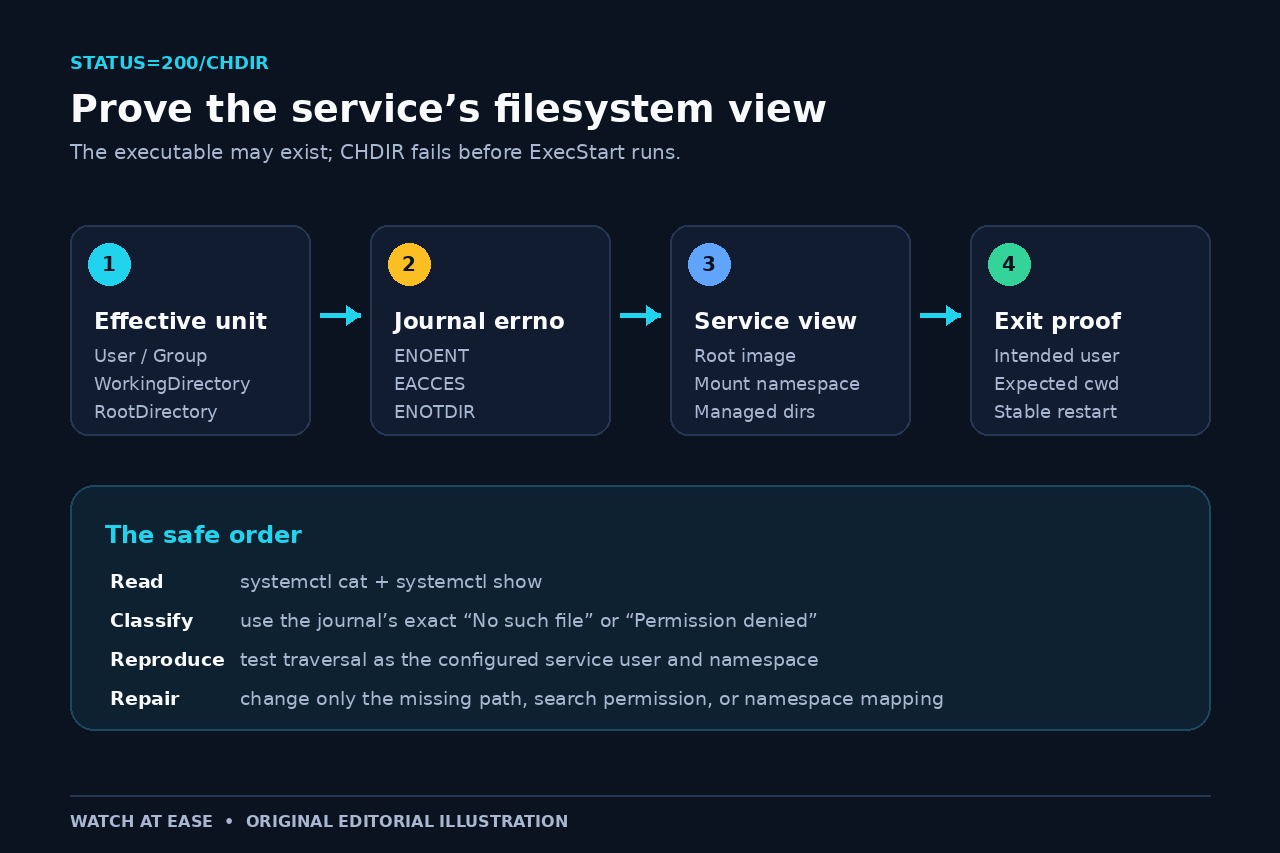
status=200/CHDIR means systemd could not change into the requested working directory before it executed the service command. The executable can exist and run perfectly in your shell while the service still fails earlier at the directory boundary.
Preserve the effective unit, the journal’s complete “Changing to the requested working directory failed” line, the configured user and the service filesystem view. That evidence separates an absent path, a non-searchable parent and a namespace-relative mismatch without reaching for User=root or chmod 777.
Freeze the effective unit and the first failure
Start with systemctl cat name.service to capture vendor files and drop-ins, then use systemctl show -p User -p Group -p WorkingDirectory -p RootDirectory -p RootImage name.service. This prevents you from debugging a fragment that systemd has already overridden. Save journalctl -u name.service -b --no-pager around the first failure, including the text after “Changing to the requested working directory failed.”
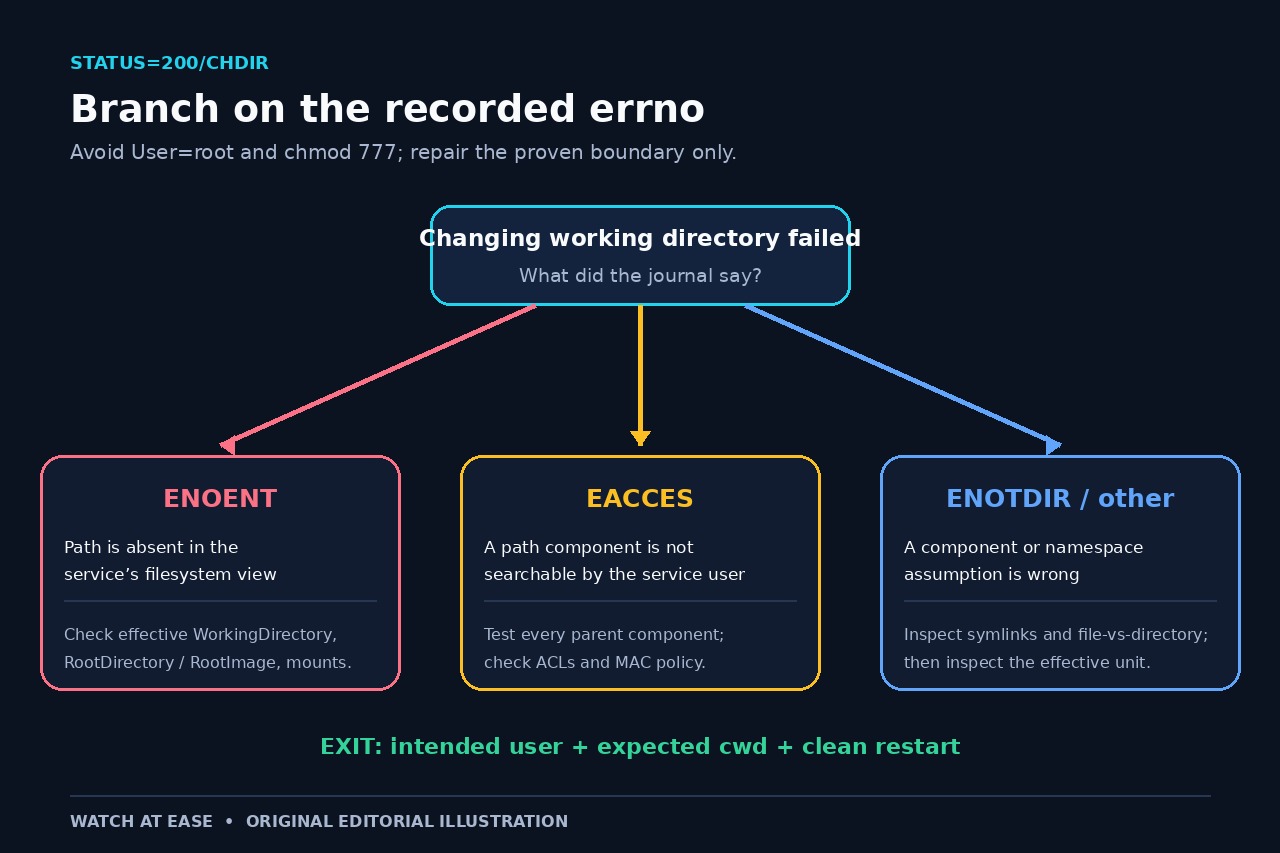
Do not edit permissions yet. status=200/CHDIR names the stage, while the journal’s errno names the branch: “No such file or directory,” “Permission denied,” “Not a directory,” or another kernel result. Also record whether a previous start step creates or removes the path.
Resolve WorkingDirectory inside the service filesystem view
systemd documents that an absolute WorkingDirectory is interpreted relative to RootDirectory or RootImage when those settings are active. Mount and user namespaces can further change what the service sees. A host path that exists is therefore not proof that the same path exists inside the execution environment.
For ENOENT, trace each component in the effective root rather than checking ExecStart first. Treat a leading minus on WorkingDirectory as an explicit request to ignore a missing directory, not a general repair. If the service needs an owned runtime or state path, consider RuntimeDirectory or StateDirectory so systemd creates and owns it predictably.
Test path traversal as the configured service user
Linux path resolution requires search permission on every directory component. The final directory can look readable while /home, a project parent, an ACL or a mandatory-access-control rule blocks traversal. Inspect the full chain with namei -l /path when available, then reproduce a harmless directory change as the configured identity, for example sudo -u serviceuser -- sh -c 'cd -- /path && pwd -P'.
Keep the test read-only and use the real User and Group from the effective unit. A successful root shell proves very little. Do not make the tree world-writable; change only the ownership, group, ACL, search bit or policy rule shown to block the intended account.
Choose the repair that matches the recorded errno
For ENOENT, create or mount the expected directory in the correct root, correct a typo, or stop deleting it between service steps. For EACCES, repair the specific parent traversal, ACL or security policy. For ENOTDIR, find the component that is a regular file or a broken symlink. Reload units only when unit files or drop-ins changed.
Do not switch to User=root merely because it changes the outcome; that is diagnostic evidence of an identity boundary, not a safe fix. Likewise, chmod 777 destroys useful permission evidence and broadens access. If the working directory is optional, remove the dependency or use the documented leading-minus behavior deliberately and explain the fallback.
Prove the exit condition without weakening the service
Run systemctl daemon-reload if configuration changed, restart the unit once and capture systemctl status plus the matching journal slice. Confirm that the process runs as the intended user and that its current working directory resolves to the expected path, for example by inspecting /proc/$MainPID/cwd when the service model exposes a stable main PID.
The incident is closed only when the original status=200/CHDIR is gone, the intended identity remains in place, the expected cwd is visible from the running service, and a second clean restart succeeds. Keep the effective-unit and errno record with the repair so a later namespace or deployment change can be compared against evidence.