Technology · PRACTICAL GUIDE
Git LFS clone left pointer text? Prove object delivery before rewriting anything
Preserve the pointer, trace attributes, endpoint, object fetch and checkout, then verify the exact SHA-256 and size.
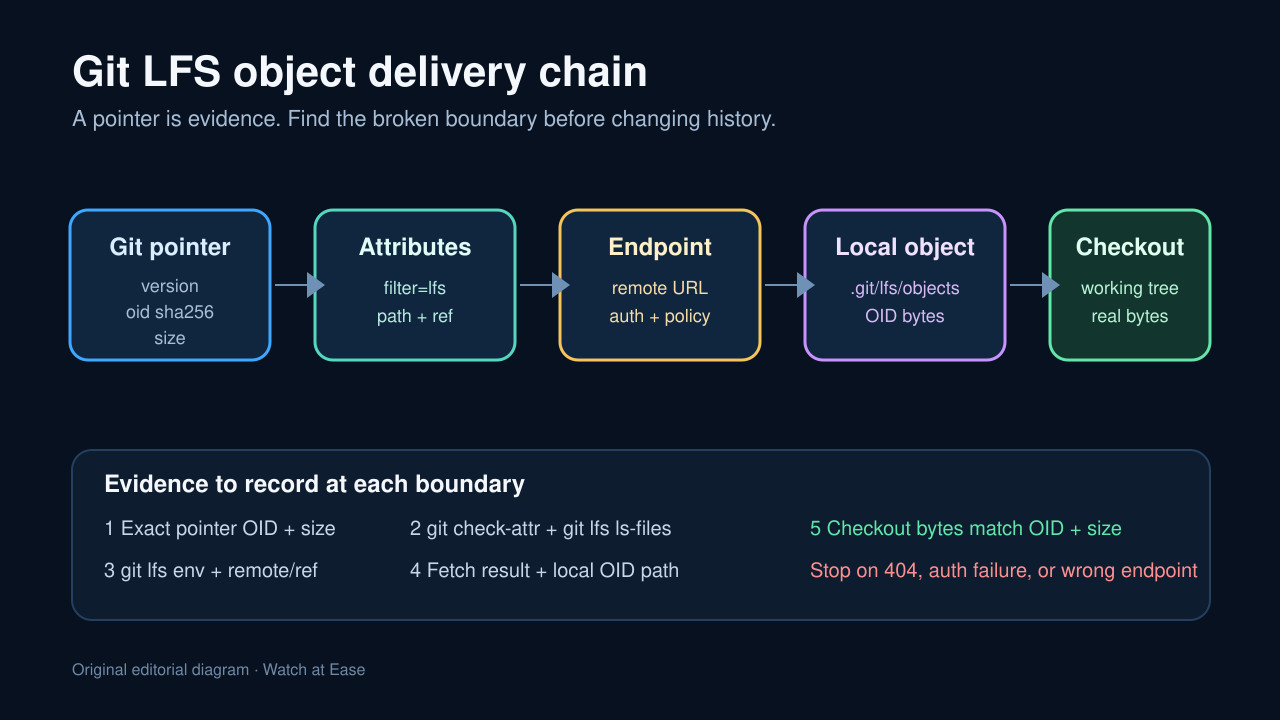
A Git LFS pointer in a working tree is not proof that the file is corrupt. It is a compact record of the expected object: a specification version, a SHA-256 object ID and a byte size. The failure can sit at a different boundary—attributes, smudge policy, endpoint selection, authentication, remote object availability or checkout.
Preserve the clone and the pointer before changing anything. Then prove the chain from the committed pointer to the exact object bytes. This keeps a recoverable missing-object incident from becoming a history rewrite, and it exposes CI jobs that silently analyze pointer text instead of the intended binary.
Preserve the pointer and classify it
Copy the suspect file, record its path and commit, and inspect it as text without editing it. A canonical pointer starts with the Git LFS specification URL and carries an oid sha256 value plus size. Record those three fields as the identity of the object you are trying to recover.
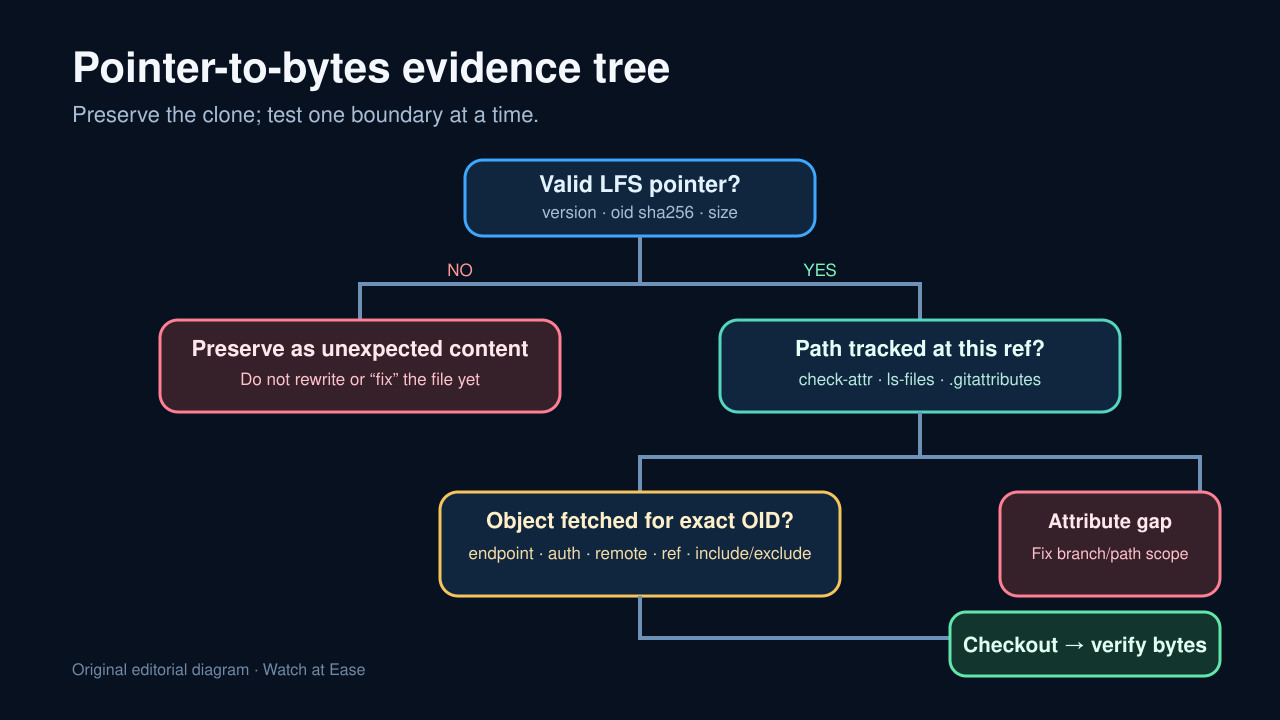
If the file is not a valid pointer, stop this workflow and preserve it as unexpected content. If it is valid, do not replace it by hand, run a broad reset or start migration. The pointer is the strongest evidence linking this path and commit to one exact binary.
Prove tracking and filter scope at this ref
Use git check-attr -a -- path/to/file to record the effective attributes, and git lfs ls-files -l to compare the tracked path with its OID. Inspect the .gitattributes file in the exact branch or tag; a rule present only on another branch, parent package or generated release tree does not prove this checkout is covered.
Record git lfs env, the Git and Git LFS versions, the current ref and relevant filter configuration. A committed pointer can be correct while the working tree stays as text because the filter was unavailable, skipped or outside the path scope.
Separate smudge policy, fetch and checkout
Check whether GIT_LFS_SKIP_SMUDGE, lfs.fetchexclude or a CI runner setting intentionally suppresses downloads. Skipping smudge is not object loss: it changes checkout behavior and can leave valid pointers while the Git commit remains intact.
Fetch the exact remote and ref, for example git lfs fetch origin main, and capture the command status and transfer errors. Then run git lfs checkout for the selected path only after the object exists locally. Checkout does not prove a missing remote object was downloaded; keep fetch and materialization as two separate rows in the evidence ledger.
Prove endpoint, authentication and remote availability
Use git lfs env to record the resolved endpoint and authentication mode. Git transport may use SSH while LFS objects still travel over HTTPS, so a successful Git clone does not prove LFS credentials or endpoint routing worked.
Treat 401, 403, 404, timeout and excluded-path results differently. A 404 for the recorded OID points to a server-side availability problem, wrong endpoint or incomplete prior push; repeatedly reinstalling Git LFS or resetting the worktree cannot create bytes that the selected server does not have.
Materialize narrowly and verify the bytes
After a successful fetch, check that the OID is present under the local LFS object store, materialize only the affected path, and preserve command output. Avoid git lfs fetch --all as a first move because it expands scope and obscures which ref and object repaired the incident.
Verify the recovered file size and SHA-256 against the pointer, then record git status --porcelain. A clean proof ends with the expected bytes, the exact OID and size, a known endpoint and ref, and no unexplained path changes. Test a fresh disposable clone only after the preserved clone explains the boundary.