Technology · PRACTICAL GUIDE
SSH says “too many authentication failures”? Count the keys offered before changing the server
The correct key can be present and still never be tried. Prove the effective host, user, identity list and offer order, then run a one-key test before clearing an agent or raising MaxAuthTries.
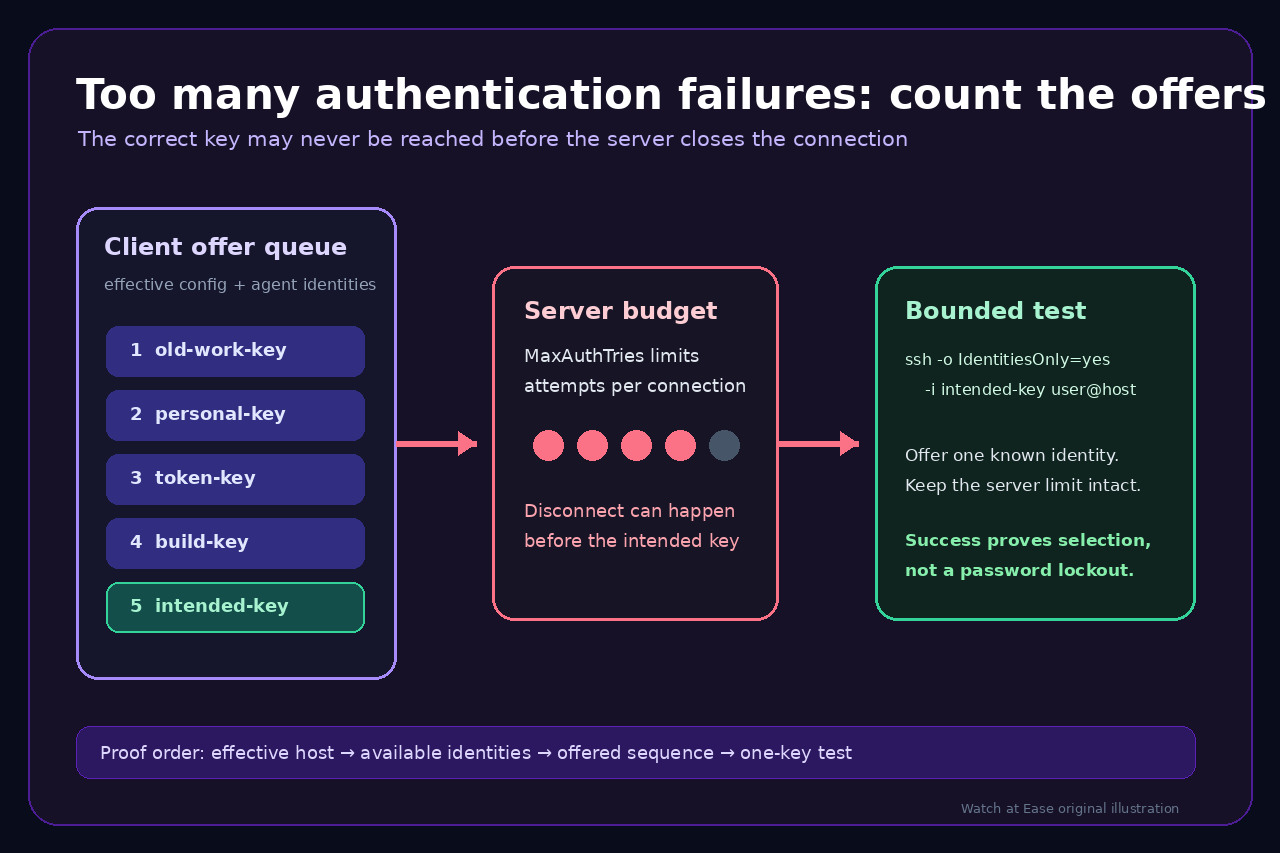
“Too many authentication failures” is a connection budget error, not proof that someone repeatedly typed the wrong password. An OpenSSH client can offer several public keys from configuration files and an agent. Each rejected authentication attempt consumes part of the server limit, so the server may disconnect before the intended key is reached.
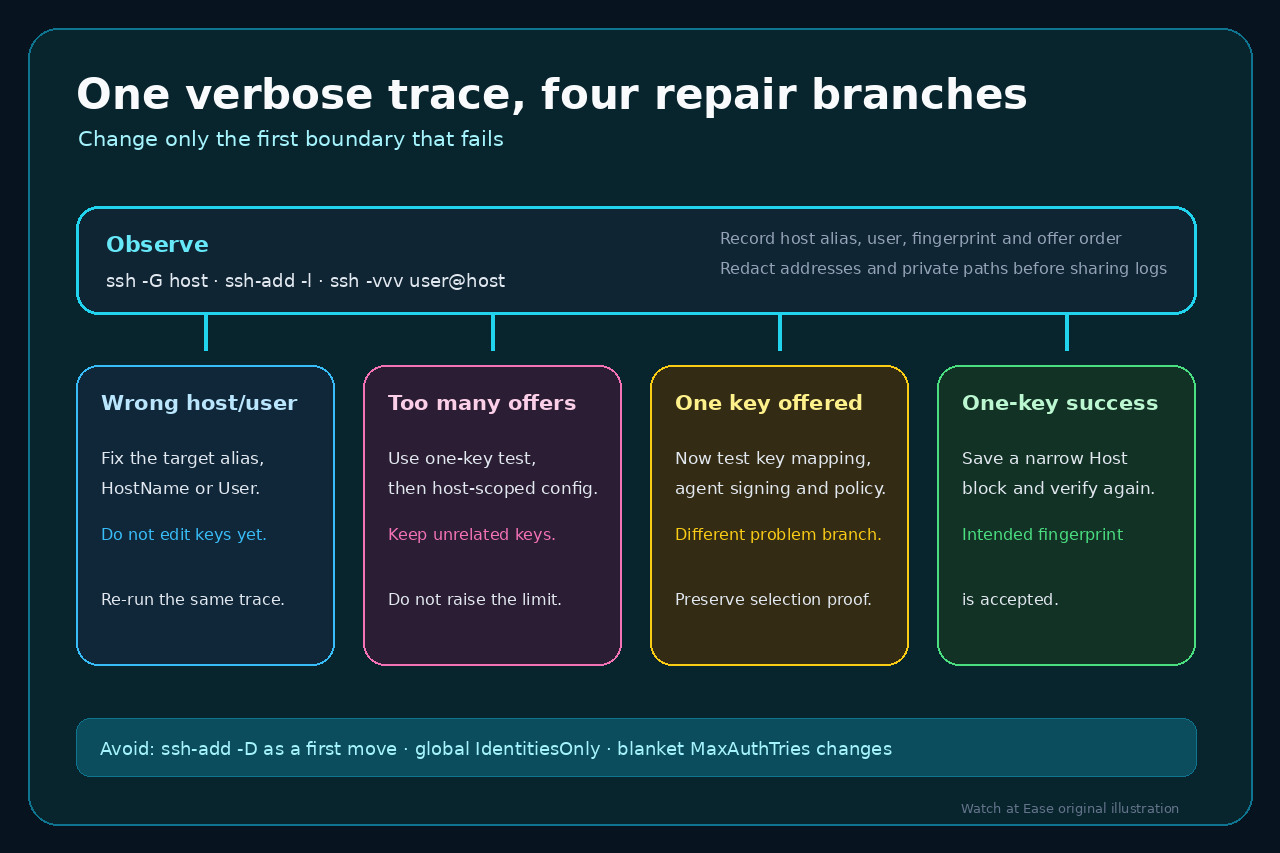
Preserve the failing terminal and diagnose the exact route. Do not begin with `ssh-add -D`, a global `IdentitiesOnly yes`, deletion of key files, or a blanket increase to `MaxAuthTries`. Those changes erase evidence, can break unrelated hosts, or weaken a server-side protection without proving why this connection exhausted it.
1. Freeze the failing target and effective configuration
Use the same shell, host alias and username that failed. Record the literal command without copying secrets. If Git, an IDE or an automation wrapper launched SSH, first extract the host and user it actually passed; testing a different alias is a different case.
Run `ssh -G your-host | grep -Ei "^(hostname|user|identityfile|identityagent|identitiesonly|preferredauthentications) "`. Check the resolved HostName and User before looking at keys. Review every printed IdentityFile: multiple directives can accumulate through included files and matching blocks.
If the host or user is wrong, correct that routing and repeat the same diagnostic. Do not remove identities to compensate for a connection aimed at the wrong account.
2. Compare available identities with the actual offer sequence
Run `ssh-add -l -E sha256` in the failing shell. This lists fingerprints held by the contacted agent; it does not mean every key will be offered, and it does not include every file the client might load directly. If the command cannot contact an agent, note that instead of starting a different agent silently.
Make one verbose attempt: `ssh -vvv user@your-host`. Find each “Offering public key” line and copy only the key type and SHA256 fingerprint into a short ordered list. Redact host addresses, usernames and private paths before sharing logs. The decisive question is whether the intended fingerprint appears before the disconnect.
If several unexpected keys are offered first, you have a selection-order problem. If only one intended key is offered and the server still rejects it, stop using this guide’s remedy: investigate username, authorized_keys, certificate principals, agent signing or server policy instead.
3. Run a one-key test without deleting anything
Identify the intended public-key fingerprint with `ssh-keygen -lf /path/to/key.pub -E sha256`, then test one connection: `ssh -o IdentitiesOnly=yes -i /path/to/key user@your-host`. This limits the test to the declared identity while leaving the agent and unrelated keys intact.
If the one-key test succeeds, the server, account and key can work together; the failure was caused by selection or offer order in the broader client context. Save a narrow Host block with the exact alias, HostName, User, IdentityFile and `IdentitiesOnly yes`, then verify with `ssh -G` and `ssh -vvv` again.
If the one-key test fails, preserve its verbose trace. “Permission denied” after one intended key is a different branch; an agent-signing refusal is another. Do not raise MaxAuthTries or clear the agent because neither action proves that the chosen key is authorized and usable.
4. Make the smallest durable repair
For one host, prefer a host-specific block. Avoid placing `IdentityFile` outside the intended Host scope or turning `IdentitiesOnly yes` into a global rule unless you have audited every destination. GitHub and GitLab both document host-scoped identity selection for multiple keys or accounts.
Keep other agent identities if they serve other systems. Remove or unload a key only when you have independently decided it is obsolete, not as a diagnostic shortcut. If a GUI client ignores OpenSSH configuration, use that client’s identity setting or confirm whether it has its own agent implementation.
Change `MaxAuthTries` only through a separate server policy review. A client-side proof that the correct key is offered and accepted is the completion condition for this incident; a larger limit is not.
Decision table
Wrong HostName or User — Correct the target first; keep key state unchanged.
Many unexpected fingerprints before disconnect — Run the one-key test, then use a narrow Host block.
One intended fingerprint offered but rejected — Move to server authorization or key-signing diagnosis.
One-key test succeeds — Preserve unrelated identities and verify the repaired effective configuration.
Client is not OpenSSH or ignores ssh_config — Identify its own agent and key-selection controls before changing server policy.