Technology · PRACTICAL GUIDE
PDF image count looks wrong? Separate objects, placements and visible output
A reused image, an off-page placement and an opaque cover can produce conflicting counts. Four tested controls show which checks answer which extraction goal.
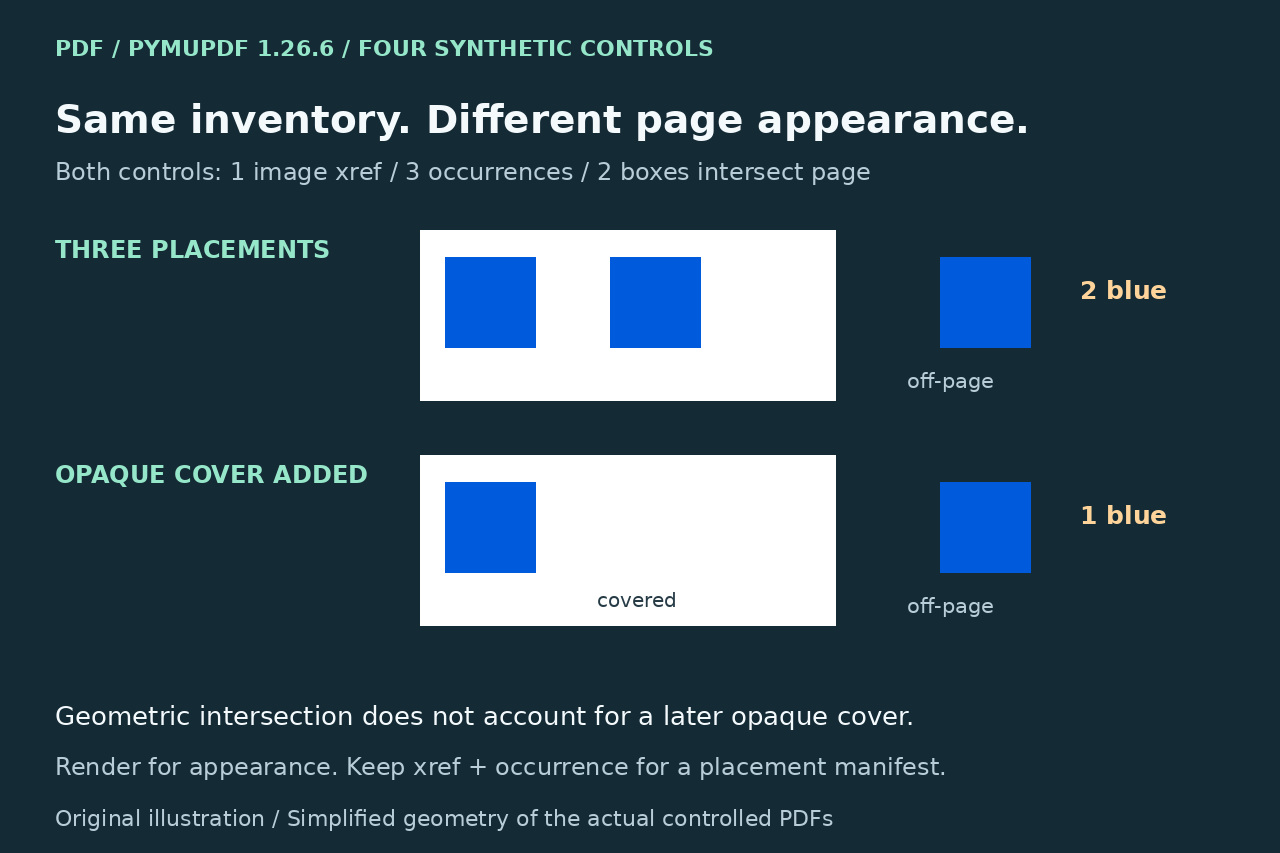
A PDF image inventory is not a count of the pictures a reader can see. In our controlled example, one embedded raster image was placed three times: two locations intersected the page and one was off-page. Adding an opaque white cover over one on-page location changed the rendered view from two blue patches to one, while the image inventory stayed the same.
Decide first whether you need unique embedded assets, every placement or a rendered page appearance. Then retain the evidence for that goal. The existing PyMuPDF extraction and clipping recipes remain useful; the extra check here is that even page-intersecting image boxes do not prove visible artwork.
Define the output before choosing a count
For an asset export, retain the embedded image's identity and extraction result; an image reused on several pages need not become several independent assets. For a placement manifest, keep every occurrence with page, bbox and transform, even when xrefs repeat. For a visual page crop, render the intended page region rather than assuming an extracted source image reproduces the composite.
These goals cannot share one success number. Deduplicating by xref may be appropriate for an asset store but loses placement information if used as the only manifest. Conversely, counting resource rows does not prove that many distinct source images exist. PyMuPDF documents repeated occurrences, possible dead resource entries and xref 0 for inline or otherwise undetected references. Do not collapse all zero-xref entries into one known asset.
Make a read-only occurrence ledger
Record the exact PDF hash, physical page, library version and intended output. On a small authorized working copy, this snippet inspects the first physical page without rewriting it. Keep the occurrence number as well as xref, bbox and transform; do not replace the list with a dictionary keyed only by xref. Other pages use the corresponding zero-based page index. ```python import pymupdf with pymupdf.open("input.pdf") as doc: page = doc[0] # first physical page refs = page.get_images(full=True) placements = page.get_image_info(xrefs=True) print("resource rows:", len(refs)) print("unique positive xrefs:", len({r[0] for r in refs if r[0] > 0})) print("placements:", len(placements)) for occurrence, item in enumerate(placements): print(occurrence, item["xref"], item["bbox"], item["transform"]) ```
For an independent inventory, pdfimages -list "input.pdf" reports page, image number, type and object ID without writing extracted images. Inspect the exit status and compare repeated object IDs, rather than treating every output row as a unique asset. Its dimensions describe embedded pixels, not the dimensions at which the image is drawn. Masks and soft masks are separate types in that report; our simple fixture had neither.
Explain clipping before declaring an image missing
PyMuPDF's image-info inventory is not restricted to the visible page rectangle. In contrast, get_text('dict') normally uses that rectangle and includes images only when fully contained by its clip. A known support question already resolves a count discrepancy using clip=pymupdf.INFINITE_RECT(); clip=None remains the normal page-area default. That existing solution is credited, not presented as a new discovery.
An infinite clip changes what is inventoried; it does not make off-page content visible in the rendered page. get_text('dict') also loads image binary content, while get_image_info avoids loading those bytes. Use the heavier comparison only on the affected, suitably small page when it answers your question. An empty raster list also does not prove an empty page: text and vector drawing commands are different content.
Read the four measured controls
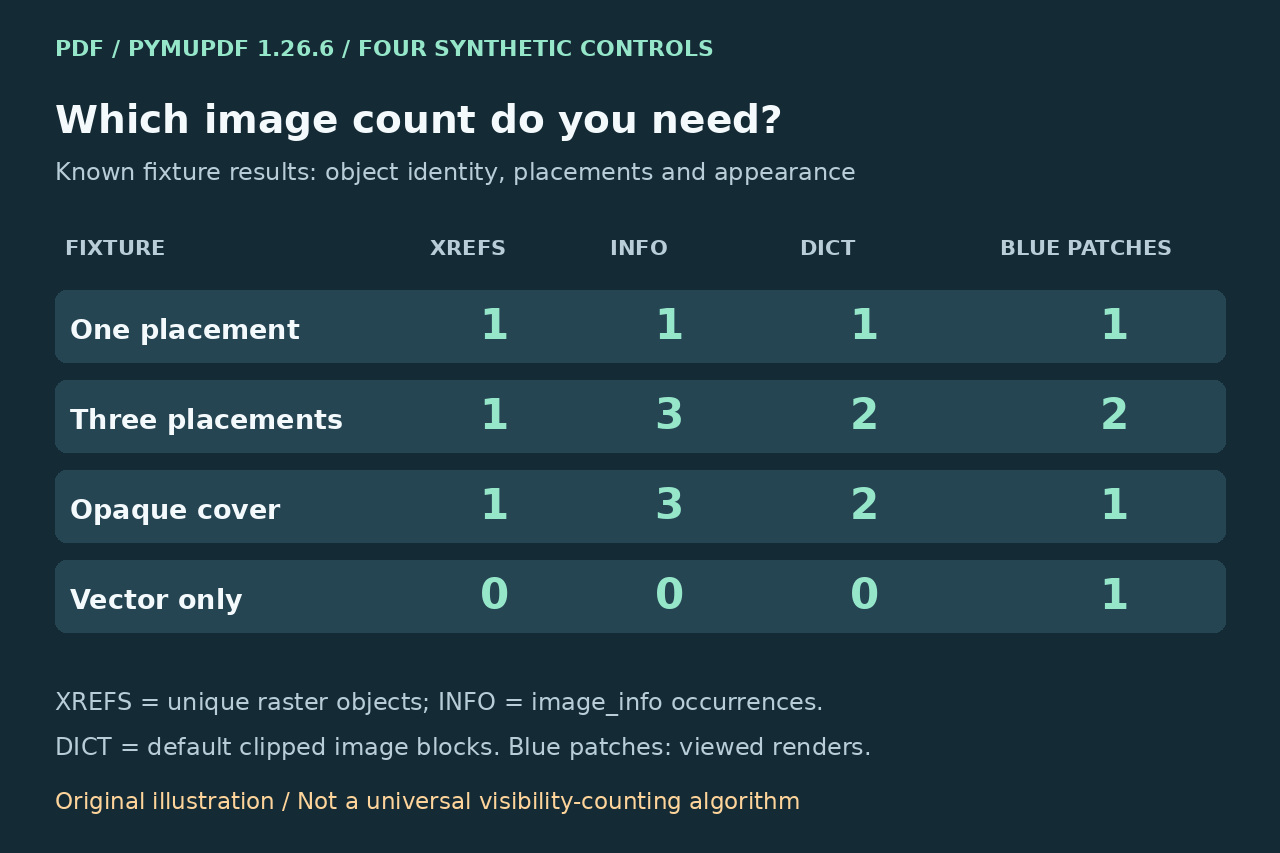
We created four new 200-by-150-point, unrotated one-page PDFs and reopened them. The raster tile was our own 20-by-20-pixel RGB square. The one-placement control had one unique xref, one image-info occurrence, one default image block and one viewed blue patch. The three-placement control reused one image xref at two on-page positions and one off-page position: resource rows 3, occurrences 3, default blocks 2, infinite-clip blocks 3 and page-intersecting boxes 2.
Adding a white opaque vector rectangle over the second on-page placement left all those inventory counts unchanged, yet only the first blue patch remained visible. Pixel samples confirmed blue at the uncovered location and white at the covered location. A separate vector-only square produced zero image resource/info/block rows while its rendered page still showed blue artwork. Poppler listed three image rows with the same object ID in both reused-image controls. Nine meaningful assertions passed; these known cases are not an automatic visibility detector.
Accept the result that matches the task
For placements, compare the complete occurrence ledger with the expected locations before exporting. For assets, document the chosen identity and deduplication policy separately. For appearance, inspect a page render, for example page.get_pixmap(), and the actual required crop; preserve the original PDF and do not delete an image simply because counts disagree. A page intersection test is geometric, and our opaque-cover control proves it cannot by itself certify visibility.
The test used PyMuPDF 1.26.6, MuPDF 1.26.11 and pdfimages 24.02.0 on Linux. It did not test masks, transparency, rotated pages, Form XObjects, optional content, annotations or private documents. General overlap and compositing require more than this simple ledger. A correct-looking crop is an appearance result, not proof of object removal or a redaction/security audit.