Technology · PRACTICAL GUIDE
umount says “target is busy”? Identify the live reference before using -l or -f
Prove the exact mount, descendants, process or kernel holders and mount namespace; release the owner cleanly, then reserve lazy or forced unmount for a documented exception.
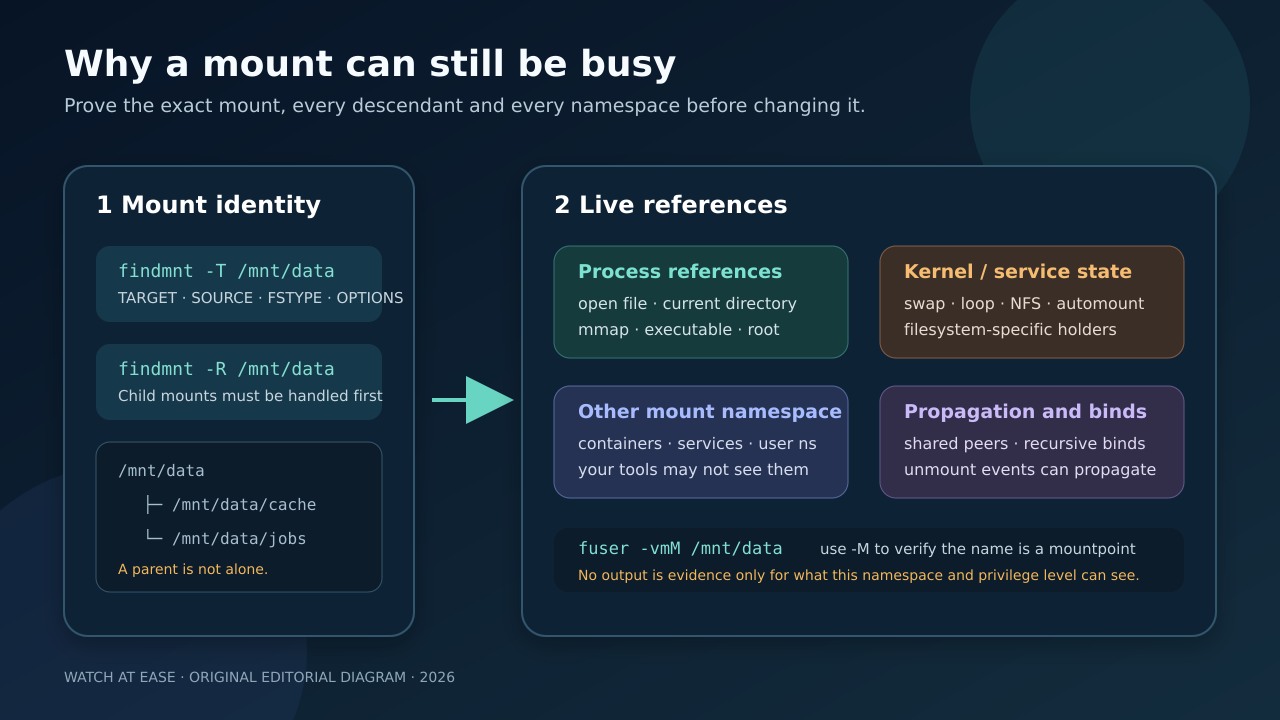
A busy-mount error is a reference problem, not permission to hide the mount. Preserve the exact target and its namespace before changing processes, propagation or flags.
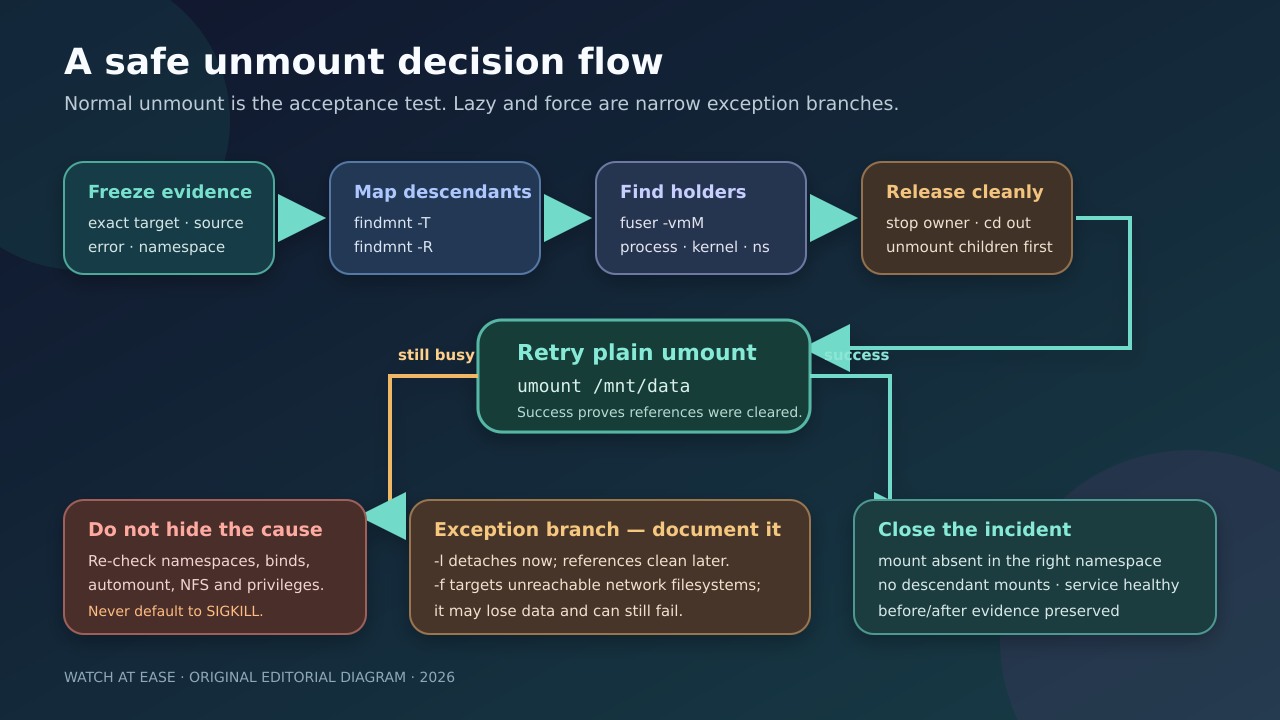
The safe order is mount identity, descendants, visible and hidden holders, clean owner release, normal unmount and only then a documented exception.
Freeze the exact mount before changing it
Save the full error, target path, effective user, host, container or service context, and the command that failed. Leave the mount in place while collecting evidence. Use findmnt -T /path with explicit columns such as TARGET,SOURCE,FSTYPE,OPTIONS to bind the pathname to the actual mount record.
Do not assume that /dev/sdb1, /mnt/data and a bind-mounted view are the same object. Record the mount ID and parent from /proc/self/mountinfo when namespaces, bind mounts or propagation may matter. The evidence must come from the same namespace that attempted the unmount.
Map descendants before hunting processes
Run findmnt -R /mountpoint and inspect every child. A filesystem mounted below the target can keep the parent tree from being removed even when no process appears to use the parent directory. Unmount or relocate children from deepest to shallowest only after confirming ownership and service impact.
Recursive unmount is a deliberate tree operation, not a shortcut to skip review. Shared and slave propagation can copy mount or unmount events across peer trees. Read the optional shared, master and propagate_from tags in mountinfo before changing propagation or using a recursive flag.
Classify visible process and kernel references
Use fuser -vmM /mountpoint from a sufficiently privileged context. The verbose access letters distinguish a current directory, executable, open file, root directory or memory mapping. Inspect the command, user and service before stopping anything. A shell parked below the mount often needs only cd elsewhere or logout.
Do not default to fuser -k: the command sends SIGKILL unless another signal is selected. Also treat empty output narrowly. The fuser manual documents incomplete information without privilege, inability to report processes using a different mount namespace, and filesystem or kernel access that may appear differently.
Check namespace, bind and service boundaries
Mount namespaces isolate the mount list visible to processes. Compare /proc/PID/mountinfo or use a namespace-aware findmnt view for the service, container or user process that owns the mount. A host shell can see a different tree from the process retaining the reference.
If the target is a bind or recursive bind, trace its source and descendants rather than killing consumers blindly. For automount, NFS, loop, swap or filesystem-specific holders, inspect the owning subsystem and stop or detach it through its supported lifecycle. Record the approved owner action and rollback.
Release the owner and retry plain umount
Close files, move current directories, stop the confirmed service, disable the proven automount trigger or unmount child filesystems in a controlled order. Make one change at a time and repeat the same findmnt and fuser evidence so that the disappearing reference is attributable.
Retry plain umount /mountpoint. Success is meaningful because it shows the active references and tree constraints were cleared through the normal path. Then confirm the mount is absent in the intended namespace and that the service or application is healthy.
Treat -l and -f as exception branches
umount -l removes the mount from the visible hierarchy now and cleans remaining references after they stop. The util-linux manual warns that its intended use for network or local filesystems with submounts assumes a near-term reboot. A detached name is not proof that users released the filesystem.
umount -f is intended for unreachable NFS-style cases, is not guaranteed to avoid hangs, and the kernel manual warns that forced unmount may lose data and can still return EBUSY when references remain. If an exception is approved, record why clean release was impossible, scope, expected reboot or recovery, data-risk owner and verification plan.
Close with evidence, not disappearance alone
Capture the before and after mountinfo or findmnt view, the holder or subsystem that was released, the successful normal command or documented exception, and the result from the original launcher. Verify no child mount remains and no peer namespace still exposes an unintended copy.
This workflow does not authorize killing a process, breaking a container, changing propagation, forcing a network filesystem or rebooting a production host. Completion means the exact mount reference is understood, the approved owner is released, the intended namespace is clean and dependent services pass their health checks.