Tech · PRACTICAL GUIDE
rsync --link-dest copied files? Prove path geometry and preserved attributes
Resolve the basis directory from the destination, expose attribute mismatches, and verify hard links by device and inode instead of trusting matching hashes.
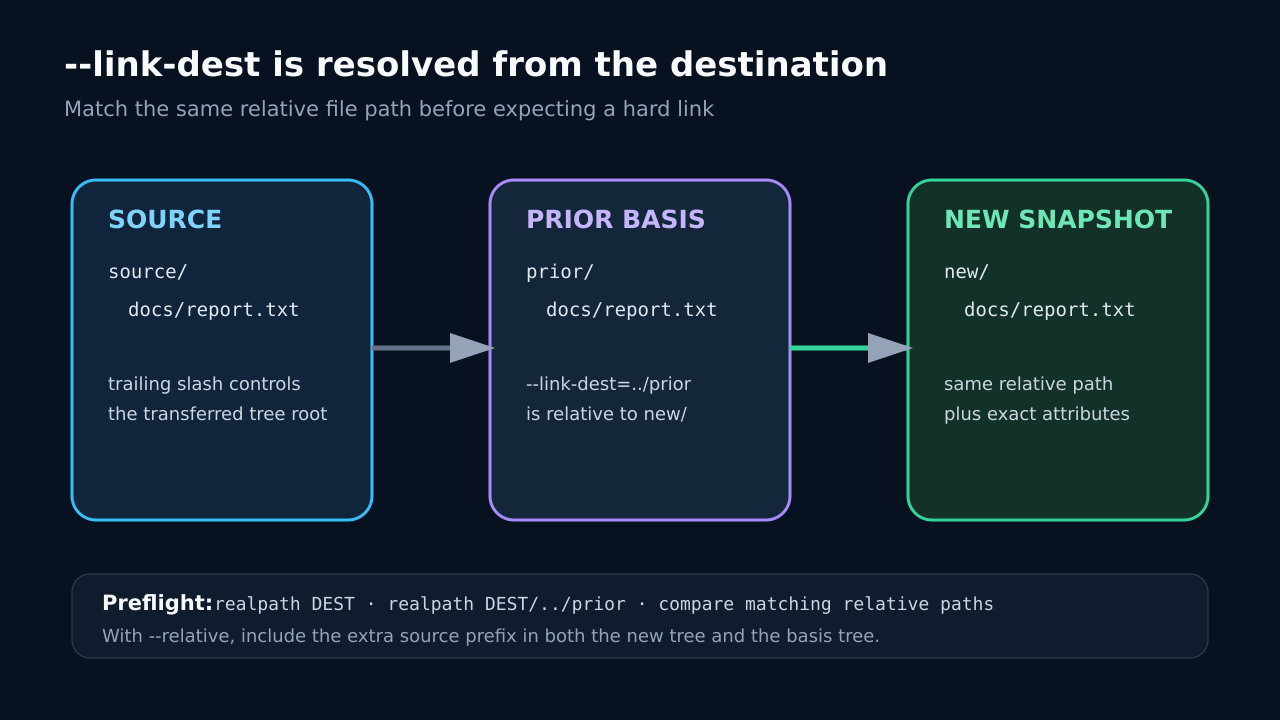
Byte-identical files are not enough for rsync --link-dest. The prior file must appear at the same relative path and match every attribute your command preserves. A wrong destination-relative basis path, --relative prefix, mode or group difference, or --ignore-times can produce a separate copy without changing file content.
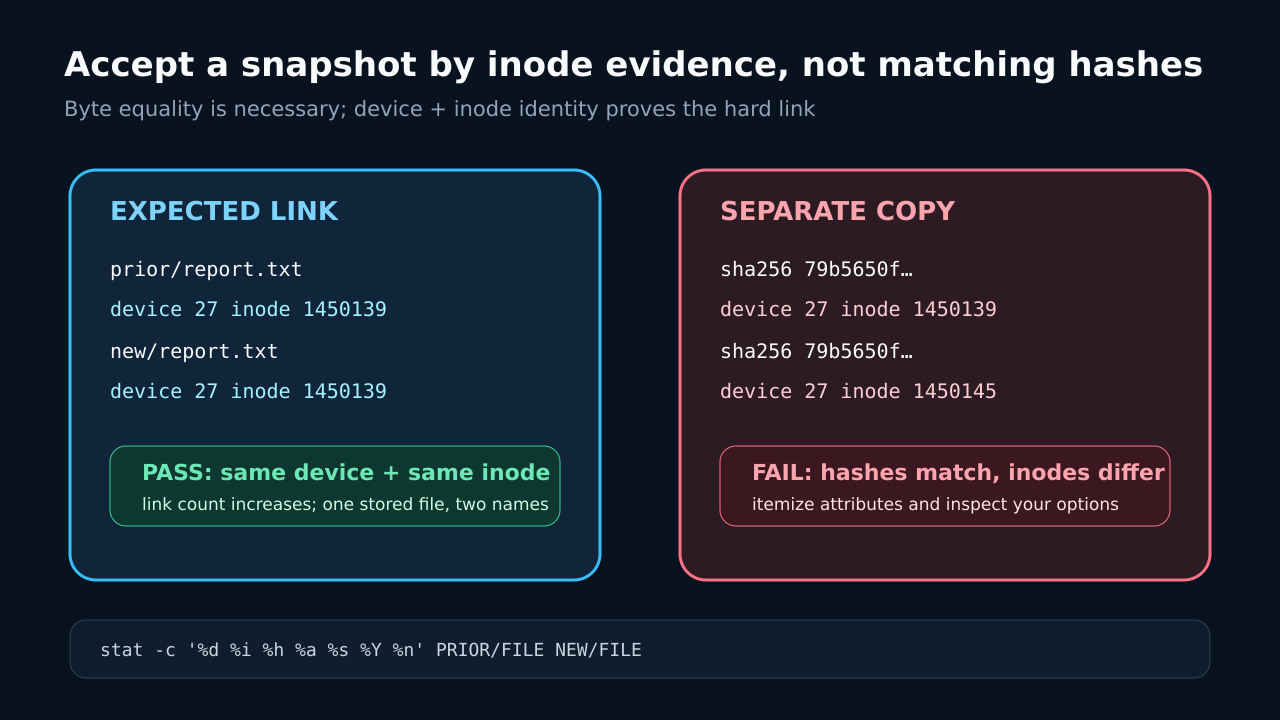
Treat hard-link creation as a verifiable backup property. Record the exact command and resolved receiver-side paths, run the same command with --dry-run and --itemize-changes, write to an empty snapshot, then compare device and inode numbers. Matching hashes only prove equal bytes; they do not prove shared storage.
1. Freeze the command and an empty destination
Copy the exact rsync command into an incident note, including source and destination trailing slashes, -a expansions, -R or --relative, -H, ACL or xattr options, excludes and every --link-dest. Work on a new empty snapshot directory; the upstream manual warns that existing destination files can have attributes changed and can muddle itemized output.
Do not add --ignore-times as a diagnostic shortcut. The rsync manual explicitly says that option prevents --link-dest from linking because linking substitutes for a transfer; it is not a second pass after an update.
2. Resolve the basis from the destination
For DEST=/backups/2026-10-28 and --link-dest=../2026-10-27, resolve the basis as /backups/2026-10-27. Use realpath on the destination and the composed basis path, and confirm the prior file exists at the same relative path the new transfer will create. Do not resolve a relative basis from the current shell directory.
A source ending in slash transfers the directory contents; without it, rsync creates an extra source-directory level. With --relative, source prefixes are preserved too. An absolute basis removes ambiguity about where DIR starts, but it does not remove prefixes introduced by --relative: the prior tree must still contain the same transferred relative path.
3. Separate byte equality from attribute equality
Run the original rsync command from the same initiating host, user account and working directory, keeping the source and destination endpoints and all other options unchanged; add --dry-run and --itemize-changes. Inspect the basis and destination paths and their device numbers on the receiving host. Decode the itemized letters instead of stopping at a matching checksum. A p, o, g, t, a or x difference can explain why rsync made a local copy: hard-linked names cannot carry different inode metadata.
Compare source and prior candidates with stat, recording mode, owner, group, size and modification time. If you intentionally do not preserve an attribute, make that an explicit policy decision and keep the source, prior snapshot and new run consistent; do not remove preservation blindly to force deduplication.
4. Check the filesystem and rsync boundary
GNU documents that hard links cannot cross filesystem boundaries. Record device numbers for the prior file and the new destination directory. If they differ, rsync may still use the prior file as a transfer basis, but it cannot create the cross-filesystem hard link. Special file types and filesystems can add further limits.
Distinguish -H from --link-dest. -H preserves hard-link groups already present in the source; --link-dest creates links from unchanged files in an alternate snapshot hierarchy. One does not repair a wrong basis path for the other.
5. Run once, then prove the link
For the real run, remove --dry-run (or -n if used) from the reviewed command, retain all other reviewed options, and run rsync into the empty destination; the stat -c check below uses GNU stat. For a sample of unchanged regular files, use stat -c '%d %i %h %a %s %Y %n' on the prior and new paths. Accept the space-saving claim only when device and inode numbers match; link count should reflect the additional name.
Also record hashes for content integrity, but keep the conclusions separate. In the local rsync 3.2.7 fixture, exact attributes produced the same inode with link count 2. Changing only mode produced itemized cf...p..... and a new inode; --ignore-times produced >f......... and another new inode even though all SHA-256 hashes matched.
6. Escalate version-specific failures with evidence
Use the observed results before escalating. If the prior candidate is missing at the computed --relative path, check both the transferred path layout and whether the selected prior snapshot contains that file and completed successfully; absence alone does not prove a prefix mismatch. Correct a confirmed layout mismatch in the transfer setup. If the reference is incomplete or lacks the file, choose a verified complete reference containing that candidate if available, or expect a new copy for that file. Itemized p, o, g, t, a or x flags identify preserved attribute values that differ; compare the source and prior metadata with the intended preservation policy before deciding what to change. -I or --ignore-times disables link substitution, and different device numbers make a hard link impossible. Only when those checks pass should you record local and remote rsync versions, transfer mode, itemized output and a minimal reproduction. A 2026 first-party issue documented a daemon relative-basis regression that silently retransferred data and was fixed in the project; preserve version evidence rather than assuming every failure is that bug.
This workflow proves regular-file link reuse for the sampled paths. It does not certify every ACL, xattr, symlink, device node, remote mount or older rsync build. Expand the sample around the exact file classes your backup promises, then monitor new snapshots for inode reuse and unexpected transferred bytes.