Technology · PRACTICAL GUIDE
PowerPoint notes export missing text? Audit four states before accepting the script
A blank result can mean three different things. Our controlled PPTX test preserves every slide and separates a missing notes body from genuinely empty notes.
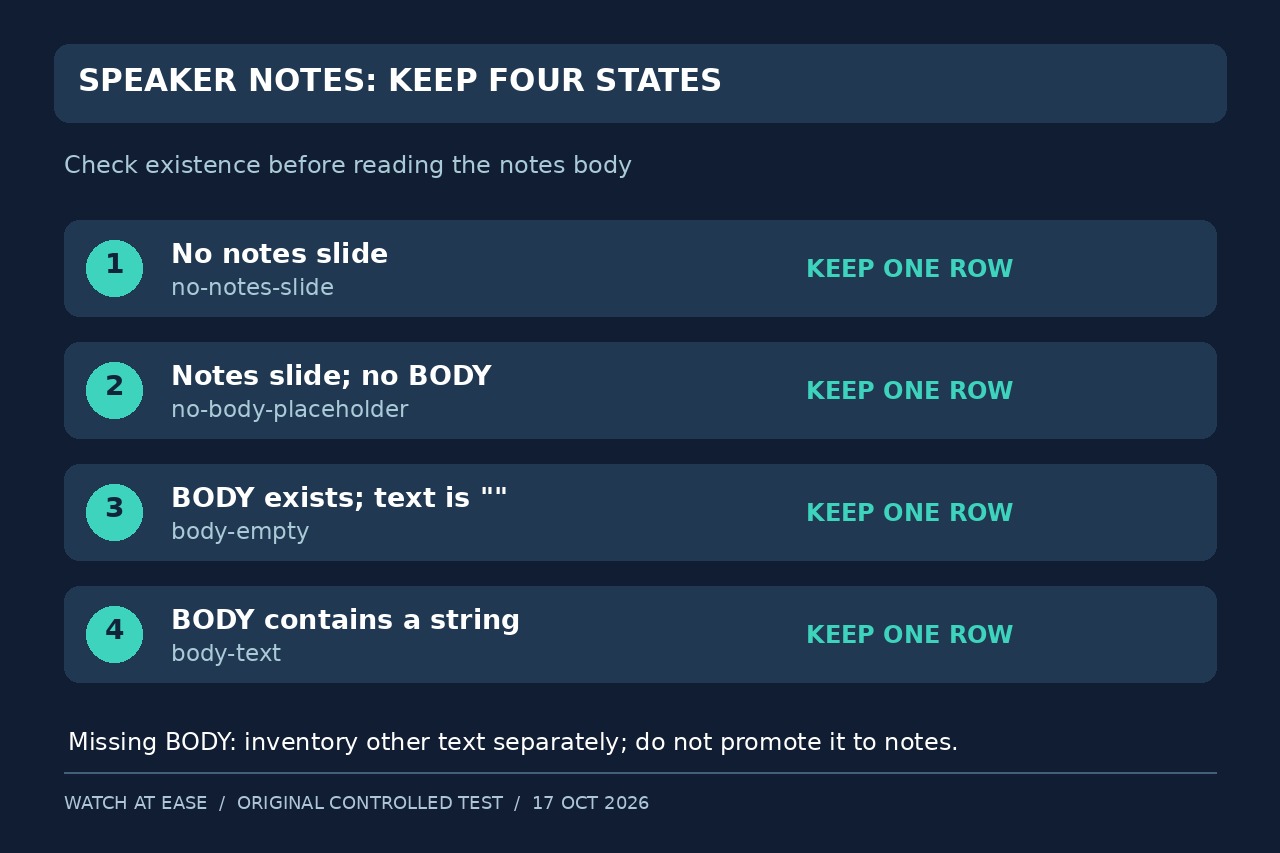
A notes export that finishes without an error can still omit part of a presentation. Before accepting the script, record one result for every slide: no notes slide, no BODY placeholder, an empty BODY, or BODY text. Keep the first two cases distinct from an intentionally blank note.
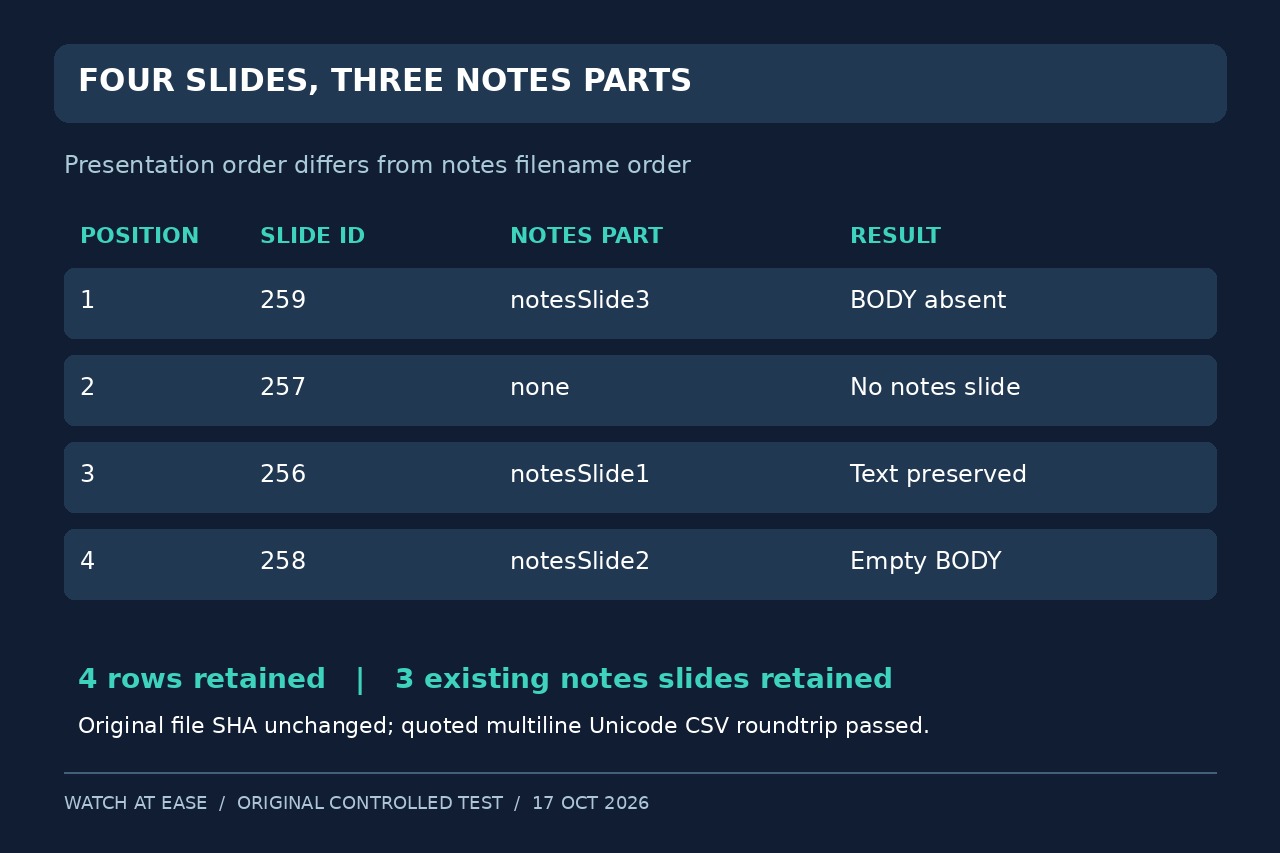
We tested this boundary with an original four-slide PPTX in Python 3.12.14 and python-pptx 1.0.2. After deliberately changing presentation order, the saved file yielded slide IDs 259, 257, 256 and 258. Their notes parts were notesSlide3, absent, notesSlide1 and notesSlide2. Sorting notes filenames would not reproduce that order.
The audit retained four rows and three existing notes slides, with the input file's SHA-256 unchanged. It preserved a note containing a comma, quotation marks, a newline and Chinese text through a CSV write/read round trip. A separate naive read created a fourth notes slide in memory; reading .text on the missing BODY raised AttributeError.
These are controlled text-extraction results, not a PowerPoint rendering or recovery test. The task is to identify what was read and what needs its owner's attention before turning notes into a conference script or downstream data.
Read the actual slide sequence and preserve four outcomes
Open a preserved copy with Presentation(path), iterate enumerate(prs.slides, 1), and record that position plus slide.slide_id. The ID identifies a slide within that presentation; it is not a universal identifier across unrelated decks. Use the slide's notes relationship, rather than assigning notesSlideN.xml to slide N.
For each slide, first test has_notes_slide. False means no-notes-slide; leave notes_slide untouched. Otherwise obtain notes_slide.notes_text_frame. None means no-body-placeholder. A text frame whose .text equals the empty string means body-empty; every other string means body-text. Keep the raw string, including whitespace; if you also flag whitespace-only notes, add a separate flag rather than silently stripping them.
Treat a missing BODY as an exception, not an empty script
The BODY placeholder is the intended notes-text target. A notes page may contain other text shapes and placeholders. In our missing-BODY fixture, a custom text shape contained a review message and a slide-number placeholder contained 999. The audit listed both separately with shape IDs, names, types and text; the speaker-notes column stayed empty.
Do not concatenate every shape into the script or automatically repair the file. Ask the presentation owner whether custom text belongs in the notes body. An absent BODY alone does not prove corruption or a library defect. Upstream issue 983 was closed after an example file was requested and not supplied; this guide does not establish its cause.
Make the export checkable without flattening its meaning
Use explicit columns such as position, slide_id, state and notes; retain a separate JSON inventory for missing-BODY shapes. Write CSV with csv.DictWriter, UTF-8 and newline='', then reopen it with csv.DictReader. Compare row count, positions, IDs, states and exact note strings. Count parsed records rather than physical lines because a quoted note can span lines.
Default CSV writing can serialize None as an empty field, so the state column carries the distinction. In our test, the four states survived and the quoted multiline Unicode note round-tripped exactly. A new output opened with mode 'x' also refused an existing destination. Keep the original PPTX unchanged and never call prs.save merely to export text.
Accept the script only after resolving the exception list
Match the result count to the presentation's slide count, and ensure each position appears exactly once. Review both no-notes-slide and no-body-placeholder rows with the owner. A body-empty result reports an existing empty text frame; it does not by itself prove that the owner intended a blank note. For an omission-sensitive workflow, stop downstream processing until those decisions are recorded.
Existing official documentation already explains the no-create check and missing BODY. Existing full scripts handle None or export only nonempty notes; a reviewed three-state CSV tutorial also safely records missing and empty notes. Our addition is the reproducible fourth-state exception and acceptance comparison. We did not test PowerPoint, Keynote or Google Slides interfaces, legacy .ppt, encrypted or hostile packages, rich-text fidelity, inherited master text, or universal recovery of arbitrary shapes.