Technology · PRACTICAL GUIDE
PostgreSQL says ‘could not resize shared memory segment’? Prove the exhausted filesystem first
ENOSPC does not prove the database data disk is full. Preserve the exact allocation error, inspect the mount from PostgreSQL’s own runtime namespace, connect the peak to the failing workload, then change one proven boundary and repeat the same operation.
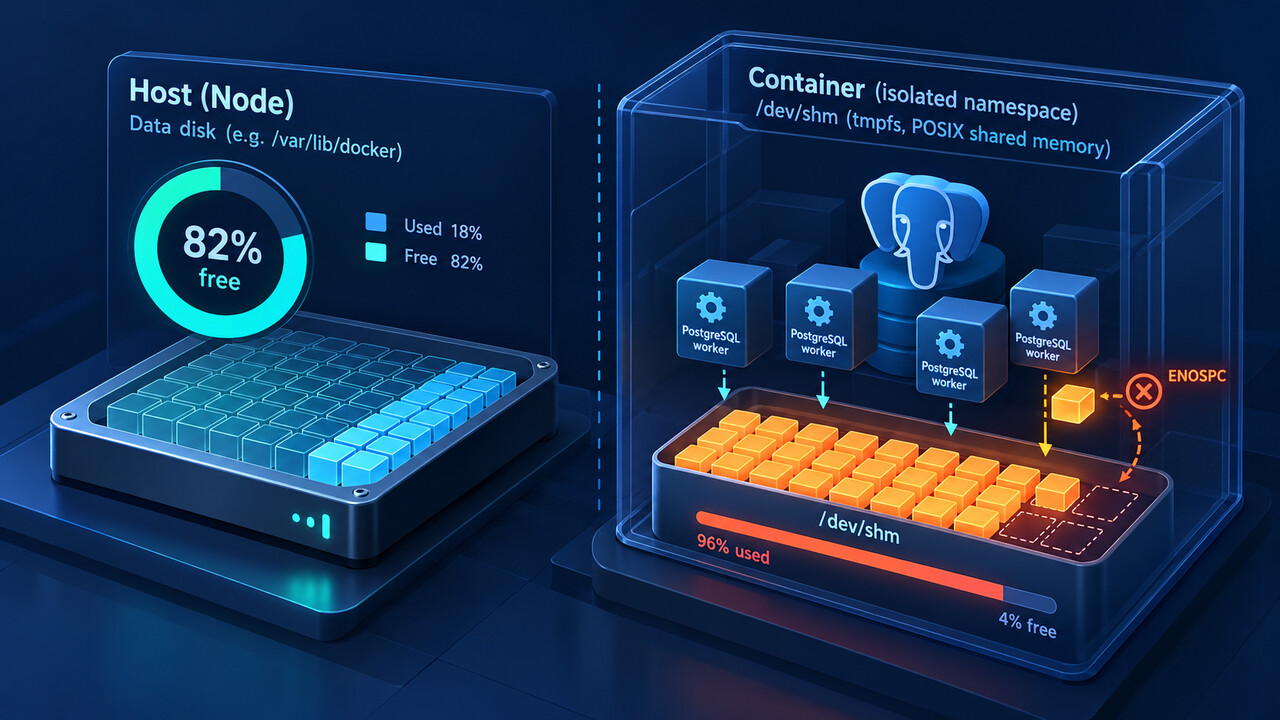
ENOSPC does not prove the database data disk is full. Preserve the exact allocation error, inspect the mount from PostgreSQL’s own runtime namespace, connect the peak to the failing workload, then change one proven boundary and repeat the same operation.
PostgreSQL can use dynamic shared memory for parallel operations. On Linux, POSIX shared-memory objects normally live on a tmpfs mounted at /dev/shm, and a container can have a small private mount even while the host and database volume have ample free space.
1. Freeze the exact allocation and runtime identity
Keep the complete PostgreSQL error, requested resize size, SQL or maintenance operation, backend PID, timestamps, database and application request ID. Record the container ID, pod UID or service task that actually hosted that backend.
Do not begin with the host’s data-volume graph. The word ENOSPC only says an allocation boundary was reached. The pathname or DSM implementation, plus the process namespace, tells you which boundary to inspect.
2. Inspect the mount from PostgreSQL’s namespace
In the same container or pod, run df -h /dev/shm, df -i /dev/shm and findmnt -T /dev/shm. Capture size, used bytes, free bytes, inode headroom, filesystem type and mount options. Compare these with the host only to prove whether the namespaces differ.
In PostgreSQL, record SHOW dynamic_shared_memory_type and relevant parallel settings. POSIX DSM points toward /dev/shm on Linux; another DSM type requires following its documented backing instead of assuming the same path.
3. Tie the peak to the failing workload
Use EXPLAIN without execution when necessary to identify planned parallel workers, and record max_parallel_workers_per_gather, concurrent copies of the query and overlapping VACUUM or maintenance work. Measure /dev/shm before, during and after a controlled reproduction.
Do not treat shared_buffers or work_mem as universal fixes. A parallel query can request dynamic shared memory while the data volume remains healthy. The useful comparison is requested growth plus concurrent DSM use versus the active mount’s measured headroom.
4. Change one proven boundary
For Docker, set an explicit shared-memory size on the service and recreate the container; editing configuration without replacing the running container does not change its existing mount. For Kubernetes, a memory-backed emptyDir mounted at /dev/shm must be sized with the pod’s memory budget in mind.
If capacity cannot be raised safely, reduce the proven peak by bounding parallel workers or concurrency for the affected workload. Do not delete PostgreSQL-looking files from /dev/shm while the server is live; ownership and lifecycle must be established before cleanup.
5. Require a same-workload exit test
After restart or rollout, re-enter the active runtime and capture the new findmnt and df evidence. Repeat the same SQL or maintenance operation with the same relevant parallelism and representative concurrency while observing peak /dev/shm use.
Accept the change only if the former operation completes, the mount retains measured headroom, no new DSM allocation error appears and memory pressure remains within the runtime budget. If the error merely moves or the pod becomes memory-starved, roll back and revisit the capacity model.