Technology · PRACTICAL GUIDE
GPX route converted, but did the point data survive?
A nonzero distance is only one check. Our gpxpy 1.6.2 tests show why names, times and overlapping geometry need a separate audit.
If gpxpy reports zero distance for a file containing a route, first identify what the file contains. Converting it to a track can produce a distance while silently changing other information. Keep the original and judge the reopened output, not the success message.
We tested four synthetic GPX 1.1 files with Python 3.12.14 and published gpxpy 1.6.2: waypoints only, route only, track only, and a route plus track deliberately following identical coordinates. These are controlled examples, not recorded journeys or tests of a navigation device.
1. Count containers before choosing a remedy
Inspect len(gpx.waypoints), len(gpx.routes), len(gpx.tracks) and each track's segments after parsing a trusted local copy. GPX 1.1 distinguishes standalone waypoints, ordered route points and track segments. Three points existing somewhere in a file do not establish a recorded track or an intended order for standalone waypoints.
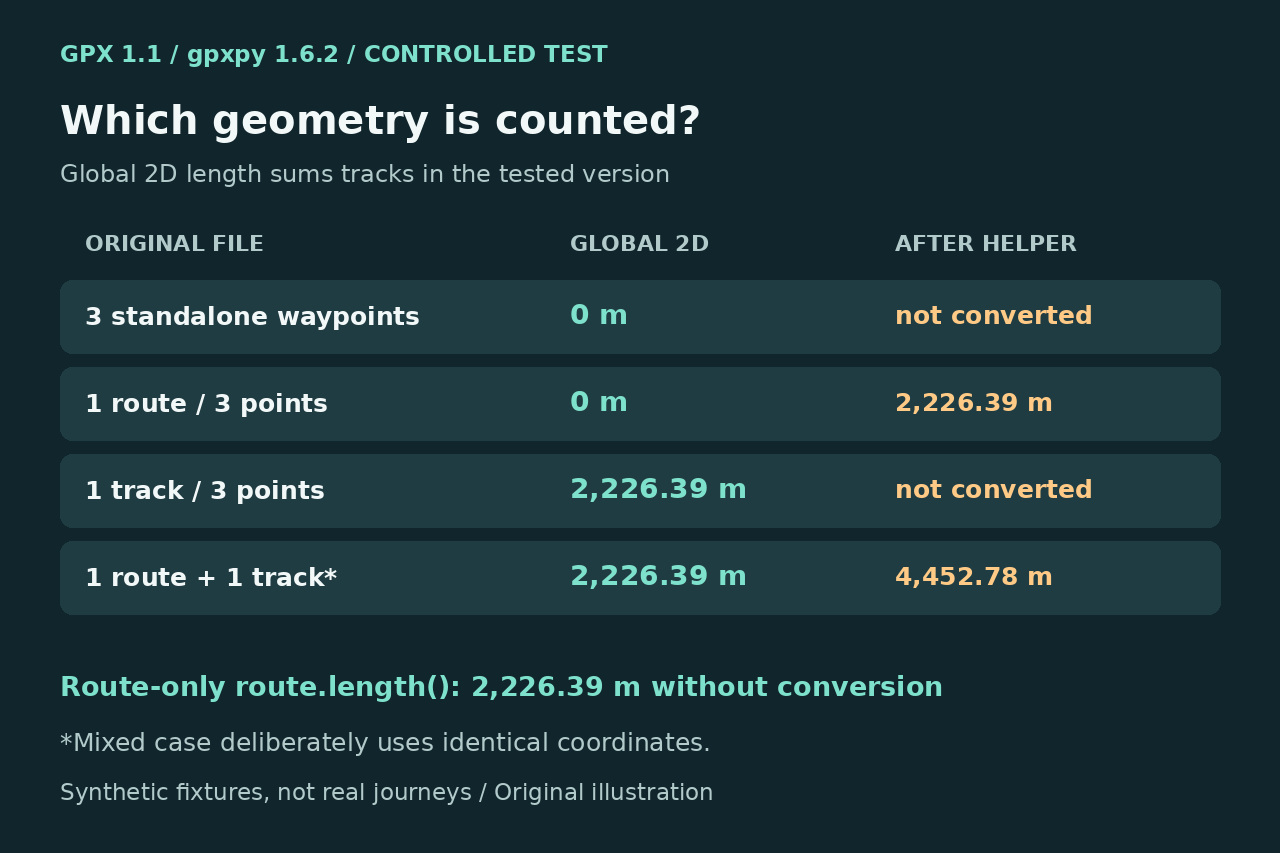
In the installed package, the global length methods iterate over tracks. If your goal is only the 2D length of an existing route, inspect route.length() for each selected route first. It returns meters and does not require converting the file. This is not a route elevation-gain or 3D-distance solution.
2. A useful helper can have a narrow data contract
The real question in gpxpy issue 290 already explains the route-only zero result and proposes a conversion helper. It creates track points from latitude, longitude and elevation, retains a route-level name as a track name and removes the original routes. It does not copy every point field. The baseline problem already has an answer.
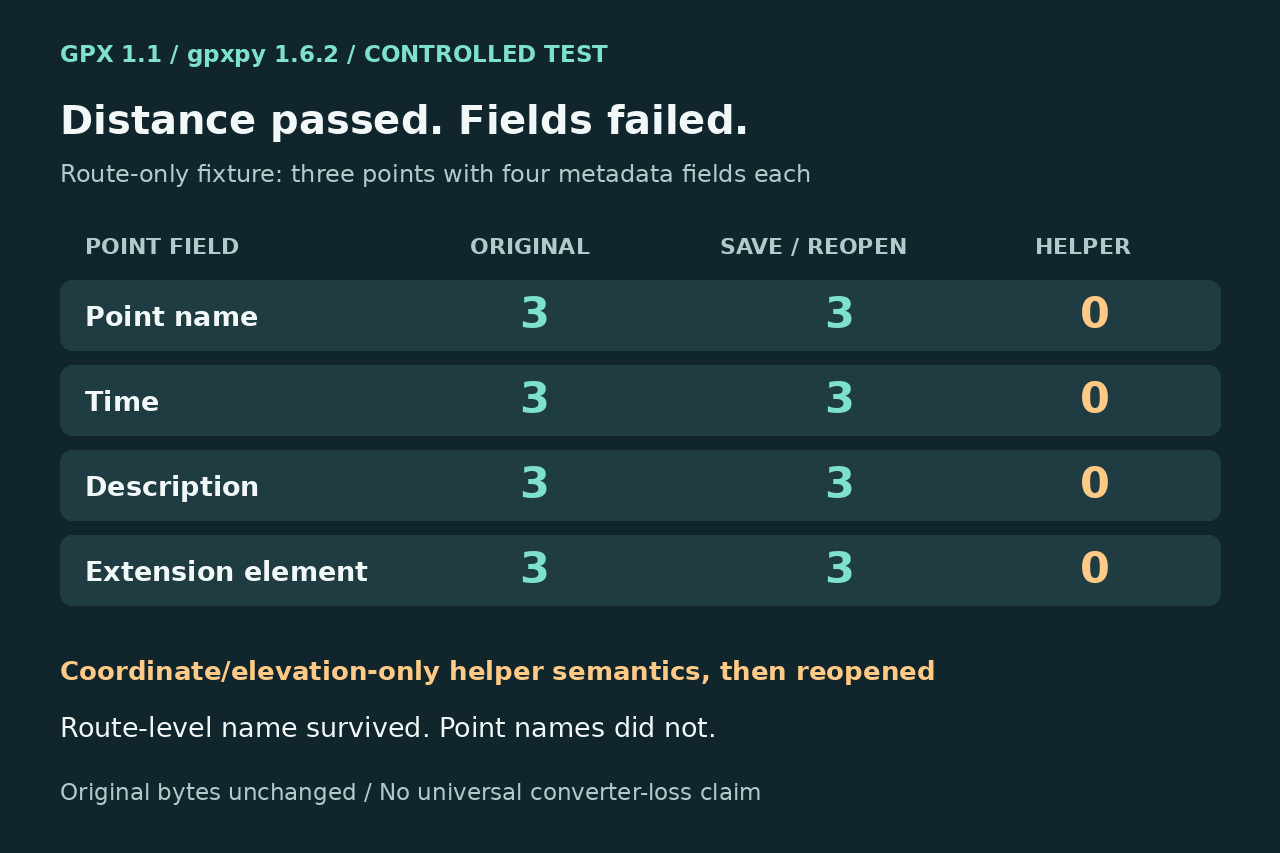
Our route fixture used latitude 0 and longitudes 0, 0.01 and 0.02, elevations 10, 20 and 30 meters, and one time, name, description and custom extension per point. Reimplementing that helper's semantics yielded a nonzero track distance, but each of those four field counts fell from three to zero after saving and reopening. The route-level name survived; the point names did not.
3. Separate transformation loss from ordinary serialization
We also saved and reopened the route without converting it. The GPX 1.1 control retained all three times, point names, descriptions and extension elements. That comparison isolates the limited helper in this example; it does not justify blaming every export or the whole library.
Before conversion, write a small field inventory for the exact points you intend to retain: coordinates, elevation, time, point name, description and required extension elements. Afterward, reopen the new file and compare values, counts and intended order, not just whether any names or timestamps exist. A track name and a point name are different checks.
4. Check which geometry should contribute once
Our mixed fixture deliberately contained one route and one track with identical coordinates. Initially the global methods counted only the existing track. Appending a converted copy of the route created two tracks, so global 2D length doubled from 2,226.39 to 4,452.78 meters. This is a constructed overlap case, not a claim that every mixed file duplicates distance.
Decide whether a route is a plan, an alternative or another representation of the same path before adding its points to measured tracks. Preserve intended segment boundaries and avoid inventing a connecting leg between unrelated pieces. Review a path preview and identify which geometry is included; a plausible total alone cannot establish that choice.
5. Accept a reopened file against an explicit checklist
Existing tools already expose conversion tradeoffs. GPSBabel 1.10.0 documents source deletion to avoid duplicated data and a timeless option affecting copied times. GPXAnalyzer's separate waypoint tool documents ordering and optional names, omits descriptions and symbols, and does not convert route-only files. Those are documented scopes, not tools we executed.
Write to a new filename; retain the original hash and an untouched copy. Accept the result only when container and segment counts, selected geometry, required point-field values and names, units and path order match your stated goal. Stop and preserve both files if anything changes unexpectedly. Our originals remained byte-identical; we did not validate a real traveled distance, strict schema conformance, Garmin, BMW, Strava or GPSBabel behavior.