기술 · 실용 가이드
Docker 볼륨이 “사용 중”인데 컨테이너가 보이지 않나요? 정리 전에 소유자 원장을 만드세요
--force, prune, 데몬 재시작부터 하지 마십시오. 오류를 정확한 Docker context에 묶고 중지된 컨테이너와 Swarm 서비스를 포함한 모든 마운트 소유자를 조사한 뒤 증거를 먼저 보존합니다.
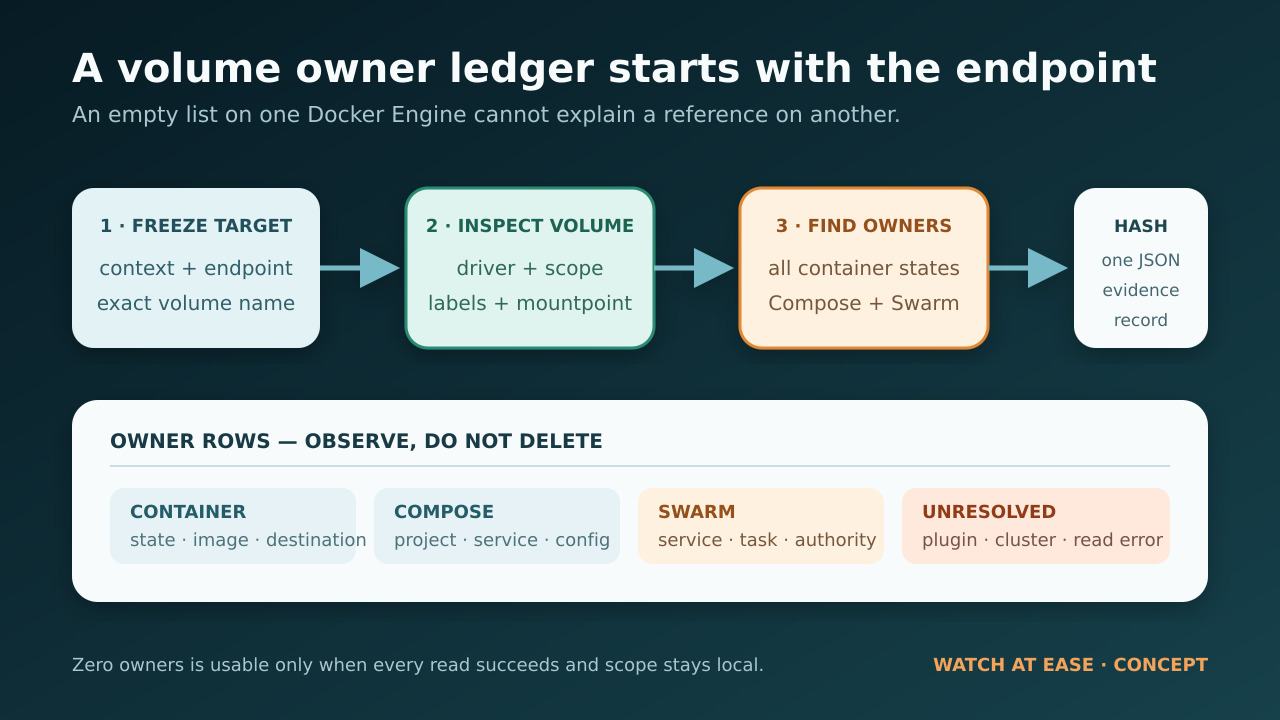
Docker volume-in-use 오류는 정리 문제이기 전에 소유권 문제입니다. 참조는 중지되거나 생성만 된 컨테이너, Compose project, Swarm service, plugin, remote Engine context 또는 첫 목록이 다루지 않은 다른 scope에 있을 수 있습니다.
이 가이드는 정확한 Docker context와 endpoint에 묶인 읽기 전용 소유자 원장을 만듭니다. volume metadata, 모든 container state, Compose/Swarm 단서, read failure와 미해결 경계를 하나의 hashed JSON에 보존하며 stop, remove, prune, restart, update, deploy는 실행하지 않습니다.
원장은 삭제를 허가하지 않습니다. application, cluster 또는 storage 소유자가 다음 검토된 조치를 결정하도록 돕고 visibility 부족, non-local scope, failed read, manager 권한 부족과 backup 불확실성을 모두 중지 이유로 취급합니다.
오류는 정리 명령이 아니라 소유권 신호다
Docker의 현재 볼륨 제거 문서는 안전 경계를 분명히 합니다. 컨테이너가 사용 중인 볼륨은 제거할 수 없습니다. 다만 “사용 중”은 “눈에 보이는 실행 중 컨테이너”보다 넓은 개념입니다. 중지되었거나 생성만 된 컨테이너도 존재하며 다시 시작할 수 있으므로 마운트 참조가 살아 있습니다. Docker Desktop의 Volumes 화면도 중지와 제거를 구분합니다.
따라서 `docker ps` 한 번으로는 충분하지 않습니다. 기본값은 실행 중 컨테이너만 표시합니다. 전체 컨테이너 보기에서는 exited, created, paused, restarting, removing, dead 상태도 찾을 수 있습니다. Compose는 레이블과 보존·고아 컨테이너로 소유 관계를 더하고, Swarm은 서비스와 태스크 소유 관계를 더합니다. CLI도 활성 context, `DOCKER_CONTEXT`, `DOCKER_HOST`, 명시적 `--context`에 따라 다른 Engine을 가리킬 수 있습니다.
이 오류를 소유자를 식별하라는 신호로 다루십시오. 참조 삭제, 프로젝트 제거, 호스트 prune, 데몬 재시작, force 플래그 사용을 허가하는 뜻이 아닙니다.
대상을 고정한다: context, endpoint, 볼륨 이름과 scope
소유자를 수집하기 전에 오류에 나온 정확한 볼륨 이름과 실패한 명령이 사용한 Docker context를 기록합니다. `docker context show`는 선택한 context를, `docker context inspect`는 Docker endpoint를 보여 줍니다. 한 Engine의 빈 컨테이너 목록으로 다른 Engine의 볼륨 참조를 설명할 수 없습니다.
다음으로 볼륨 자체를 inspect하고 driver, scope, labels, options, 생성 시각, mountpoint를 보존합니다. local이 아닌 scope나 driver는 중지 조건이지 지름길이 아닙니다. 플러그인·클러스터 볼륨은 로컬 컨테이너 목록 밖에 소유자가 있을 수 있으므로 로컬 결과만으로 미사용을 증명할 수 없습니다.
클라이언트와 서버 버전도 기록합니다. 과거 Docker CLI 이슈에서는 Swarm이 활성화된 특정 버전에서 볼륨이 남아 있어도 제거 명령이 이름을 출력할 수 있었습니다. 한 줄 출력으로 성공을 추정하지 말고 객체 상태를 독립적으로 확인하십시오.
읽기 전용 소유자 원장을 실행한다
동봉된 Node 스크립트는 볼륨 이름과 출력 파일명을 받아 context, version, info, volume inspect, container list/inspect, service list/inspect 읽기 작업만 실행합니다. stop, rm, down, prune, restart, update, deploy는 호출하지 않습니다. 선택 endpoint, 볼륨 기록, 일치하는 모든 컨테이너 마운트, Compose/Swarm 레이블, 서비스 마운트, 명령 실패와 미해결 경계를 하나의 JSON에 기록합니다.
환경 변수가 선택 context를 바꿀 수 있으므로 오류가 난 동일한 shell과 환경에서 실행합니다. 출력 파일은 독점 생성되어 기존 증거를 덮어쓰지 않습니다. 완성된 JSON의 SHA-256도 출력하므로 후속 검토자가 변경 여부를 확인할 수 있게 incident 기록과 함께 보관하십시오.
`readErrors`와 `unresolved`가 모두 비어 있을 때만 소유자 0이라는 결과에 의미가 있습니다. 읽기 실패가 하나라도 있거나 plugin/cluster scope라면 빠진 행은 “알 수 없음”이지 “소유자 없음”의 증거가 아닙니다.
```javascript #!/usr/bin/env node import { spawnSync } from "node:child_process"; import { createHash } from "node:crypto"; import { writeFileSync } from "node:fs"; function runDocker(args) { const result = spawnSync("docker", args, { encoding: "utf8", shell: false, maxBuffer: 16 * 1024 * 1024, }); return { ok: result.status === 0, status: result.status, stdout: result.stdout.trim(), stderr: result.stderr.trim(), }; } function parseJson(text, fallback) { try { return JSON.parse(text); } catch { return fallback; } } function dockerJson(args, errors, label, fallback = null) { const result = runDocker(args); if (!result.ok) { errors.push({ label, args, status: result.status, error: result.stderr || "docker command failed" }); return fallback; } const parsed = parseJson(result.stdout, Symbol.for("invalid-json")); if (parsed === Symbol.for("invalid-json")) { errors.push({ label, args, status: result.status, error: "docker returned invalid JSON" }); return fallback; } return parsed; } function dockerText(args, errors, label, fallback = "") { const result = runDocker(args); if (!result.ok) { errors.push({ label, args, status: result.status, error: result.stderr || "docker command failed" }); return fallback; } return result.stdout; } function compactContext(context) { return { name: context?.Name ?? null, description: context?.Metadata?.Description ?? null, orchestrator: context?.Metadata?.StackOrchestrator ?? null, dockerEndpoint: context?.Endpoints?.docker?.Host ?? null, skipTlsVerify: context?.Endpoints?.docker?.SkipTLSVerify ?? null, }; } function compactMount(mount) { return { type: mount?.Type ?? null, name: mount?.Name ?? null, source: mount?.Source ?? null, destination: mount?.Destination ?? null, driver: mount?.Driver ?? null, mode: mount?.Mode ?? null, rw: mount?.RW ?? null, propagation: mount?.Propagation ?? null, }; } function compactContainer(container, volumeName) { const labels = container?.Config?.Labels ?? {}; const mounts = (container?.Mounts ?? []) .filter((mount) => mount?.Type === "volume" && (mount?.Name === volumeName || mount?.Source === volumeName)) .map(compactMount); if (mounts.length === 0) return null; return { id: container?.Id ?? null, name: String(container?.Name ?? "").replace(/^\//, "") || null, state: container?.State?.Status ?? null, running: container?.State?.Running ?? null, created: container?.Created ?? null, image: container?.Config?.Image ?? null, mounts, compose: { project: labels["com.docker.compose.project"] ?? null, service: labels["com.docker.compose.service"] ?? null, oneoff: labels["com.docker.compose.oneoff"] ?? null, workingDir: labels["com.docker.compose.project.working_dir"] ?? null, configFiles: labels["com.docker.compose.project.config_files"] ?? null, }, swarm: { serviceName: labels["com.docker.swarm.service.name"] ?? null, serviceId: labels["com.docker.swarm.service.id"] ?? null, taskId: labels["com.docker.swarm.task.id"] ?? null, }, }; } function serviceMountsVolume(service, volumeName) { const mounts = service?.Spec?.TaskTemplate?.ContainerSpec?.Mounts ?? []; return mounts.some((mount) => mount?.Type === "volume" && mount?.Source === volumeName); } function compactService(service, volumeName) { const mounts = (service?.Spec?.TaskTemplate?.ContainerSpec?.Mounts ?? []) .filter((mount) => mount?.Type === "volume" && mount?.Source === volumeName) .map((mount) => ({ type: mount?.Type ?? null, source: mount?.Source ?? null, target: mount?.Target ?? null, readOnly: mount?.ReadOnly ?? null, volumeOptions: mount?.VolumeOptions ?? null, })); return { id: service?.ID ?? null, name: service?.Spec?.Name ?? null, labels: service?.Spec?.Labels ?? {}, mode: service?.Spec?.Mode ?? null, mounts, }; } function main() { const volumeName = process.argv[2]; const outputPath = process.argv[3] || `docker-volume-owner-ledger-${Date.now()}.json`; if (!volumeName || volumeName.startsWith("-")) { console.error("Usage: node docker-volume-owner-ledger.mjs VOLUME_NAME [OUTPUT.json]"); process.exit(2); } const errors = []; const contextName = dockerText(["context", "show"], errors, "context-show", null); const contexts = contextName ? dockerJson(["context", "inspect", contextName], errors, "context-inspect", []) : []; const version = dockerJson(["version", "--format", "{{json .}}"], errors, "version", null); const info = dockerJson(["info", "--format", "{{json .}}"], errors, "info", null); const volumes = dockerJson(["volume", "inspect", volumeName], errors, "volume-inspect", []); const containerIds = dockerText(["container", "ls", "-aq", "--no-trunc"], errors, "container-list", "") .split(/\s+/) .filter(Boolean); let containers = []; if (containerIds.length > 0) { const inspected = dockerJson(["container", "inspect", ...containerIds], errors, "container-inspect", []); containers = inspected.map((container) => compactContainer(container, volumeName)).filter(Boolean); } const swarm = { localNodeState: info?.Swarm?.LocalNodeState ?? null, controlAvailable: info?.Swarm?.ControlAvailable ?? null, nodeId: info?.Swarm?.NodeID ?? null, services: [], inspectionSkippedReason: null, }; if (swarm.localNodeState === "active" && swarm.controlAvailable === true) { const serviceIds = dockerText(["service", "ls", "-q", "--no-trunc"], errors, "service-list", "") .split(/\s+/) .filter(Boolean); if (serviceIds.length > 0) { const services = dockerJson(["service", "inspect", ...serviceIds], errors, "service-inspect", []); swarm.services = services .filter((service) => serviceMountsVolume(service, volumeName)) .map((service) => compactService(service, volumeName)); } } else if (swarm.localNodeState === "active") { swarm.inspectionSkippedReason = "Swarm is active, but this node is not a manager; service ownership remains unresolved."; } else { swarm.inspectionSkippedReason = "Swarm is not active on the selected Docker Engine."; } const volume = volumes[0] ?? null; const unresolved = []; if (!contextName) unresolved.push("Could not determine the active Docker context."); if (!volume) unresolved.push("Could not inspect the requested volume on the selected context."); if (volume?.Scope && volume.Scope !== "local") unresolved.push(`Volume scope is ${volume.Scope}; cluster or plugin ownership needs separate review.`); if (volume?.Driver && volume.Driver !== "local") unresolved.push(`Volume driver is ${volume.Driver}; vendor or plugin state is outside this local audit.`); if (swarm.localNodeState === "active" && swarm.controlAvailable !== true) unresolved.push("Swarm service inspection requires a manager node."); if (errors.length > 0) unresolved.push("One or more read-only Docker commands failed; do not infer that missing owners do not exist."); const ledger = { schema: "watchatease.docker-volume-owner-ledger.v1", capturedAt: new Date().toISOString(), volumeName, context: compactContext(contexts[0]), environmentOverrides: { dockerContextPresent: Boolean(process.env.DOCKER_CONTEXT), dockerHostPresent: Boolean(process.env.DOCKER_HOST), note: "Values are intentionally omitted; rerun from the same shell that produced the error.", }, clientVersion: version?.Client?.Version ?? null, serverVersion: version?.Server?.Version ?? null, volume: volume ? { name: volume.Name ?? null, driver: volume.Driver ?? null, scope: volume.Scope ?? null, mountpoint: volume.Mountpoint ?? null, labels: volume.Labels ?? {}, options: volume.Options ?? {}, createdAt: volume.CreatedAt ?? null, } : null, containerOwners: containers, swarm, readErrors: errors, unresolved, mutationCommandsRun: [], }; const canonical = JSON.stringify(ledger, null, 2) + "\n"; writeFileSync(outputPath, canonical, { encoding: "utf8", flag: "wx" }); const sha256 = createHash("sha256").update(canonical).digest("hex"); console.log(JSON.stringify({ outputPath, sha256, owners: containers.length, swarmServices: swarm.services.length, unresolved: unresolved.length })); if (unresolved.length > 0) process.exitCode = 3; } main(); ```
컨테이너 소유자를 삭제 없이 해석한다
일치하는 각 컨테이너의 state, image, mount destination, Compose/Swarm labels를 확인합니다. 중지된 컨테이너도 재현 가능한 구성이며 애플리케이션 시작 방식을 보여 주는 유일한 기록일 수 있습니다. Compose 소속이면 project, service, working directory, config-file labels를 먼저 기록해 볼륨 prefix 추측이 아니라 정확한 프로젝트 정의로 돌아갑니다.
Compose 레이블을 봤다고 즉시 `docker compose down --volumes`를 실행하지 마십시오. 공식 문서에 따르면 `--volumes`는 프로젝트가 선언한 named volume과 컨테이너의 anonymous volume을 삭제합니다. external volume은 보호되지만 프로젝트 관리 데이터는 삭제될 수 있습니다. 정확한 프로젝트, 보존 정책, 사용 가능한 백업, 애플리케이션 소유자의 승인을 먼저 확인합니다.
`docker container prune`로 범위를 넓혀서도 안 됩니다. 이 명령은 해당 scope의 모든 중지 컨테이너를 제거하며 이 볼륨을 보유한 컨테이너로 제한되지 않습니다. 원장은 이름이 확인된 소유자별로 판단할 수 있도록 의도적으로 범위를 좁혔습니다.
Swarm과 remote context 결과를 해석한다
Swarm이 active이고 선택한 노드가 manager라면 원장은 서비스를 검사하고 해당 볼륨을 마운트하는 task template을 기록합니다. 서비스 소유자가 있으면 로컬 task 컨테이너를 지워도 orchestrator가 다시 만들 수 있습니다. service 또는 stack 수준에서 조정하고 desired state 증거를 먼저 보존합니다.
Swarm이 active지만 현재 노드가 manager가 아니면 서비스 검사는 미해결입니다. 권한 있는 manager로 이동하거나 클러스터 소유자를 참여시키고, 빈 로컬 목록을 볼륨이 비었다는 결론으로 사용하지 마십시오.
context endpoint가 remote라면 실패한 명령과 원장이 같은 endpoint를 대상으로 했는지 확인합니다. TLS 자료나 자격 증명을 보고서에 붙이지 마십시오. 스크립트는 endpoint 문자열과 선택된 비밀이 아닌 메타데이터만 저장합니다.
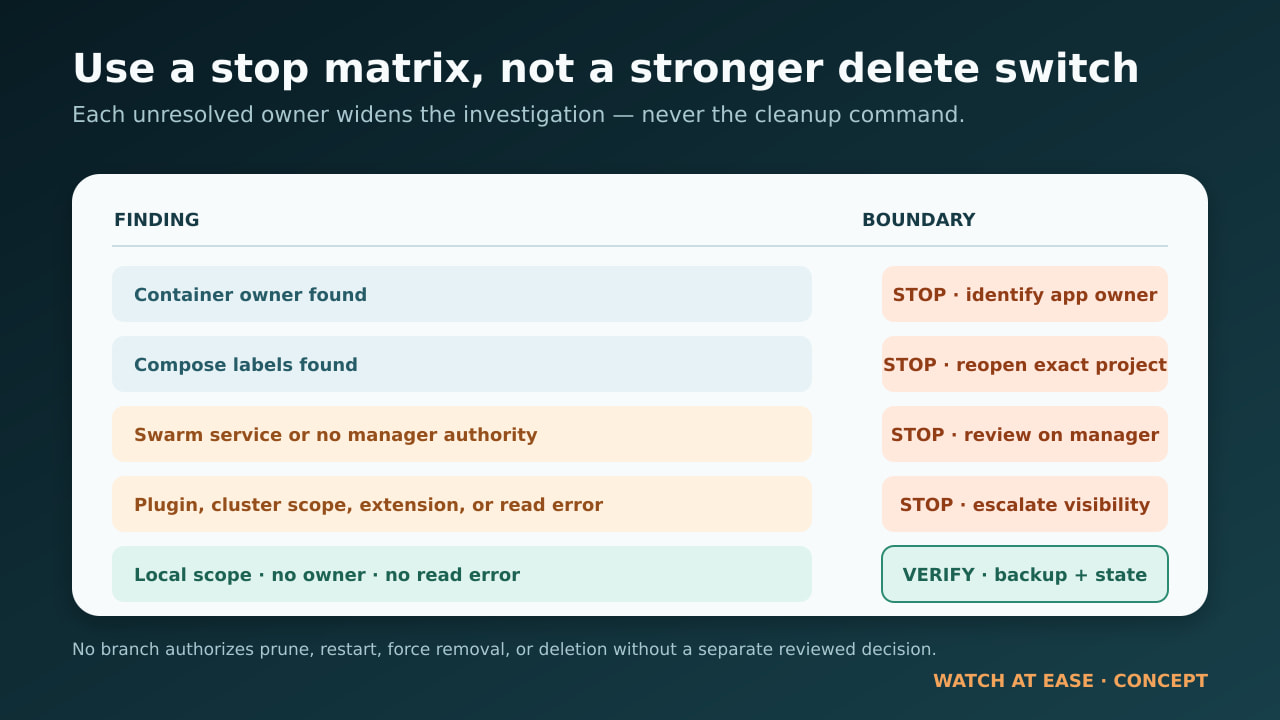
일반 해결 목록 대신 stop/go matrix를 사용한다
컨테이너 소유자 발견: 중지. 애플리케이션 소유자를 확인하고 컨테이너가 남은 이유와 복원 가능한 백업을 검증한 뒤, 해당 컨테이너를 보존·재생성·제거할지 책임자가 결정합니다. 원장이 업무 결정을 대신하지 않습니다.
Compose 레이블 발견: 중지. 정확한 Compose 프로젝트를 다시 열어 현재 구성을 기록된 레이블과 비교합니다. 프로젝트 범위와 데이터 보존 정책이 명확해질 때까지 볼륨을 제거하는 teardown을 실행하지 않습니다.
Swarm 서비스 발견 또는 Swarm 검사 불가: 중지. manager에서 service/stack을 검토합니다. 로컬 컨테이너 작업만으로 desired state가 바뀌었다고 증명할 수 없습니다.
plugin driver, cluster scope, Desktop extension, 읽기 실패: 중지. 해당 driver, cluster, Desktop extension 또는 플랫폼 소유자에게 에스컬레이션합니다. 보이지 않는 것은 존재하지 않는다는 뜻이 아닙니다.
소유자 없음, 오류 없음, driver와 scope가 local: 가능하면 Docker Desktop의 in-use 탭으로 교차 확인하고, 볼륨이 여전히 존재하는지 검증하며, 정리를 고려하기 전에 백업을 보존하거나 시험합니다. Engine이 설명되지 않는 충돌을 계속 보고하면 version과 daemon logs를 수집해 support에 전달하고 불확실성을 prune이나 restart 권고로 바꾸지 않습니다.
--force, prune, restart보다 안전한 이유
`--force`는 흔히 오해됩니다. 과거 Docker 논의가 보여 주듯 중지된 컨테이너는 사라진 것이 아니고 다시 시작할 수 있어 볼륨을 정당하게 보호할 수 있습니다. 안전한 대응은 더 강한 삭제 스위치를 찾는 것이 아니라 소유자를 이해하는 것입니다.
prune 명령은 영향 범위를 넓힙니다. system prune은 options에 따라 중지 컨테이너, network, image, build cache를 대상으로 하고, volume prune은 범위가 넓어지면 미사용 named volume도 포함할 수 있습니다. 어느 쪽도 이 데이터의 애플리케이션 소유자를 알려 주지 않습니다.
daemon restart는 일시 상태를 바꿀 수 있지만 시스템을 변경하면서 변경 전 증거 일부도 없앱니다. support가 최종적으로 권하더라도 원장, Docker versions, logs를 먼저 저장합니다. 목표는 오류를 없애는 것이 아니라 다음 조치를 검토 가능하고 가능한 한 되돌릴 수 있게 만드는 것입니다.
이 가이드가 증명하지 않는 것
깨끗한 원장도 볼륨 삭제가 안전하다고 증명하지 않습니다. application-consistent backup, database quiescence, plugin-side snapshot, cluster replication, Desktop extension 소유권, recovery procedure를 검증하지 않습니다. manager 권한 없는 worker에서는 Swarm service도 검사할 수 없습니다.
JSON과 SHA-256을 incident 기록에 함께 보관합니다. 소유자, endpoint, label, driver, scope, permission, backup 질문 중 하나라도 미해결이면 정리 전에 중지합니다. 가장 유용한 결과는 삭제 명령이 아니라 application, cluster 또는 storage 소유자에게 정확히 인계하는 것일 수 있습니다.