Technology · 실용 가이드
Docker Desktop WSL 디스크가 큰가요? 정리나 압축 전에 세 계층을 측정하세요
Docker 객체, WSL 게스트 파일 시스템, Windows 호스트 VHDX를 읽기 전용으로 따로 기록합니다.
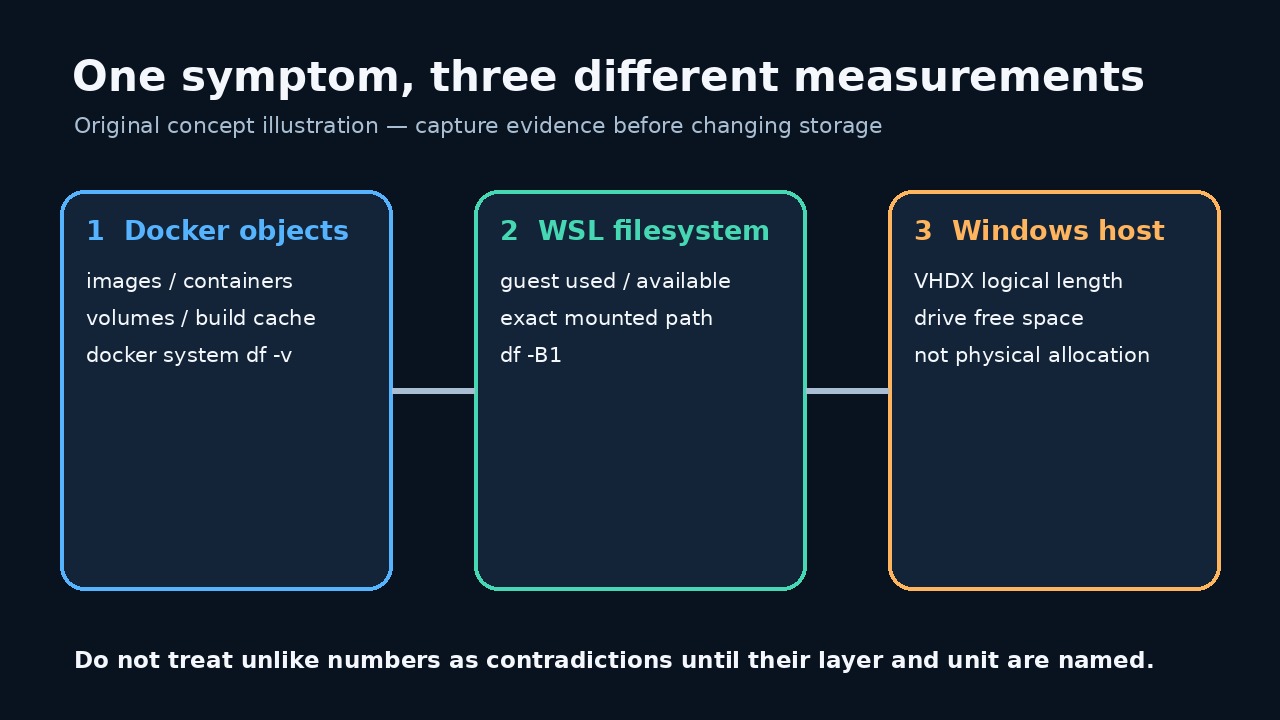
이미지를 삭제한 뒤 docker_data.vhdx가 여전히 크다는 사실만으로 같은 양의 Docker 객체가 남았다고 볼 수 없습니다.
이 가이드는 읽기 전용 JSON 증거 원장을 만들며 prune, 삭제, WSL 종료, sparse 전환, 압축을 실행하지 않습니다.
비교 전에 세 계층을 구분하세요
Docker 객체, 게스트 사용량, 호스트 VHDX 길이는 서로 다른 계층입니다. 비교 전에 세 값을 모두 보존하세요.
동적 VHD는 파일 삭제 뒤에도 클 수 있고 Docker 요약 밖의 데이터가 게스트를 실제로 가득 채울 수도 있습니다.
기준선과 정확한 경로를 보존하세요
현재 Docker Desktop 설정에서 정확한 디스크 이미지 경로를 복사하고 예전 기본값을 추측하지 마세요.
데몬, 배포판, 게스트 경로 실패는 0이 아니라 미해결 오류로 기록됩니다.
읽기 전용 감사를 저장하고 실행하세요
전체 프로그램을 UTF-8 audit_docker_wsl_disk.mjs로 저장하고 .txt가 붙지 않았는지 확인하세요. 읽기 쿼리만 실행합니다.
node --check audit_docker_wsl_disk.mjs 뒤 node audit_docker_wsl_disk.mjs "C:\exact\path\docker_data.vhdx" > docker-wsl-disk-before.json을 실행하세요.
import { spawnSync } from 'node:child_process'; import { stat, statfs } from 'node:fs/promises'; import { dirname, resolve } from 'node:path'; import { pathToFileURL } from 'node:url'; const clip = (value, limit = 200000) => String(value ?? '').slice(0, limit); export function runCommand(file, args, spawn = spawnSync) { const result = spawn(file, args, { encoding: 'utf8', timeout: 30000, windowsHide: true, shell: false, maxBuffer: 1024 * 1024, }); return { command: [file, ...args], mutating: false, status: Number.isInteger(result.status) ? result.status : null, signal: result.signal ?? null, stdout: clip(result.stdout), stderr: clip(result.stderr), error: result.error ? String(result.error.code || result.error.message) : null, }; } export async function buildAudit({ vhdxPath, distro = process.env.DOCKER_WSL_DISTRO || 'docker-desktop', guestPath = process.env.DOCKER_WSL_MOUNT || '/tmp/docker-desktop-root/mnt/docker-desktop-disk', platform = process.platform, fsStat = stat, fsStatfs = statfs, spawn = spawnSync, } = {}) { if (!vhdxPath || typeof vhdxPath !== 'string') throw new Error('VHDX_PATH_REQUIRED'); if (!/^[A-Za-z0-9._-]+$/.test(distro)) throw new Error('INVALID_DISTRO_NAME'); if (!guestPath.startsWith('/') || guestPath.includes('\0')) throw new Error('INVALID_GUEST_PATH'); const exactPath = resolve(vhdxPath); const [file, hostFs] = await Promise.all([fsStat(exactPath), fsStatfs(dirname(exactPath))]); if (!file.isFile()) throw new Error('VHDX_NOT_A_FILE'); const command = (fileName, args) => runCommand(fileName, args, spawn); const commands = { dockerVersion: command('docker', ['version', '--format', '{{json .}}']), dockerObjects: command('docker', ['system', 'df', '-v']), wslStatus: command('wsl.exe', ['--status']), wslDistributions: command('wsl.exe', ['--list', '--verbose']), guestFilesystem: command('wsl.exe', ['-d', distro, '--', 'df', '-B1', guestPath]), }; return { schemaVersion: 1, capturedAt: new Date().toISOString(), scope: 'read-only Docker Desktop / WSL disk evidence', safety: { mutatingCommandsRun: false, notRun: ['docker system prune', 'docker * prune', 'wsl --shutdown', 'diskpart compact vdisk', 'Optimize-VHD', 'wsl --manage --set-sparse', 'file deletion'], }, host: { platform, vhdxPath: exactPath, fileLengthBytes: Number(file.size), containingFilesystem: { blockSize: Number(hostFs.bsize), blocks: Number(hostFs.blocks), blocksFree: Number(hostFs.bfree), blocksAvailable: Number(hostFs.bavail), }, limitation: 'fileLengthBytes is the file logical length. This audit does not claim to measure NTFS allocated clusters or reclaimable physical bytes.', }, docker: { version: commands.dockerVersion, objects: commands.dockerObjects, limitation: 'docker system df reports Docker-managed objects; it is not the Windows VHDX file size and can omit other guest-side use.', }, wsl: { distro, guestPath, status: commands.wslStatus, distributions: commands.wslDistributions, guestFilesystem: commands.guestFilesystem, limitation: 'A failed guest-path check is an unresolved measurement, not proof that the filesystem is empty.', }, interpretationOrder: [ 'Preserve this file before changing anything.', 'Use Docker object output to identify Docker-managed and potentially reclaimable categories.', 'Use guest df output to decide whether the WSL filesystem itself is near full.', 'Compare those readings with the host VHDX logical length and host filesystem free space.', 'Choose a change only after the mismatched layer is identified; rerun the same audit afterward under a new filename.', ], }; } async function main() { if (process.argv.length !== 3) throw new Error('USAGE: node audit_docker_wsl_disk.mjs <exact-vhdx-path>'); const report = await buildAudit({vhdxPath: process.argv[2]}); process.stdout.write(`${JSON.stringify(report, null, 2)}\n`); } if (import.meta.url === pathToFileURL(process.argv[1] || '').href) { main().catch(error => { process.stderr.write(`Audit failed without changing Docker or WSL: ${error.code || error.message}\n`); process.exitCode = 1; }); }
프로그램 SHA-256: d43b227f591fff111404afb1505ab5552965d8095eb907d60aa9c680c12785bb. Linux 모의 명령으로 합성 테스트 5개를 통과했지만 실제 Windows/Docker Desktop은 테스트하지 않았습니다.
Docker 객체 출력부터 읽으세요
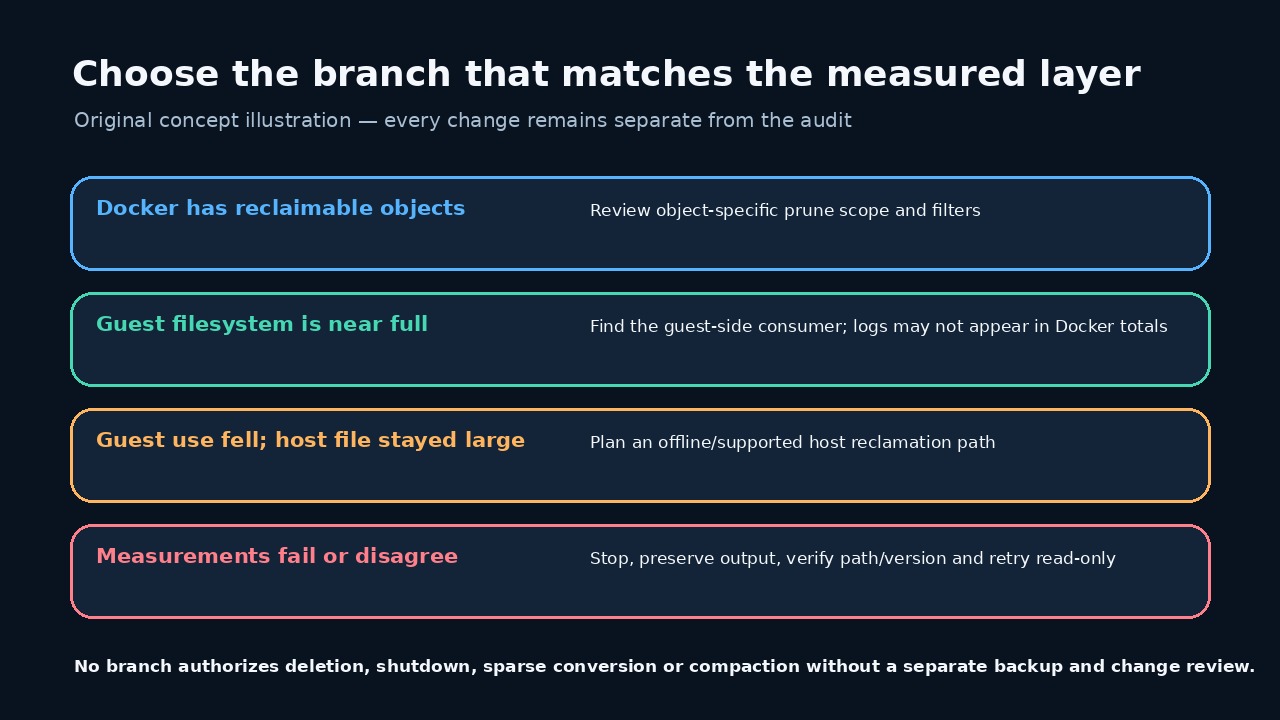
docker system df -v는 이미지, 컨테이너, 볼륨, 캐시를 구분합니다. VHDX 전체가 회수 가능하다고 추정하지 마세요.
제거 후보가 있어도 별도 변경 계획에서 전용 명령의 범위, 필터와 경고를 검토하세요.
WSL 게스트가 실제로 가득 찼는지 확인하세요
df는 지정한 게스트 마운트의 전체, 사용, 가용 바이트를 보여 줍니다. 게스트 용량은 호스트 여유 공간과 다릅니다.
게스트 사용량은 높고 Docker 합계는 낮다면 로그 같은 게스트 내부 소비자를 먼저 조사하세요.
Windows VHDX 길이를 신중히 해석하세요
보고서는 논리 파일 길이와 호스트 여유 공간만 기록하며 NTFS 할당 클러스터나 물리적 회수 바이트를 측정하지 않습니다.
Microsoft 문서상 동적 VHD는 자동 축소되지 않으며 압축하려면 분리 또는 읽기 전용 상태여야 합니다.
증거가 뒷받침하는 최소 분기를 선택하세요
회수 가능 객체, 가득 찬 게스트, 큰 호스트 파일은 별도 분기입니다. 측정이 뒷받침하는 최소 분기만 선택하세요.
계층 실패나 경로 불일치가 있으면 중지하고 숫자를 맞추기 위한 등록 해제, 삭제, 압축을 하지 마세요.
승인된 한 번의 변경 뒤 같은 감사를 다시 실행하세요
승인된 한 번의 변경 뒤 새 파일로 재실행하여 네 측정값과 중간 작업을 보존하세요.
수치 감소는 데이터 무결성 증명이 아닙니다. 컨테이너, 볼륨, 애플리케이션 데이터를 따로 검증하세요.