Technology · PRACTICAL GUIDE
Docker volume is “in use” but no container is obvious? Build an owner ledger before cleanup
Do not begin with --force, prune, or a daemon restart. Bind the error to the exact Docker context, inventory every mount owner—including stopped containers and Swarm services—and preserve the evidence first.
A Docker volume-in-use error is an ownership question before it is a cleanup problem. The reference may belong to a stopped or merely created container, a Compose project, a Swarm service, a plugin, a remote Engine context, or another scope that the first container list did not cover.
This guide builds a read-only owner ledger tied to the exact Docker context and endpoint. It preserves volume metadata, every container state, Compose and Swarm clues, read failures and unresolved boundaries in one hashed JSON file without stopping, removing, pruning, restarting, updating or deploying anything.
The ledger does not authorize deletion. It helps the application, cluster or storage owner decide the next reviewed action, and it treats missing visibility, non-local scope, failed reads, missing manager authority and uncertain backups as reasons to stop.
The error is an ownership signal, not a cleanup instruction
Docker’s current volume-removal documentation is unambiguous about the safety boundary: a volume that is in use by a container cannot be removed. The surprising part is that “in use” is broader than “a running container I can see.” A stopped or merely created container still exists and can be started again, so its mount remains a live reference. Docker Desktop’s volume view makes the same distinction: stopping a container is not the same as removing it.
This is why a quick `docker ps` check is not enough. By default it shows running containers only. The all-containers view can reveal exited, created, paused, restarting, removing, or dead records. A Compose project can add another layer of ownership through labels and retained or orphaned containers. Swarm can add service and task ownership, and the CLI may be pointed at a different Engine through the active context, `DOCKER_CONTEXT`, `DOCKER_HOST`, or an explicit `--context` option.
Treat the error as a request to identify the owner. Do not treat it as permission to delete the reference, remove the project, prune the host, restart the daemon, or try a force flag.
Freeze the target: context, endpoint, volume name and scope
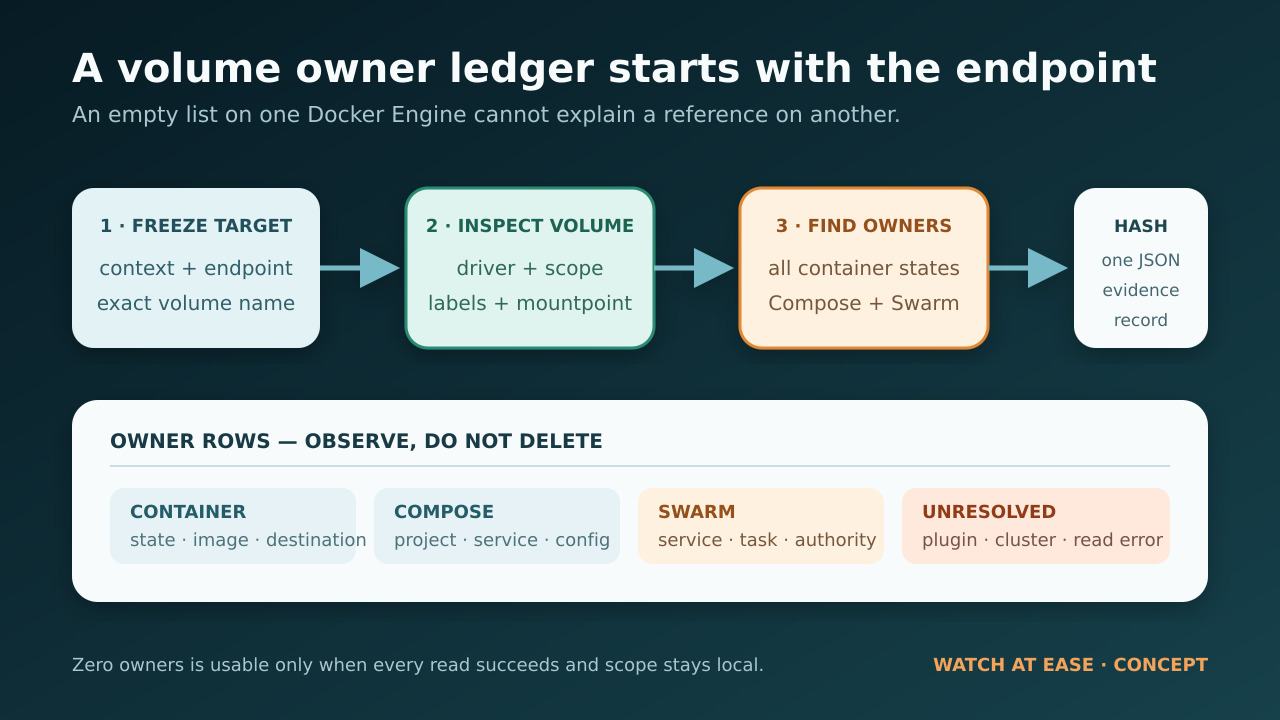
Before collecting owners, write down the exact volume name from the error and the Docker context used by the failing command. `docker context show` reports the selected context, while `docker context inspect` exposes its Docker endpoint. That pairing matters: an empty container list on one Engine does not explain a volume reference on another.
Next inspect the volume itself. Preserve its driver, scope, labels, options, creation time and mountpoint. A non-local scope or non-local driver is a stop condition, not a shortcut. Plugin and cluster volumes may have ownership outside the local container list, so a local-only result cannot prove that the volume is unused.
Also record the client and server versions. A historical Docker CLI issue showed why the printed result of a removal command is not sufficient evidence: under a specific Swarm-enabled version, the CLI could print the volume name even though the volume remained. Verify the object state independently instead of inferring success from one line of output.
Run the read-only owner ledger
The companion Node script takes a volume name and an output filename. It runs Docker only with context, version, info, volume inspect, container list, container inspect, service list and service inspect operations. It never calls stop, rm, down, prune, restart, update or deploy. The script writes one JSON document with the selected endpoint, the volume record, every matching container mount, Compose labels, Swarm task labels, matching service mounts, command failures and unresolved boundaries.
Run it from the same shell and environment that produced the error, because environment variables can change the selected context. The output file is created with an exclusive write, so it will not overwrite an earlier capture. The script prints the SHA-256 of the finished JSON; keep that digest with your incident notes so a later reviewer can tell whether the evidence changed.
A zero-owner result is meaningful only when `readErrors` and `unresolved` are both empty. If any read failed, or if the selected volume uses a plugin or cluster scope, the missing row is unknown—not proof that no owner exists.
```javascript #!/usr/bin/env node import { spawnSync } from "node:child_process"; import { createHash } from "node:crypto"; import { writeFileSync } from "node:fs"; function runDocker(args) { const result = spawnSync("docker", args, { encoding: "utf8", shell: false, maxBuffer: 16 * 1024 * 1024, }); return { ok: result.status === 0, status: result.status, stdout: result.stdout.trim(), stderr: result.stderr.trim(), }; } function parseJson(text, fallback) { try { return JSON.parse(text); } catch { return fallback; } } function dockerJson(args, errors, label, fallback = null) { const result = runDocker(args); if (!result.ok) { errors.push({ label, args, status: result.status, error: result.stderr || "docker command failed" }); return fallback; } const parsed = parseJson(result.stdout, Symbol.for("invalid-json")); if (parsed === Symbol.for("invalid-json")) { errors.push({ label, args, status: result.status, error: "docker returned invalid JSON" }); return fallback; } return parsed; } function dockerText(args, errors, label, fallback = "") { const result = runDocker(args); if (!result.ok) { errors.push({ label, args, status: result.status, error: result.stderr || "docker command failed" }); return fallback; } return result.stdout; } function compactContext(context) { return { name: context?.Name ?? null, description: context?.Metadata?.Description ?? null, orchestrator: context?.Metadata?.StackOrchestrator ?? null, dockerEndpoint: context?.Endpoints?.docker?.Host ?? null, skipTlsVerify: context?.Endpoints?.docker?.SkipTLSVerify ?? null, }; } function compactMount(mount) { return { type: mount?.Type ?? null, name: mount?.Name ?? null, source: mount?.Source ?? null, destination: mount?.Destination ?? null, driver: mount?.Driver ?? null, mode: mount?.Mode ?? null, rw: mount?.RW ?? null, propagation: mount?.Propagation ?? null, }; } function compactContainer(container, volumeName) { const labels = container?.Config?.Labels ?? {}; const mounts = (container?.Mounts ?? []) .filter((mount) => mount?.Type === "volume" && (mount?.Name === volumeName || mount?.Source === volumeName)) .map(compactMount); if (mounts.length === 0) return null; return { id: container?.Id ?? null, name: String(container?.Name ?? "").replace(/^\//, "") || null, state: container?.State?.Status ?? null, running: container?.State?.Running ?? null, created: container?.Created ?? null, image: container?.Config?.Image ?? null, mounts, compose: { project: labels["com.docker.compose.project"] ?? null, service: labels["com.docker.compose.service"] ?? null, oneoff: labels["com.docker.compose.oneoff"] ?? null, workingDir: labels["com.docker.compose.project.working_dir"] ?? null, configFiles: labels["com.docker.compose.project.config_files"] ?? null, }, swarm: { serviceName: labels["com.docker.swarm.service.name"] ?? null, serviceId: labels["com.docker.swarm.service.id"] ?? null, taskId: labels["com.docker.swarm.task.id"] ?? null, }, }; } function serviceMountsVolume(service, volumeName) { const mounts = service?.Spec?.TaskTemplate?.ContainerSpec?.Mounts ?? []; return mounts.some((mount) => mount?.Type === "volume" && mount?.Source === volumeName); } function compactService(service, volumeName) { const mounts = (service?.Spec?.TaskTemplate?.ContainerSpec?.Mounts ?? []) .filter((mount) => mount?.Type === "volume" && mount?.Source === volumeName) .map((mount) => ({ type: mount?.Type ?? null, source: mount?.Source ?? null, target: mount?.Target ?? null, readOnly: mount?.ReadOnly ?? null, volumeOptions: mount?.VolumeOptions ?? null, })); return { id: service?.ID ?? null, name: service?.Spec?.Name ?? null, labels: service?.Spec?.Labels ?? {}, mode: service?.Spec?.Mode ?? null, mounts, }; } function main() { const volumeName = process.argv[2]; const outputPath = process.argv[3] || `docker-volume-owner-ledger-${Date.now()}.json`; if (!volumeName || volumeName.startsWith("-")) { console.error("Usage: node docker-volume-owner-ledger.mjs VOLUME_NAME [OUTPUT.json]"); process.exit(2); } const errors = []; const contextName = dockerText(["context", "show"], errors, "context-show", null); const contexts = contextName ? dockerJson(["context", "inspect", contextName], errors, "context-inspect", []) : []; const version = dockerJson(["version", "--format", "{{json .}}"], errors, "version", null); const info = dockerJson(["info", "--format", "{{json .}}"], errors, "info", null); const volumes = dockerJson(["volume", "inspect", volumeName], errors, "volume-inspect", []); const containerIds = dockerText(["container", "ls", "-aq", "--no-trunc"], errors, "container-list", "") .split(/\s+/) .filter(Boolean); let containers = []; if (containerIds.length > 0) { const inspected = dockerJson(["container", "inspect", ...containerIds], errors, "container-inspect", []); containers = inspected.map((container) => compactContainer(container, volumeName)).filter(Boolean); } const swarm = { localNodeState: info?.Swarm?.LocalNodeState ?? null, controlAvailable: info?.Swarm?.ControlAvailable ?? null, nodeId: info?.Swarm?.NodeID ?? null, services: [], inspectionSkippedReason: null, }; if (swarm.localNodeState === "active" && swarm.controlAvailable === true) { const serviceIds = dockerText(["service", "ls", "-q", "--no-trunc"], errors, "service-list", "") .split(/\s+/) .filter(Boolean); if (serviceIds.length > 0) { const services = dockerJson(["service", "inspect", ...serviceIds], errors, "service-inspect", []); swarm.services = services .filter((service) => serviceMountsVolume(service, volumeName)) .map((service) => compactService(service, volumeName)); } } else if (swarm.localNodeState === "active") { swarm.inspectionSkippedReason = "Swarm is active, but this node is not a manager; service ownership remains unresolved."; } else { swarm.inspectionSkippedReason = "Swarm is not active on the selected Docker Engine."; } const volume = volumes[0] ?? null; const unresolved = []; if (!contextName) unresolved.push("Could not determine the active Docker context."); if (!volume) unresolved.push("Could not inspect the requested volume on the selected context."); if (volume?.Scope && volume.Scope !== "local") unresolved.push(`Volume scope is ${volume.Scope}; cluster or plugin ownership needs separate review.`); if (volume?.Driver && volume.Driver !== "local") unresolved.push(`Volume driver is ${volume.Driver}; vendor or plugin state is outside this local audit.`); if (swarm.localNodeState === "active" && swarm.controlAvailable !== true) unresolved.push("Swarm service inspection requires a manager node."); if (errors.length > 0) unresolved.push("One or more read-only Docker commands failed; do not infer that missing owners do not exist."); const ledger = { schema: "watchatease.docker-volume-owner-ledger.v1", capturedAt: new Date().toISOString(), volumeName, context: compactContext(contexts[0]), environmentOverrides: { dockerContextPresent: Boolean(process.env.DOCKER_CONTEXT), dockerHostPresent: Boolean(process.env.DOCKER_HOST), note: "Values are intentionally omitted; rerun from the same shell that produced the error.", }, clientVersion: version?.Client?.Version ?? null, serverVersion: version?.Server?.Version ?? null, volume: volume ? { name: volume.Name ?? null, driver: volume.Driver ?? null, scope: volume.Scope ?? null, mountpoint: volume.Mountpoint ?? null, labels: volume.Labels ?? {}, options: volume.Options ?? {}, createdAt: volume.CreatedAt ?? null, } : null, containerOwners: containers, swarm, readErrors: errors, unresolved, mutationCommandsRun: [], }; const canonical = JSON.stringify(ledger, null, 2) + "\n"; writeFileSync(outputPath, canonical, { encoding: "utf8", flag: "wx" }); const sha256 = createHash("sha256").update(canonical).digest("hex"); console.log(JSON.stringify({ outputPath, sha256, owners: containers.length, swarmServices: swarm.services.length, unresolved: unresolved.length })); if (unresolved.length > 0) process.exitCode = 3; } main(); ```
Interpret container owners without deleting them
For each matching container, review the state, image, mount destination and Compose or Swarm labels. A stopped container still represents a reproducible configuration and may contain the only record of how the application was launched. If the container belongs to Compose, record the project name, service, working directory and config-file labels before touching anything. Those labels help you return to the correct project definition rather than guessing from a volume prefix.
Do not jump from a Compose label to `docker compose down --volumes`. Docker’s own Compose documentation says that `--volumes` removes named volumes declared by the project and anonymous volumes attached to its containers; external volumes are protected, but project-managed data can still be deleted. First confirm the correct project, the intended retention policy, a usable backup, and the application owner’s approval.
Likewise, do not replace targeted evidence with `docker container prune`. It removes all stopped containers that match its scope, not only the one holding this volume. The ledger is deliberately narrow so a decision can be made about one named owner at a time.
Interpret Swarm and remote-context findings
If Swarm is active and the selected node is a manager, the ledger inspects services and records any task template that mounts the named volume. A service owner changes the decision boundary: removing a local task container may be temporary because the orchestrator can create another task from the service specification. Coordinate the change at the service or stack level and preserve the desired-state evidence first.
If Swarm is active but the current node is not a manager, service inspection remains unresolved. Move the investigation to an authorized manager or involve the cluster owner; do not conclude that an empty local list means the volume is free.
If the context endpoint is remote, confirm that the failing command and the ledger targeted the same endpoint. Never paste TLS material or credentials into the report. The script keeps only the endpoint string and selected non-secret metadata.
Use a stop/go matrix, not a generic fix list
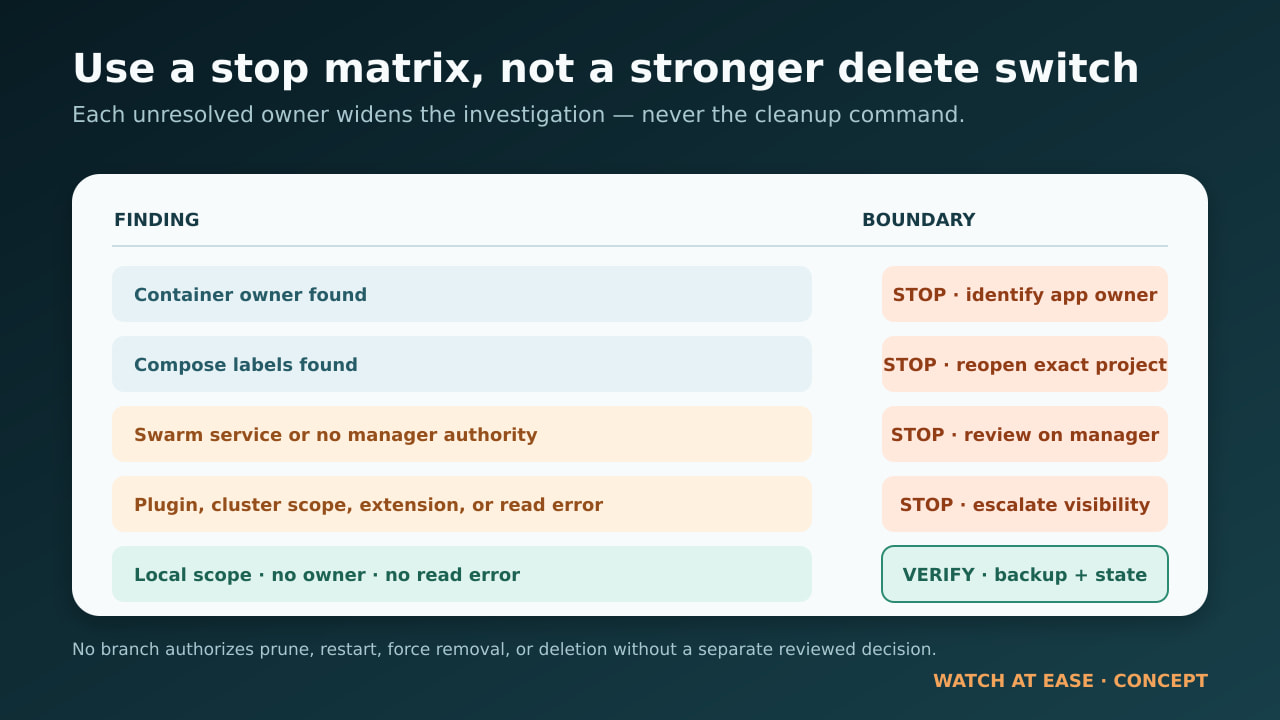
Container owner found: stop. Identify the application owner, confirm why the container still exists, verify a restorable backup, and decide whether that specific container should be preserved, recreated, or removed. The ledger does not make that business decision.
Compose labels found: stop. Reopen the exact Compose project and compare its current configuration with the recorded labels. Do not run a volume-removing teardown until the project scope and retention policy are explicit.
Swarm service found—or Swarm inspection unavailable: stop. Review the service or stack on a manager. A local container action cannot prove that desired state has changed.
Plugin driver, cluster scope, Desktop extension, or failed read: stop. Escalate to the relevant driver, cluster, Desktop extension, or platform owner. Missing visibility is not absence.
No owners, no errors, local driver and local scope: cross-check Docker Desktop’s in-use tab if available, verify the volume still exists, and preserve or test a backup before considering any cleanup. If the Engine still reports an unexplained conflict, collect version and daemon logs for support. Do not convert uncertainty into a prune or restart recommendation.
Why this is safer than --force, prune or restart
The `--force` option is commonly misunderstood. Historical Docker discussion shows why a stopped container can legitimately keep a volume protected: the container is not gone and can be started again. The safe response is to understand that owner, not to search for a stronger deletion switch.
Prune commands widen the blast radius. A system prune targets stopped containers, networks, images and build cache according to its options; a volume prune can include unused named volumes when widened. Neither command answers which application owns this specific data.
A daemon restart may change transient state, but it also changes the system while erasing part of the pre-change evidence. If support ultimately recommends it, capture the ledger, Docker versions and logs first. The goal is not to make the error disappear; it is to make the next action reviewable and reversible wherever possible.
What this guide does not prove
A clean ledger does not prove that deleting the volume is safe. It does not validate application-consistent backups, database quiescence, plugin-side snapshots, cluster replication, Desktop extension ownership or recovery procedures. It also cannot inspect Swarm services from a worker that lacks manager authority.
Keep the JSON and its SHA-256 with the incident record. If any owner, endpoint, label, driver, scope, permission or backup question remains unresolved, stop before cleanup. The most useful outcome may be a precise handoff to the application, cluster or storage owner—not a deletion command.