Technology · PRACTICAL GUIDE
Docker Desktop’s WSL disk is huge? Measure three layers before you prune or compact
A read-only audit separates Docker objects, the WSL guest filesystem and the Windows VHDX before any destructive cleanup or offline compaction.
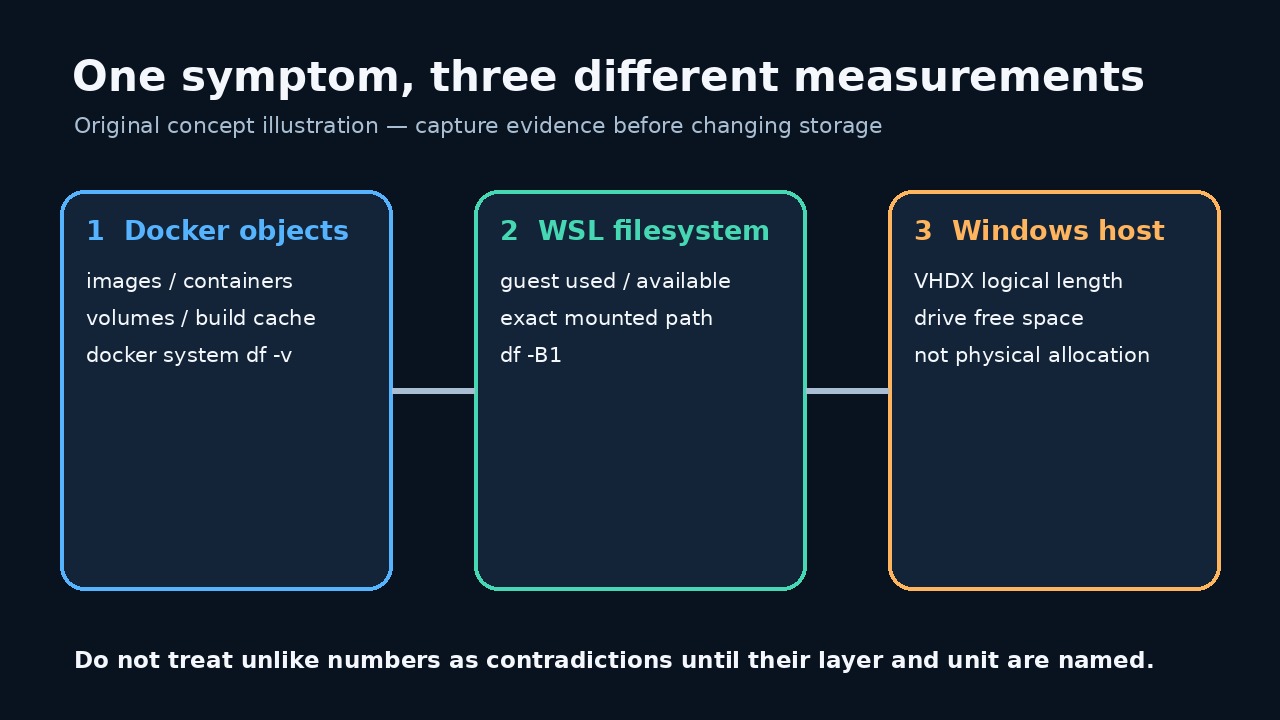
A Docker Desktop VHDX can stay large after images are deleted because Docker object accounting, guest-filesystem occupancy and the Windows host file are three different measurements.
This guide supplies a tested read-only JSON audit. It runs no prune, deletion, WSL shutdown, sparse conversion or VHD compaction command.
Name the three layers before you compare numbers
A large VHDX, a full guest filesystem and a large Docker object total are not interchangeable facts. Docker's report covers engine-managed categories; df measures a mounted filesystem; the Windows file length measures the container that stores that filesystem. Record all three before deciding what is wrong.
A discrepancy can be expected. A dynamically expanding VHD can remain large after files are deleted, while a genuinely full guest filesystem can also be caused by data that Docker's object summary does not classify. A single number cannot distinguish those cases.
Preserve a baseline and use an explicit path
Quit any plan to prune or compact long enough to preserve a baseline. In Docker Desktop, copy the exact disk-image path from the current settings instead of guessing an old default. The supplied audit requires that exact VHDX path and refuses to scan the drive for candidates.
Run it from a normal terminal first. It records failures instead of converting them into zeros. A missing Docker daemon, unavailable distro or changed guest mount is unresolved evidence and should stop interpretation.
Save and run the read-only audit
Save the complete program below as audit_docker_wsl_disk.mjs using UTF-8. Check that the filename does not end in .txt. The program invokes only docker version, docker system df -v, WSL status/list and df; it reads the VHDX file metadata and containing filesystem statistics.
Run node --check audit_docker_wsl_disk.mjs, then run node audit_docker_wsl_disk.mjs "C:\exact\path\docker_data.vhdx" > docker-wsl-disk-before.json. Replace the example with the exact path from your installation. Redirecting output keeps a dated evidence file.
import { spawnSync } from 'node:child_process'; import { stat, statfs } from 'node:fs/promises'; import { dirname, resolve } from 'node:path'; import { pathToFileURL } from 'node:url'; const clip = (value, limit = 200000) => String(value ?? '').slice(0, limit); export function runCommand(file, args, spawn = spawnSync) { const result = spawn(file, args, { encoding: 'utf8', timeout: 30000, windowsHide: true, shell: false, maxBuffer: 1024 * 1024, }); return { command: [file, ...args], mutating: false, status: Number.isInteger(result.status) ? result.status : null, signal: result.signal ?? null, stdout: clip(result.stdout), stderr: clip(result.stderr), error: result.error ? String(result.error.code || result.error.message) : null, }; } export async function buildAudit({ vhdxPath, distro = process.env.DOCKER_WSL_DISTRO || 'docker-desktop', guestPath = process.env.DOCKER_WSL_MOUNT || '/tmp/docker-desktop-root/mnt/docker-desktop-disk', platform = process.platform, fsStat = stat, fsStatfs = statfs, spawn = spawnSync, } = {}) { if (!vhdxPath || typeof vhdxPath !== 'string') throw new Error('VHDX_PATH_REQUIRED'); if (!/^[A-Za-z0-9._-]+$/.test(distro)) throw new Error('INVALID_DISTRO_NAME'); if (!guestPath.startsWith('/') || guestPath.includes('\0')) throw new Error('INVALID_GUEST_PATH'); const exactPath = resolve(vhdxPath); const [file, hostFs] = await Promise.all([fsStat(exactPath), fsStatfs(dirname(exactPath))]); if (!file.isFile()) throw new Error('VHDX_NOT_A_FILE'); const command = (fileName, args) => runCommand(fileName, args, spawn); const commands = { dockerVersion: command('docker', ['version', '--format', '{{json .}}']), dockerObjects: command('docker', ['system', 'df', '-v']), wslStatus: command('wsl.exe', ['--status']), wslDistributions: command('wsl.exe', ['--list', '--verbose']), guestFilesystem: command('wsl.exe', ['-d', distro, '--', 'df', '-B1', guestPath]), }; return { schemaVersion: 1, capturedAt: new Date().toISOString(), scope: 'read-only Docker Desktop / WSL disk evidence', safety: { mutatingCommandsRun: false, notRun: ['docker system prune', 'docker * prune', 'wsl --shutdown', 'diskpart compact vdisk', 'Optimize-VHD', 'wsl --manage --set-sparse', 'file deletion'], }, host: { platform, vhdxPath: exactPath, fileLengthBytes: Number(file.size), containingFilesystem: { blockSize: Number(hostFs.bsize), blocks: Number(hostFs.blocks), blocksFree: Number(hostFs.bfree), blocksAvailable: Number(hostFs.bavail), }, limitation: 'fileLengthBytes is the file logical length. This audit does not claim to measure NTFS allocated clusters or reclaimable physical bytes.', }, docker: { version: commands.dockerVersion, objects: commands.dockerObjects, limitation: 'docker system df reports Docker-managed objects; it is not the Windows VHDX file size and can omit other guest-side use.', }, wsl: { distro, guestPath, status: commands.wslStatus, distributions: commands.wslDistributions, guestFilesystem: commands.guestFilesystem, limitation: 'A failed guest-path check is an unresolved measurement, not proof that the filesystem is empty.', }, interpretationOrder: [ 'Preserve this file before changing anything.', 'Use Docker object output to identify Docker-managed and potentially reclaimable categories.', 'Use guest df output to decide whether the WSL filesystem itself is near full.', 'Compare those readings with the host VHDX logical length and host filesystem free space.', 'Choose a change only after the mismatched layer is identified; rerun the same audit afterward under a new filename.', ], }; } async function main() { if (process.argv.length !== 3) throw new Error('USAGE: node audit_docker_wsl_disk.mjs <exact-vhdx-path>'); const report = await buildAudit({vhdxPath: process.argv[2]}); process.stdout.write(`${JSON.stringify(report, null, 2)}\n`); } if (import.meta.url === pathToFileURL(process.argv[1] || '').href) { main().catch(error => { process.stderr.write(`Audit failed without changing Docker or WSL: ${error.code || error.message}\n`); process.exitCode = 1; }); }
Program SHA-256: d43b227f591fff111404afb1505ab5552965d8095eb907d60aa9c680c12785bb. The five synthetic tests passed on Linux with mocked Docker/WSL commands, Node v24.19.0. They covered a successful capture, missing path, suspicious distro name, command failure and non-file path. No real Windows or Docker Desktop environment was tested.
Read Docker object output first
docker system df -v distinguishes images, containers, local volumes and build cache. Docker documents that prune commands remove only defined unused categories and that volumes have separate safeguards. Do not infer that every byte in a VHDX is reclaimable from these tables.
If the output shows a category you may remove, review the object-specific command, filters and warning before making a separate change plan. This audit never supplies --force and never performs cleanup.
Check whether the WSL guest is actually full
The df row supplies total, used and available bytes for the configured guest path. Microsoft's WSL guidance explains that the capacity shown inside the VHD is not the same as the host computer's remaining space. A failed path check is not an empty disk.
If guest use is unexpectedly high while Docker totals are low, investigate guest-side consumers before compacting. One independent report found growing container logs that were not explained by the expected Docker size summaries. Preserve evidence before deleting a container or log.
Interpret the Windows VHDX length carefully
The report records the VHDX logical file length and free space on its containing filesystem. It does not measure NTFS allocated clusters and must not label its file length as physical or reclaimable bytes.
Microsoft documents that dynamically expanding VHDs grow as files are added but do not automatically reduce when files are deleted. Its compact-vdisk command requires a detached or read-only dynamic disk. Those facts explain a possible branch; they do not authorize an immediate shutdown or compaction.
Choose the smallest justified next branch
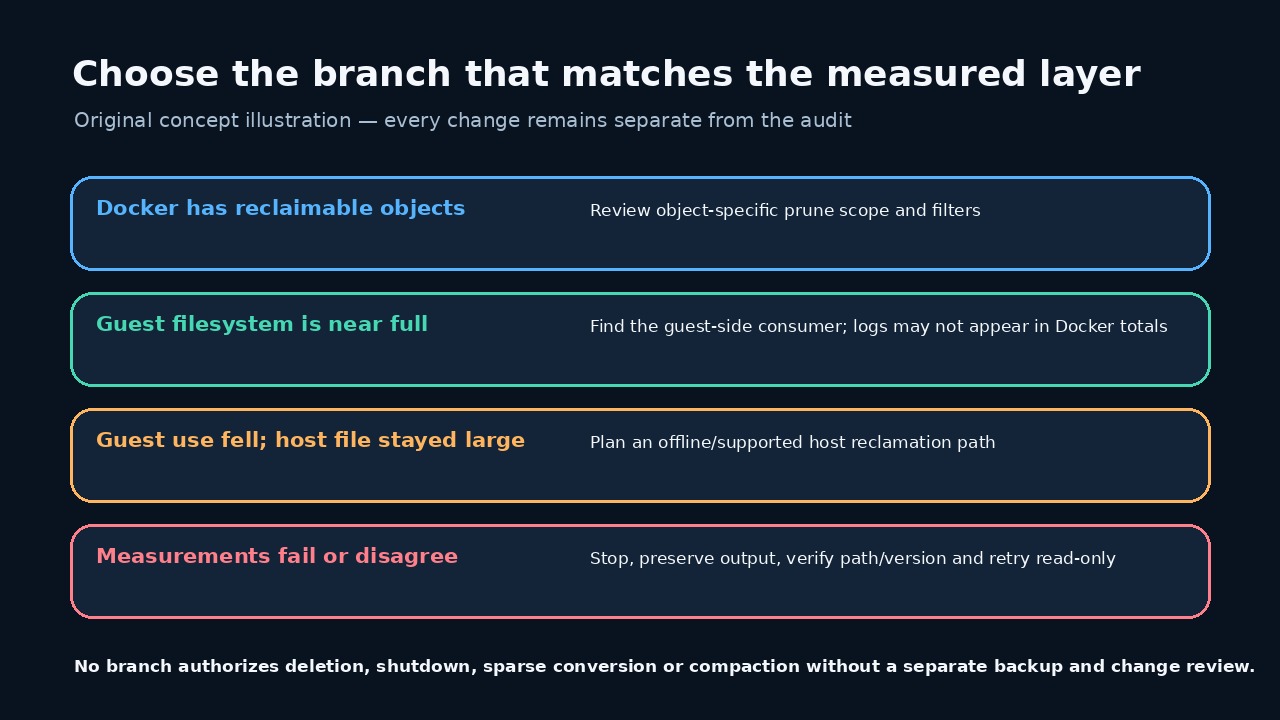
If Docker shows known unused objects, review only the relevant prune scope. If the guest filesystem is near full but Docker totals are small, find the guest-side consumer. If guest use has fallen yet the host file remains large, plan a separately backed-up, supported offline reclamation procedure for your Windows and Docker versions.
If any layer failed, paths changed or the numbers cannot be reconciled, stop. Do not unregister a WSL distribution, purge Docker data, enable sparse mode or compact a VHDX merely to make the figures match.
Rerun the same audit after one approved change
After one independently reviewed change, rerun the same program to a new filename. Compare Docker categories, guest used/available bytes, VHDX logical length and host free space. Keep both reports and the exact action that occurred between them.
A smaller number is not proof that workloads are intact. Start the required containers, check volumes and bind mounts, and verify application data separately. This guide measures storage layers; it does not test backups, data integrity or application behavior.