Technology · PRACTICAL GUIDE
Python cannot find a time zone? Separate missing data from the wrong key before changing settings
Use the failing interpreter, compare a known control key with the required zone, and verify the deployed data source in a fresh process.
An exception mentioning UTC does not mean UTC should be replaced. First determine whether the failing process can access time-zone data and whether the requested key exists.
1. Freeze the failing runtime and intended key
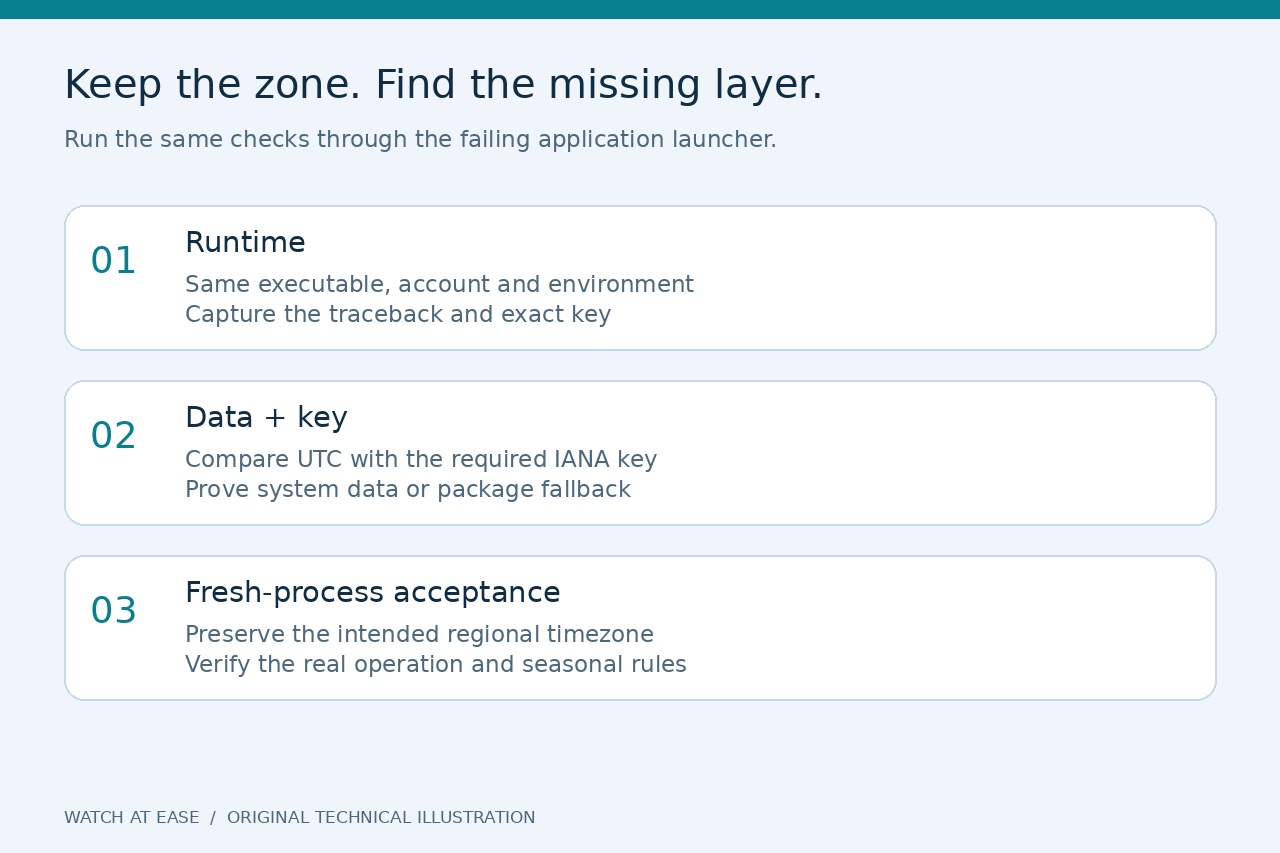
Keep the complete traceback and the exact key, including capitalization and underscores. Run a small diagnostic through the same executable, service account, container or virtual environment that failed. Record sys.executable, sys.version, zoneinfo.TZPATH and os.environ.get('PYTHONTZPATH'). An interactive shell succeeding elsewhere is a comparison result, not proof that the application is repaired.
Also record importlib.util.find_spec('tzdata') in that runtime. A package visible to one interpreter may be absent from another. Do not change the application's business timezone, disable timezone support or replace regional rules with a fixed offset merely to make startup succeed.
2. Compare a control key with the required key
In a fresh process, try ZoneInfo('UTC') and then ZoneInfo with the exact required key. If both fail, investigate data availability first. If UTC succeeds while the required key fails, examine spelling, the deployed dataset and whether that specific key is included. This is a diagnostic branch, not proof that every UTC failure has the same cause.
Use a verified IANA location key such as America/New_York when that is the intended region. America/NewYork and UTC+8 failed in our isolated test even with tzdata available. Do not copy an arbitrary working city from an answer: it can change historical offsets or daylight-saving behavior.
3. Prove which data source the deployment can use
zoneinfo searches configured system directories and then the Python tzdata package. Windows installations often need the package; a minimal Linux image can also lack the system files. Decide which dependency your release will own, then make it part of the reproducible application or image build rather than an undocumented repair in one shell.
For a package-based deployment, invoke the approved installer through the actual application interpreter—for example, the exact Python executable followed by -m pip install tzdata—and declare the dependency in the project's normal manifest. If the environment is managed or externally controlled, update its build configuration instead of using sudo or bypass flags. For a system-data deployment, have the image or OS owner provision its supported timezone dataset.
4. Use isolated comparisons instead of changing a live cache
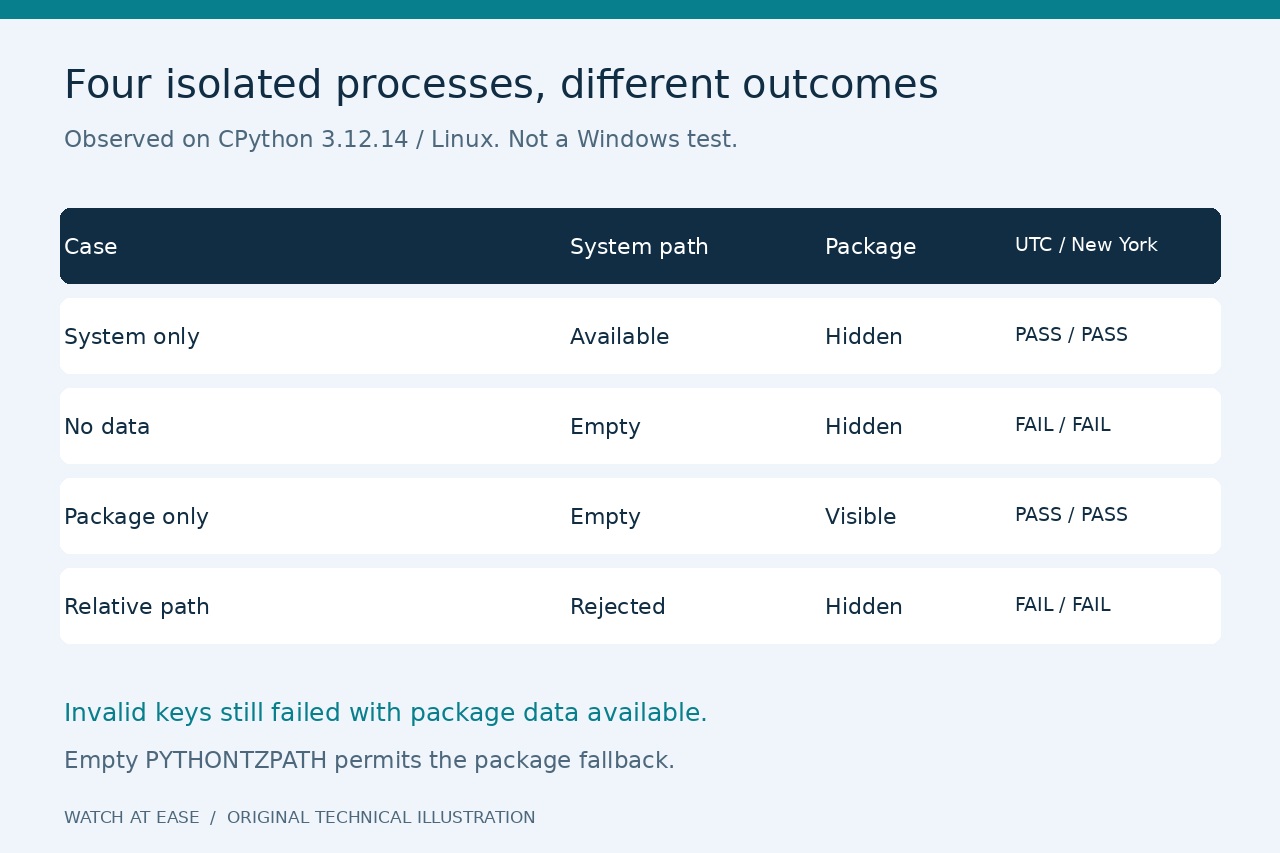
We ran four subprocess cases on CPython 3.12.14 on Linux. With site packages disabled but system paths retained, UTC and America/New_York loaded. With site packages disabled and PYTHONTZPATH empty, both failed. With normal site packages and an empty PYTHONTZPATH, both loaded from the available package fallback. A relative PYTHONTZPATH produced InvalidTZPathWarning and no usable system path in that test.
These cases demonstrate why 'the package is not installed' and 'the module cannot find data' are different observations. They do not reproduce Windows locally. Use the empty-path setting only in a controlled test when proving package fallback; do not push it into production without deciding the data-version policy. reset_tzpath does not clear existing ZoneInfo objects, so use a new process for an unambiguous acceptance test rather than clearing a running service's cache.
5. Verify the real launch and seasonal behavior
Restart through the original launcher after the smallest verified repair. Load the unchanged required key, execute the operation that originally failed and preserve its result. For a regional zone, compare representative winter and summer dates against the application's expected rules. Our package-only test returned UTC−05:00 for New York on January 15, 2026 and UTC−04:00 on July 15; these are two observations, not a complete historical-timezone test.
Record the executable, deployment image or environment, selected dependency, exact key and before/after output. If a fresh shell works but the service still fails, collect the same ledger inside that service context. If the key still fails with known data available, investigate its exact name and dataset version; stop guessing cities or repeatedly installing into unrelated environments.