Technology · PRACTICAL GUIDE
Attempted relative import with no known parent package? Prove the execution context first
The leading dot is rarely the real mystery. Capture how Python launched the file, inspect __package__ and __spec__, then choose one honest entry-point contract: a package module, an installed command, or a standalone script.
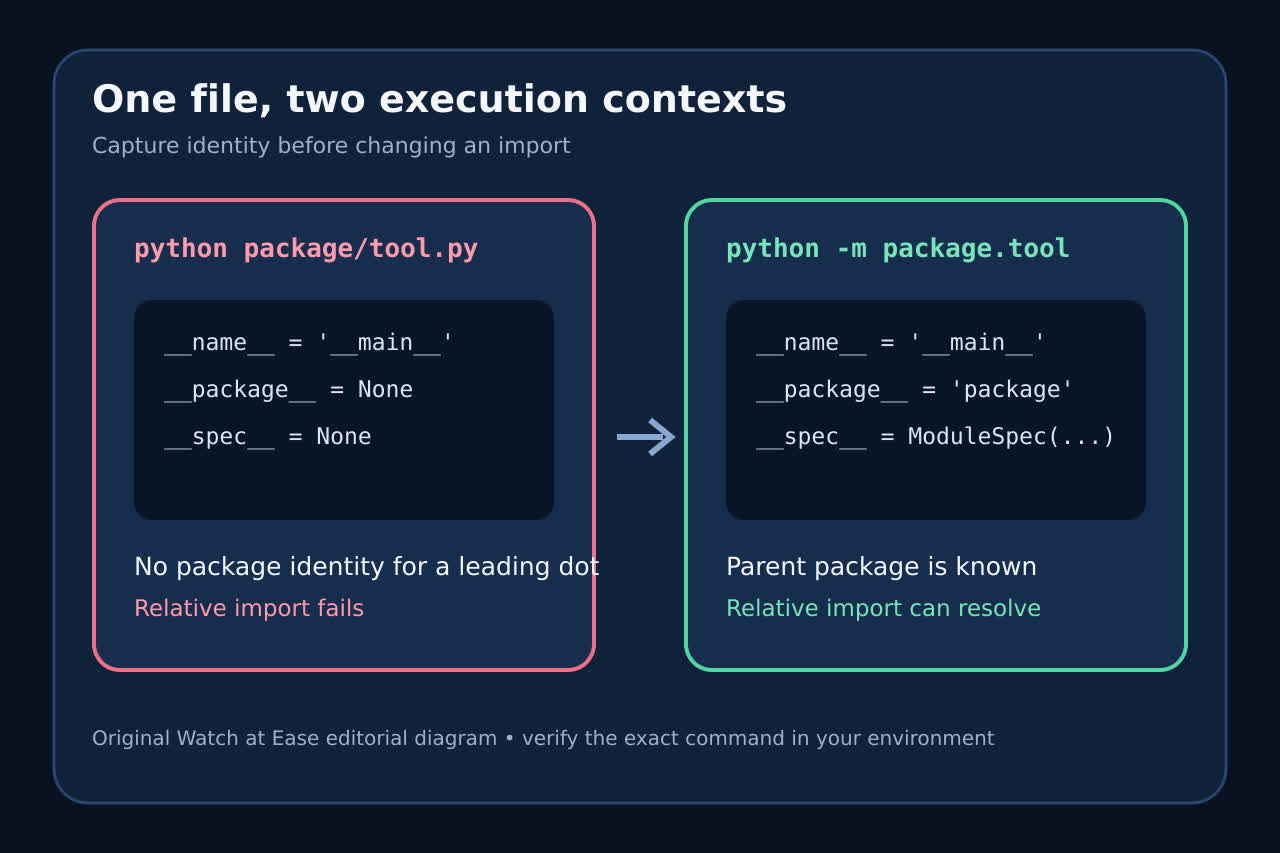
Run the same command that failed and print the execution identity before changing any import: __name__, __package__, __spec__, sys.argv, the current working directory and sys.path[0]. A file can sit inside a package-shaped directory yet still execute as a top-level __main__ module. In that direct-file case Python documents that __main__.__spec__ is None, so a leading dot has no recorded parent package to anchor it.
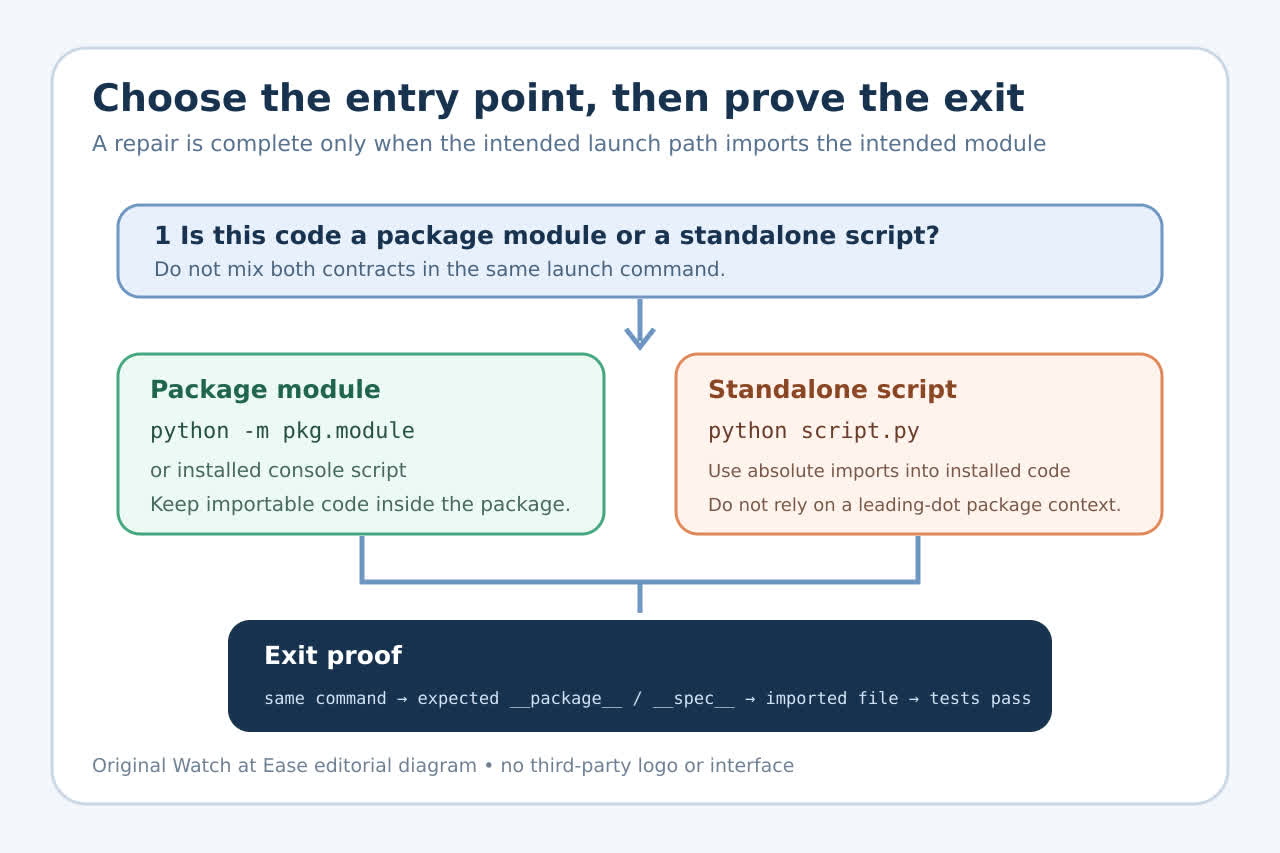
The durable repair is not “try more dots.” Decide whether the code is a package module, an installed command or a standalone script. Launch a package module from the directory that contains its top-level package with python -m package.module; expose a stable application command through [project.scripts]; or keep the tiny standalone launcher outside the package and import application code absolutely. Then repeat the intended command and record the module origin and package metadata as the exit proof.
1. Capture the failing launch, not a cleaner substitute
Copy the exact command, IDE run configuration, service command or test invocation that produced the traceback. Add a temporary diagnostic before the failing import: print __name__, __package__, repr(__spec__), sys.argv, os.getcwd() and sys.path[0]. Do not “confirm” the issue with a different terminal command; the launch boundary is the evidence.
If the file was invoked as python package/tool.py, expect __name__ to be __main__ and __spec__ to be None. The script directory can appear on sys.path, but that search entry does not give the executing module a parent package. The error is therefore about identity as well as searchability.
2. Prove the package root and module name
Write the fully qualified module name that you expect, such as acme.tools.report, and identify the directory that contains the top-level acme package. From that containing directory, run python -m acme.tools.report. If Python cannot find acme, repair the install or the chosen working directory; do not insert a guessed parent directory into sys.path inside the module.
Inspect __package__ and __spec__.name under the -m launch. They should identify the package and module you intended. If they name another installed copy, stop: an editable install, duplicate checkout or launcher environment is selecting different code. Print the imported module __file__ before making further changes.
3. Choose one entry-point contract
For package-internal tools, keep relative imports and launch the module with -m from the package root context. For applications meant to be run after installation, put startup logic in an importable main function and declare a [project.scripts] entry. The generated command imports that function instead of pretending an internal source file is a standalone program.
For a genuinely standalone script, use absolute imports into installed application code and keep the launcher outside the package internals. A file should not simultaneously depend on leading-dot package imports and promise that arbitrary direct-file execution is a supported entry point.
4. Reject repairs that only move the accident
Adding __init__.py can define a regular package, but it does not by itself change how python path/to/file.py initializes __main__. Changing a relative import to an absolute name can also appear to work while selecting a different checkout. Global PYTHONPATH settings and unconditional sys.path.insert calls hide the launch error and make behavior depend on the caller.
A guarded compatibility shim is justified only when an upstream tool requires a documented nonstandard launch. Record that contract and test it separately. Do not copy a package directory into another project, install globally with elevated privileges or rename modules until the identity evidence shows which boundary is actually wrong.
5. Define the exit proof before removing diagnostics
Repeat the exact intended launch path. Record sys.executable, __package__, __spec__.name, sys.path[0] and the imported dependency __file__. A package-module launch should identify the expected package; an installed command should import the intended installed module; a standalone script should import its dependency by an absolute, documented name.
Run the smallest unit test that imports the module, then the normal command from a clean shell or service environment. Remove the temporary diagnostic only after both paths select the same code. If the failure remains, the captured values now distinguish package identity, search path, wrong checkout and framework-launcher problems without another blind import rewrite.