Technology · PRACTICAL GUIDE
Python NamedTemporaryFile on Windows: reopen it and still clean it up
The first PermissionError and the later unlink failure have different causes. Choose where deletion happens, then close every secondary handle before that boundary.
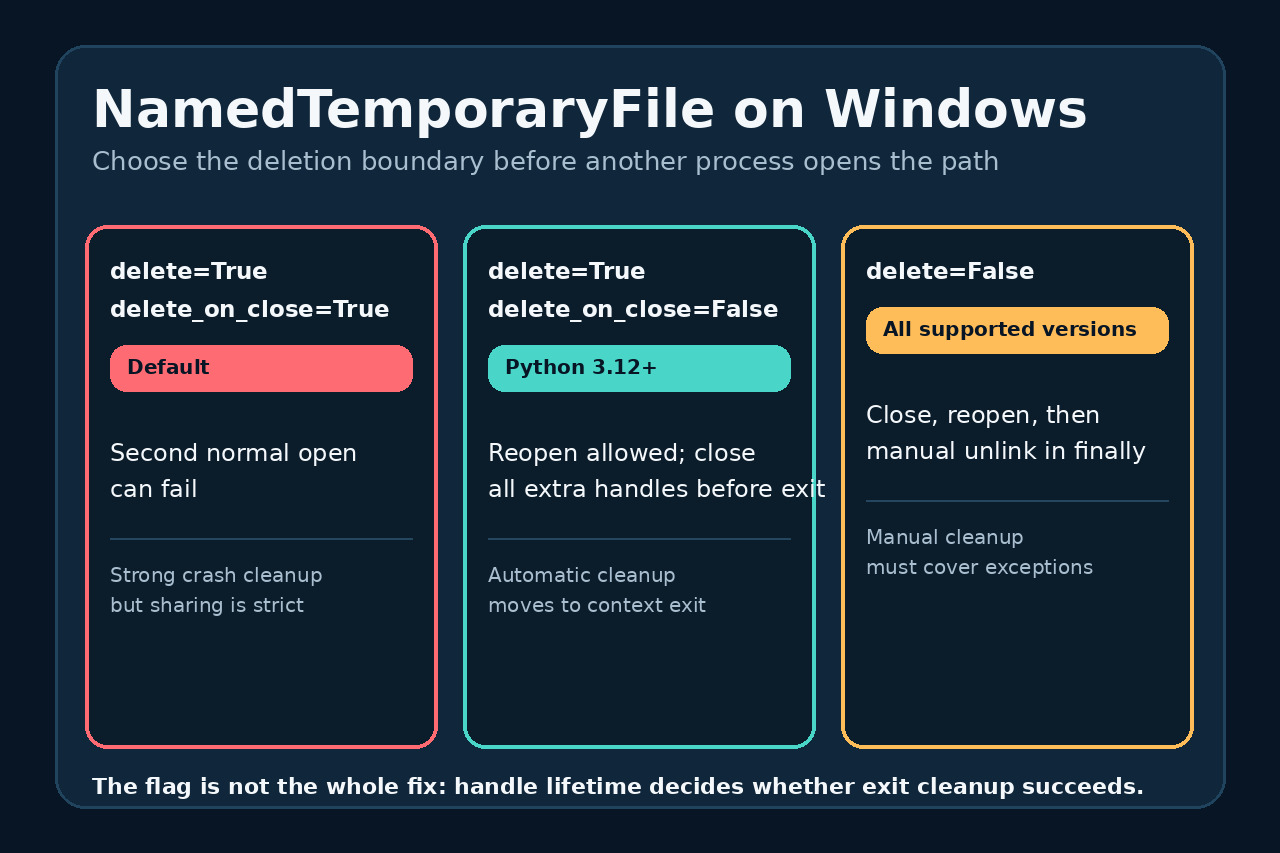
A NamedTemporaryFile can fail at two different moments on Windows. With the default settings, another program may be unable to open the path at all. After changing the flags, that program may open it successfully but leave a handle alive, so cleanup fails when the context exits.
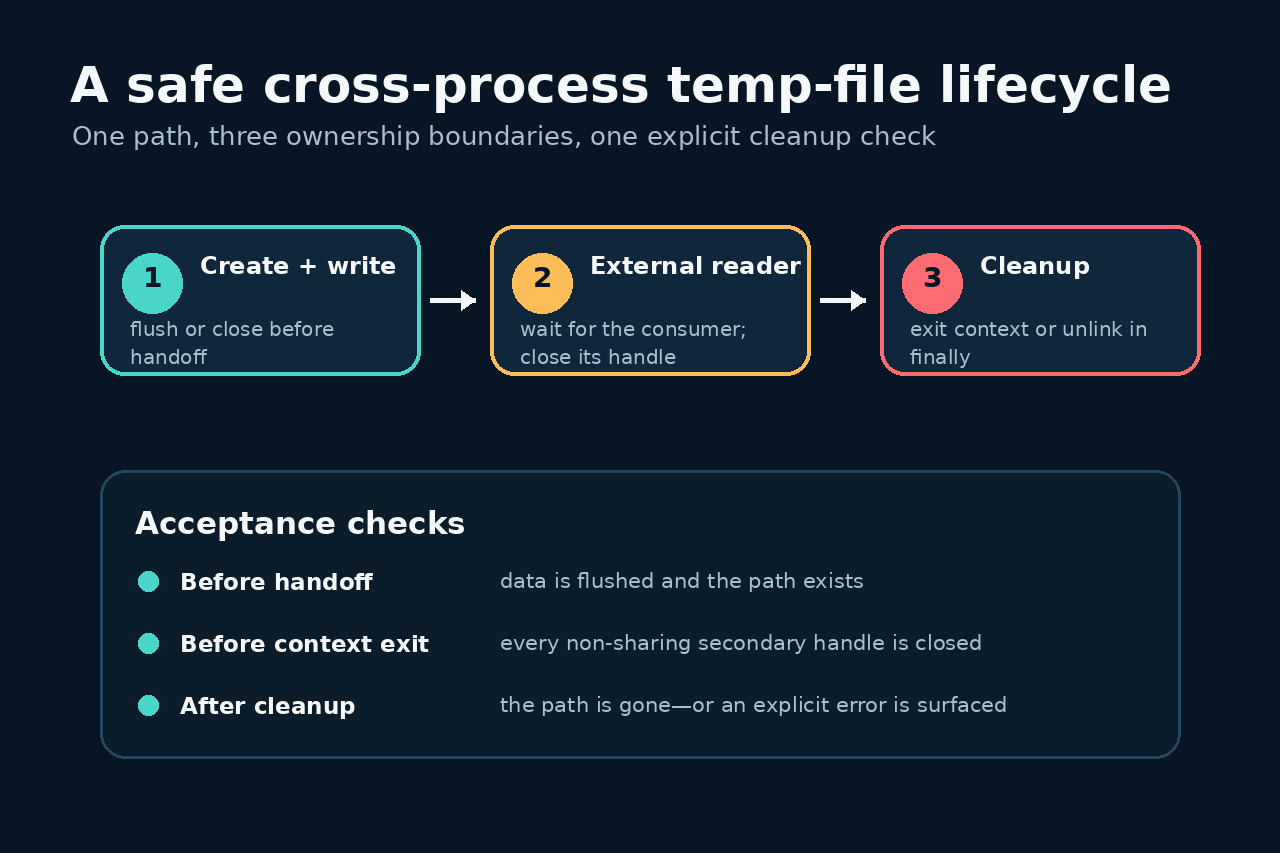
Treat the temporary path as a handoff with an ownership boundary. Decide whether deletion belongs to file close, context exit or your own finally block; then make every consumer finish before that boundary.
1. Identify which PermissionError you have
If the subprocess, browser or upload library cannot open the path, the creator is still holding a Windows handle with sharing conditions the second opener does not satisfy. CPython's default delete=True and delete_on_close=True uses O_TEMPORARY on Windows; builtin open and many external programs do not request matching delete sharing.
If the consumer reads the file but context exit or os.unlink later fails, look for a different handle that is still open. Microsoft documents that sharing choices stay active until a handle closes and deletion waits for compatible handles. Changing one flag cannot close a requests upload stream, browser, subprocess or duplicate file object for you.
2. Prefer context-exit cleanup on Python 3.12+
For an ordinary external opener, use with NamedTemporaryFile(delete=True, delete_on_close=False) as tmp:. Write the data, flush it when the consumer reads while tmp remains open, or close tmp inside the block if the consumer requires exclusive access. The path remains until the with block exits, when Python attempts os.unlink.
Wait for the subprocess and close every file object opened for an upload before leaving the block. A normal secondary open that does not share delete access must be closed first. If the containing directory does not grant delete access, the unlink can still raise PermissionError; test that permission at the actual deployment directory rather than hiding the exception.
3. Use a finally block on older Python
Before Python 3.12, or when a library closes the wrapper before it can hand off the path, use delete=False. Close the NamedTemporaryFile, call the consumer, and remove the path in finally. Because delete=False makes delete_on_close irrelevant, cleanup is now entirely your responsibility.
Keep the path in a variable only after creation succeeds. In finally, close any secondary stream before os.unlink. Do not use tempfile.mktemp to avoid the problem: it returns a name without securely creating the file and introduces a race that NamedTemporaryFile was designed to avoid.
4. Audit the whole handle lifecycle
Before handoff, confirm the write is flushed or the creator is closed as required and the path exists. During handoff, wait for the consumer to finish rather than launching it asynchronously and immediately leaving the context. For libraries that accept a file object, wrap open(tmp.name, 'rb') in its own with block so the upload handle closes deterministically.
Before cleanup, enumerate your program's file objects, subprocesses and memory mappings. After cleanup, assert that the path is gone or surface the exact error. A retry loop may mask an unclosed handle; it is not a substitute for establishing which owner still holds the file.
5. Keep the portability boundary explicit
POSIX normally allows reopening a named temporary file while it is open, but that does not make a Windows-only lifecycle safe. Use the same explicit handoff and cleanup sequence on every platform so tests do not pass on macOS or Linux while production fails on Windows.
The official choices have different crash behavior. Default delete-on-close is strongest when every opener shares deletion; context-exit cleanup is easier for ordinary programs but can be interrupted; delete=False offers the broadest compatibility but demands a finally block and startup cleanup for abandoned files. Record the chosen boundary in code review and test both consumer failure and cleanup failure.