Technology · PRACTICAL GUIDE
pip says externally managed? Choose the install target before forcing anything
Prove the active interpreter, marker and package owner, then choose a distro package, venv, pipx or a documented controlled override.
This refusal says the active Python belongs to another package manager; it does not say every pip install is impossible.
The safe answer depends on what you are installing and who owns the interpreter. Prove both before choosing a command.
Freeze the interpreter and the complete error
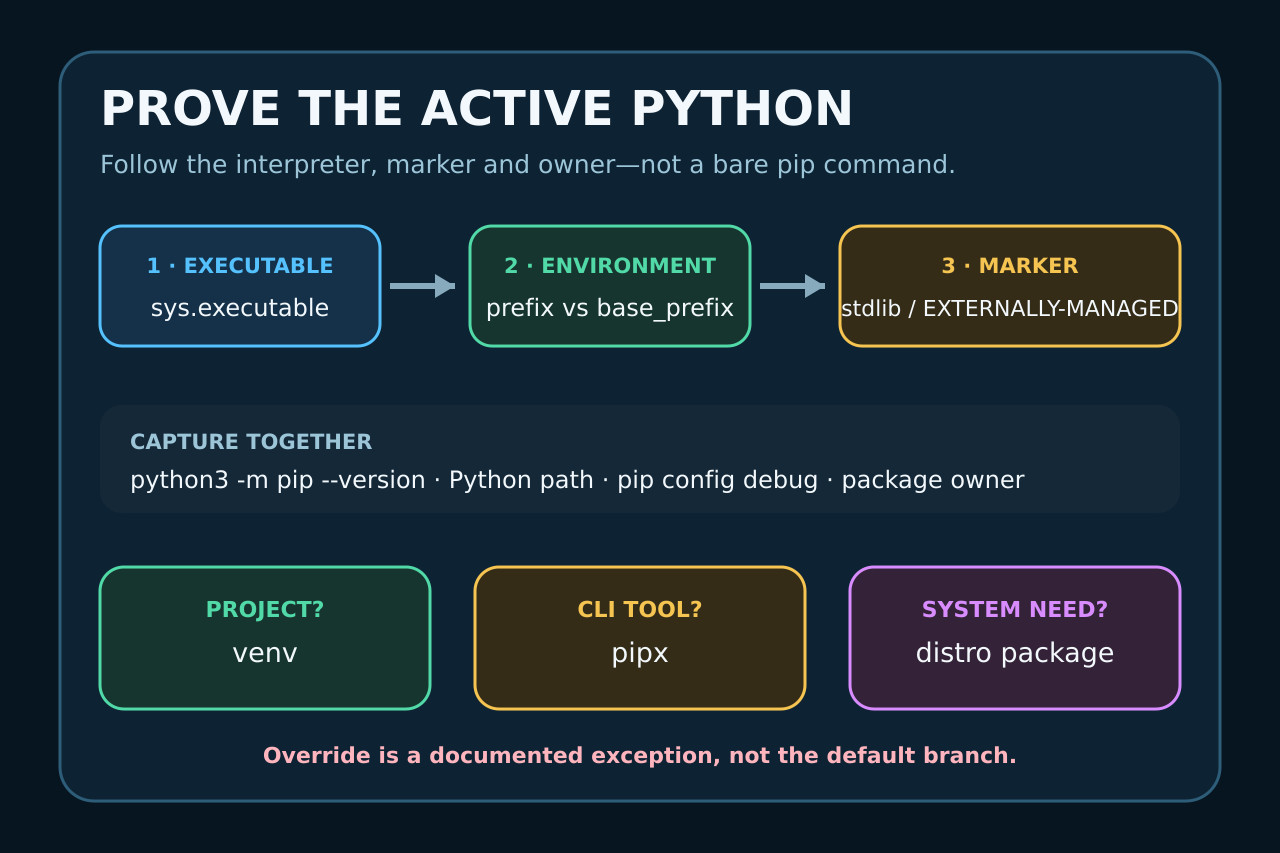
Copy the full message, the command, the requested package and the shell or automation context before changing anything. Run python3 -m pip --version rather than a bare pip command, then record command -v python3, Python’s sys.executable, sys.prefix, sys.base_prefix and sysconfig.get_path('stdlib'). These values prove which interpreter, pip and standard-library directory produced the refusal. Keep the observed path, package owner and rollback evidence with this branch before moving on.
Do not delete EXTERNALLY-MANAGED, upgrade the system pip, or add a permanent break-system-packages setting as a first response. The marker describes ownership of an interpreter, not corruption of one package. Preserve pip config debug and environment variables so a wrapper or global override is not mistaken for the default behavior. Keep the observed path, package owner and rollback evidence with this branch before moving on.
Classify what you are trying to install
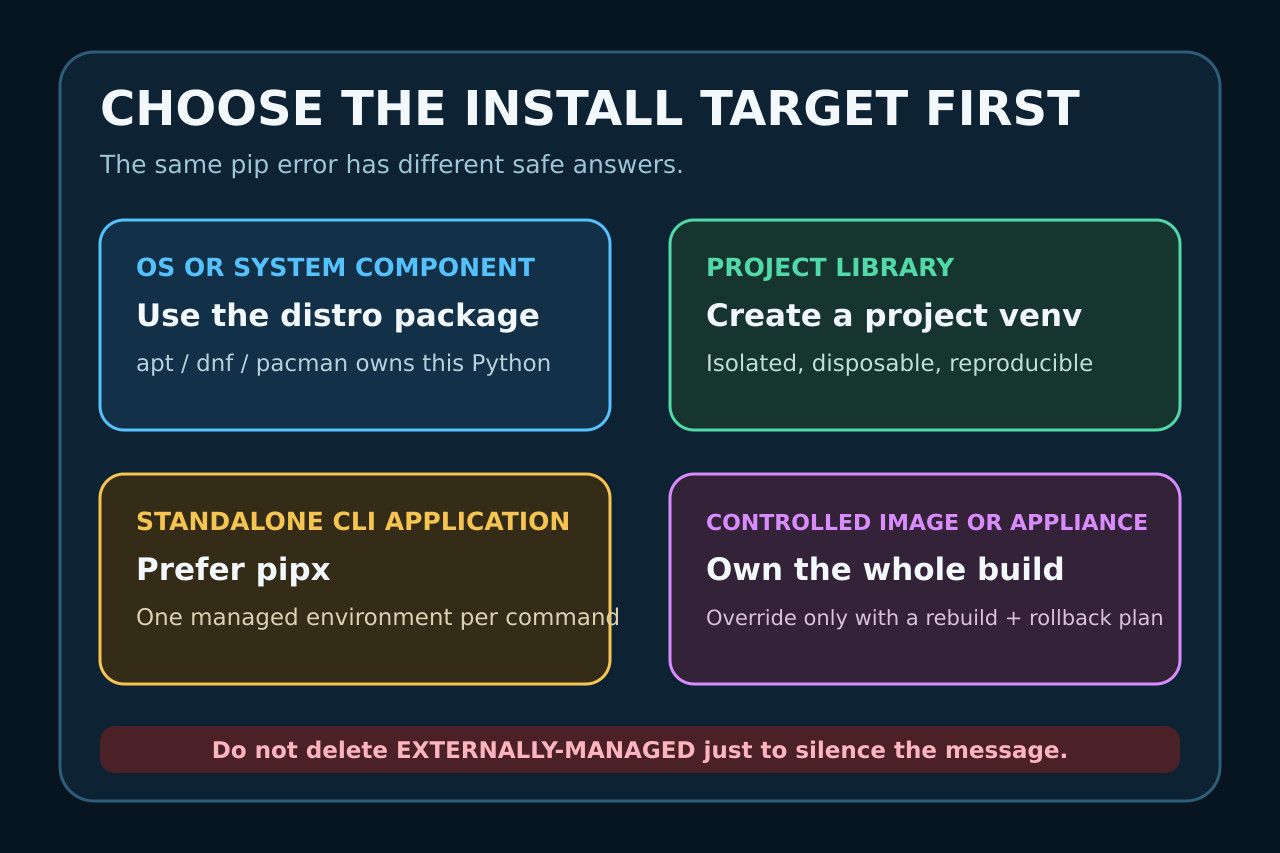
Choose the install target before the command. A library needed by one project belongs in that project’s virtual environment. A standalone Python command is usually better installed with pipx. A component required by the operating system or an OS-managed service should come from the distro package when available. A controlled container or appliance is a separate branch because its builder owns the whole image lifecycle. Keep the observed path, package owner and rollback evidence with this branch before moving on.
This classification is the missing decision step behind many one-line fixes. The same package name can be used as an imported library, a CLI application, a system dependency or an image build input. The safe tool and rollback path change with that role. Keep the observed path, package owner and rollback evidence with this branch before moving on.
Verify the marker and package owner
The canonical specification says installers check two conditions: whether Python is outside a virtual environment and whether EXTERNALLY-MANAGED exists in the standard-library directory selected by sysconfig. Inspect that exact path instead of assuming /usr/lib/pythonX.Y. Also identify which package manager installed the interpreter and target package using the distro’s query tools. Keep the observed path, package owner and rollback evidence with this branch before moving on.
If sys.prefix differs from sys.base_prefix, you are already in a virtual environment and should verify that python -m pip points inside it. If the marker exists for the base interpreter, treat the OS distributor as the owner. Removing the file changes the safety signal without changing ownership, update policy or rollback responsibility. Keep the observed path, package owner and rollback evidence with this branch before moving on.
Use a project virtual environment for libraries
For a project dependency, create an environment from the intended interpreter, for example python3 -m venv .venv, activate it or invoke .venv/bin/python directly, and then use python -m pip install. Confirm sys.executable and pip --version point into .venv before installing requirements. Keep the observed path, package owner and rollback evidence with this branch before moving on.
Virtual environments isolate their installed packages from the base interpreter and are meant to be disposable and recreated. Record requirements or a lock file rather than treating .venv as unique data. If venv creation is missing on a Debian-family system, install the distro’s venv support rather than forcing packages into system Python. Keep the observed path, package owner and rollback evidence with this branch before moving on.
Use pipx for a command and the distro for system needs
If the desired result is a command such as an end-user application, pipx can maintain one isolated environment per application while exposing its entry point. Verify the command’s purpose and data paths before replacing an existing distro package. For OS components, prefer apt, dnf, pacman, brew or the platform’s supported mechanism when that is the declared owner. Keep the observed path, package owner and rollback evidence with this branch before moving on.
Do not assume pip --user is an escape hatch: the externally managed rule intentionally covers the base interpreter even when user-site packages could still affect its import path. A package manager boundary is about who owns upgrades and removals, not only whether the current user has write permission. Keep the observed path, package owner and rollback evidence with this branch before moving on.
Reserve override for a controlled exception
pip documents --break-system-packages as permission to modify an EXTERNALLY-MANAGED installation. That description is literal, not a recommendation. Use it only when you own the complete environment, have confirmed no supported package, venv or pipx branch fits, and can rebuild or roll back the interpreter and every dependent service. Keep the observed path, package owner and rollback evidence with this branch before moving on.
For a disposable image, encode the choice in the image definition, pin inputs and rebuild from a clean base. For a running workstation or server, avoid turning the flag into a global pip configuration. Never delete the marker merely to make an automation green; fix the automation so its intended target is explicit. Keep the observed path, package owner and rollback evidence with this branch before moving on.
Verify imports, ownership and rollback
Repeat the original goal with the selected environment, then record python -m pip --version, sys.executable, sys.prefix and the import location of the installed distribution. For a CLI, verify which executable is on PATH. For a system package, query the distro database. For a container, rebuild from scratch rather than accepting a cached success. Keep the observed path, package owner and rollback evidence with this branch before moving on.
Keep the original error, chosen branch, exact commands, package owner and rollback instructions. A successful repair leaves the base interpreter’s marker and distro database coherent, keeps project dependencies reproducible, and avoids a hidden global override that will surprise the next update. Keep the observed path, package owner and rollback evidence with this branch before moving on.