Technology · NEWS EXPLAINER
Muse Spark Open can run on a desk—but not on one Mac Studio
Meta released an 816-billion-parameter open-weight model on October 15. Apple’s own measurements show the practical catch: the quantized model needs at least two top-memory M5 Ultra Mac Studios.
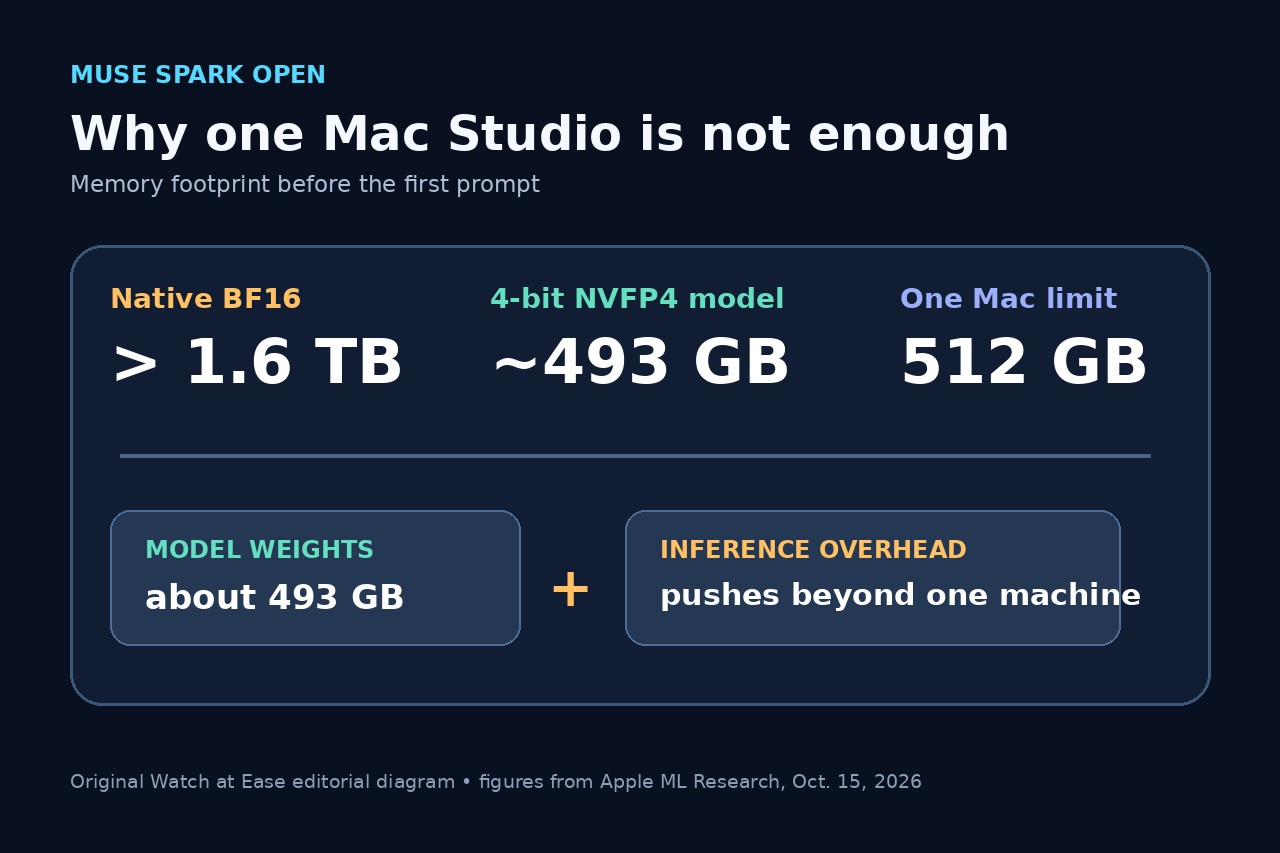
Meta released the weights for Muse Spark Open on October 15, calling it a desktop-capable open-weight model for coding and agentic work. The phrase “on your desktop” is technically true, but Apple’s full benchmark makes the hardware boundary clear: the 816-billion-parameter model does not fit on one 512GB Mac Studio, even after 4-bit quantization.
What Meta released
Muse Spark Open is a natively multimodal mixture-of-experts model with 816 billion total parameters, 42 billion active parameters and a stated one-million-token context window. Meta positions it for long-horizon coding, software engineering and multi-step agentic tasks. The weights are available through Hugging Face and several cloud model catalogs, while hosted inference is offered by multiple API providers.
Open-weight does not mean unrestricted public-domain software. Meta says the release uses its Muse Model License with limited commercial terms. Developers should read that license for their use case instead of treating “available for download” as permission for every commercial deployment.
Why one 512GB Mac Studio is not enough
Apple reports that the model parameters alone would require more than 1.6TB in native BF16 precision. Its tested NVFP4 version cuts the model footprint to about 493GB, but inference also needs memory for intermediate computations. That overhead pushes the working set beyond a single Mac Studio’s 512GB unified-memory ceiling.
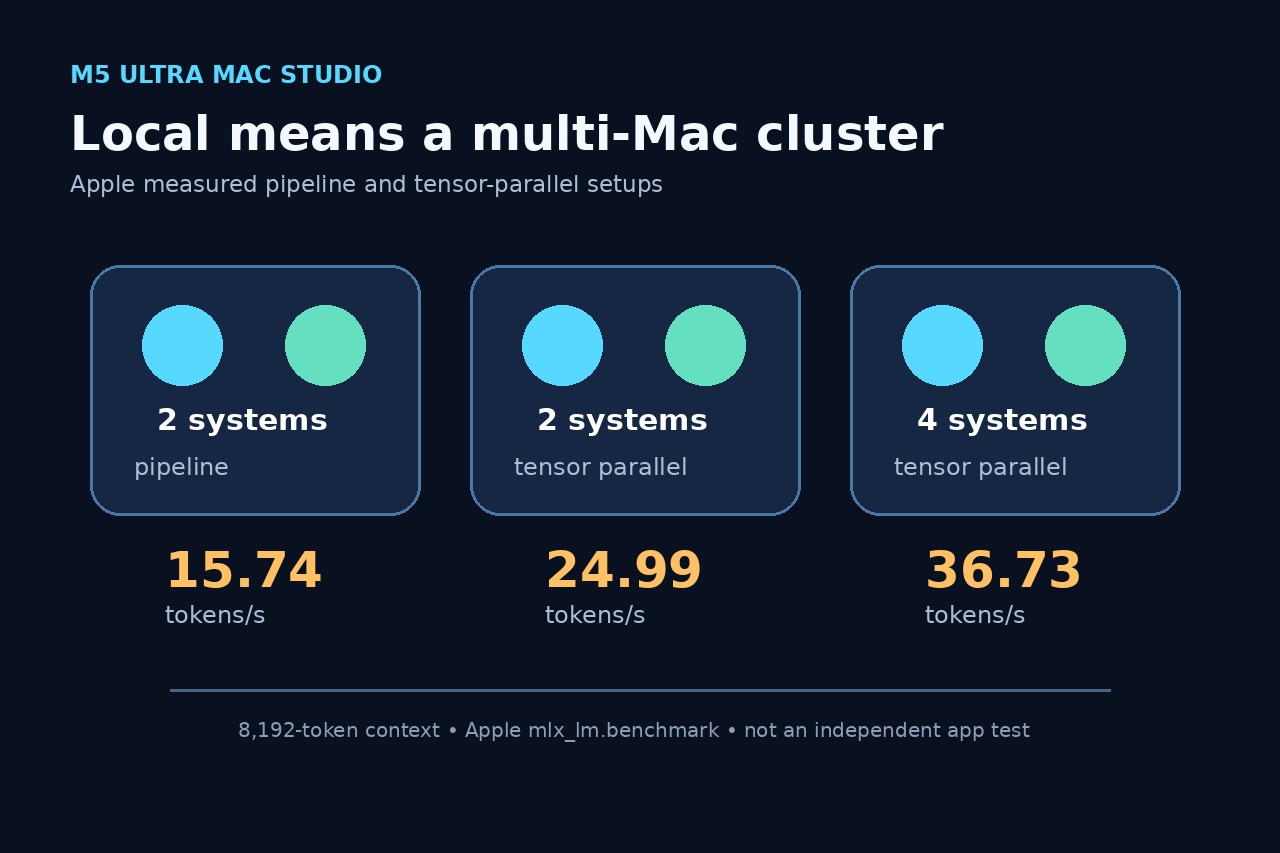
The minimum desktop configuration described by both companies uses two M5 Ultra Mac Studios. Half the model can reside on each machine and run as a pipeline. Apple also tested tensor parallelism across two and four systems, linked in a Thunderbolt mesh. This is a multi-computer local cluster, not a normal laptop or one-box workstation setup.
What Apple’s speed numbers do—and do not—show
At an 8,192-token context, Apple measured 8.4 seconds to the first token and 15.74 tokens per second for the two-machine pipeline. Two-machine tensor parallelism measured 8.2 seconds and 24.99 tokens per second; four systems reached 4.8 seconds and 36.73 tokens per second. These are Apple’s benchmark results using mlx_lm.benchmark, not independent application tests or guarantees for every prompt.
Longer contexts change the balance between computation and communication. Apple says two-machine tensor parallelism can trail the pipeline at 65,536 tokens because expert-output normalization adds communication overhead during prefill. More machines improve decode throughput, but they also increase cost, cabling and configuration complexity.
Who should use the download and who should use an API
A lab that already owns high-memory Mac Studios and needs local control can evaluate the two-machine MLX route. Apple provides an mlx.launch example and Meta links an MLX adapter. Teams should still budget for downloading hundreds of gigabytes, model storage, two compatible machines, high-bandwidth links and operational testing.
For a developer with one Mac, a laptop or no reason to maintain a cluster, Meta’s hosted partners are the practical path to test the model. Smaller open-weight models are also a better fit for one Mac Studio: Apple reports that the 128B Mistral Medium 3.5 and 27B Qwen 3.8 fit on a single 512GB system. Muse Spark Open expands local-model options, but “local” here means a desk-side cluster, not consumer-device portability. This article does not calculate a purchase price because exact configured hardware pricing was not established by the two technical sources.