Tech · PRACTICAL GUIDE
Google Forms checkbox answers with commas: recover exact choices
Choose between a Forms-native CSV and original response arrays, then check each selected label before filtering or counting.
If a Google Forms checkbox response splits into the wrong tasks or produces suspicious counts, check how the selections reached your table. A comma-joined cell can hide the boundary between two choices and punctuation inside one choice. Adding another splitting rule can produce a tidy table with the wrong meaning.
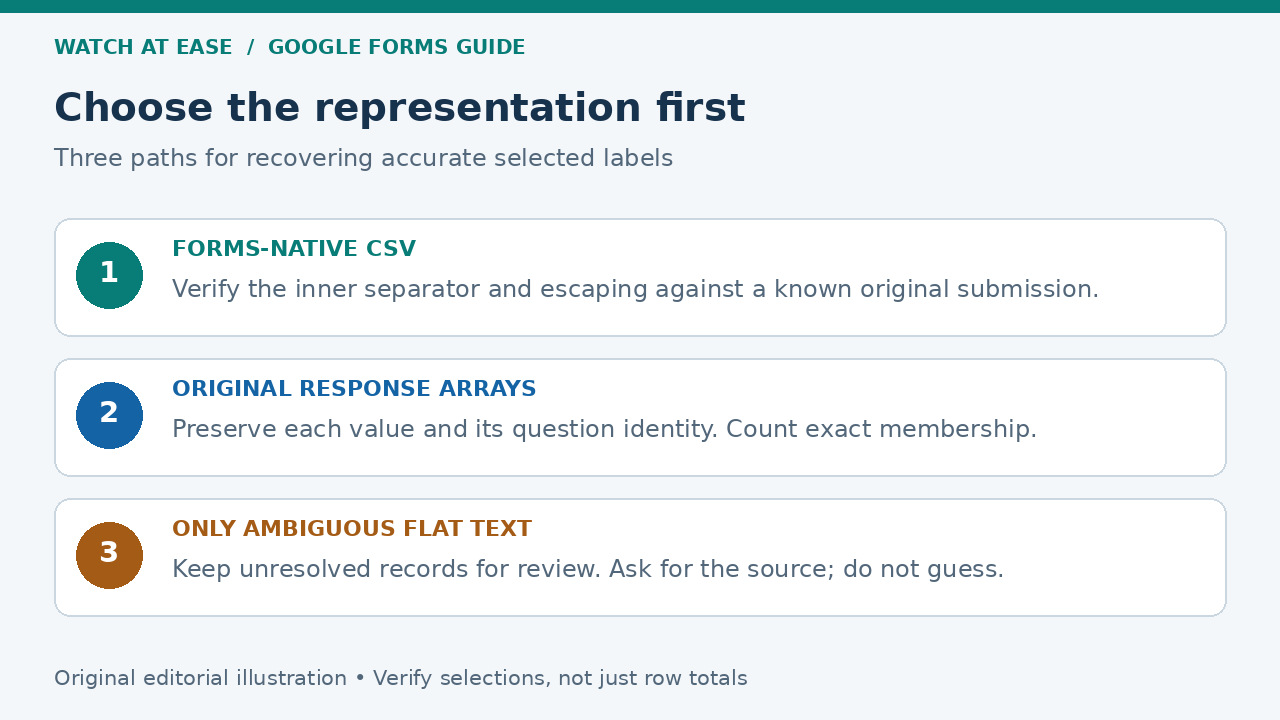
Start with the form’s own CSV download and check its actual representation. When a delimiter cannot distinguish the values you need, return to the original response arrays. The goal is an exact list of selected labels for each submission, with a clear stopping point when the original information is unavailable.
Check one original submission before changing the table
Open the original form as an editor and choose Responses → Individual. Pick a submission containing a comma in a selected label, and note the complete choices. If relevant, also pick a submission with overlapping labels such as Email and Email newsletter. This gives you a source comparison for the table you are about to create. Keep the current export unchanged while you test a copy.
Check the actual question type. This guide concerns an ordinary checkbox question, where several choices answer one question. A checkbox grid has a row structure and a different array shape. Also decide whether you need option counts, lists of submissions containing an option, or a visual summary. If the existing Forms summary answers your question, an export may add unnecessary work.
Try the Forms-native CSV before building a custom export
In the form itself, use Responses → More → Download responses (.csv). This is a different route from downloading the linked Google Sheet as CSV. Displayr’s integration documentation, updated in February 2026, describes multiple-response values in the native download as semicolon-delimited; an existing Stack Overflow answer reports the same distinction. A comma inside a label therefore does not automatically make that native file unusable.
Import the outer CSV with a CSV-aware reader, then inspect the checkbox field from your known submission. Quoting around a CSV field protects the field as a whole; it does not, by itself, specify how multiple choices inside that field are encoded. Confirm the inner separator and any escaping in your actual file. Test labels containing that separator and free-text Other answers before adopting a splitting rule. If the resulting exact choices match the source, use this simpler route. Do not replace a working export with a script merely because its linked Sheet looked awkward. If arbitrary Other text can contain that separator and you cannot establish a reliable escaping rule, use the original arrays.
Understand why splitting and text searches can disagree
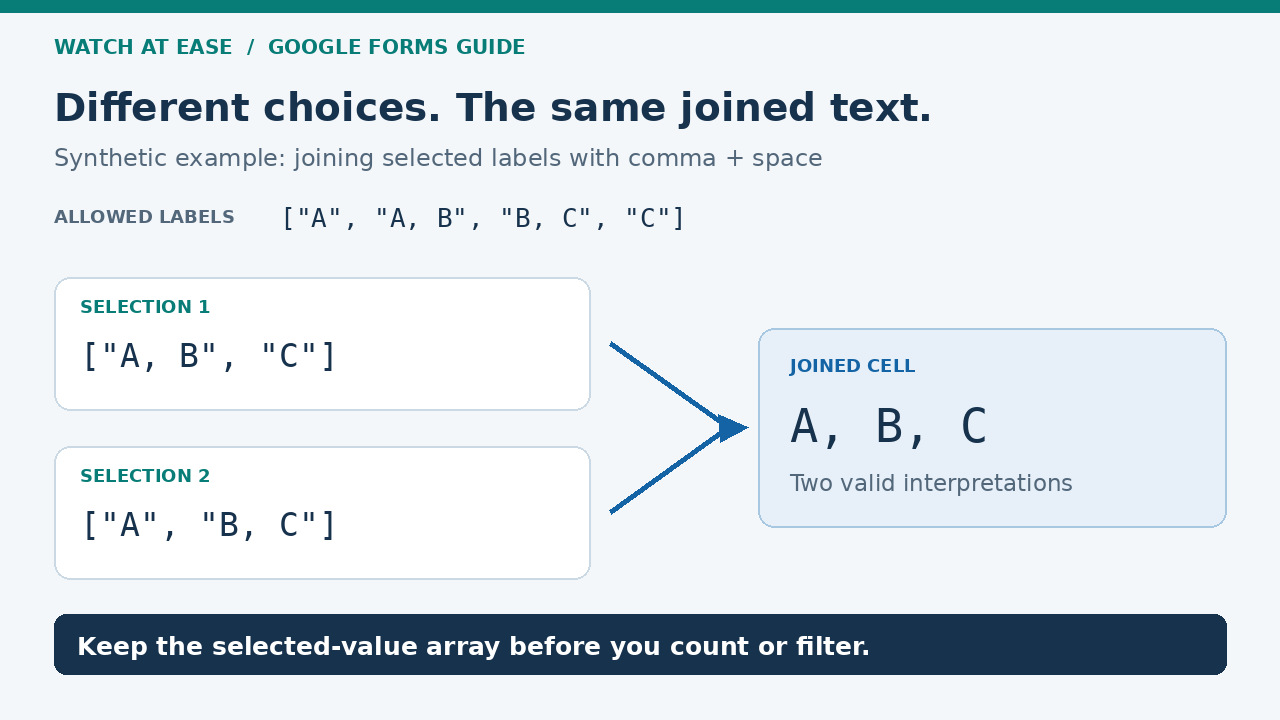
Consider the four allowed labels ["A", "A, B", "B, C", "C"]. The selections ["A, B", "C"] and ["A", "B, C"] both become A, B, C when joined with comma and space. Even knowing the complete option list cannot choose between those two results. This is a synthetic representation example, not a claim about every Google export format.
Text searches create a different error. If the selected values are ["Email newsletter", "Food, drinks"], searching the joined string for Email counts an option that was not selected. Splitting that string on comma and space and then matching whole values loses Food, drinks. We executed both counterexamples locally. The practical lesson is to establish the selection boundaries before counting; switching between substring matching and splitting does not establish them.
Recover the selected arrays from the original form
Google’s Apps Script reference defines an ordinary CheckboxItem response as a String[] containing the selected choices. An existing complete Stack Overflow example reads getResponses(), walks each response’s getItemResponses(), selects CHECKBOX items and calls getResponse(). If you use Apps Script, start from the form’s More → Apps Script menu so the script is bound to that form; edit permission is required. The source example is linked below, and the API method is documented by Google.
Within that checkbox loop, retain the array returned by itemResponse.getResponse(). Check Array.isArray(values) before treating values as an array, and use JSON.stringify(values) when you need a textual representation that preserves the separate strings. Joining the array into prose and then trying to split it later defeats that purpose. Keep the response ID and the item’s ID with the values; a question title is a label, and the item’s position is a separate property. Google also warns that checkbox array order may vary, so do not interpret it as the order in which someone clicked.
Use the official response API when you need structured pages
The Forms REST API provides another documented route without inventing an inner delimiter. In the official forms.responses.list reference, open Try it, use an account allowed to read the form’s responses, and enter the form ID from its editor URL. Save the returned JSON as response data, rather than copying an OAuth token or request header. The forms.get method separately retrieves the form definition so you can identify the checkbox question’s questionId.
For that question, each chosen value is a separate entry in textAnswers.answers. Keep responseId, the questionId mapping and the form ID alongside the saved pages; the list method does not repeat formId inside each returned response object. These REST question IDs belong to that API model. Do not substitute the Apps Script item IDs from a different export.
A successful first request does not establish a complete export. If nextPageToken is present, request the next page with that token, the same form and the same filter. Continue until it is absent. A requested pageSize is a maximum, and the service can return fewer responses. Preserve every page and check the distinct response IDs before calling the collection complete; this guide does not claim a live account export or a transactionally frozen snapshot.
Count exact membership and keep missing answers separate
For an ordinary checkbox answer already obtained as an array, values.includes("Food, drinks") asks whether that complete label was selected. It does not match part of another label. In the REST representation, obtain the strings from the chosen answer’s textAnswers.answers with .map(x => x.value) before applying the same exact-membership check. Count at most once per submission for that label; do not turn a multi-select response into several different people.
An absent answer needs its own handling. Apps Script omits unanswered items of this type from getItemResponses(), so matching answers by array position can attach a later answer to the wrong question. Match the item or question ID instead. Keep an absent checkbox answer distinct from an explicit selection and choose any percentage denominator deliberately: a missing answer does not tell you whether a question was skipped, bypassed by a branch or added later. These exports also do not restore deleted historical question definitions.
Verify the result against selections, not just row totals
Check the complete labels from the original submission against the recovered array or parsed native CSV field. Include a label with punctuation, a short label contained in a longer one, a free-text value if your form permits one, and an unanswered optional question. Then verify one selected and one unselected label through the exact-membership count. A correct total number of rows can coexist with incorrect selections inside those rows.
Our ten local Node 24.22.1 assertions covered delimiter collisions, the two counting errors, UTF-8 JSON round trips, separate item IDs, missing items and safe textual handling. They used documented Forms object shapes in a local fixture. We did not run Google Forms, Apps Script authorization, a live CSV export or the API Explorer in a signed-in account. On an active form, record the export time or chosen response range and account for new submissions before comparing totals.
If only an ambiguous cell remains, preserve the uncertainty
If the original form responses are unavailable, a known option list can sometimes identify one unique interpretation. It cannot guarantee one: the A, B, C example admits two valid selections. Other free text makes assumptions about a reserved delimiter especially fragile. Keep unresolved cells marked for review and ask the owner for the original responses or another export whose boundaries you can verify.
Changing commas to semicolons after information has been flattened does not recover that information. Neither does adding quotation marks around the entire cell. Retain the source file and the assumptions used for any approved conversion. Your completion condition is a traceable set of exact selected values, or a clearly identified unresolved record, before the results are used to assign work or report counts.