Technology · PRACTICAL GUIDE
GitHub Actions cache not restoring? Audit key, version, scope and access before changing the runner
A cache entry can exist and still be invisible to the current run. Compare the producer and consumer across evaluated key, cache version, ref scope, access mode and entry state before deleting caches or changing runners.
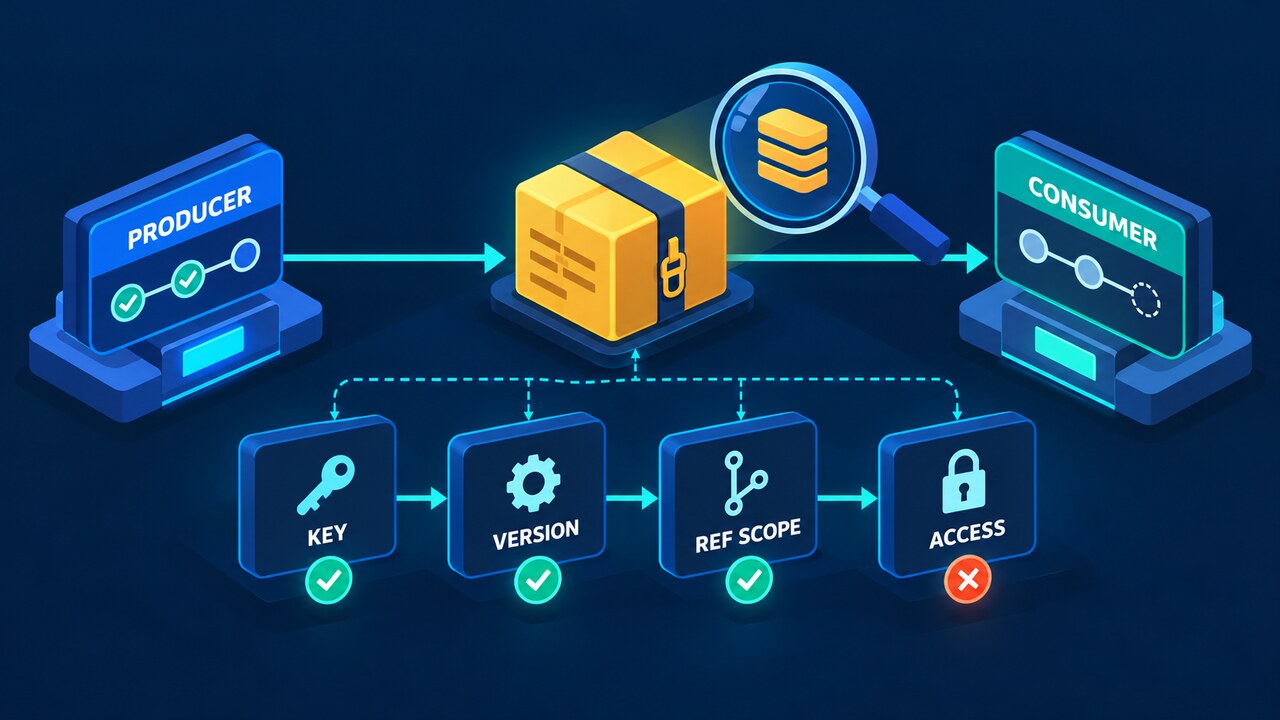
A GitHub Actions cache miss does not prove that the cache was never saved, that the runner is broken, or that the visible key changed. GitHub evaluates more than the key string: cache version, branch or pull-request ref scope, restore-key search order, repository access rules and the continued existence of the entry all affect the result.
The safest diagnosis is a two-run identity ledger. Capture the producer run that created the cache and the consumer run that missed it, then compare the evaluated key, path and compression inputs, resolved ref, event, repository context, permissions, lookup result and save outcome line by line.
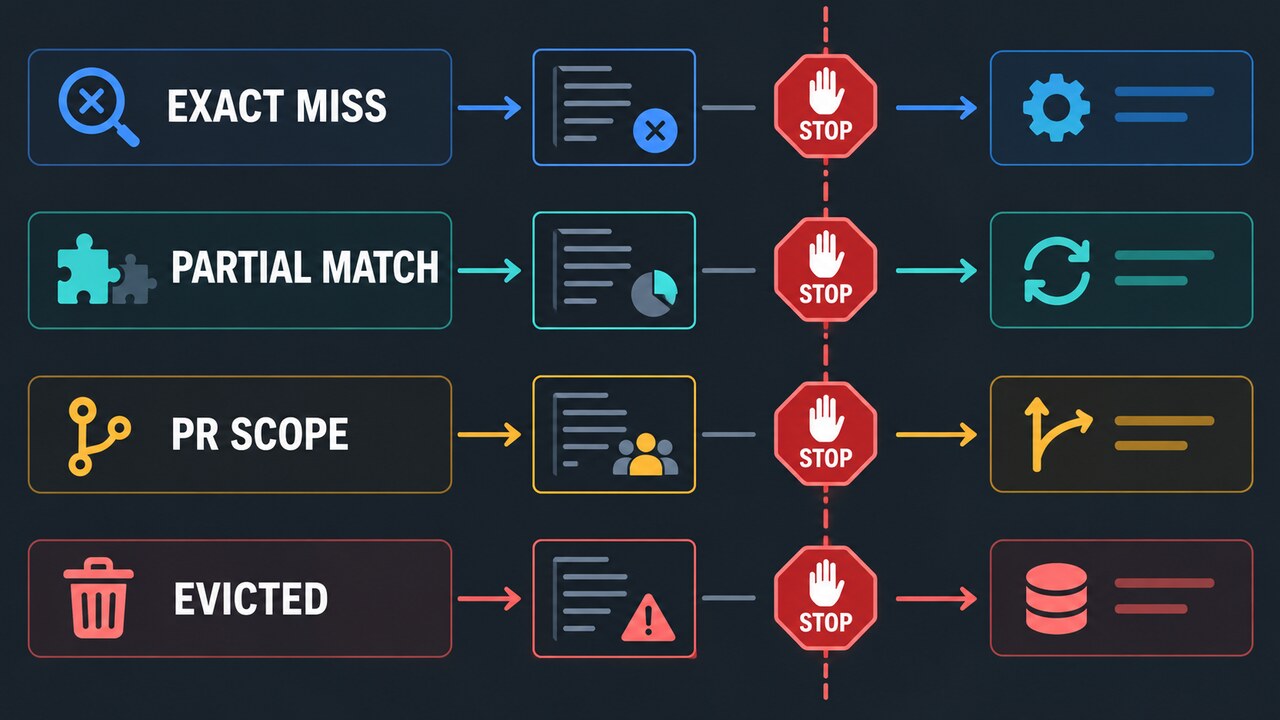
This guide keeps exact misses, partial restores, pull-request scope and evicted entries on separate branches. It preserves useful evidence before anyone rotates keys, deletes a cache, grants broader access or moves the job to another runner.
Start with a producer-versus-consumer ledger
Choose one successful producer run and one consumer run that should have reused it. For both, record repository, workflow file and commit, event name, `github.ref`, `github.ref_name`, base and head refs when applicable, runner OS and architecture, action version, evaluated primary key, every restore key, cached paths, lookup-only or fail-on-cache-miss settings, and the final restore or save log.
Do not compare YAML templates alone. Expressions can evaluate differently across push, pull_request, matrix jobs and reusable workflows. Copy the evaluated values from logs or add a safe diagnostic step that prints only non-secret identity fields. Never print tokens, environment secrets, credentials, or private file contents.
Separate the visible key from the cache version
GitHub associates a cache version with metadata for the cached paths and the compression tool used to create the archive. Two runs can display the same key yet produce incompatible versions when path inputs, runner platform, compression availability or the action implementation differ. That produces a real miss even though the key line looks identical.
Compare the exact path list after expression expansion, including ordering, globs, tilde or workspace resolution, and any OS-dependent location. Keep the runner image and action version in the ledger. Do not fix a suspected version mismatch by adding a timestamp to the key; that guarantees new entries and hides the original evidence.
Treat ref scope as a visibility rule, not a random miss
GitHub restricts caches by branch and pull-request context. A cache created during a pull_request run is tied to the pull request merge ref and can be reused by reruns of that pull request, but it is not generally visible to the base branch or another pull request. A branch can use caches from its current branch and documented default-branch fallback, but not arbitrary sibling or child branches.
Record the event and resolved ref from both runs. If an identical key hits on push and misses on pull_request, compare scope before changing the runner or cache path. A community report is a symptom report, not proof of the cause: verify the actual references against GitHub's documented access rules.
Read cache-hit and restore keys correctly
The cache action's `cache-hit` output is true only when the primary key matches exactly. If the primary key misses but a restore key finds a prefix match, data can be restored while `cache-hit` remains false. A build step that treats false as 'nothing restored' can perform unnecessary work or overwrite the restored state.
Save the restore log, matched key and exact output string together. The README's Outputs section documents an empty string for a miss; do not collapse every non-true value into false. Classify exact hit, partial restore and no restored data from the log as well as the output. A dependency installation after a partial restore may still be necessary to reconcile changed dependencies. In a Stack Overflow follow-up, the question's author reported resolving their condition by comparing with the string 'true' rather than the unquoted boolean. That is a reported workflow fix, not proof that every cache miss has the same cause.
Check access mode and repository context
Inspect cache access separately from branch visibility. Record the effective `ACTIONS_CACHE_MODE`, workflow and job `cache-mode` settings, reusable-workflow limits and the log describing any skipped operation. `read` allows restore but not save; `write` permits both; `write-only` permits save but not restore; `none` permits neither. A mode-blocked restore can appear as a miss without proving that the entry is absent.
Do not equate every pull request with the same restriction. GitHub's default-branch low-trust trigger restriction and the merge-ref scope of `pull_request` are different rules. Record repository, event and resolved ref alongside the effective mode. A green job can still contain a rejected or skipped save. Preserve that warning and keep secure defaults; use an appropriate trusted producer rather than granting untrusted code write access.
Prove the entry still exists before blaming identity
A historical 'Cache saved successfully' line proves that an entry existed at that time. It does not prove the entry still exists. Repository cache storage limits, inactivity retention, manual deletion and storage churn can remove entries. Use the repository cache list or API with an authorized account to confirm the key, ref, creation time, last access time and size.
Do not delete all caches as a diagnostic step. If the entry is absent, preserve the producer log and inventory result, then create one controlled replacement. If the entry exists under another ref or incompatible version, deleting it removes useful evidence without changing the visibility rule.
Use the branch matrix to choose one reversible next step
For a miss with a matching key, first establish that reads were allowed, then compare version inputs and ref scope. For a partial restore, check the consuming condition but still reconcile dependencies when needed. For a pull-request scope mismatch, use an appropriate trusted producer or accept the isolation. For an absent entry, create one controlled producer run and verify inventory. Never broaden untrusted access to force a hit.
Escalate with the two-run ledger when all identity fields appear equal and the entry is visible to the expected ref. Include run URLs, safe evaluated values, action version, runner image, inventory evidence and the smallest reproducible workflow. That package lets maintainers investigate a platform or action defect without asking you to delete evidence or expose secrets.