Technology · PRACTICAL GUIDE
Git worktree broke after a folder move? Audit both links before repair, prune or remove
Preserve dirty work, map Git's two path records, choose the correct repair branch, and verify both directions before prune or removal.
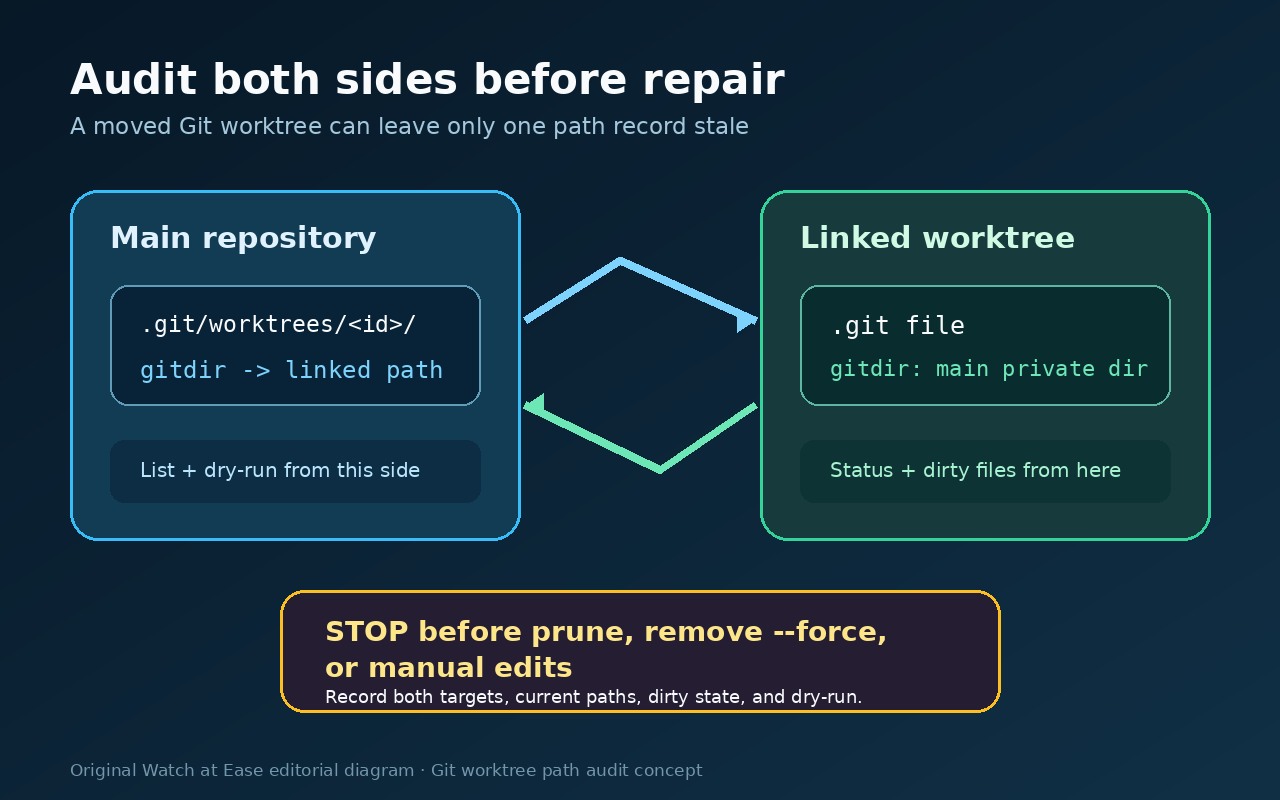
When a main repository or a linked worktree is moved outside `git worktree move`, Git's two path records can disagree. That can look like “not a git repository,” a worktree marked `prunable`, or a folder that still contains your files but no longer appears in `git worktree list`.
Do not begin with `prune`, `remove --force`, `rm -rf`, or a hand edit to `.git`. First preserve the working directories and record both sides of the link. The repair itself is usually short; proving that you repaired the right relationship without losing dirty work is the important part.
This guide covers Git's own worktree metadata. A desktop app, IDE, task runner, or workspace database may keep a second path of its own. Git can be healthy while that separate registry is stale.
1. Freeze the evidence
Stop cleanup jobs, garbage collection, IDE “remove workspace” actions, and scripts that call `git worktree prune`. Do not move either directory again during the audit.
Copy every affected working directory to a safe location if it contains uncommitted or untracked files. A broken registration does not mean the folder is disposable.
From any worktree that still runs Git commands, save:
```sh git --version git worktree list --porcelain git worktree prune --dry-run --verbose ```
The dry run is diagnostic only. If it proposes removing a worktree whose files still exist at a new path, stop: that is evidence of a stale registration, not permission to prune it.
For each affected directory, also record the absolute path, whether the path exists, and whether `git status --porcelain=v1` works. If it works, save the status output. If it fails, save the first error exactly.
Never paste credentials, remote URLs containing tokens, or private file contents into a support report.
2. Build a two-way link ledger
A linked worktree normally has a small `.git` file pointing to a private directory under the main repository's `.git/worktrees/`. That private directory contains a `gitdir` record pointing back to the linked working directory. The relationship therefore has two directions.
Use one row per worktree:
| Field | What to record | | --- | --- | | Worktree label | A neutral name, not a secret project name | | Current directory | The path that exists now | | Listed directory | The path in `git worktree list --porcelain` | | Linked `.git` target | The `gitdir:` target, recorded but not edited | | Main-side `gitdir` target | The reciprocal path under `.git/worktrees/<id>/gitdir` | | Branch or detached HEAD | From the porcelain list or saved HEAD | | Dirty/untracked state | Exact status summary or “status unavailable” | | Prune dry-run result | No action, or the exact proposed removal | | Third-party path | Any IDE/workspace path stored outside Git | | Decision | Main moved, linked moved, both moved, orphan, or unknown |
Do not assume that a directory name identifies the right registration. Two worktrees can have similar names, and the administrative directory name is not a safe substitute for the current path.
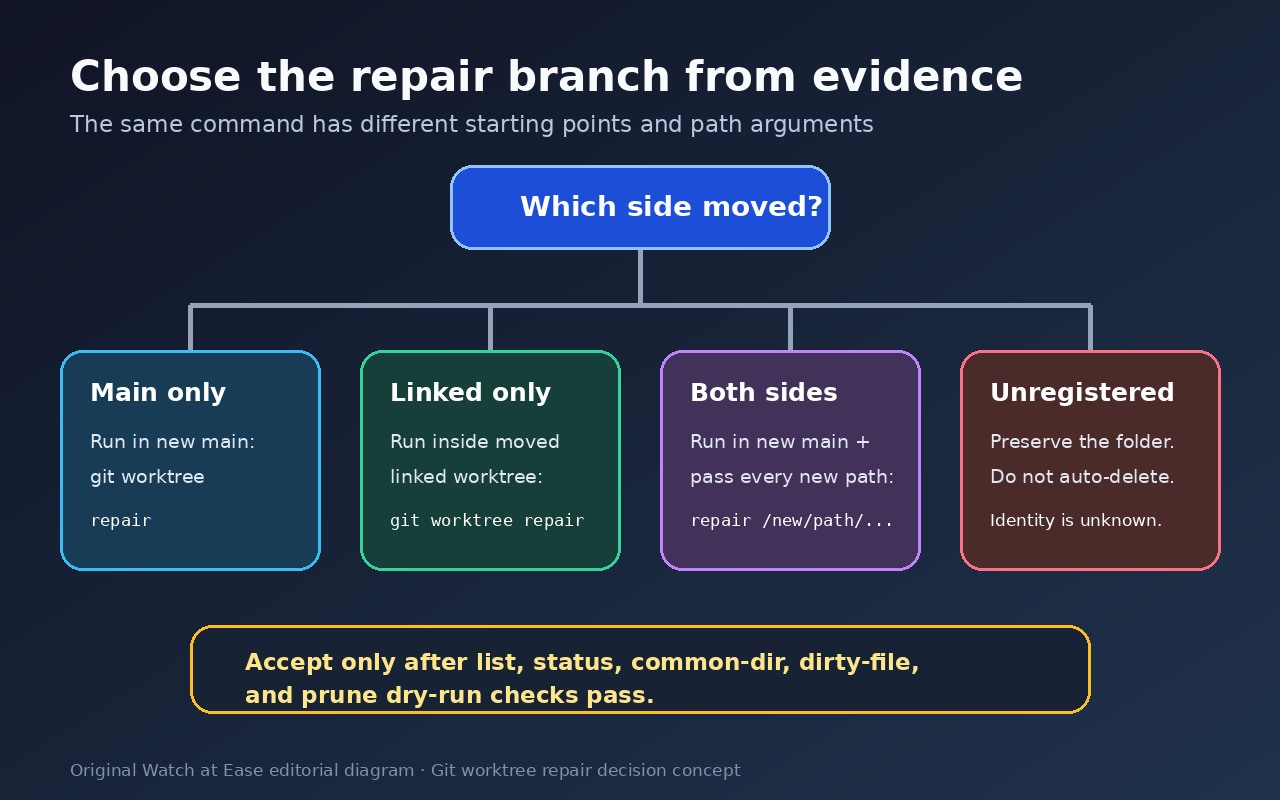
3. Classify the move before running repair
Use the ledger to choose one of these branches.
Only the main worktree moved
The linked worktree's `.git` file still points to the main repository's old location, so commands inside the linked worktree may fail. The new main repository still contains the private worktree records.
Run from the new main worktree:
```sh git worktree repair ```
Git's documentation says this reconnects linked worktrees to the moved main repository.
Only one linked worktree moved
The linked directory can sometimes still run Git commands because its pointer reaches the main repository, while the main-side `gitdir` record still names the old linked path. The main list may mark the old path `prunable`.
Run inside the moved linked worktree:
```sh git worktree repair ```
Then verify from the main worktree that the porcelain list contains the new path.
Several linked worktrees moved
From a worktree that can reach the main repository, pass every new linked-worktree path:
```sh git worktree repair /new/path/alpha /new/path/beta ```
Use absolute paths while diagnosing unless you have intentionally standardized relative links and tested that policy.
Both the main and linked worktrees moved
Run from the new main worktree and supply the new path of every linked worktree:
```sh git worktree repair /new/path/alpha /new/path/beta ```
This is the branch that explicitly repairs both directions after both sides were moved manually.
The directory exists but is not registered
Do not treat “not a registered worktree” as “safe to delete.” The folder may contain uncommitted work even if its administrative record is missing. Preserve it, inspect its files, and keep it out of automated removal. `repair` cannot invent an administrative record when the identity relationship is unknown.
If the directory is a verified disposable leftover, removal is a separate human decision after inspection—not an automatic consequence of a failed Git probe.
4. Verify the repaired relationship
After repair, rerun the same read-only checks from the main and every linked worktree:
```sh git worktree list --porcelain git worktree prune --dry-run --verbose git status --porcelain=v1 git rev-parse --path-format=absolute --git-dir git rev-parse --path-format=absolute --git-common-dir ```
Accept the repair only if all of these are true:
1. Every intended worktree appears once at its current path. 2. No live worktree is marked `prunable`. 3. Each linked worktree resolves the expected common directory. 4. Branch or detached-HEAD identity is unchanged. 5. Dirty and untracked files recorded before repair are still present. 6. The prune dry run proposes no removal of a live worktree. 7. Any third-party workspace or IDE opens the intended path, or is explicitly recorded as a separate unresolved problem.
If any item fails, stop. Keep the evidence bundle and do not escalate to force flags.
5. Keep repair, prune, remove and lock separate
`git worktree repair` updates stale or corrupted administrative links. It is the normal command for a moved main or linked worktree.
`git worktree prune` removes administrative information for worktrees whose directories are gone. It is not the first fix for a directory that was merely moved. Always inspect the dry run first.
`git worktree remove` retires a registered worktree you no longer need. Git normally refuses an unclean worktree; `--force` weakens that protection and is not a repair strategy.
`git worktree lock --reason "..."` protects a worktree on a portable drive or intermittently mounted share from automatic pruning. Locking does not repair a wrong path, and a locked worktree cannot be moved or removed without additional force.
These commands answer different questions. Git does not support `worktree move` for the main worktree or a linked worktree containing submodules; its manual also warns that multiple checkouts of a superproject are not recommended. The examples here do not solve those submodule limitations. Preserve the evidence and investigate that layout separately.
6. Treat third-party path registries as another layer
A workspace product can save an absolute worktree path in its own database. After a supported `git worktree move`, Git may list the new path correctly while the product still opens the old one.
Prove Git's state first with the acceptance checks above. Then inspect the product's documented re-point, import, or recreate workflow. Do not change Git metadata again to satisfy a stale application record.
Record the third-party outcome separately:
- Git healthy, product path updated. - Git healthy, product has no re-point operation. - Git healthy, product recreation required and application state may be lost. - Git still unhealthy; return to the Git ledger.
This boundary prevents a product limitation from being misdiagnosed as a failed Git repair.
7. What the disposable test showed
In a temporary Git 2.51.1 repository, a main worktree and one linked worktree were created, and an untracked file was placed in the linked directory.
When both directories were moved manually, the main list showed the old linked path as `prunable`, the prune dry run proposed deleting its administrative entry, and `git status` in the moved linked directory failed. Running `git worktree repair <new-linked-path>` from the new main location restored both paths; the untracked file remained.
Moving only the linked directory left its own status usable but made the main-side path stale. Running repair inside the moved linked directory updated the main list. Moving only the main directory broke the linked pointer; running repair from the new main directory restored it.
The three disposable Linux scenarios ran on Git 2.51.1; tracked edits and untracked file bytes, HEAD and branch identity survived each repair. Current documentation was checked at version 2.56.0, but that binary was not tested. The experiment does not establish behavior for every Git release, network filesystem, submodule layout, IDE or workspace database.
Frequently asked questions
Should I edit the linked worktree's .git file by hand?
Preserve it as evidence, but prefer `git worktree repair`. A one-sided manual edit can leave the reciprocal main-side record stale.
Why does git status work in the moved linked folder while the main list shows the old path?
The linked folder may still reach the main repository through its `.git` pointer, while the main repository's reciprocal `gitdir` record still names the old linked location. That is a one-direction repair case.
Is a prunable entry safe to prune?
Not until you verify that the corresponding worktree is truly gone. A moved live directory can make its old path appear prunable.
Can repair recover an unregistered directory?
Only when enough administrative identity remains for Git to reconnect the relationship. A directory that merely resembles a worktree is not proof of a valid registration. Preserve and inspect it before any deletion.
Does repair update my IDE or workspace manager?
Not necessarily. Git repairs Git's metadata. Other tools may store separate absolute paths and require their own supported update or recreation flow.