Technology · PRACTICAL GUIDE
Git worktree path missing? Repair or lock it before you prune
A missing path can mean moved, temporarily offline or truly deleted. Preserve the per-worktree HEAD and index, classify the state, then repair, lock or prune with an acceptance check.
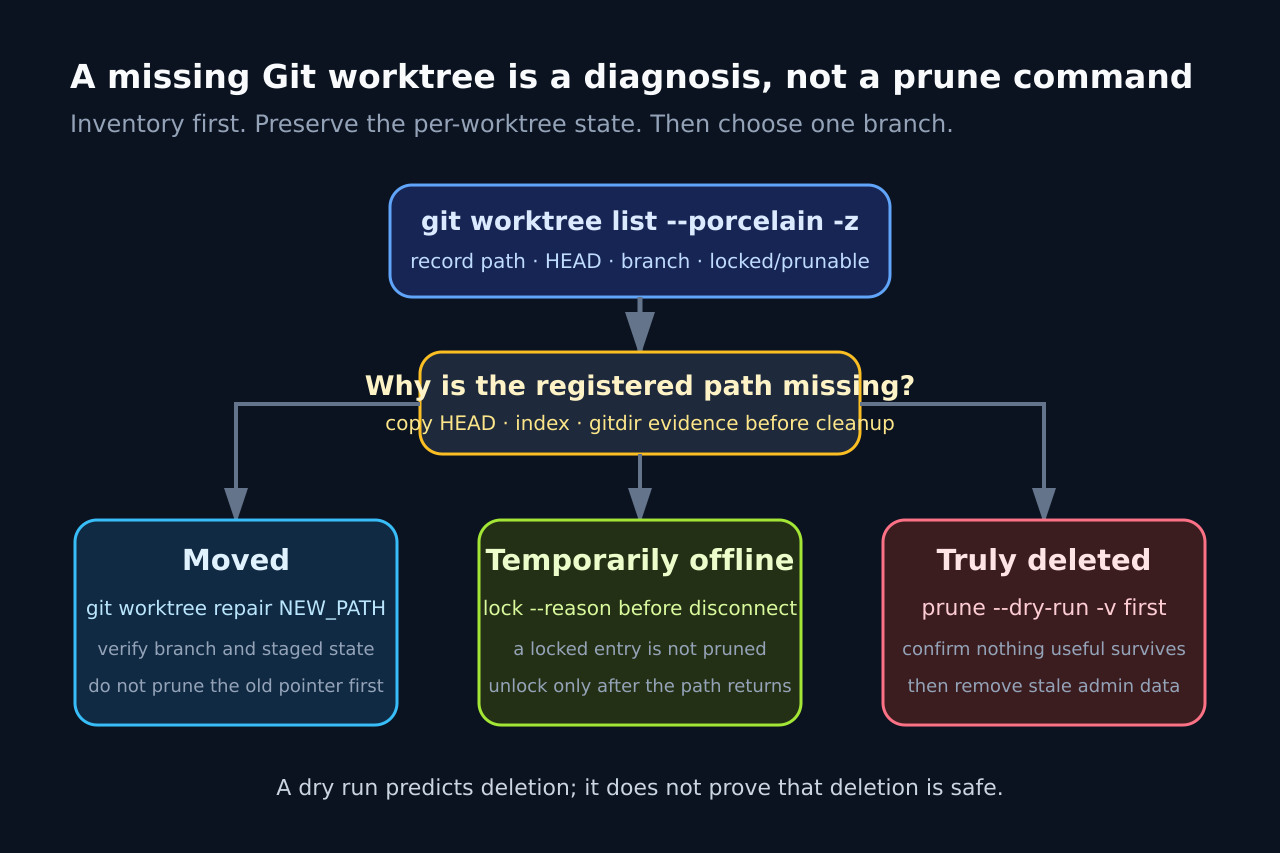
A missing linked-worktree path is an ambiguous state, not permission to delete metadata. The same symptom can describe a directory that moved, a share that is offline or a worktree that was truly discarded.
Preserve the per-worktree administration and reachable files before cleanup. Then choose exactly one path: repair a move, lock intermittent storage or prune only a registration proven stale.
1. Freeze the evidence before any cleanup
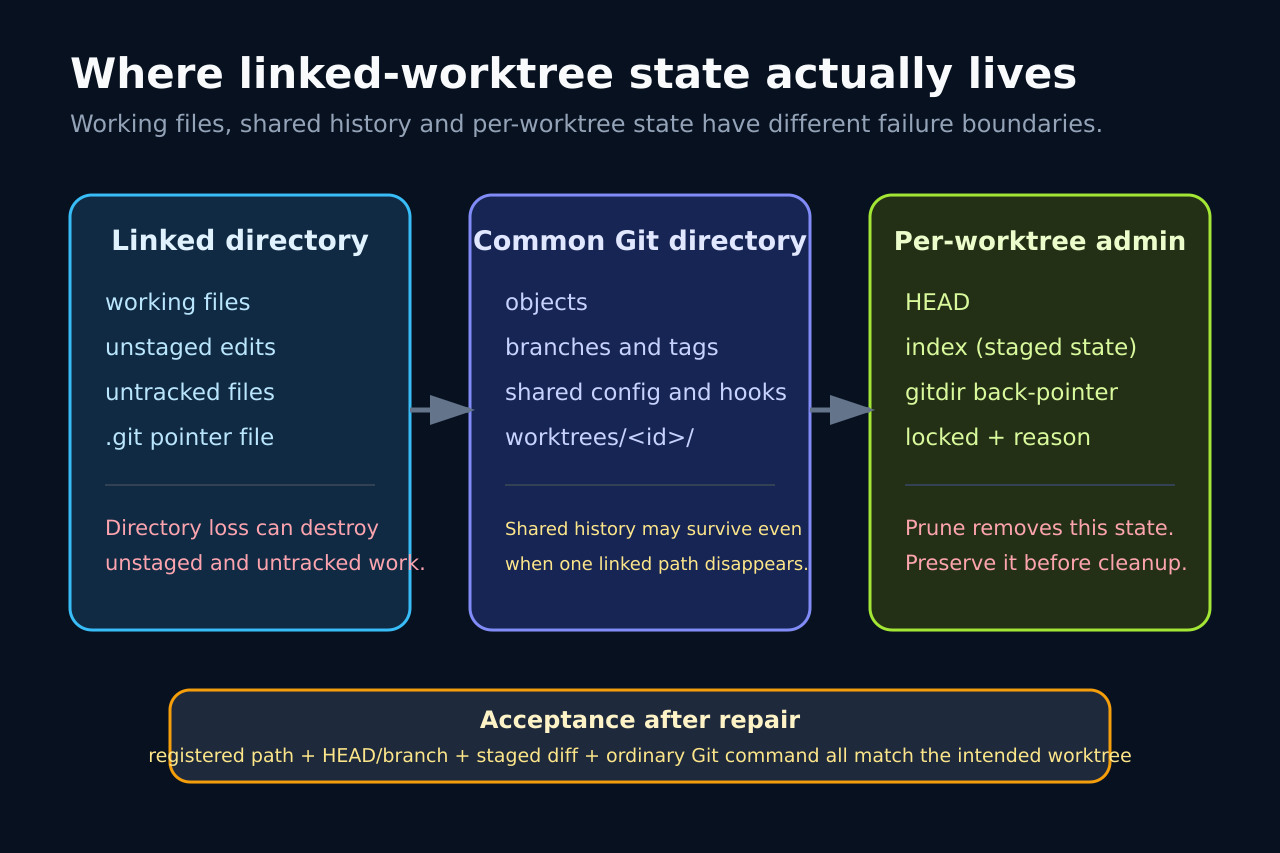
Run git worktree list --porcelain -z from a healthy worktree and save the exact records for path, HEAD, branch, locked and prunable. Resolve the common Git directory and the affected per-worktree admin directory. Record the gitdir back-pointer, HEAD and index hashes; copy that admin directory to a separate evidence location while Git activity is quiescent.
Also preserve the reachable working directory, including untracked files, before experimenting. A branch tip is shared history, but unstaged files live only in the working directory and staged state is represented by the per-worktree index. A dry-run message predicts what Git would remove; it does not prove the state is disposable.
2. Classify the missing path
If the directory exists elsewhere, treat it as moved. If it lives on a portable device, network share or mount that can disappear, treat it as temporarily offline. Only classify it as truly deleted when the intended owner confirms that the directory and its uncommitted work are no longer needed.
Do not use git worktree prune as a discovery tool. Git documents that prune removes administrative information for worktrees whose paths are missing, and list marks those entries prunable. A wrong absolute back-pointer can therefore make a live tree look stale across a container or host boundary.
3. Repair moved paths and lock intermittent paths
For a moved linked worktree, run git worktree repair with its new path from a healthy worktree, or run repair inside the moved worktree as documented. Then list again and compare the new gitdir link, HEAD and branch with the preserved evidence.
For storage that is intentionally intermittent, lock the worktree while it is reachable and include a reason. Git stores a locked marker in the per-worktree admin directory and excludes that entry from automatic and manual worktree prune. Unlock only after the expected path is mounted and an ordinary Git command succeeds.
4. Accept the repair by checking staged state
A repaired registration is not enough. Re-run status, compare the staged diff with git diff --cached, verify the expected branch or detached HEAD, and read one ordinary Git object from the repaired path. Do not overwrite the preserved admin snapshot until these checks agree.
In the bounded Git 2.51.1 fixture, moving the linked directory made list label the old registration prunable and prune --dry-run --expire now proposed removing its admin directory. Running repair on the new path restored the link and preserved an added file in the staged index. Locking it before simulating an offline path produced no prune candidate; after the path returned, repair again preserved the staged state.
5. Prune only a proven stale registration
When the path is truly obsolete and its useful working and index state has been preserved or deliberately discarded, run prune with --dry-run and --verbose first. Match every proposed admin-directory removal to the evidence ledger, then run the real cleanup. Prefer git worktree remove while a worktree still exists, because it checks cleanliness unless force is explicitly requested.
If pruning already happened, stop further cleanup and preserve the surviving worktree files, shared object database and reflogs. fsck can report reachable, unreachable and dangling objects, but it cannot recreate missing unstaged files or guarantee reconstruction of a lost per-worktree index. Recovery now depends on what actually survived, so do not present repair or fsck as an automatic undo button.