기술 · 실용 가이드
Git의 “src refspec main does not match any”? push 전에 로컬 source를 증명하세요
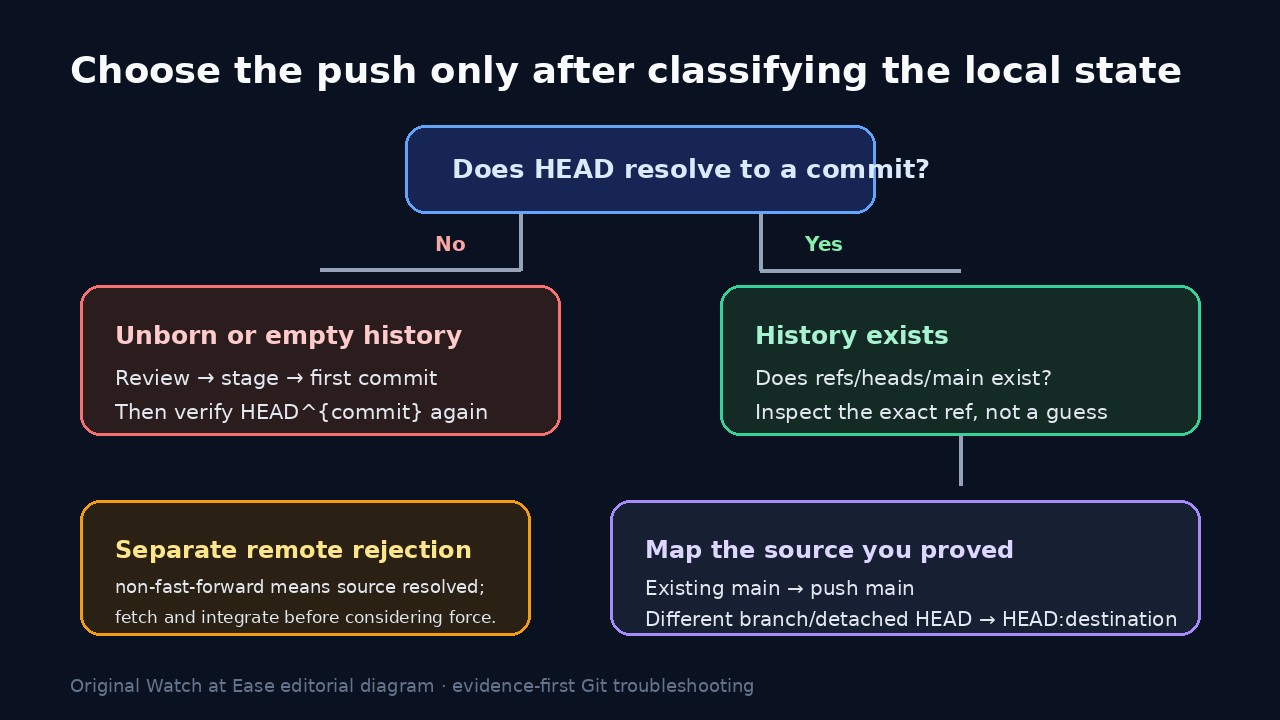
이 오류는 refspec의 로컬 source에 관한 것이며 GitHub가 기존 branch를 거부했다는 증거가 아닙니다. HEAD가 commit인지, refs/heads/main이 있는지 확인한 뒤 첫 commit, 실제 branch 또는 명시적 HEAD mapping을 선택하세요.
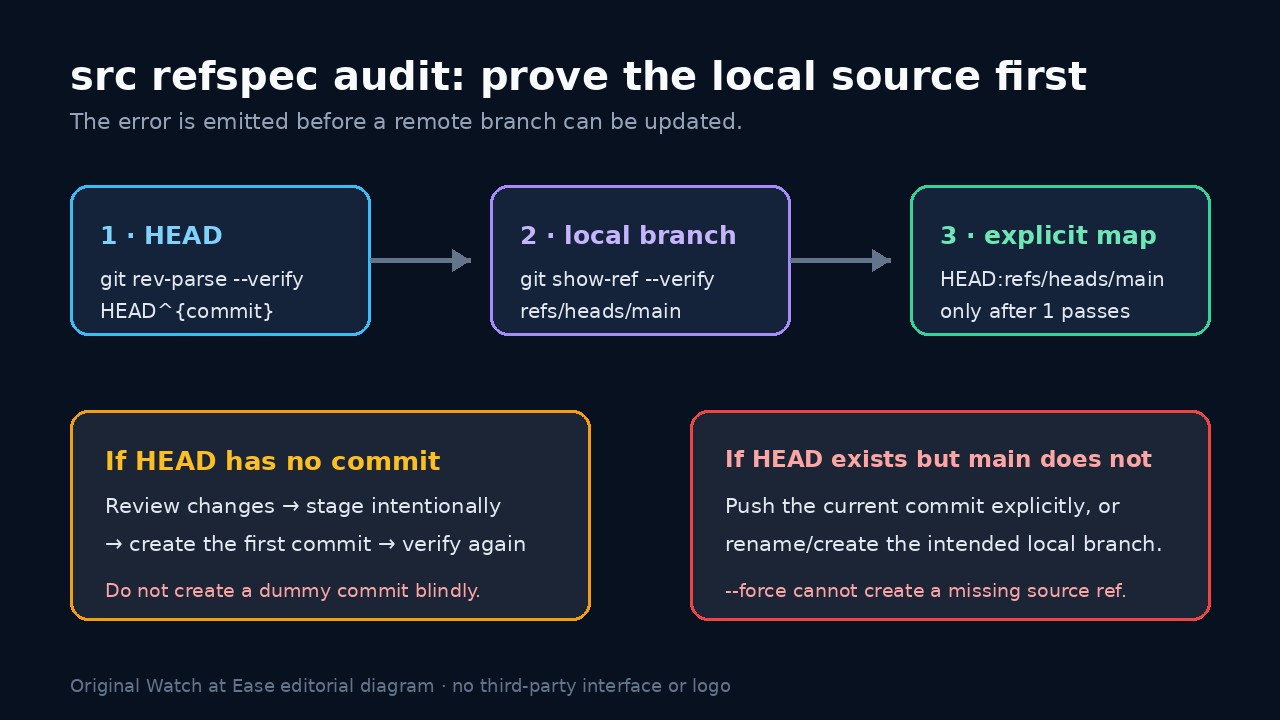
“src refspec main does not match any”는 Git이 push의 왼쪽에 지정한 로컬 source를 해석하지 못했다는 뜻입니다. remote main 충돌, 인증 실패 또는 force 필요를 증명하지 않습니다.
원래 명령을 보존하고 HEAD가 commit으로 해석되는지, 지정한 source ref가 존재하는지 확인하세요. 그 뒤에 첫 commit, 실제 branch push, 의도적 rename 또는 HEAD-to-remote mapping을 선택합니다.
명령을 보존하고 HEAD 증명
push 명령, repository path, git status --short --branch, git branch --show-current, git remote -v를 저장합니다. script는 main을 쓰지만 실제 branch는 다른 이름이거나 detached HEAD일 수 있습니다.
git rev-parse --verify HEAD^{commit}을 실행합니다. 새 repository에서 실패하면 변경을 검토하고 필요한 파일만 stage한 뒤 실제 첫 commit을 만드세요. 오류만 없애려는 dummy commit은 피합니다.
정확한 로컬 source ref 확인
명령이 main을 쓴다면 git show-ref --verify refs/heads/main을 실행합니다. 0이 아니면 remote-tracking ref나 tag에 main이 있어도 정확한 로컬 branch는 없습니다.
git symbolic-ref --short -q HEAD와 git branch --show-current를 비교합니다. 원하는 commit이 다른 branch에 있으면 그 branch를 push하거나 의도적으로 rename합니다.
필요하면 명시적 mapping 사용
HEAD는 올바른 commit이지만 로컬 main을 만들 필요가 없다면 git push -u origin HEAD:refs/heads/main을 사용할 수 있습니다. 왼쪽은 증명된 source, 오른쪽은 remote branch입니다.
로컬 main이 필요하면 가리킬 commit을 확인한 뒤 만들거나 rename하고 show-ref와 git log -1 --decorate를 다시 확인합니다.
remote rejection을 별도 분기로 처리
Git이 remote에 도달해 non-fast-forward를 보고했다면 source는 이미 해석되었습니다. fetch하고 분기를 확인한 뒤 repository 정책에 따라 통합합니다.
“does not match any”를 --force로 고치지 마세요. force는 없는 source를 만들 수 없고 잘못된 remote history를 덮어쓸 수 있습니다.
결과 검증과 마무리
좁은 수정 하나 뒤 push를 한 번 실행해 source, destination, -u upstream, git rev-parse HEAD의 commit ID를 확인합니다.
git status --short --branch와 git ls-remote --heads origin main을 확인하고 원인을 unborn history, branch 이름, detached HEAD, wrapper 또는 remote divergence로 기록합니다.