technology · PRACTICAL GUIDE
Git fatal: bad object? Prove the ref, object and repository boundary before deleting anything
Preserve local work, resolve the exact ref, test the named object, classify shallow or partial history, and repair only the layer the evidence proves is broken.
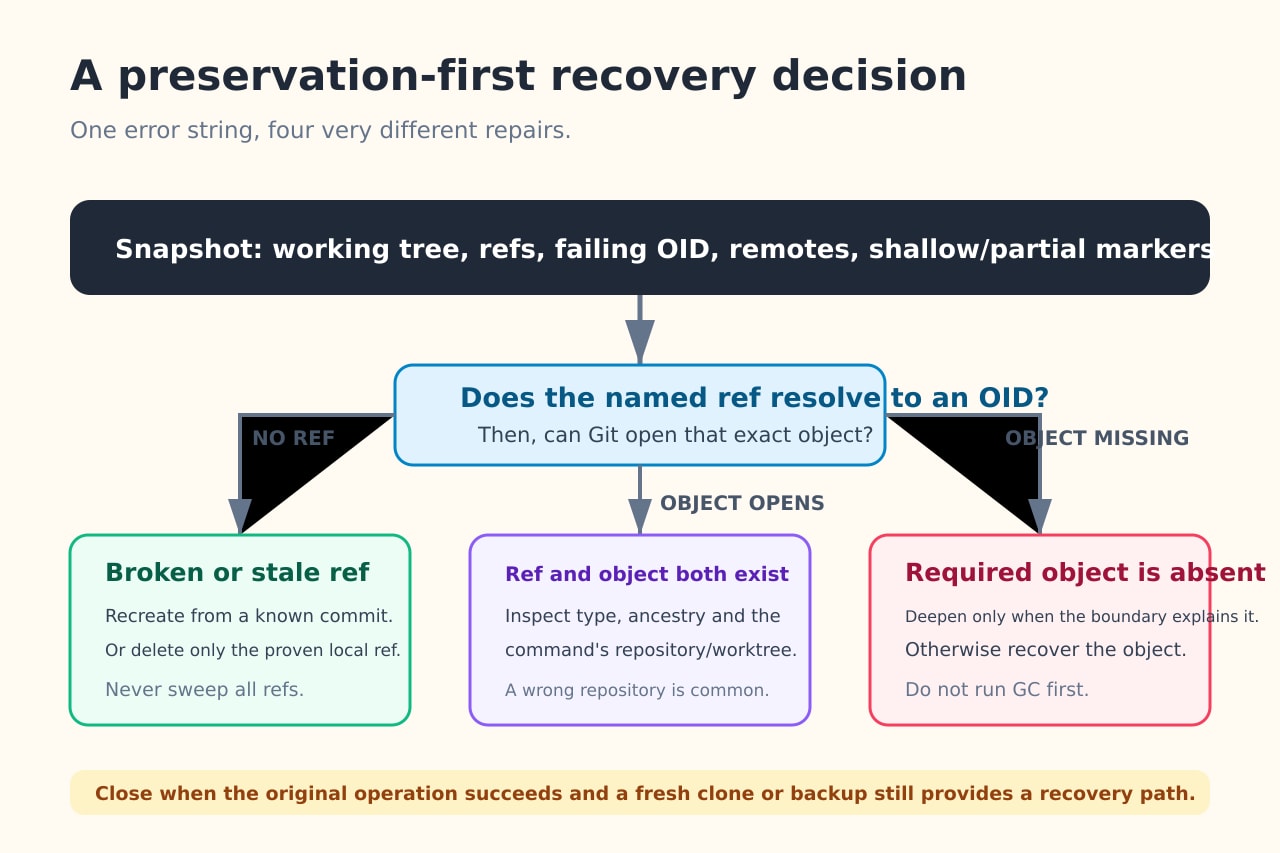
`fatal: bad object` does not identify one repair. Git may have resolved a name to an object ID that is absent, encountered a ref with invalid content, crossed an intentional shallow or partial boundary, opened the wrong repository, or found real object damage.
Preserve the working tree and repository metadata before changing anything. Then prove the exact ref, object ID, object type and reachability boundary. A repair is safe only when it changes the smallest proven layer and leaves a verified recovery path.
Snapshot the work before running repair commands
Copy or archive the working tree and the repository metadata before checkout, reset, gc, prune, repack or ref deletion. Record `git status --porcelain=v2 --branch`, `git rev-parse --show-toplevel --git-dir`, `git remote -v`, `git worktree list --porcelain`, and `git show-ref`. Remove credentials from the record, but keep every ref name and object ID.
If the repository is large, preserve at least uncommitted files, `.git/HEAD`, packed and loose refs, reflogs, the shallow file, alternates and partial-clone configuration. Test whether a fresh clone can reach the remote, but do not replace the damaged copy until local-only commits and files are accounted for.
Resolve the exact name and test the exact object
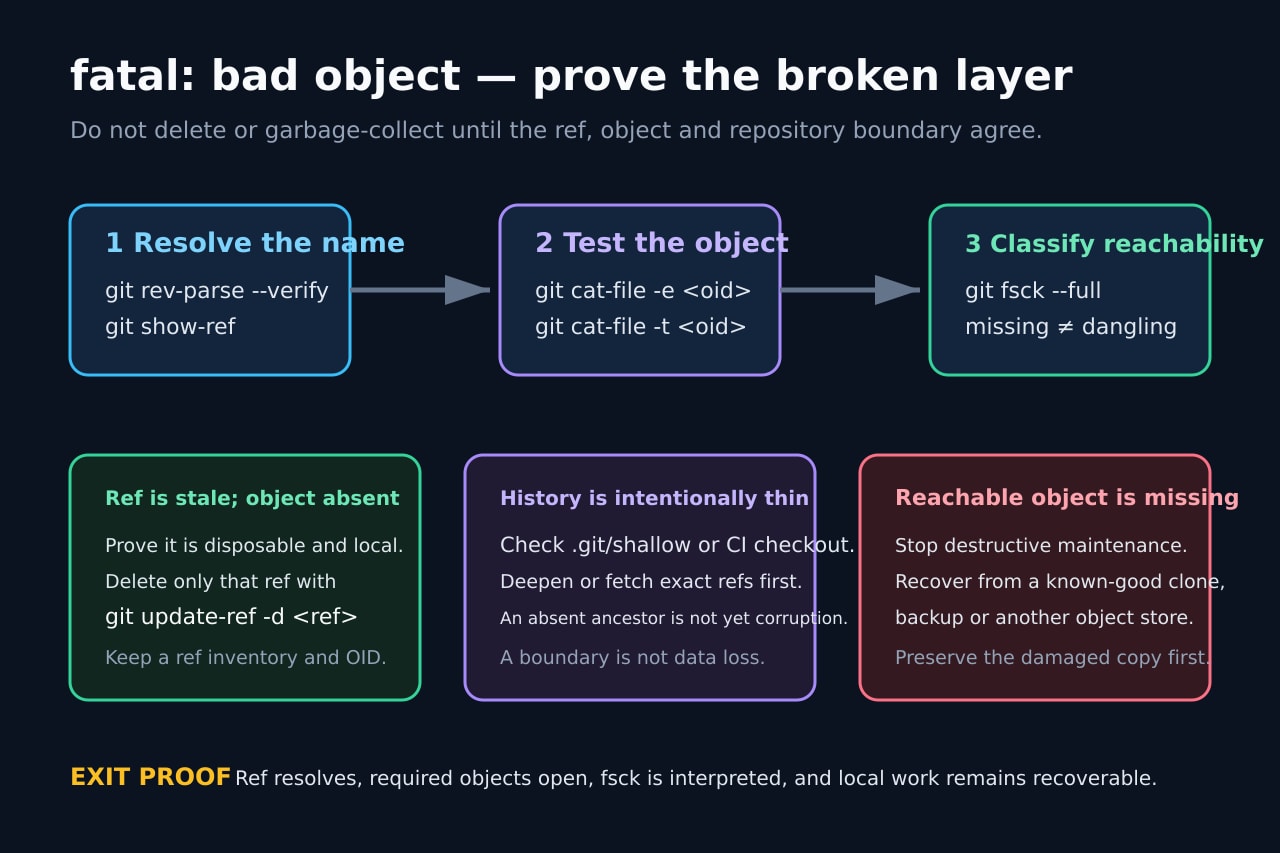
Take the token printed after `bad object` literally. If it is a ref, inspect it with `git show-ref`, `git for-each-ref` and `git rev-parse --verify`. If it resolves to an object ID, test that ID with `git cat-file -e <oid>` and inspect its type with `git cat-file -t <oid>`. Record whether the name fails, the object fails, or both succeed.
Also prove the repository and worktree used by the failing process. Editors, hooks, services and CI steps can run with another current directory, `GIT_DIR`, worktree or submodule. When the ref and object both open in one shell, reproduce the original environment before declaring corruption.
Interpret fsck without treating every line as data loss
Run `git fsck --full` on the preserved copy. A missing object, invalid ref pointer, hash mismatch or corrupt object file is actionable. A dangling commit or blob means the object exists but is not currently reachable from normal refs; that can be a recovery lead rather than a repair target. Save the complete output.
Map the first actionable line back to the exact ref or parent edge. If one disposable local ref points to an absent object while the required history is intact elsewhere, a targeted `git update-ref -d <ref>` can be appropriate. Never translate that case into a command that deletes every matching ref.
Separate intentional history boundaries from missing data
Check for `.git/shallow`, CI checkout depth, partial-clone filters, promisor remotes, alternates and submodules. Git documents shallow roots as intentional boundaries. actions/checkout fetches one commit by default; a command that expects older ancestry may fail even though the checked-out commit is sound.
Deepen or fetch the exact required ref only after confirming the remote and expected history. In actions/checkout, `fetch-depth: 0` requests full history for branches and tags, but a smaller deliberate depth or targeted fetch may be enough. A fetch that cannot supply an object still leaves broken-ref or object-recovery branches open.
Choose the smallest repair and prove the exit condition
For a stale symbolic or remote ref, repoint it to a verified branch or delete only that proven disposable ref. For an intentionally thin clone, deepen or fetch the needed history. For a reachable object that is truly missing or corrupt, stop destructive maintenance and recover it from a known-good clone, backup, alternate object store or another site.
Retest the original command, then re-run the narrow ref and object checks plus fsck interpretation. Confirm uncommitted and local-only work is preserved. Keep the damaged copy until a fresh clone or backup independently proves the recovery path and the repaired repository survives a new process, editor or CI run.