Technology · PRACTICAL GUIDE
Git detected dubious ownership? Prove the user, path owner and trust scope
Audit the executing Git binary, operating-system identity, canonical repository owner and protected configuration before changing ownership or adding a narrow safe.directory exception.
Git’s dubious-ownership refusal is a security boundary, not a permissions typo. The fastest safe fix starts by proving which Git process rejected which canonical path under which user.
This guide separates unexpected ownership, launcher identity, shared repositories and configuration-scope mismatches so you can choose the smallest reversible repair.
Freeze the exact failure context
Copy the complete fatal message, rejected path and command before changing ownership or configuration. Record whether the failure came from a terminal, Sourcetree or another GUI, a service, a container, a CI runner, WSL, or an SSH command. The same working tree can pass in one context and fail in another because a different Git binary, user, HOME or configuration stack is active.
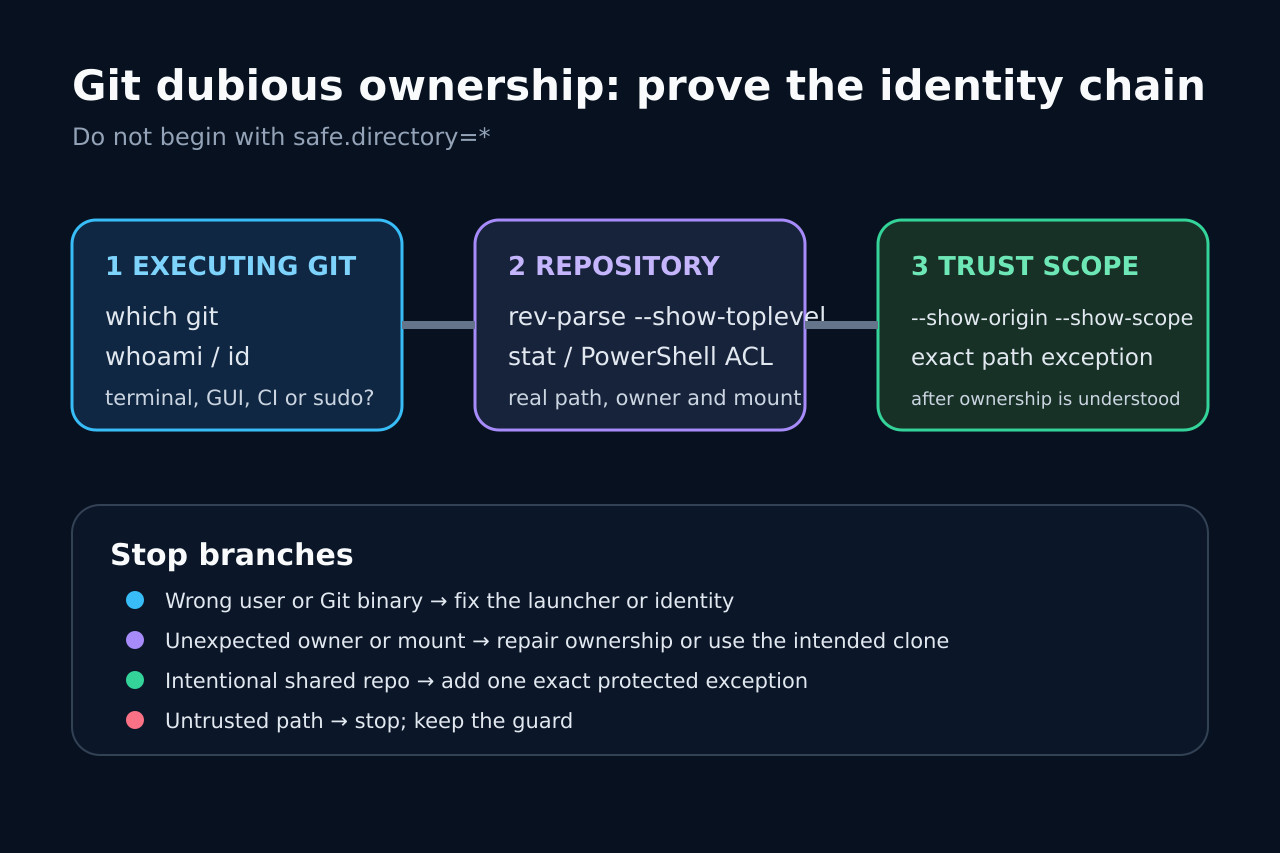
Do not begin with chmod, recursive chown, a fresh clone, or safe.directory=*. First preserve git --version, the launcher, the rejected path and the operating-system identity. This evidence determines whether you are repairing the repository, correcting the caller, or granting an intentional exception.
Prove which Git process and user are running
In the failing context, capture the executable and identity: command -v git (or where.exe git), git --version, whoami, id, HOME and relevant service or runner account. If sudo is involved, record sudo -V and SUDO_UID rather than assuming Git trusts only root; official Git documentation says a sudo-launched Git may also trust the UID recorded in SUDO_UID.
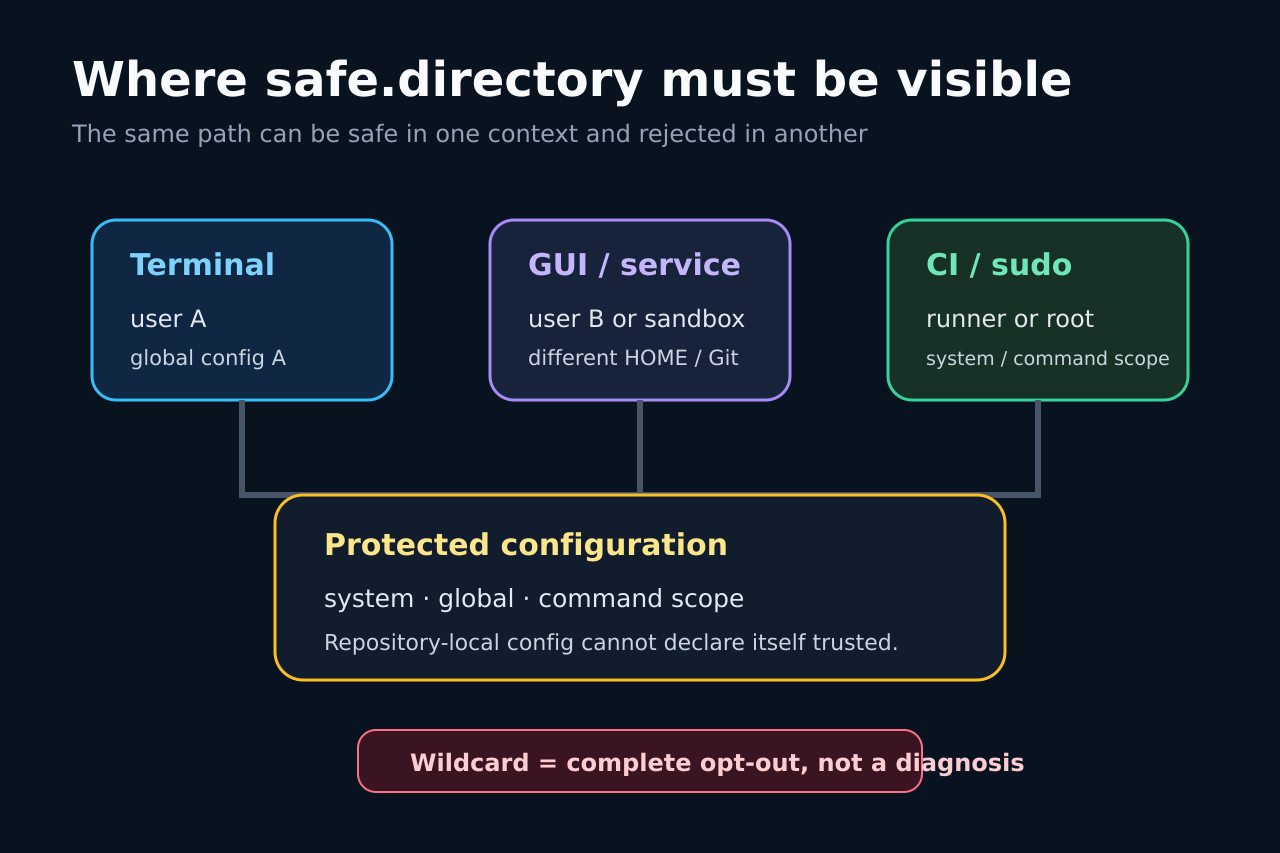
For a GUI, use its embedded terminal or diagnostic log when available. A safe.directory entry written by terminal user A may be invisible to GUI user B. In WSL, Windows Git and Linux Git are different programs with different ownership models and configuration files even when they point at the same files.
Resolve the rejected repository and its owner without Git
Use the exact path printed in the error. Resolve symlinks or mapped paths with realpath or the platform equivalent, then inspect the path and parent directories with stat -c '%U:%G %u:%g %n' on Linux, ls -ld on macOS, or Get-Acl on Windows. If Git refuses before rev-parse works, do not depend on a repository command to discover the path.
Compare the observed owner with the intended operating model. A personal clone unexpectedly owned by root after sudo clone is different from a deliberately shared service repository, a bind mount with remapped IDs, a NAS share, or a WSL path read by Windows Git. Group membership alone does not necessarily satisfy Git’s owner check.
Inspect every safe.directory origin and scope
Run git config --show-origin --show-scope --get-all safe.directory in the same failing context, then inspect the relevant global and system files explicitly. Git accepts safe.directory only from protected configuration: system, global or command scope. A repository cannot mark itself safe in its own local config.
An exact entry can fail when it names a symlink spelling while Git evaluates a canonical path, when the GUI reads another HOME, or when the exception was written on the client but the failing Git runs on an SSH server. Match the error path and execution side before adding or changing any entry.
Choose the narrowest repair branch
If this is a personal clone and the owner is simply wrong, correct ownership to the intended user after checking for shared-service consequences. If the repository is intentionally owned by another trusted user, add one exact absolute path in the protected scope used by the failing Git process. Keep separate clones for unrelated users when practical.
Treat safe.directory=* as a complete opt-out, not a diagnosis. Official Git documentation says it makes every repository trusted. Avoid recursive chmod as a substitute for ownership reasoning, and do not chown shared, package-managed or service-owned trees until the service model and rollback are known.
Handle GUI, WSL, container and CI boundaries explicitly
When terminal Git works but a GUI fails, compare the GUI’s Git executable, user, HOME and config origins. When WSL works but Git for Windows fails, decide which Git should own the workflow rather than mirroring blanket exceptions. For containers and CI, inspect the numeric UID/GID, bind-mount owner mapping and workspace lifecycle inside the actual job.
For SSH or server-side failures, configure or repair the server-side identity and path; a client-side global entry cannot affect remote Git. For sudo, decide whether the inherited SUDO_UID behavior is intended. Each branch ends with a documented owner or one exact trusted path, not a machine-wide wildcard.
Verify the fix and keep a rollback record
Repeat the original command in the original context, then run git status and a read-only operation that exercises the same repository discovery path. Re-run --show-origin --show-scope so the effective exception is visible. Verify that no unrelated repository has become trusted and that hooks or local configuration were not executed from an unreviewed path.
Record the old owner, new owner or exact safe.directory value, config file, responsible user, reason and rollback command. Remove temporary exceptions with git config --global --unset-all safe.directory '/exact/path' or the matching system-scope command. Success means the intended caller can use the intended repository while the ownership guard remains active elsewhere.