기술 · 실용 가이드
Git의 dubious ownership 경고: safe.directory를 바꾸기 전에 감사하기
권한 변경이나 safe.directory 예외 추가 전에 Git 소유권 경고의 근거를 읽기 전용 원장으로 남깁니다.
Git의 “detected dubious ownership” 메시지는 보안 중단이며 저장소 손상의 증거가 아닙니다. Git 2.35.2부터 다른 주체가 소유한 저장소를 명령이 거부할 수 있습니다. 공식 safe.directory는 예외를 허용하지만, 신뢰하지 않는 저장소가 스스로 허용하지 못하도록 보호된 설정에서만 적용됩니다.
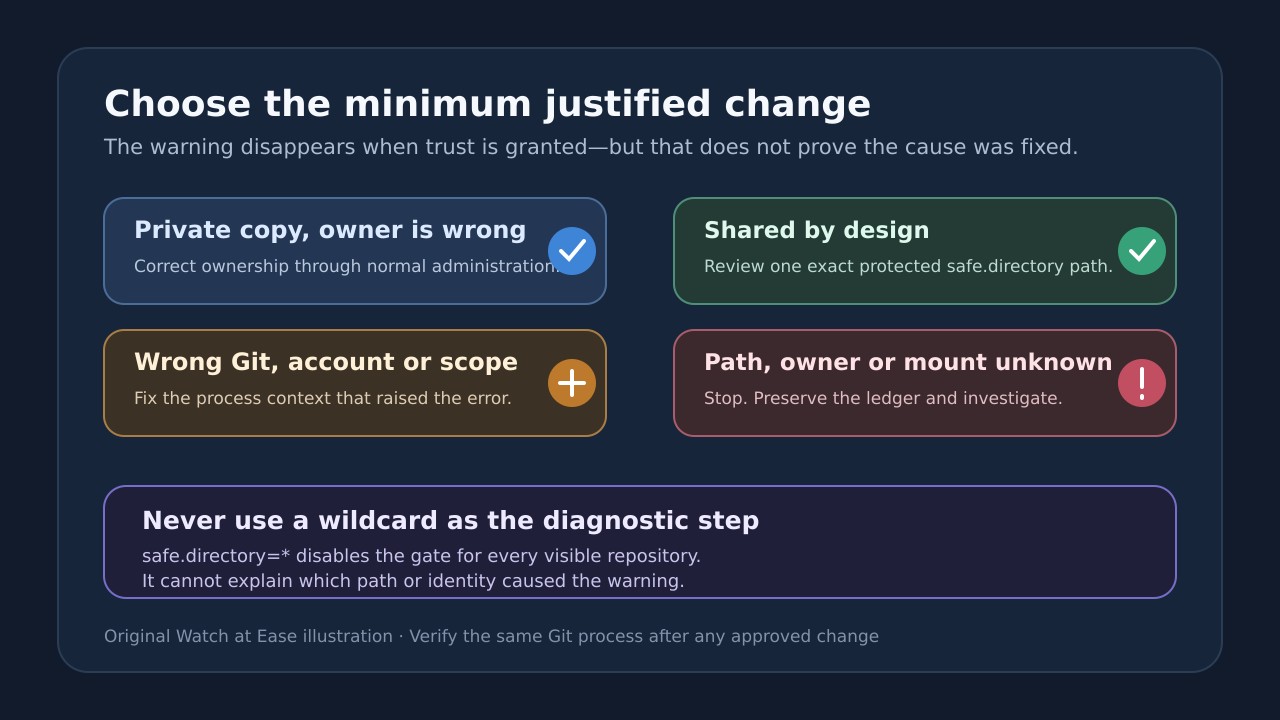
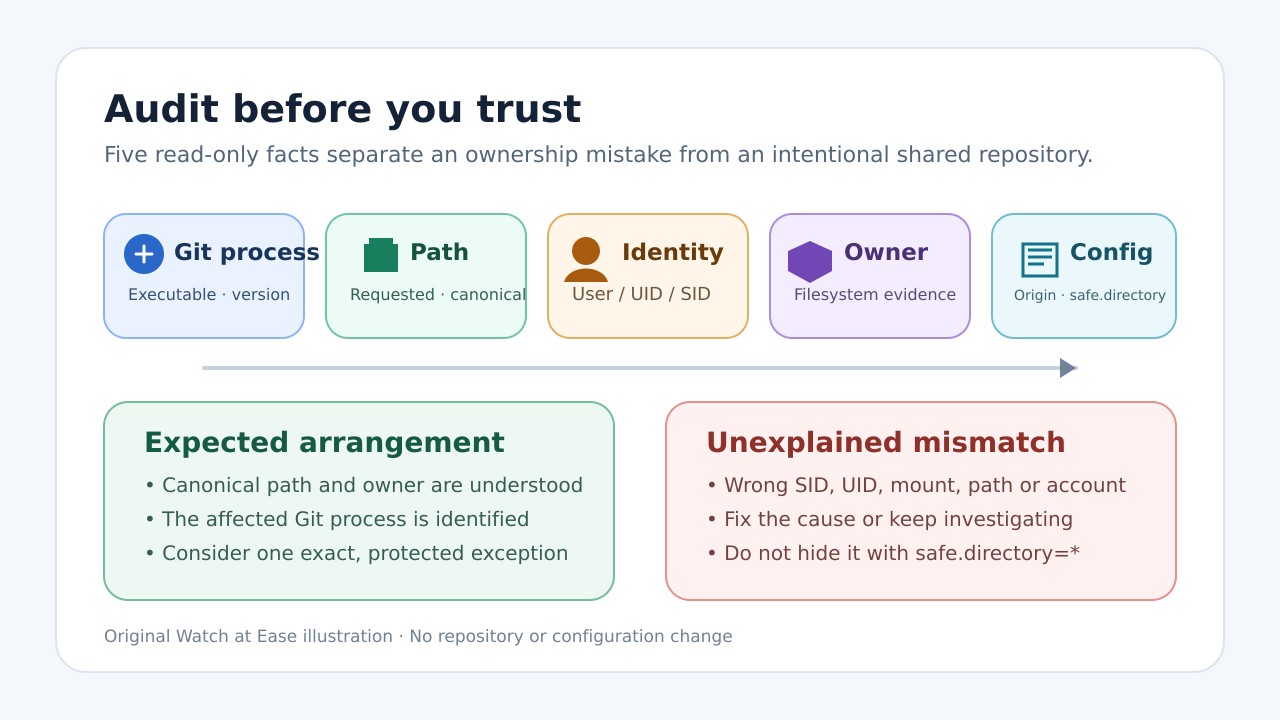
safe.directory=*부터 사용하지 마세요. 이 값은 해당 Git이 볼 수 있는 모든 저장소에서 소유권 검사를 끕니다. 정확한 Git 실행 파일, 정규 경로, 현재 계정, 파일 시스템 소유자, 마운트 환경, 기존 보호된 safe.directory 값을 먼저 기록한 뒤 근거가 있는 최소 범위 변경을 선택하세요.
아래 감사 도구는 저장소 밖에 JSON 보고서 하나만 새로 씁니다. 대상 안에서 Git을 실행하거나 로컬 설정을 해석하지 않고, 소유권·권한·신뢰 설정을 바꾸지 않으며, 체크아웃·훅 실행·원격 접속도 하지 않습니다.
1. 경고와 경로를 그대로 보존하기
Git이 표시한 경로와 소유자/현재 사용자 신원을 포함한 오류 전체를 복사하세요. 터미널, IDE, GUI, CI 러너, Git LFS, 컨테이너, 서비스 중 무엇이 오류를 냈는지도 기록하세요. 서로 다른 Git 실행 파일과 계정을 쓸 수 있습니다.
경로를 눈으로 보고 통일하지 마세요. Windows Git과 WSL은 같은 파일을 다른 경로 표기와 보호 설정으로 봅니다. 심볼릭 링크, 연결된 worktree, 마운트, 네트워크 공유도 입력 경로와 Git이 검사한 실체를 다르게 만들 수 있습니다.
2. safe.directory가 실제로 바꾸는 범위
Git은 safe.directory를 다른 사용자가 소유한 저장소도 허용하는 다중 값 목록으로 정의합니다. 보호된 설정에서만 유효합니다. 빈 값은 상속 목록을 초기화하고, /* 접미사는 하위 저장소를 신뢰하며, *는 소유권 검사를 완전히 끕니다.
개인 복사본이 예전 SID, root, 다른 계정 소유라면 소유권 수정이 맞을 수 있습니다. 의도된 공유 저장소라면 경로와 소유자를 확인한 뒤 정확한 예외 하나를 검토할 수 있습니다. 와일드카드는 두 경우의 차이를 숨깁니다.
3. 저장소 밖에서 읽기 전용 감사 실행하기
아래 프로그램을 audit_git_trust.mjs로 저장해 중립 폴더에 두세요. 첫 인수는 저장소, 둘째 선택 인수는 저장소 밖에 새로 만들 보고서입니다. 기존 보고서 덮어쓰기와 대상 내부 출력은 거부합니다.
Windows PowerShell: node .\audit_git_trust.mjs "D:\Work\project" ".\git-trust-project.json". Linux/macOS: node ./audit_git_trust.mjs "/mnt/work/project" "./git-trust-project.json". 합성 테스트 7건은 Node 24.19.0에서 실행했으며 다른 버전은 검증하지 않았습니다.
```javascript #!/usr/bin/env node import {access, lstat, mkdir, open, readFile, realpath, stat} from 'node:fs/promises'; import {constants as fsConstants} from 'node:fs'; import {execFile} from 'node:child_process'; import {promisify} from 'node:util'; import {basename, delimiter, dirname, isAbsolute, join, resolve} from 'node:path'; import {tmpdir} from 'node:os'; const runFile = promisify(execFile); const fail = (code, detail = '') => { const error = new Error(detail ? `${code}: ${detail}` : code); error.code = code; throw error; }; const isObject = value => value !== null && typeof value === 'object' && !Array.isArray(value); const normalizePrefix = value => process.platform === 'win32' ? value.toLowerCase() : value; const isWithin = (parent, child) => { const p = normalizePrefix(resolve(parent)); const c = normalizePrefix(resolve(child)); return c === p || c.startsWith(p.endsWith('/') || p.endsWith('\\') ? p : p + (process.platform === 'win32' ? '\\' : '/')); }; async function existingExecutable(name) { const extensions = process.platform === 'win32' ? (process.env.PATHEXT || '.EXE;.CMD;.BAT;.COM').split(';') : ['']; for (const folder of (process.env.PATH || '').split(delimiter).filter(Boolean)) { for (const extension of extensions) { const candidate = join(folder, process.platform === 'win32' ? name + extension.toLowerCase() : name); try { await access(candidate, process.platform === 'win32' ? fsConstants.F_OK : fsConstants.X_OK); return await realpath(candidate).catch(() => resolve(candidate)); } catch {} } } return null; } async function command(executable, args, options = {}) { try { const result = await runFile(executable, args, { cwd: options.cwd || tmpdir(), encoding: 'utf8', timeout: 15_000, maxBuffer: 2 * 1024 * 1024, windowsHide: true, env: process.env }); return {ok: true, stdout: result.stdout, stderr: result.stderr}; } catch (error) { return { ok: false, code: typeof error.code === 'string' || typeof error.code === 'number' ? error.code : 'COMMAND_FAILED', stdout: typeof error.stdout === 'string' ? error.stdout : '', stderr: typeof error.stderr === 'string' ? error.stderr : '' }; } } async function inspectGitMarker(root) { const marker = join(root, '.git'); try { const info = await lstat(marker); if (info.isDirectory()) return {kind: 'directory', marker, adminPath: marker}; if (!info.isFile()) return {kind: 'unsupported-marker', marker}; const text = await readFile(marker, 'utf8'); const match = /^gitdir:\s*(.+?)\s*$/im.exec(text); if (!match) return {kind: 'unrecognized-file', marker}; const candidate = isAbsolute(match[1]) ? match[1] : resolve(root, match[1]); return {kind: 'gitdir-file', marker, declared: match[1], adminPath: await realpath(candidate).catch(() => resolve(candidate))}; } catch (error) { if (error.code !== 'ENOENT') throw error; } const [head, objects, refs] = await Promise.all([ stat(join(root, 'HEAD')).catch(() => null), stat(join(root, 'objects')).catch(() => null), stat(join(root, 'refs')).catch(() => null) ]); return head?.isFile() && objects?.isDirectory() && refs?.isDirectory() ? {kind: 'bare-repository', adminPath: root} : {kind: 'not-detected'}; } async function posixIdentity(targetStat) { const user = await command('id', ['-un']); const group = await command('id', ['-gn']); return { process: { uid: typeof process.getuid === 'function' ? process.getuid() : null, gid: typeof process.getgid === 'function' ? process.getgid() : null, user: user.ok ? user.stdout.trim() : null, group: group.ok ? group.stdout.trim() : null, sudoUid: process.env.SUDO_UID || null }, target: {uid: targetStat.uid, gid: targetStat.gid, mode: `0${(targetStat.mode & 0o7777).toString(8)}`} }; } async function windowsIdentity(target) { const script = "param([string]$p) $a=Get-Acl -LiteralPath $p; [pscustomobject]@{Owner=$a.Owner;Sddl=$a.Sddl}|ConvertTo-Json -Compress"; const result = await command('powershell.exe', ['-NoProfile', '-NonInteractive', '-Command', script, target]); let acl = null; if (result.ok) { try { acl = JSON.parse(result.stdout); } catch { acl = {parseError: true, raw: result.stdout.trim()}; } } return { process: {user: process.env.USERNAME || null, userDomain: process.env.USERDOMAIN || null}, target: acl, aclRead: result.ok, aclError: result.ok ? null : (result.stderr.trim() || String(result.code)) }; } function decodeMountField(value) { return value.replaceAll('\\040', ' ').replaceAll('\\011', '\t').replaceAll('\\012', '\n').replaceAll('\\134', '\\'); } async function linuxMount(target) { try { const lines = (await readFile('/proc/self/mountinfo', 'utf8')).trim().split('\n'); const candidates = lines.map(line => { const parts = line.split(' '), separator = parts.indexOf('-'); if (separator < 6) return null; return { mountPoint: decodeMountField(parts[4]), mountOptions: parts[5], optionalFields: parts.slice(6, separator), filesystem: parts[separator + 1], source: decodeMountField(parts[separator + 2] || ''), superOptions: parts.slice(separator + 3).join(' ') }; }).filter(Boolean).filter(item => isWithin(item.mountPoint, target)); return candidates.sort((a, b) => b.mountPoint.length - a.mountPoint.length)[0] || null; } catch (error) { return {readError: error.code || error.message}; } } async function portableMount(target) { if (process.platform === 'linux') return linuxMount(target); if (process.platform === 'win32') { const root = /^[A-Za-z]:\\/.exec(target)?.[0]?.slice(0, 2) || null; if (!root) return {drive: null}; const script = "param([string]$d) Get-Volume -DriveLetter $d.TrimEnd(':') | Select DriveLetter,FileSystem,DriveType,HealthStatus | ConvertTo-Json -Compress"; const result = await command('powershell.exe', ['-NoProfile', '-NonInteractive', '-Command', script, root]); return result.ok ? {drive: root, raw: result.stdout.trim()} : {drive: root, error: result.stderr.trim() || String(result.code)}; } const result = await command('df', ['-P', target]); return result.ok ? {raw: result.stdout.trim()} : {error: result.stderr.trim() || String(result.code)}; } async function protectedConfig(git) { if (!git) return {available: false, reason: 'git-not-found-in-path'}; const version = await command(git, ['--version']); const traced = await command(git, ['config', '--show-origin', '--show-scope', '--get-all', 'safe.directory']); const global = await command(git, ['config', '--global', '--get-all', 'safe.directory']); const system = await command(git, ['config', '--system', '--get-all', 'safe.directory']); return { available: version.ok, executable: git, version: version.stdout.trim() || null, safeDirectoryWithOrigin: traced.stdout.split(/\r?\n/).filter(Boolean), globalValues: global.stdout.split(/\r?\n/).filter(Boolean), systemValues: system.stdout.split(/\r?\n/).filter(Boolean), notes: [ !traced.ok && traced.code !== 1 ? `origin-read-failed:${traced.code}` : null, !global.ok && global.code !== 1 ? `global-read-failed:${global.code}` : null, !system.ok && system.code !== 1 ? `system-read-failed:${system.code}` : null ].filter(Boolean) }; } async function main() { if (process.argv.length < 3 || process.argv.length > 4) fail('USAGE', 'node audit_git_trust.mjs REPOSITORY_PATH [REPORT.json]'); const requestedPath = resolve(process.argv[2]); const output = resolve(process.argv[3] || `git-trust-audit-${Date.now()}.json`); const target = await realpath(requestedPath).catch(error => fail('TARGET_NOT_FOUND', error.code || error.message)); const targetStat = await stat(target); if (!targetStat.isDirectory()) fail('TARGET_NOT_DIRECTORY'); if (isWithin(target, output)) fail('OUTPUT_INSIDE_TARGET', 'write the report outside the repository being audited'); const git = await existingExecutable('git'); const report = { schemaVersion: 1, createdAt: new Date().toISOString(), readOnlyScope: { targetMutation: false, commandsExecutedInsideTarget: false, configWrites: false, ownershipOrPermissionWrites: false, repositoryOperations: false }, paths: {requested: requestedPath, canonical: target, targetName: basename(target), output}, marker: await inspectGitMarker(target), identity: process.platform === 'win32' ? await windowsIdentity(target) : await posixIdentity(targetStat), mount: await portableMount(target), git: await protectedConfig(git), interpretation: { warningMeaning: 'Git declined to trust a repository whose owner differs from the current execution identity; this is not proof of repository corruption.', minimumChangeRule: 'Verify path, identity and ownership first. Prefer correcting unintended ownership. For an intentionally shared repository, review one exact protected safe.directory entry instead of a wildcard.', limits: 'This ledger does not decide whether an owner or path is trustworthy and does not modify the repository, filesystem ownership, permissions or Git configuration.' } }; if (!isObject(report.marker) || !isObject(report.identity) || !isObject(report.git)) fail('REPORT_BUILD_FAILED'); await mkdir(dirname(output), {recursive: true}); const handle = await open(output, 'wx', 0o600).catch(error => fail(error.code === 'EEXIST' ? 'OUTPUT_EXISTS' : 'OUTPUT_OPEN_FAILED', error.code)); try { await handle.writeFile(JSON.stringify(report, null, 2) + '\n', 'utf8'); await handle.sync(); } finally { await handle.close(); } console.log(`Wrote read-only Git trust audit: ${output}`); } main().catch(error => { console.error(error.code || error.message || 'UNEXPECTED_ERROR'); process.exitCode = 1; }); ```
4. 보고서를 판결이 아니라 증거로 읽기
paths는 요청 경로와 정규 파일 시스템 경로를 함께 보존합니다. marker는 일반 .git 디렉터리, gitdir: 파일, bare 저장소, 미검출을 구분해 Git이 다른 실체를 검사하는데 별칭을 신뢰하는 일을 막습니다.
identity는 실행 계정과 소유권 증거를 비교합니다. POSIX에서는 UID/GID와 사용자/그룹을, Windows에서는 PowerShell로 ACL 소유자와 SDDL을 읽기만 합니다. 불일치는 조사 대상이지 악의의 증명이 아닙니다.
mount는 가장 가까운 Linux 마운트 또는 플랫폼 드라이브 정보를 기록합니다. git은 PATH의 실행 파일, 버전, 보호된 safe.directory 값과 가능한 출처/범위를 기록합니다. Git으로 저장소 로컬 설정을 열지 않습니다.
5. 변경 전에 원인 분류하기
개인 복사본이 예전 계정, root, 설치 프로그램 소유면 wrong-owner입니다. 터미널, IDE, WSL, 컨테이너, 서비스가 다른 Git/설정을 읽으면 wrong-executable-or-scope입니다. 정규 경로, 소유 구조, 허가된 작성자, 훅, 설정을 확인한 공유만 intentional-shared-repository로 분류합니다.
SMB, NFS, 이동식 드라이브, bind mount가 다른 소유자를 보여 주면 mount-or-share-identity입니다. 경로·소유자·실행 환경을 확정할 수 없으면 unknown입니다.
공유 범위를 모른 채 재귀적으로 소유권을 바꾸지 말고, sudo Git을 상시 우회로 쓰지 말며, 포럼의 와일드카드 명령을 전역/시스템 설정에 복사하지 마세요.
6. 검증된 최소 범위 수정만 적용하기
개인 복사본의 소유자가 예상과 다르면 운영체제의 정상 관리 절차로 올바른 계정에 할당하세요. Atlassian은 takeown/chown 예를 들지만 계정, 그룹, 상속, 공유 스토리지 정책은 환경별 결정입니다. 재귀 변경 전에 중요 작업을 보존하세요.
의도된 공유라면 영향을 받은 Git 프로세스가 읽는 보호 설정에 정규 경로 하나만 추가하세요. 다른 앱이나 계정에서 경고가 나면 다시 감사하세요. 보고서는 쓰기 명령을 만들거나 실행하지 않습니다.
WSL, 컨테이너, CI, 서비스에서는 실제 Git 실행 환경을 고치세요. Windows Git 설정은 WSL Git을 설정하지 않고, 개발자 전역 파일은 서비스 계정을 설정하지 않으며, 호스트 설정이 컨테이너에 들어간다는 보장도 없습니다. GitLab 문서는 잘못된 실행 계정이 원인이 될 수 있음을 보여 줍니다.
7. 결과를 검증하고 되돌릴 증거 남기기
승인된 변경 뒤 새 파일명으로 같은 감사를 실행하고 실행 파일, 정규 경로, 신원, 소유자, 마운트, safe.directory 출처를 비교하세요. 변경 전후 보고서와 원본 오류를 함께 보관하세요.
처음 실패한 같은 앱/계정에서 필요한 최소 읽기 명령(예: git status --short)을 실행하세요. 다른 셸의 성공은 IDE, 서비스, 공유 프로세스가 고쳐졌다는 증거가 아닙니다.
정확한 예외로 경고가 사라져도 경로나 소유자를 설명할 수 없다면 같은 보호 범위에서 예외를 제거하고 조사를 계속하세요. 경고 소멸은 신뢰 게이트를 통과했다는 뜻뿐입니다.
8. 감사의 한계 알기
이 프로그램은 객체, 커밋, 훅, 원격 신원을 검증하거나 공유 저장소의 안전을 증명하거나 삭제된 작업을 복구하지 않습니다. Windows는 PowerShell/ACL에, 마운트 세부 정보는 /proc/self/mountinfo, PowerShell 또는 df에 의존합니다.
합성 테스트 7건은 일반 worktree, gitdir: 파일, bare 저장소, 심볼릭 링크, 없는 대상, 덮어쓰기 거부, 대상 내부 쓰기 거부를 다뤘고 대상 해시는 바뀌지 않았습니다. Linux와 Node 24.19.0만 사용했으며 실제 Windows SID, SMB/NFS, WSL, 컨테이너, IDE, CI는 시험하지 않았습니다.