Travel · PRACTICAL GUIDE
FlixBus Ticket Canceled but the Bus Still Runs? Verify Your Replacement Trip
Check the affected booking, destination and current ticket before treating a new departure time or confirmation email as a completed rebooking.
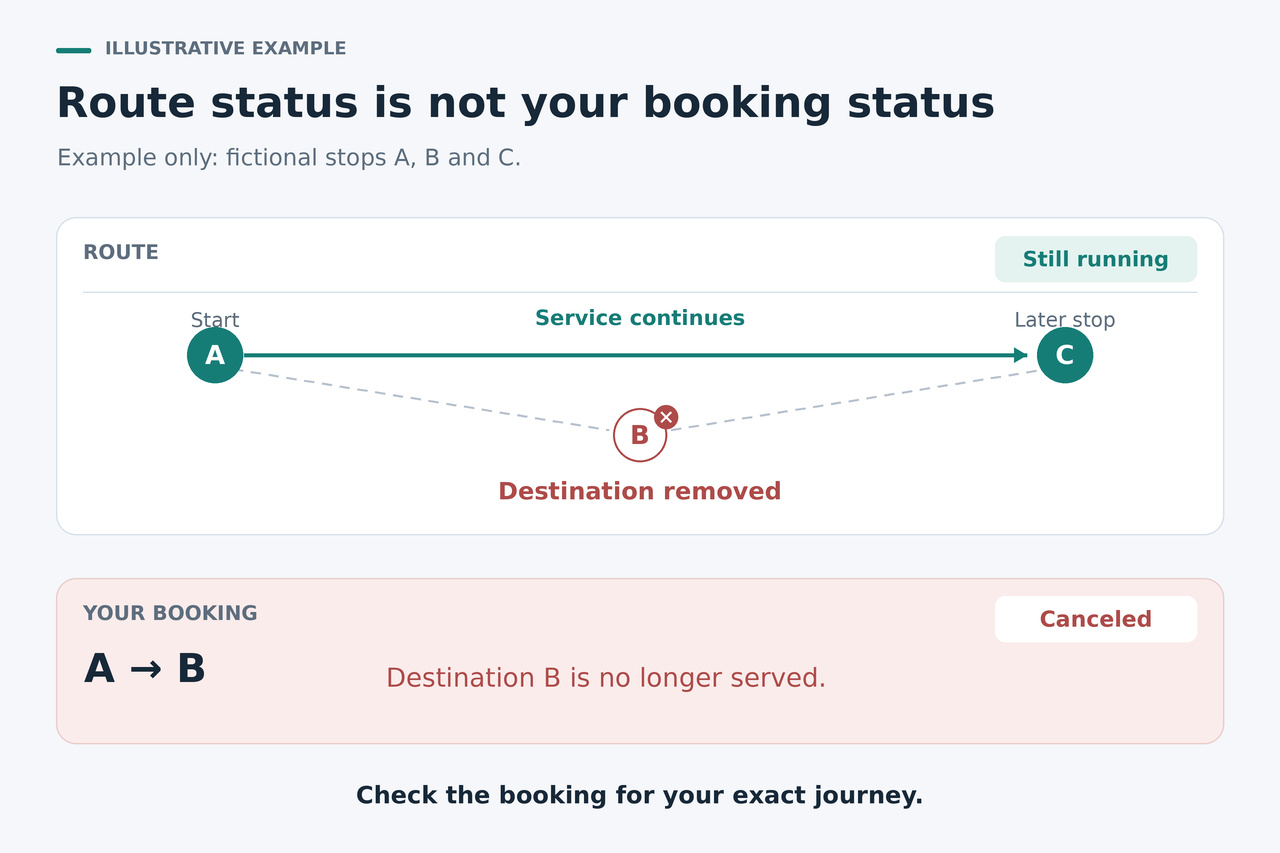
If FlixBus sends a cancellation message while the bus still appears to run, check your personal reservation before relying on that departure. You need a current itinerary that covers your boarding stop and destination, plus the ticket for that itinerary. A moving bus, a new time or a QR code by itself does not establish that.
Work through the booking and destination first, then decide whether you need to retrieve the right ticket or complete a rebooking. The support steps below use FlixBus's U.S. help pages; Omio purchases have a separate access branch. Other travel markets and external operators can have different conditions.
1. Match the notice to the affected booking
Keep the cancellation or change message and find the booking number it refers to. Flix lists the number in the confirmation email, at the top of the ticket and under General Info for the booked trip in its app. Open that reservation in Manage My Booking.
If you have several messages after time or seat changes, compare the booking and journey each one describes. Write down the passenger name, original departure date and boarding and arrival stops. This gives you a stable reference when a later message or screen shows a different arrangement.
2. Check whether the bus still serves your destination
A route can remain active while your own journey is canceled. In its August 2026 response to a complaint hosted by the Better Business Bureau, FlixBus said a passenger's destination had been removed while the bus continued serving other stops. The company explained that the later departure required an explicit rebooking; the old ticket did not cover it.
That is one possible explanation for conflicting information. Inspect the destination of the actual replacement being offered, including any connection. A familiar route number or departure time is insufficient if the itinerary no longer takes you to your intended stop. The company response is an account of that case, not a finding independently verified by BBB.
3. Read what the newest confirmation confirms
Flix's U.S. help says confirmed booking changes generate a new confirmation email. Its voluntary-cancellation section also says a new booking confirmation follows cancellation. The label therefore does not identify a usable replacement by itself. This does not mean every carrier-initiated cancellation uses the same email template.
Read the current reservation and its documents together. Check the traveler, journey, date, stops and any cancellation wording. If the latest file still records the canceled journey, downloading it again has not created a replacement.
If a current replacement is already confirmed for the right journey, compare your saved ticket with it and retrieve the matching current document. If you have only a timetable update and no confirmed replacement, or if the replacement itinerary omits your destination or is marked canceled, continue with the rebooking or support steps. You do not need to prove that the booking number changed; you need to establish which journey your current booking covers.
4. Complete the replacement through the right channel
For a Flix-canceled trip, the U.S. help directs you to the cancellation notice and Manage My Booking to choose a suitable free rescheduling option. Finish the confirmation steps for the actual journey you intend to take. If no suitable option appears or the system requests payment for this cancellation rebooking, use the chat contact on the U.S. delays-and-cancellations help page.
Keep operator cancellation separate from a voluntary change of plans. The normal change and cancellation pages include different fee conditions. Check the support options for your travel market before canceling again or buying a separate ticket; a separate purchase does not itself resolve the original reservation.
If you bought through Omio, start with the ticket information in its app or confirmation email. Omio directs Flix customers to Manage My Booking using the booking number and either the last name or booking email, and points canceled journeys there to select a new travel date or request a refund.
Omio also has its own Your Bookings change tool, but says bookings with paid seat reservations or extra services such as additional luggage cannot be modified through that tool. If you cannot update the booking online, contact Omio Customer Service. A limitation in that seller interface says nothing about whether a replacement has already been confirmed.
5. Verify the current ticket against the whole journey
After the replacement is confirmed, retrieve its documentation through Manage My Booking. Omio customers can also display their ticket in its app or download the PDF. Compare six items across the reservation and ticket: passenger; booking number; departure date and time; boarding stop; destination and any connection; and the current status of your own trip.
Use the actual station names, not just the city. For a journey with a transfer, check the onward segment too. If you purchased a seat, additional baggage or another extra, look for it in the updated journey summary: Flix says extras on a changed booking depend on availability. An old receipt alone does not show that an extra is included in the replacement.
Save the document that matches the confirmed replacement and keep the earlier notices as a record of the change. The goal is agreement between your current booking, its itinerary and the ticket you will present. A PDF on your phone, without that agreement, is not a boarding guarantee.
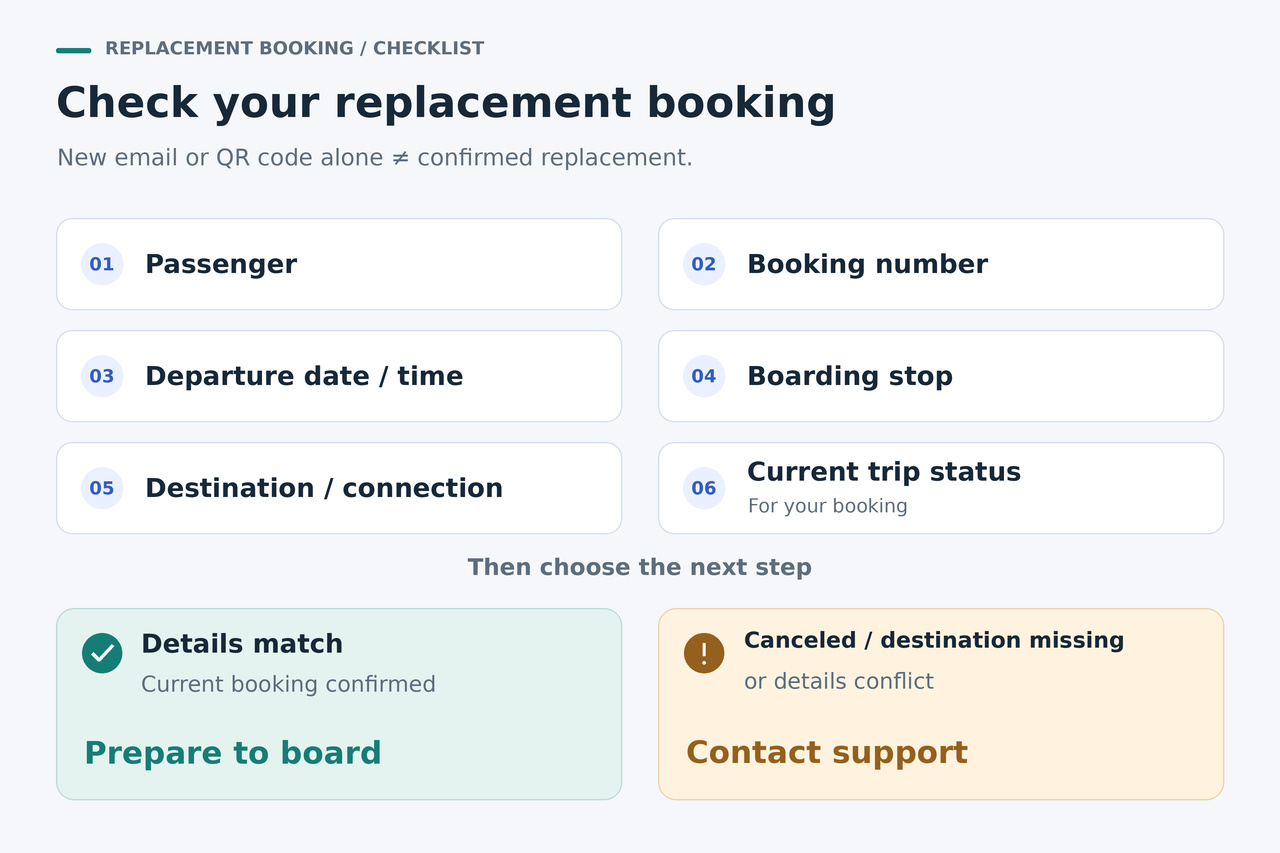
6. Resolve any remaining conflict before relying on the new departure
If the current file still says canceled, the destination does not match or support has only said that the bus is running, ask for a booking-specific answer. Give support the affected booking number, original destination, proposed replacement date and time, and the conflicting notice or ticket.
You can ask: Is this passenger's booking confirmed on the replacement journey to this destination, including the connection? Which current ticket should I use? If it is not confirmed, please help complete the rebooking. These questions make the unresolved reservation explicit without assuming that a timetable update settled it.
Once the current reservation and ticket agree, follow the boarding instructions for that trip and arrive at least 15 minutes before departure, as Flix's U.S. help advises. If the ticket names an external operator, consult its instructions too. This check resolves the booking-document conflict; the operator still applies its other boarding conditions.