Technology · 實用指南
Docker Desktop 的 WSL 磁碟很大?清理或壓縮前先量三層
用唯讀稽核分開記錄 Docker 物件、WSL 客體檔案系統與 Windows 主機 VHDX,再決定下一步。
刪除映像後 docker_data.vhdx 仍很大,不代表 Docker 必然保留了同量物件。
本指南建立唯讀 JSON 證據帳本;不執行清理、刪除、關閉 WSL、稀疏化或壓縮。
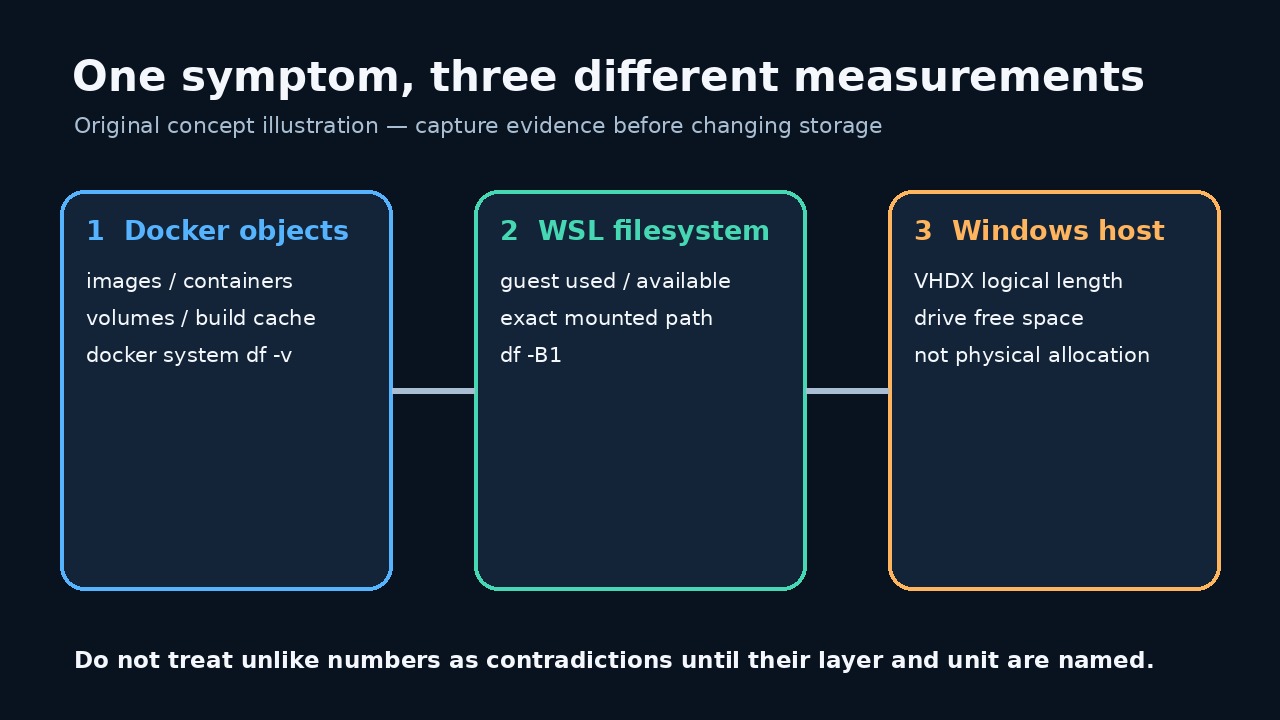
比較前先替三層命名
Docker 物件、客體檔案系統用量與主機 VHDX 長度是不同層。比較前先完整保存。
動態 VHD 刪檔後仍可能很大;Docker 摘要外的資料也可能讓客體真正寫滿。
保留基線並使用精確路徑
從目前 Docker Desktop 設定複製精確磁碟映像路徑,不要猜舊預設值。程式不會掃描磁碟。
守護程式、發行版或客體路徑失敗都保留為錯誤,不能當成零。
儲存並執行唯讀稽核
把完整程式存成 UTF-8 的 audit_docker_wsl_disk.mjs,確認沒有 .txt 副檔名。它只執行查詢。
先執行 node --check audit_docker_wsl_disk.mjs,再執行 node audit_docker_wsl_disk.mjs "C:\精確\路徑\docker_data.vhdx" > docker-wsl-disk-before.json。
import { spawnSync } from 'node:child_process'; import { stat, statfs } from 'node:fs/promises'; import { dirname, resolve } from 'node:path'; import { pathToFileURL } from 'node:url'; const clip = (value, limit = 200000) => String(value ?? '').slice(0, limit); export function runCommand(file, args, spawn = spawnSync) { const result = spawn(file, args, { encoding: 'utf8', timeout: 30000, windowsHide: true, shell: false, maxBuffer: 1024 * 1024, }); return { command: [file, ...args], mutating: false, status: Number.isInteger(result.status) ? result.status : null, signal: result.signal ?? null, stdout: clip(result.stdout), stderr: clip(result.stderr), error: result.error ? String(result.error.code || result.error.message) : null, }; } export async function buildAudit({ vhdxPath, distro = process.env.DOCKER_WSL_DISTRO || 'docker-desktop', guestPath = process.env.DOCKER_WSL_MOUNT || '/tmp/docker-desktop-root/mnt/docker-desktop-disk', platform = process.platform, fsStat = stat, fsStatfs = statfs, spawn = spawnSync, } = {}) { if (!vhdxPath || typeof vhdxPath !== 'string') throw new Error('VHDX_PATH_REQUIRED'); if (!/^[A-Za-z0-9._-]+$/.test(distro)) throw new Error('INVALID_DISTRO_NAME'); if (!guestPath.startsWith('/') || guestPath.includes('\0')) throw new Error('INVALID_GUEST_PATH'); const exactPath = resolve(vhdxPath); const [file, hostFs] = await Promise.all([fsStat(exactPath), fsStatfs(dirname(exactPath))]); if (!file.isFile()) throw new Error('VHDX_NOT_A_FILE'); const command = (fileName, args) => runCommand(fileName, args, spawn); const commands = { dockerVersion: command('docker', ['version', '--format', '{{json .}}']), dockerObjects: command('docker', ['system', 'df', '-v']), wslStatus: command('wsl.exe', ['--status']), wslDistributions: command('wsl.exe', ['--list', '--verbose']), guestFilesystem: command('wsl.exe', ['-d', distro, '--', 'df', '-B1', guestPath]), }; return { schemaVersion: 1, capturedAt: new Date().toISOString(), scope: 'read-only Docker Desktop / WSL disk evidence', safety: { mutatingCommandsRun: false, notRun: ['docker system prune', 'docker * prune', 'wsl --shutdown', 'diskpart compact vdisk', 'Optimize-VHD', 'wsl --manage --set-sparse', 'file deletion'], }, host: { platform, vhdxPath: exactPath, fileLengthBytes: Number(file.size), containingFilesystem: { blockSize: Number(hostFs.bsize), blocks: Number(hostFs.blocks), blocksFree: Number(hostFs.bfree), blocksAvailable: Number(hostFs.bavail), }, limitation: 'fileLengthBytes is the file logical length. This audit does not claim to measure NTFS allocated clusters or reclaimable physical bytes.', }, docker: { version: commands.dockerVersion, objects: commands.dockerObjects, limitation: 'docker system df reports Docker-managed objects; it is not the Windows VHDX file size and can omit other guest-side use.', }, wsl: { distro, guestPath, status: commands.wslStatus, distributions: commands.wslDistributions, guestFilesystem: commands.guestFilesystem, limitation: 'A failed guest-path check is an unresolved measurement, not proof that the filesystem is empty.', }, interpretationOrder: [ 'Preserve this file before changing anything.', 'Use Docker object output to identify Docker-managed and potentially reclaimable categories.', 'Use guest df output to decide whether the WSL filesystem itself is near full.', 'Compare those readings with the host VHDX logical length and host filesystem free space.', 'Choose a change only after the mismatched layer is identified; rerun the same audit afterward under a new filename.', ], }; } async function main() { if (process.argv.length !== 3) throw new Error('USAGE: node audit_docker_wsl_disk.mjs <exact-vhdx-path>'); const report = await buildAudit({vhdxPath: process.argv[2]}); process.stdout.write(`${JSON.stringify(report, null, 2)}\n`); } if (import.meta.url === pathToFileURL(process.argv[1] || '').href) { main().catch(error => { process.stderr.write(`Audit failed without changing Docker or WSL: ${error.code || error.message}\n`); process.exitCode = 1; }); }
程式 SHA-256:d43b227f591fff111404afb1505ab5552965d8095eb907d60aa9c680c12785bb。五項 Linux 合成測試通過;未測試真實 Windows 或 Docker Desktop。
先讀 Docker 物件輸出
docker system df -v 分列映像、容器、磁碟區與快取;VHDX 的每個位元組不一定都能由 Docker 回收。
若有可移除類別,另行審查專用命令的範圍、篩選器與警告。
檢查 WSL 客體是否真的已滿
df 顯示指定客體掛載點的總量、已用與可用;客體容量不等於主機剩餘空間。
客體用量高而 Docker 摘要低時,先查客體內部消耗者,例如容器記錄。
謹慎解讀 Windows VHDX 長度
報告只記錄 VHDX 邏輯長度與所在檔案系統空間,不測 NTFS 已配置叢集或可回收實體位元組。
Microsoft 說明動態 VHD 會成長但不自動縮小;壓縮需要已卸離或唯讀。
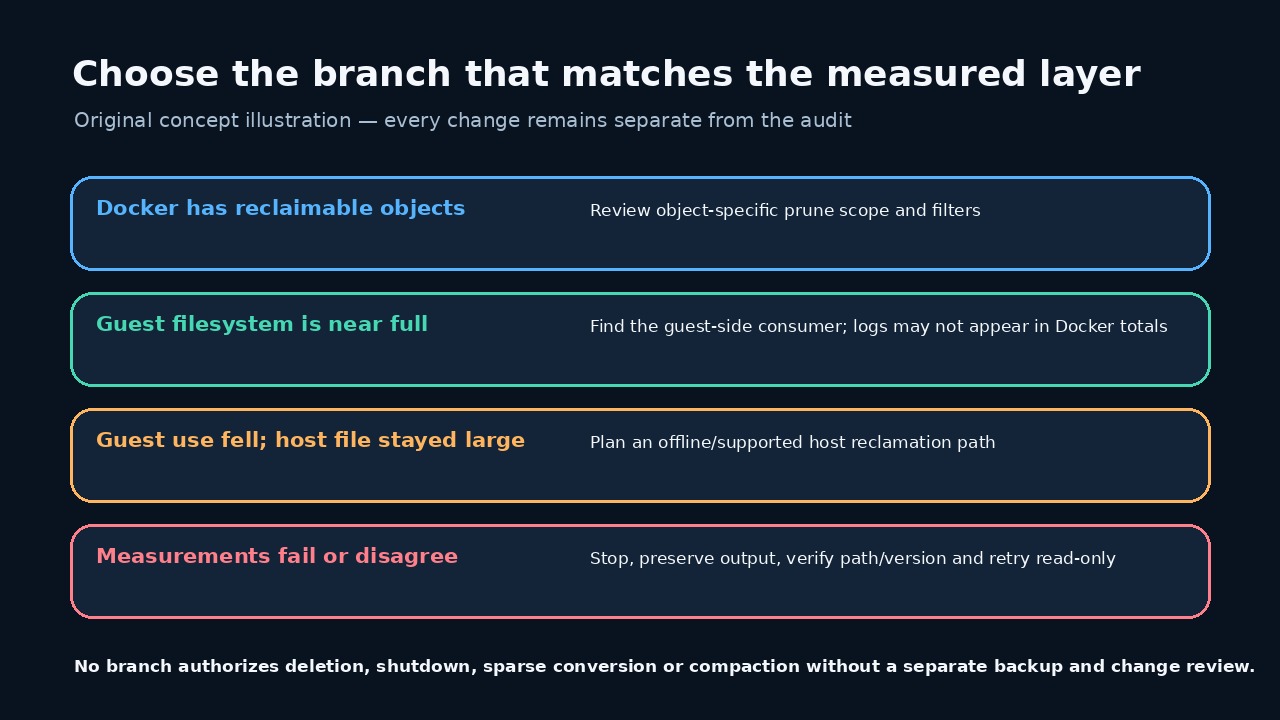
選擇證據支持的最小分支
Docker 可回收物件、客體已滿、主機檔案仍大是不同分支,只走量測支持的一支。
任一層失敗或路徑不符都應停止;不要為對齊數字而取消註冊 WSL、清空或壓縮。
一次核准變更後重跑稽核
一次核准變更後保存第二份報告,比較四組讀數並記錄中間唯一動作。
數字變小不代表工作負載完整;容器、磁碟區、綁定掛載與應用資料要另行驗證。