Technology · 实用指南
Docker Desktop 的 WSL 磁盘很大?清理或压缩前先测三层
用只读审计把 Docker 对象、WSL 客体文件系统与 Windows 宿主 VHDX 分开记录,再决定下一步。
删除镜像后,docker_data.vhdx 仍很大,并不自动说明 Docker 还保留了相同数量的对象。
本指南提供只读 JSON 证据账本;它不执行清理、删除、关闭 WSL、稀疏化或压缩。
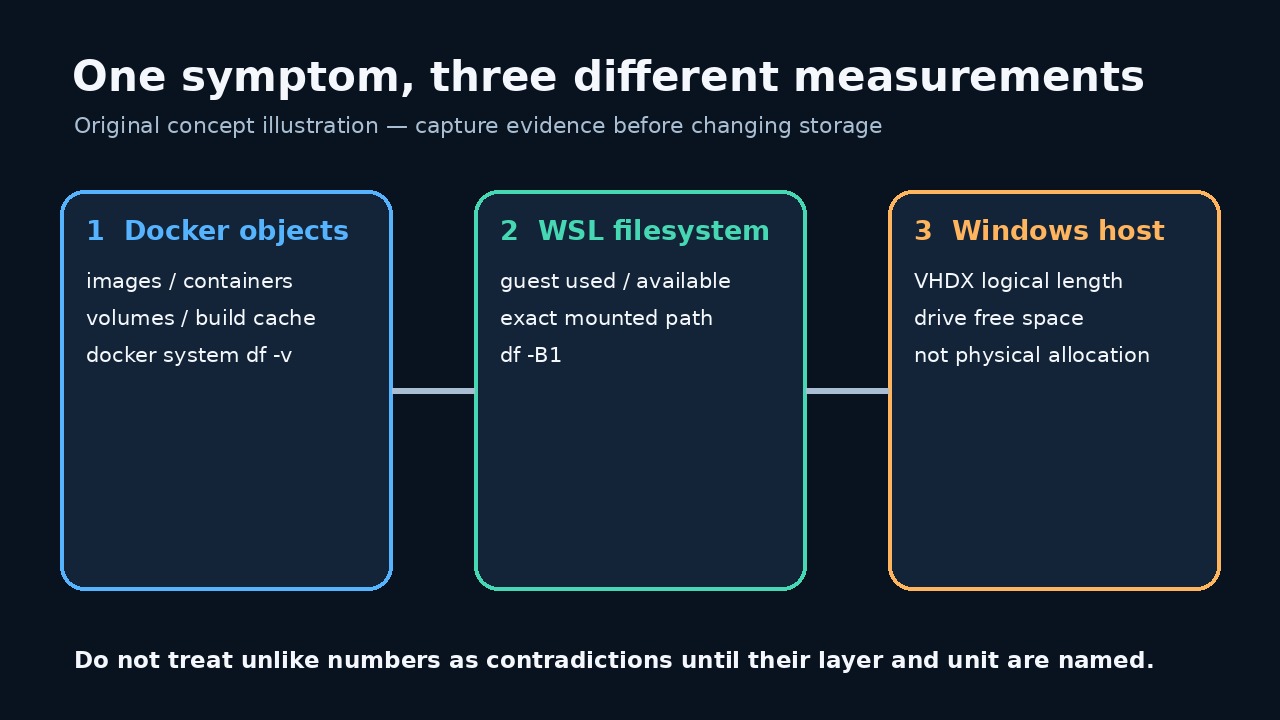
比较前先给三层命名
Docker 对象、客体文件系统占用和宿主 VHDX 长度属于不同层。比较前先完整保存。
动态 VHD 删除文件后仍可能很大;Docker 汇总之外的数据也可能让客体真正写满。
保存基线并使用精确路径
从当前 Docker Desktop 设置复制精确磁盘映像路径,不要猜旧默认值。脚本不会扫描磁盘。
守护进程、发行版或客体路径失败都保留为错误,绝不能当成零。
保存并运行只读审计
把完整程序保存为 UTF-8 的 audit_docker_wsl_disk.mjs,并确认没有 .txt 后缀。它只执行查询。
先运行 node --check audit_docker_wsl_disk.mjs,再运行 node audit_docker_wsl_disk.mjs "C:\精确\路径\docker_data.vhdx" > docker-wsl-disk-before.json。
import { spawnSync } from 'node:child_process'; import { stat, statfs } from 'node:fs/promises'; import { dirname, resolve } from 'node:path'; import { pathToFileURL } from 'node:url'; const clip = (value, limit = 200000) => String(value ?? '').slice(0, limit); export function runCommand(file, args, spawn = spawnSync) { const result = spawn(file, args, { encoding: 'utf8', timeout: 30000, windowsHide: true, shell: false, maxBuffer: 1024 * 1024, }); return { command: [file, ...args], mutating: false, status: Number.isInteger(result.status) ? result.status : null, signal: result.signal ?? null, stdout: clip(result.stdout), stderr: clip(result.stderr), error: result.error ? String(result.error.code || result.error.message) : null, }; } export async function buildAudit({ vhdxPath, distro = process.env.DOCKER_WSL_DISTRO || 'docker-desktop', guestPath = process.env.DOCKER_WSL_MOUNT || '/tmp/docker-desktop-root/mnt/docker-desktop-disk', platform = process.platform, fsStat = stat, fsStatfs = statfs, spawn = spawnSync, } = {}) { if (!vhdxPath || typeof vhdxPath !== 'string') throw new Error('VHDX_PATH_REQUIRED'); if (!/^[A-Za-z0-9._-]+$/.test(distro)) throw new Error('INVALID_DISTRO_NAME'); if (!guestPath.startsWith('/') || guestPath.includes('\0')) throw new Error('INVALID_GUEST_PATH'); const exactPath = resolve(vhdxPath); const [file, hostFs] = await Promise.all([fsStat(exactPath), fsStatfs(dirname(exactPath))]); if (!file.isFile()) throw new Error('VHDX_NOT_A_FILE'); const command = (fileName, args) => runCommand(fileName, args, spawn); const commands = { dockerVersion: command('docker', ['version', '--format', '{{json .}}']), dockerObjects: command('docker', ['system', 'df', '-v']), wslStatus: command('wsl.exe', ['--status']), wslDistributions: command('wsl.exe', ['--list', '--verbose']), guestFilesystem: command('wsl.exe', ['-d', distro, '--', 'df', '-B1', guestPath]), }; return { schemaVersion: 1, capturedAt: new Date().toISOString(), scope: 'read-only Docker Desktop / WSL disk evidence', safety: { mutatingCommandsRun: false, notRun: ['docker system prune', 'docker * prune', 'wsl --shutdown', 'diskpart compact vdisk', 'Optimize-VHD', 'wsl --manage --set-sparse', 'file deletion'], }, host: { platform, vhdxPath: exactPath, fileLengthBytes: Number(file.size), containingFilesystem: { blockSize: Number(hostFs.bsize), blocks: Number(hostFs.blocks), blocksFree: Number(hostFs.bfree), blocksAvailable: Number(hostFs.bavail), }, limitation: 'fileLengthBytes is the file logical length. This audit does not claim to measure NTFS allocated clusters or reclaimable physical bytes.', }, docker: { version: commands.dockerVersion, objects: commands.dockerObjects, limitation: 'docker system df reports Docker-managed objects; it is not the Windows VHDX file size and can omit other guest-side use.', }, wsl: { distro, guestPath, status: commands.wslStatus, distributions: commands.wslDistributions, guestFilesystem: commands.guestFilesystem, limitation: 'A failed guest-path check is an unresolved measurement, not proof that the filesystem is empty.', }, interpretationOrder: [ 'Preserve this file before changing anything.', 'Use Docker object output to identify Docker-managed and potentially reclaimable categories.', 'Use guest df output to decide whether the WSL filesystem itself is near full.', 'Compare those readings with the host VHDX logical length and host filesystem free space.', 'Choose a change only after the mismatched layer is identified; rerun the same audit afterward under a new filename.', ], }; } async function main() { if (process.argv.length !== 3) throw new Error('USAGE: node audit_docker_wsl_disk.mjs <exact-vhdx-path>'); const report = await buildAudit({vhdxPath: process.argv[2]}); process.stdout.write(`${JSON.stringify(report, null, 2)}\n`); } if (import.meta.url === pathToFileURL(process.argv[1] || '').href) { main().catch(error => { process.stderr.write(`Audit failed without changing Docker or WSL: ${error.code || error.message}\n`); process.exitCode = 1; }); }
程序 SHA-256:d43b227f591fff111404afb1505ab5552965d8095eb907d60aa9c680c12785bb。五项 Linux 合成测试通过;没有测试真实 Windows 或 Docker Desktop。
先读 Docker 对象输出
docker system df -v 分开列出镜像、容器、卷与缓存;VHDX 的每个字节并不都可由 Docker 回收。
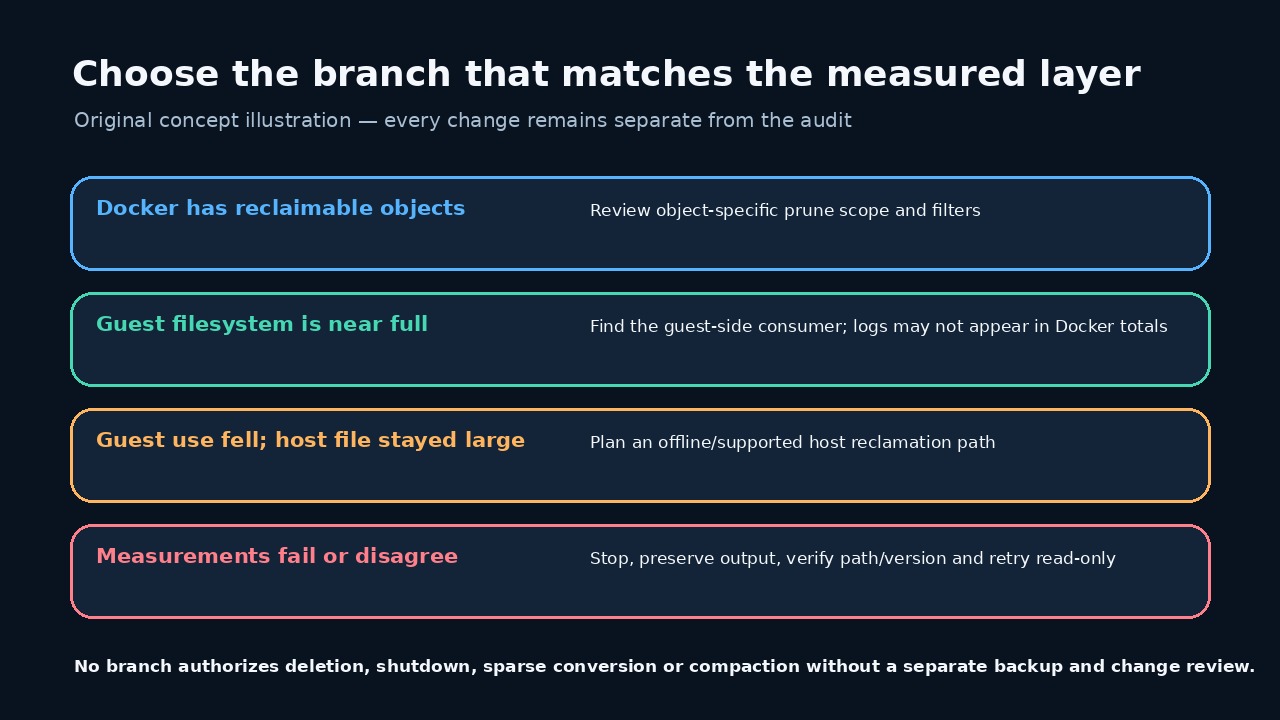
若出现可移除类别,另行审查对象专用命令的范围、过滤器与警告。
检查 WSL 客体是否真的已满
df 行显示指定客体挂载点的总量、已用与可用;客体容量不等于宿主剩余空间。
客体占用高而 Docker 汇总低时,应先查客体内部消费者,例如容器日志。
谨慎解释 Windows VHDX 长度
报告只记录 VHDX 逻辑长度和所在文件系统空闲量,不测 NTFS 已分配簇或可回收物理字节。
微软说明动态 VHD 会增长但不会自动缩小;压缩要求磁盘已分离或只读。
选择证据支持的最小分支
Docker 可回收对象、客体已满、宿主文件仍大是不同分支,只走测量支持的一支。
任何层失败或路径不一致都应停止;不要为对齐数字而注销 WSL、清空数据或压缩。
一次改动后重跑同一审计
一次获批改动后保存第二份报告,对比四组读数并记录中间唯一动作。
数字变小不代表工作负载完整;容器、卷、绑定挂载和应用数据必须另行验证。