Technology · 実用ガイド
Docker Desktop の WSL ディスクが大きい?削除や圧縮の前に3層を測る
Docker オブジェクト、WSL ゲストのファイルシステム、Windows 側 VHDX を読み取り専用で別々に記録します。
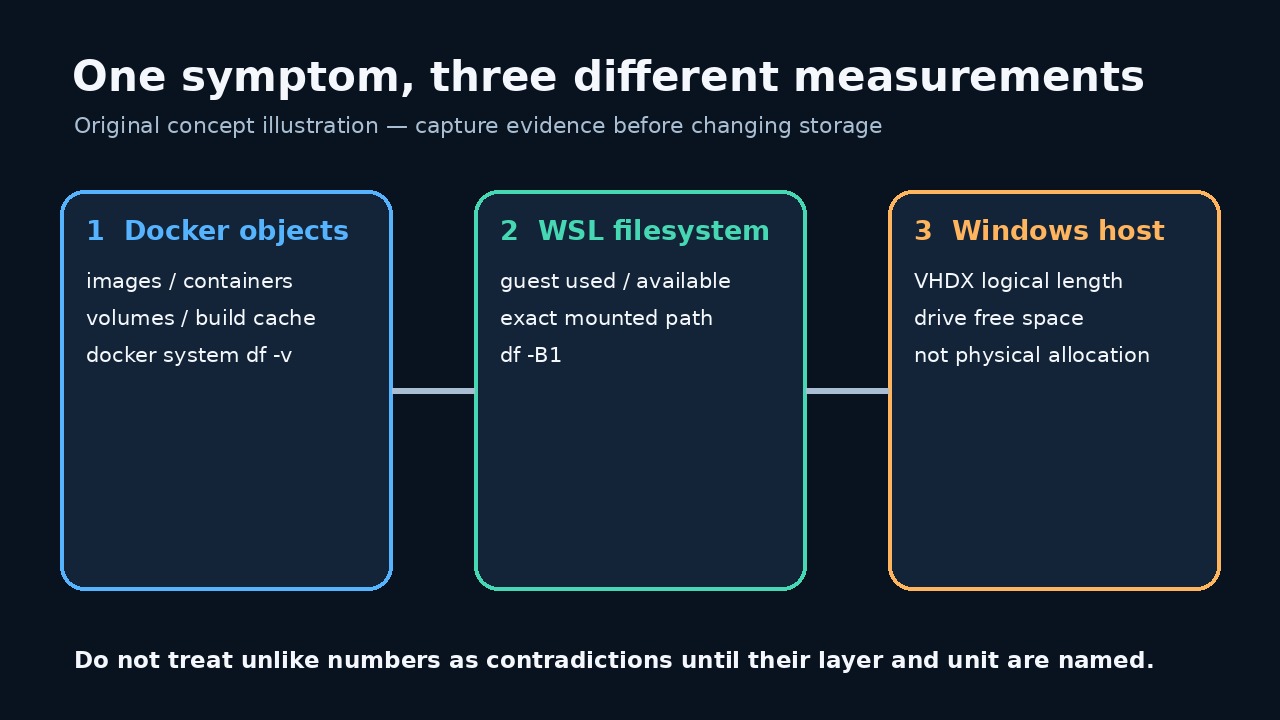
イメージ削除後も docker_data.vhdx が大きいことだけでは、同量の Docker オブジェクトが残っているとは判断できません。
このガイドは読み取り専用の JSON 台帳を作り、prune、削除、WSL 停止、スパース化、圧縮を実行しません。
比較前に3層を区別する
Docker オブジェクト、ゲスト使用量、ホスト VHDX 長は別の層です。比較前に3つとも保存します。
動的 VHD は削除後も大きい場合があり、Docker 集計外のデータでゲストが満杯になる場合もあります。
基準値と正確なパスを保存する
現在の Docker Desktop 設定から正確なディスクイメージのパスをコピーし、旧既定値を推測しません。
デーモン、ディストリビューション、ゲストパスの失敗は0ではなく未解決のエラーとして残します。
読み取り専用監査を保存して実行する
完全なプログラムを UTF-8 の audit_docker_wsl_disk.mjs として保存し、.txt が付いていないことを確認します。
node --check audit_docker_wsl_disk.mjs の後、node audit_docker_wsl_disk.mjs "C:\exact\path\docker_data.vhdx" > docker-wsl-disk-before.json を実行します。
import { spawnSync } from 'node:child_process'; import { stat, statfs } from 'node:fs/promises'; import { dirname, resolve } from 'node:path'; import { pathToFileURL } from 'node:url'; const clip = (value, limit = 200000) => String(value ?? '').slice(0, limit); export function runCommand(file, args, spawn = spawnSync) { const result = spawn(file, args, { encoding: 'utf8', timeout: 30000, windowsHide: true, shell: false, maxBuffer: 1024 * 1024, }); return { command: [file, ...args], mutating: false, status: Number.isInteger(result.status) ? result.status : null, signal: result.signal ?? null, stdout: clip(result.stdout), stderr: clip(result.stderr), error: result.error ? String(result.error.code || result.error.message) : null, }; } export async function buildAudit({ vhdxPath, distro = process.env.DOCKER_WSL_DISTRO || 'docker-desktop', guestPath = process.env.DOCKER_WSL_MOUNT || '/tmp/docker-desktop-root/mnt/docker-desktop-disk', platform = process.platform, fsStat = stat, fsStatfs = statfs, spawn = spawnSync, } = {}) { if (!vhdxPath || typeof vhdxPath !== 'string') throw new Error('VHDX_PATH_REQUIRED'); if (!/^[A-Za-z0-9._-]+$/.test(distro)) throw new Error('INVALID_DISTRO_NAME'); if (!guestPath.startsWith('/') || guestPath.includes('\0')) throw new Error('INVALID_GUEST_PATH'); const exactPath = resolve(vhdxPath); const [file, hostFs] = await Promise.all([fsStat(exactPath), fsStatfs(dirname(exactPath))]); if (!file.isFile()) throw new Error('VHDX_NOT_A_FILE'); const command = (fileName, args) => runCommand(fileName, args, spawn); const commands = { dockerVersion: command('docker', ['version', '--format', '{{json .}}']), dockerObjects: command('docker', ['system', 'df', '-v']), wslStatus: command('wsl.exe', ['--status']), wslDistributions: command('wsl.exe', ['--list', '--verbose']), guestFilesystem: command('wsl.exe', ['-d', distro, '--', 'df', '-B1', guestPath]), }; return { schemaVersion: 1, capturedAt: new Date().toISOString(), scope: 'read-only Docker Desktop / WSL disk evidence', safety: { mutatingCommandsRun: false, notRun: ['docker system prune', 'docker * prune', 'wsl --shutdown', 'diskpart compact vdisk', 'Optimize-VHD', 'wsl --manage --set-sparse', 'file deletion'], }, host: { platform, vhdxPath: exactPath, fileLengthBytes: Number(file.size), containingFilesystem: { blockSize: Number(hostFs.bsize), blocks: Number(hostFs.blocks), blocksFree: Number(hostFs.bfree), blocksAvailable: Number(hostFs.bavail), }, limitation: 'fileLengthBytes is the file logical length. This audit does not claim to measure NTFS allocated clusters or reclaimable physical bytes.', }, docker: { version: commands.dockerVersion, objects: commands.dockerObjects, limitation: 'docker system df reports Docker-managed objects; it is not the Windows VHDX file size and can omit other guest-side use.', }, wsl: { distro, guestPath, status: commands.wslStatus, distributions: commands.wslDistributions, guestFilesystem: commands.guestFilesystem, limitation: 'A failed guest-path check is an unresolved measurement, not proof that the filesystem is empty.', }, interpretationOrder: [ 'Preserve this file before changing anything.', 'Use Docker object output to identify Docker-managed and potentially reclaimable categories.', 'Use guest df output to decide whether the WSL filesystem itself is near full.', 'Compare those readings with the host VHDX logical length and host filesystem free space.', 'Choose a change only after the mismatched layer is identified; rerun the same audit afterward under a new filename.', ], }; } async function main() { if (process.argv.length !== 3) throw new Error('USAGE: node audit_docker_wsl_disk.mjs <exact-vhdx-path>'); const report = await buildAudit({vhdxPath: process.argv[2]}); process.stdout.write(`${JSON.stringify(report, null, 2)}\n`); } if (import.meta.url === pathToFileURL(process.argv[1] || '').href) { main().catch(error => { process.stderr.write(`Audit failed without changing Docker or WSL: ${error.code || error.message}\n`); process.exitCode = 1; }); }
プログラム SHA-256: d43b227f591fff111404afb1505ab5552965d8095eb907d60aa9c680c12785bb。5件の Linux 合成テストに合格しましたが、実際の Windows/Docker Desktop は未検証です。
Docker オブジェクト出力から読む
docker system df -v はイメージ、コンテナ、ボリューム、キャッシュを分けます。VHDX 全体を回収可能とみなしません。
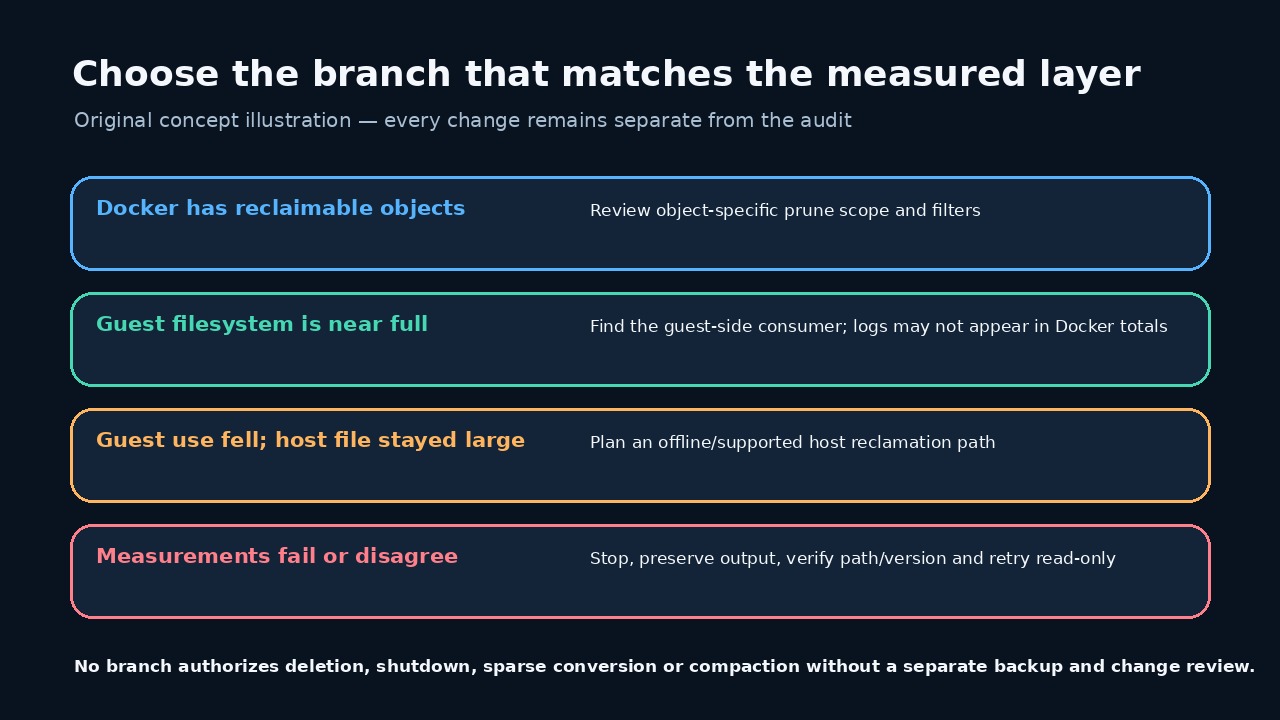
不要候補がある場合も、別の変更計画で対象コマンドの範囲、フィルター、警告を確認します。
WSL ゲストが本当に満杯か確認する
df は対象ゲストマウントの合計、使用、空きを示します。ゲスト容量はホスト空き容量と同じではありません。
ゲスト使用量が高く Docker 集計が低い場合は、ログなどゲスト内の消費元を先に調べます。
Windows VHDX 長を慎重に解釈する
レポートは論理ファイル長とホスト空き容量を記録するだけで、NTFS の割当クラスタや回収可能物理バイトは測りません。
Microsoft は動的 VHD が自動縮小しないこと、圧縮には切断または読み取り専用が必要なことを説明しています。
根拠のある最小分岐を選ぶ
不要オブジェクト、満杯のゲスト、大きいホストファイルは別の分岐です。測定に合う最小分岐だけを選びます。
失敗やパス不一致があれば停止し、数値を合わせるためだけの登録解除、消去、圧縮はしません。
承認済みの1変更後に同じ監査を再実行する
承認済みの1変更後に新しいファイルへ再実行し、4つの測定値と中間操作を保存します。
数値低下はデータ完全性の証明ではありません。コンテナ、ボリューム、アプリデータを別に検証します。