Tech · PRACTICAL GUIDE
Bambu Studio presets disappeared? Audit the files before reinstalling
A missing menu entry does not prove the preset JSON is gone. Preserve the configuration tree, hash every user preset, and resolve inherited parents before any repair.
When custom filament presets disappear from Bambu Studio, do not begin by copying random JSON files back into the live profile or reinstalling over it. Current reports show at least two materially different cases: inherited presets can remain on disk but become hidden, and a system profile package can be empty after an update. The same symptom can therefore point to a visibility problem, a missing parent, malformed data, or an actually absent file.
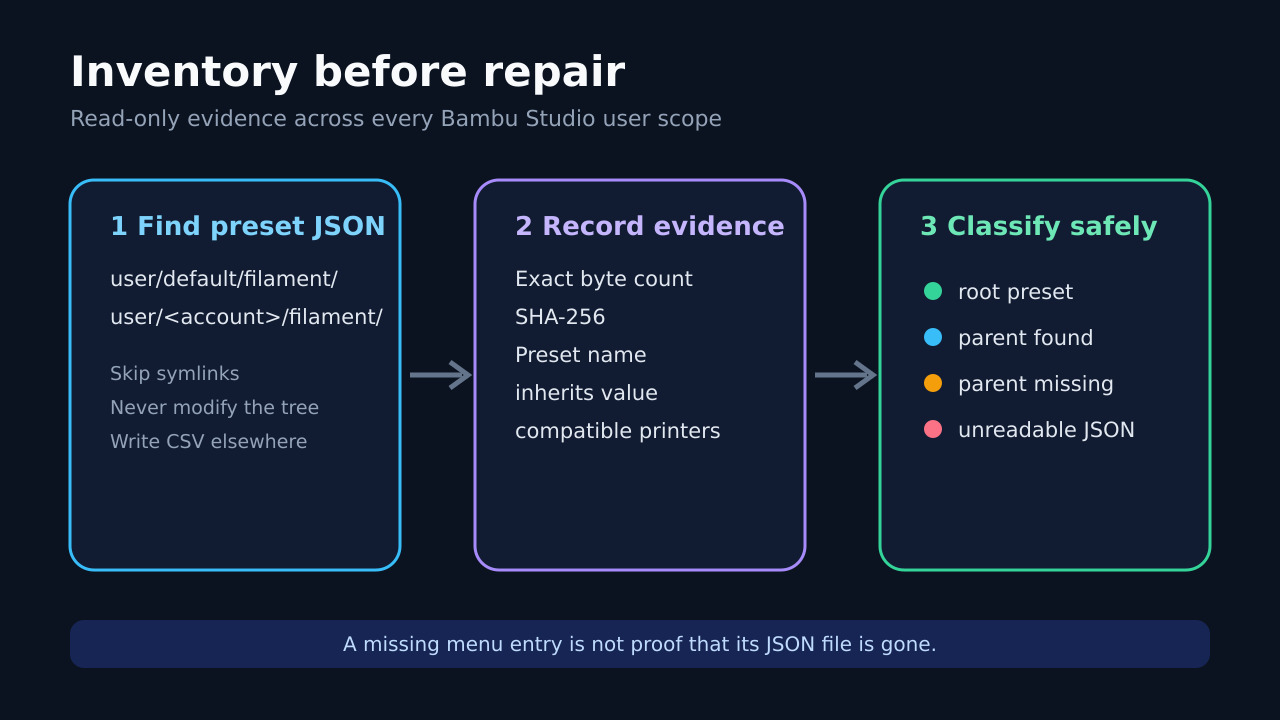
This guide creates a read-only evidence report from a preserved copy of the Bambu Studio configuration tree. The report records each user preset’s account scope, relative path, exact byte count, SHA-256, name, inherits value, compatible printers, and one of four statuses: root-preset, parent-found, parent-missing, or unreadable. It does not log into Bambu Cloud, alter the live profile, or promise recovery of deleted files.
Freeze the evidence before changing Studio
Close Bambu Studio completely, then identify the configuration root actually used by that installation. Preserve the entire root—not only the filament folder—in a new, separately named copy. Keep the original timestamps and permissions when your operating system supports it. Do not run cleanup, sync, import, reset, or reinstall first; each can change the evidence needed to distinguish a hidden preset from a missing file.
Record the Bambu Studio version, operating system, selected printer and nozzle, and the time you made the copy. If the presets are still visible in any profile, also use the documented preset-bundle export before closing that working session. A visible export and an on-disk inventory answer different questions, so retaining both is useful.
Separate user presets from their system parents
Bambu Studio can store user filament presets under more than one user scope, including a default folder and account-specific folders. A preset may also contain an inherits value rather than a self-contained set of every parameter. That means finding one user JSON file is necessary evidence, but not sufficient proof that Studio can load the preset.
The audit indexes named system filament presets under system/BBL/filament, then compares every user preset’s inherits value with that index. It never assumes that two filenames identify the same preset. The JSON name and exact bytes are recorded, and duplicate JSON keys are rejected instead of silently accepting the last value.
Run the audit only on the preserved copy
Save the script below as bambu_preset_audit.py. Run it with Python 3.12 or a compatible Python 3 release, passing the preserved configuration root and a new CSV path outside that root. The report is opened with exclusive creation, so an existing report is not overwritten. Symlinks are skipped and no input file is written.
Run this exact reviewed script from a copy of the configuration tree, not the live tree: ```python #!/usr/bin/env python3 """Read-only inventory for Bambu Studio user filament preset JSON files.""" from __future__ import annotations import argparse import csv import hashlib import json from pathlib import Path def object_no_duplicates(pairs): result = {} for key, value in pairs: if key in result: raise ValueError(f"duplicate JSON key: {key}") result[key] = value return result def load_json(path: Path): raw = path.read_bytes() value = json.loads(raw.decode("utf-8-sig"), object_pairs_hook=object_no_duplicates) if not isinstance(value, dict): raise ValueError("top-level JSON value is not an object") return raw, value def text_list(value): if value is None: return [] if isinstance(value, str): return [value] if isinstance(value, list) and all(isinstance(item, str) for item in value): return value raise ValueError("compatible_printers is not a string list") def system_names(root: Path): names = {} system_root = root / "system" / "BBL" / "filament" if not system_root.is_dir(): return names for path in sorted(system_root.rglob("*.json")): if path.is_symlink() or not path.is_file(): continue try: _, data = load_json(path) name = data.get("name") if isinstance(name, str) and name: names.setdefault(name, []).append(path.relative_to(root).as_posix()) except (OSError, UnicodeError, ValueError, json.JSONDecodeError): continue return names def audit(root: Path): parents = system_names(root) user_root = root / "user" rows = [] if not user_root.is_dir(): return rows for scope in sorted(user_root.iterdir()): filament = scope / "filament" if scope.is_symlink() or not scope.is_dir() or not filament.is_dir(): continue for path in sorted(filament.rglob("*.json")): if path.is_symlink() or not path.is_file(): continue row = { "account_scope": scope.name, "relative_path": path.relative_to(root).as_posix(), "bytes": path.stat().st_size, "sha256": "", "preset_name": "", "inherits": "", "parent_status": "unreadable", "parent_paths": "", "compatible_printers": "", "error": "", } try: raw, data = load_json(path) row["sha256"] = hashlib.sha256(raw).hexdigest() name = data.get("name", path.stem) if not isinstance(name, str): raise ValueError("name is not a string") inherits = data.get("inherits", "") if not isinstance(inherits, str): raise ValueError("inherits is not a string") printers = text_list(data.get("compatible_printers")) row["preset_name"] = name row["inherits"] = inherits row["compatible_printers"] = " | ".join(printers) if not inherits: row["parent_status"] = "root-preset" elif inherits in parents: row["parent_status"] = "parent-found" row["parent_paths"] = " | ".join(parents[inherits]) else: row["parent_status"] = "parent-missing" except (OSError, UnicodeError, ValueError, json.JSONDecodeError) as exc: row["error"] = str(exc) rows.append(row) return rows def main(): parser = argparse.ArgumentParser() parser.add_argument("config_root", type=Path) parser.add_argument("report_csv", type=Path) args = parser.parse_args() root = args.config_root.resolve(strict=True) report = args.report_csv.resolve() if not root.is_dir(): raise SystemExit("config_root is not a directory") if report == root or root in report.parents: raise SystemExit("report_csv must be outside config_root") rows = audit(root) fields = [ "account_scope", "relative_path", "bytes", "sha256", "preset_name", "inherits", "parent_status", "parent_paths", "compatible_printers", "error", ] with report.open("x", encoding="utf-8-sig", newline="") as handle: writer = csv.DictWriter(handle, fieldnames=fields) writer.writeheader() writer.writerows(rows) print(json.dumps({"config_root": str(root), "report_csv": str(report), "rows": len(rows)})) if __name__ == "__main__": main() ```
Verify the command and the report boundary
Example: python3 bambu_preset_audit.py '/evidence/BambuStudio-copy' '/evidence/bambu-preset-report.csv'. The second path must be outside the configuration copy. The script prints only the resolved input path, report path, and row count; the CSV contains the detailed evidence. Preserve the script and report hashes with the configuration copy.
The reviewed helper is 4,697 bytes with SHA-256 4711e9c5db94afee575fc6dbbc2a206a29178eeae4ce17387db8a6159a21cf0. It passed a CPython 3.12.14 fixture containing a root preset, a resolved inherited preset, an unresolved parent, and malformed duplicate-key JSON. That fixture proves the bounded classifier behavior, not compatibility with a live account, printer, or cloud session.
Read every row before choosing a repair
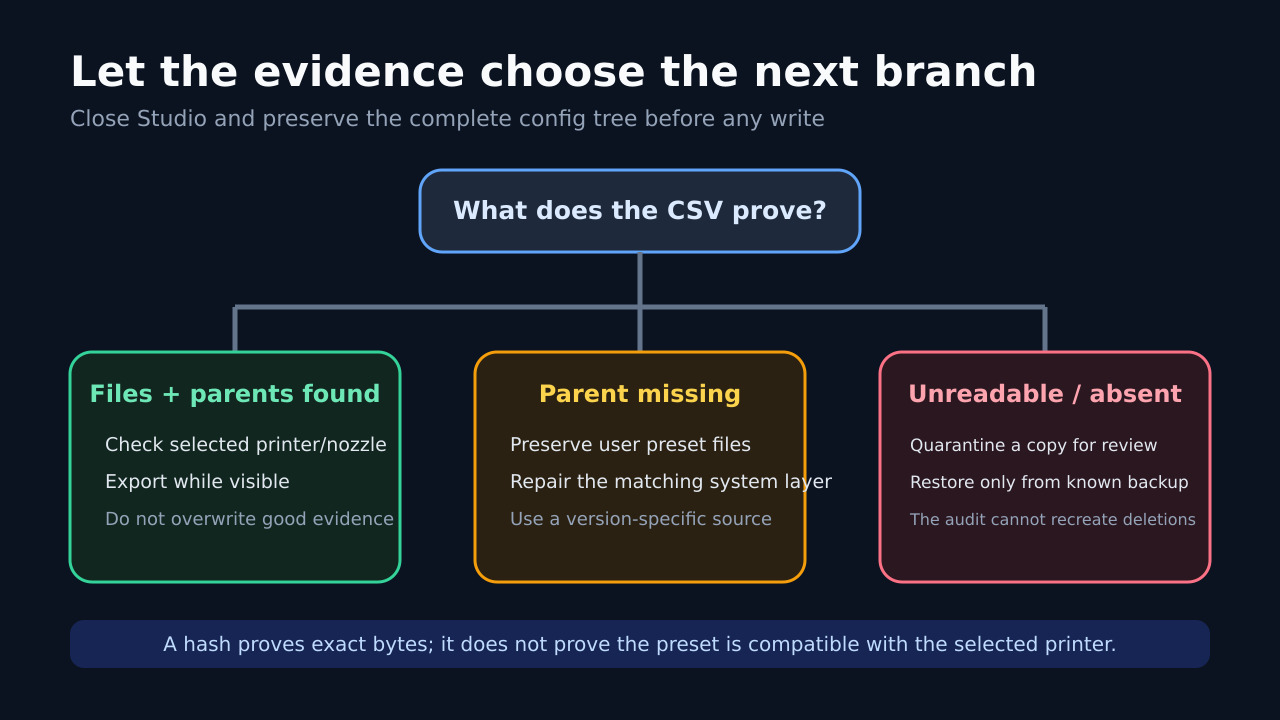
A root-preset row means the file declares no parent. A parent-found row means at least one installed system preset has the inherited name; inspect parent_paths and compatible_printers together. A parent-missing row means the user file exists but its named system parent was not found in the preserved tree. An unreadable row preserves the path and error while refusing to treat malformed JSON as valid.
Compare account_scope before merging anything. Two profiles can contain similarly named presets with different bytes. The SHA-256 is an exact-byte identity, not a quality or compatibility verdict. Keep rows with the same display name separate unless the paths and hashes support a deliberate merge.
Let the evidence choose the next branch
If the needed files are present and their parents resolve, first check the selected printer/nozzle and whether Studio is hiding an incompatible preset. Export visible presets rather than editing live JSON. If parents are missing, preserve the user files and repair only the matching system-profile layer from a version-specific, trusted source. Do not use a profile package described for another build without verifying it.
For unreadable JSON, review a copy and compare it with a known backup; do not normalize or rewrite the only evidence. If no matching user file exists, the audit cannot recreate it. Recovery then depends on a known backup, a still-visible export, or provider-supported restoration—not on inventing a replacement from the preset name.
Know what completion looks like
The evidence stage is complete when every user-scope filament JSON in the preserved copy has a row, the CSV is stored outside the copy, and parent-missing or unreadable rows have been reviewed. A successful repair is separate: reopen Studio only after preserving evidence, select the intended printer/nozzle, and confirm the exact preset values or import a verified bundle.
This procedure does not decide which preset is safe for a material or printer, inspect cloud synchronization, or diagnose every historical report. It deliberately stops before modifying the live tree. If the report conflicts with what Studio displays, keep the copy and CSV intact when escalating; they give support a reproducible path, hash, parent status, and application version instead of only a screenshot of an empty menu.